
PayByPhone is a mobile payment service that allows users to pay for parking, public transit fares, and other services using their smartphone. The service is available in cities and towns across North America and Europe, and is supported by a range of local and national organizations.
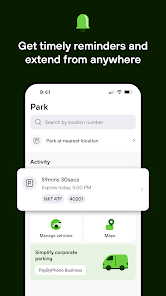
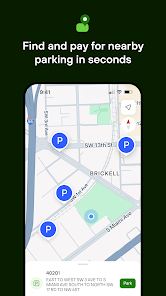
With PayByPhone, users can easily and securely pay for parking and other services using their smartphone. The app allows users to locate and pay for parking spots, and to track their parking time and payment status. It also provides tools for users to manage and track their payments, and to receive reminders and notifications about their parking.
PayByPhone is a convenient and secure way to pay for parking and other services. The app is easy to use, and provides users with a range of tools and features to help them manage their payments and stay organized.
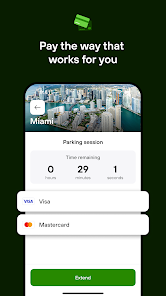
The PayByPhone app offers a range of features to help users pay for parking and other services using their smartphone. Some of the key features of the app include: The ability to locate and pay for parking spots, and to track your parking time and payment status Tools for managing and tracking your payments, including the ability to view payment history and receipts Reminders and notifications, which provide important information and updates about your parking and payments The ability to pay for public transit fares and other services, in addition to parking Support for multiple payment methods, including credit and debit cards, and mobile payment services such as Apple Pay and Google Pay The ability to access the app on a variety of devices, including smartphones and tablets The PayByPhone app is designed to be user-friendly and easy to use. It provides users with a convenient and secure way to pay for parking and other services using their smartphone. To use the PayByPhone app, you will need to have a smartphone or tablet that is capable of running the app, and that is connected to the internet. You will also need to create a free account with PayByPhone, which you can do through the app or on the PayByPhone website. Once you have the app and an account, you can use the app to pay for parking and other services. To get started, you can follow these steps: Download the PayByPhone app from the Apple App Store or Google Play Install the app on your smartphone or tablet Launch the app and sign in to your PayByPhone account Use the app to locate a parking spot or other service that you want to pay for Follow the instructions provided by the app to pay for the parking or service Use the app to manage and track your payments, and to receive reminders and notifications about your parking and services The PayByPhone app is designed to be user-friendly and easy to use. It provides users with a convenient and secure way to pay for parking and other services using their smartphone. Features:
How to use PayByPhone?

 Convenient mobile payments eliminate the need for cash or coins. Real-time parking updates help you extend your session effortlessly. User-friendly app simplifies the parking process for everyone. Secure transactions ensure your financial information is protected. Flexible payment options cater to various parking needs and preferences.
 Limited payment options may frustrate users seeking flexibility. Transaction fees can add up over time. Requires a smartphone, excluding those without access. Connectivity issues can disrupt payment processing unexpectedly.
 PayByPhone collects certain personal data to facilitate transactions and improve user experience, but it is committed to maintaining user privacy and security.
PayByPhone does not offer a free trial, but the app itself is free to download and use; users only pay for the services they utilize.
Yes, PayByPhone requires an internet connection to process payments and access account features.
You can contact PayByPhone support through the app, their website, or by emailing their customer service team directly for assistance or feedback.
Since PayByPhone does not have a subscription model, users can simply stop using the app or delete their account if they wish to discontinue.
You can contact Customer Service through the app or visit their website for support options.
To activate your account, download the app, create an account, and follow the verification instructions sent to your email.
Open the app, enter your registered email and password, then tap 'Log In.' If you forget your password, use the 'Forgot Password' link.
The customer number for PayByPhone can be found in the app under the Help section or on their official website.













 Google Play
  App Store