This site uses cookies to enhance your user experience. By clicking any link on this site you are giving your consent to our cookie policy. Read more
Reject
Accept All

Advertiser and Editorial Disclosures

SHAREit: Transfer, Share Files

SHAREit: Transfer, Share Files

verified

Smart Media4U Technology Pte.Ltd.

4.3
Rating
1,000,000,000+ Downloads
6.26.98_ww Version
  • category

    Category: Tools

  • price

    Price: free

  • age rating

    Age Rating: Everyone

  • rating

    Rating: 4.3

  • available on

    Available on: /

  • updated on

    Updated on: Jul 3, 2026

Screenshot 1
Screenshot 2
Screenshot 3
Screenshot 4
Screenshot 5
Screenshot 6
Screenshot 7
Advertisement

Features & Highlights

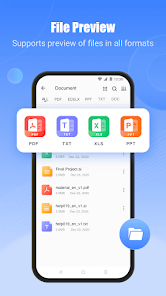
Built-In Media Player

SHAREit also comes with a built-in media player that allows you to view and play files directly within the app. This feature not only enhances user experience but also helps you manage and enjoy your content without needing to switch between different applications.

Cross-Platform Compatibility

One of the standout features of SHAREit is its ability to work seamlessly across various platforms, including Android, iOS, and Windows. This means you can easily share files between different devices without worrying about compatibility issues, making it a versatile tool for everyone.

Fast File Transfer

SHAREit allows users to transfer files at lightning speed, making it one of the fastest sharing apps available. Whether it's photos, videos, or documents, you can send large files without the hassle of taps and delays, ensuring a smooth experience for all your sharing needs.

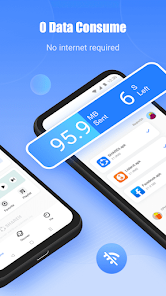
No Internet Required

With SHAREit, you don't need an internet connection to transfer files, which is a game changer for users in areas with poor connectivity. By using Wi-Fi Direct technology, the app enables rapid file sharing without relying on mobile data or Wi-Fi networks, ensuring convenience wherever you are.

Advertisement

Pros & Cons

Pros
  • Fast file transfer speeds enhance productivity and save time.
  • User-friendly interface makes sharing effortless for everyone.
  • Supports multiple file types, accommodating various content formats.
  • Enables cross-platform sharing between different operating systems seamlessly.
  • Offline sharing eliminates the need for internet connectivity while transferring files.
Cons
  • Limited file transfer speed can be frustrating for larger files
  • Frequent ads disrupt user experience and may annoy users
  • Security concerns regarding data privacy raise potential risks for users

Real Experience Using SHAREit: Transfer, Share Files

Real Experience Application Scenarios

SHAREit: Transfer, Share Files is a versatile application designed to facilitate seamless file sharing between devices. Whether you are a student looking to exchange notes with classmates, a professional transferring presentations and documents, or simply someone wanting to share photos and videos with friends, SHAREit caters to all these scenarios. The app supports a wide range of file types including documents, music, videos, and images, making it a one-stop solution for all your sharing needs. It is particularly useful in environments where internet connectivity is limited or unavailable, as it allows users to transfer files directly over Wi-Fi without incurring data charges. This feature makes SHAREit a preferred choice for users in schools, offices, and social gatherings.

User Experience

The user interface of SHAREit is intuitive and user-friendly, which enhances the overall experience. Upon launching the app, users are greeted with a clean and organized layout that makes navigation straightforward. The process of sending and receiving files is simple and quick, requiring just a few taps. Users can create a hotspot for others to connect, eliminating the need for Bluetooth or mobile data. The transfer speeds are impressive, often outperforming traditional methods of file sharing. However, some users have reported occasional connectivity issues, particularly when transferring large files or when multiple devices are connected. Despite these minor hiccups, the overall user experience remains positive, as the app efficiently fulfills its primary function with minimal hassle.

Pricing

One of the standout features of SHAREit is that it is completely free to download and use. There are no hidden fees or subscriptions required, which makes it accessible to a wide audience. While the app does include advertisements, they are not overly intrusive and do not significantly detract from the user experience. Users have the option to upgrade to an ad-free experience, but the free version remains fully functional, allowing users to enjoy all core features without any financial commitment. This pricing model makes SHAREit an attractive option for individuals and businesses alike.

Updates & Support

SHAREit is frequently updated to enhance its performance and introduce new features, ensuring that it stays competitive in the ever-evolving app landscape. The developers are proactive in addressing user feedback and resolving any issues that arise, which is evident in the regular patches and enhancements. Customer support is available through the app, where users can find answers to common questions and submit requests for assistance. The community forum also provides a platform for users to share tips and troubleshoot problems collaboratively. Overall, SHAREit demonstrates a commitment to maintaining a quality user experience through consistent updates and reliable support.

verified Security & Privacy Review

Security & Privacy Review SHAREit: Transfer, Share Files prioritizes user privacy and data security through several practices. The app does not require an internet connection for file transfers, which minimizes the risk of data interception during the sharing process. However, users should be aware that the app requests various permissions, including access to contacts, storage, and location. While these permissions are necessary for its functionality, they raise concerns about potential overreach and data usage. In terms of data handling, SHAREit claims to encrypt files during transfer and does not store user data on its servers, which is a positive aspect for privacy-conscious users. Nevertheless, the app's privacy policy indicates that it may collect certain user data for analytics and advertising purposes. Users should review these practices to understand how their information might be used. Overall, while SHAREit offers convenient file-sharing capabilities, users are encouraged to be mindful of the permissions granted and stay informed about the app's privacy policies.
Advertisement

User Reviews

  • A Google user
    2019/03/12

    This app saved me from losing all of my pictures from my S7 when I switched to an iPhone. I tried so many apps before this that claimed to do the same thing, but none of them worked. Share it worked right away and I only had issues with a few pictures, but overall it transfered over 2,000 pictures in a really quick time and I only lost a few pictures.

  • Jake Stine
    2022/10/21

    I was impressed. I had to move tons of photos from my old phone to my new phone. They were important to me (proposal, family trips, and family pictures). I was worried they would come out super compressed or mising and everything transfer fast. It's a little more confusing than drop box at first, but I'd choose their over dropbox due to storage limits.

  • A Google user
    2018/09/17

    It is a great app to share files between different brands of android devices. It is faster than the proprietary Samsung file share. However, I wish it had less advertising. I do not mind some advertising because the creators need a source of income for living but, different than other apps, this app is bloated with ads. More ads than functionality. Yet, it is still worth 5 stars.

  • NexusGrey
    2024/04/14

    This used to be a good app for sharing files and media between devices. Now, it's flooded with a constant stream of unwanted apps, spam, unwanted videos, notifications and is almost unnavigable because of how aggressive the ads are. And finally, I have decided to uninstall it after years of using it because now, it also downloads apps without asking for my permission. It has become an intrusive app so much that the best course of action for me was to just find a more useable alternative.

  • Douglas Glenn
    2024/07/10

    In addition to excessive ads, one ad for an anti-virus app claims x number of viruses found, and does not allow you to exit, even when selecting X to close it. Then upgrade to pro jumped from $4.99 per year to $1.99 per month. A 400% increase. Purchased $4.99 upgrade then later it suddenly changed pricing saying it changed at the beginning of month. It's currently the 10th and latest version, smells like bait and switch scam. Cannot recommend at all. App processes shows too many Chinese APKs

Review Source: Google Play store public user reviews.

FAQ

1

Can I submit suggestions or feedback to SHAREit: Transfer, Share Files?

Yes, users can usually submit suggestions or feedback directly within the app or through the official SHAREit website or support channels, allowing the developers to consider user input for future updates.

2

Does SHAREit: Transfer, Share Files collect my personal data?

SHAREit: Transfer, Share Files may collect certain user data to enhance the app's functionality and user experience, but it is advisable to review their privacy policy for specific details on data collection and usage.

3

Does SHAREit: Transfer, Share Files support offline use?

Yes, SHAREit: Transfer, Share Files supports offline use, allowing users to transfer files between devices without the need for an active internet connection, utilizing Wi-Fi Direct technology instead.

4

How do I cancel my SHAREit: Transfer, Share Files subscription?

To cancel a SHAREit: Transfer, Share Files subscription, users typically need to go through the app store or platform where the subscription was purchased and follow the cancellation instructions provided there.

5

How much does a subscription to SHAREit: Transfer, Share Files cost?

SHAREit: Transfer, Share Files may offer premium features through a subscription, but the pricing can vary based on the region and the specific features selected. Users should check the app for the most current pricing information.

How to use SHAREit: Transfer, Share Files

1

Can I change my customer number after activation?

No, once activated, your customer number cannot be changed. Please contact customer service for further inquiries.

2

Can I share my customer number with others?

It's not recommended to share your customer number for security reasons. Keep it confidential and contact customer service if needed.

3

How can I log in to my SHAREit account?

To log in, open the app and enter your registered email or phone number and password.

4

How can I reach customer service if I have issues activating my account?

If you face activation issues, please contact customer service through the app for immediate assistance.

5

How do I contact customer service for SHAREit?

You can reach customer service through the app's help section or visit the official SHAREit website for support options.

Editor's Choice