





Hopper is a mobile app that helps travelers find the best deals on flights, hotels, and rental cars. The app uses data and predictive analytics to provide users with the best prices and the most accurate information about their travel plans. It also offers personalized recommendations and exclusive deals.
Pros:Features
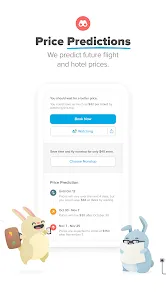
1. Price Prediction: Hopper's Price Prediction feature uses historical data to predict future prices for flights, hotels, and rental cars.
2. Price Alerts: Hopper's Price Alerts feature allows users to set up notifications for when prices drop on flights, hotels, and rental cars.
3. Flexible Dates: Hopper's Flexible Dates feature allows users to search for flights, hotels, and rental cars with flexible dates.
4. Price Graphs: Hopper's Price Graphs feature allows users to view price trends over time for flights, hotels, and rental cars.
5. Trip Planning: Hopper's Trip Planning feature allows users to plan their entire trip, including flights, hotels, and rental cars.
6. Deals: Hopper's Deals feature allows users to find the best deals on flights, hotels, and rental cars.
7. Reviews: Hopper's Reviews feature allows users to read reviews from other travelers about flights, hotels, and rental cars.How to use Hopper: Hotels, Flights & Cars Mobile App?
1. Download the Hopper App: Download the Hopper app from the App Store or Google Play Store.
2. Create an Account: Create an account with your email address and a password.
3. Search for Flights: Enter your departure and arrival cities, dates, and number of passengers.
4. Select Your Flight: Select the flight that best fits your needs and budget.
5. Book Your Flight: Enter your payment information and book your flight.
6. Manage Your Booking: View and manage your booking details, including flight times, seat selection, and more.
7. Search for Hotels: Enter your destination city and dates to search for hotels.
8. Select Your Hotel: Select the hotel that best fits your needs and budget.
9. Book Your Hotel: Enter your payment information and book your hotel.
10. Manage Your Booking: View and manage your booking details, including check-in and check-out times, room type, and more.
11. Search for Cars: Enter your destination city and dates to search for cars.
12. Select Your Car: Select the car that best fits your needs and budget.
13. Book Your Car: Enter your payment information and book your car.
14. Manage Your Booking: View and manage your booking details, including pick-up and drop-off times, car type, and more.Pros & Cons
1. Easy to use: Hopper’s mobile app is designed to be user-friendly and intuitive, making it easy to find the best deals on flights, hotels, and car rentals.
2. Price predictions: Hopper’s price prediction feature helps users determine the best time to book a flight, hotel, or car rental.
3. Price alerts: Hopper’s price alert feature notifies users when prices drop, so they can take advantage of the best deals.
4. Comprehensive search: Hopper’s search feature allows users to search for flights, hotels, and car rentals all in one place.
Cons:
1. Limited destinations: Hopper’s search feature is limited to certain destinations, so users may not be able to find the best deals on flights, hotels, and car rentals in all locations.
2. Limited payment options: Hopper’s payment options are limited to certain credit cards and PayPal, so users may not be able to use their preferred payment method.
3. Limited customer service: Hopper’s customer service is limited to email and online chat, so users may not be able to get the help they need in a timely manner.
 Google Play
  App Store
 Can I manage my bookings in the app?
How do I book my travel through Hopper?
What happens after I enter my details?
What is the price prediction feature?
What do I need to do to use Hopper?