Ditch typos, tame tantrums, and conquer comma chaos! Grammarly's mobile app is your pocket-sized writing superhero, ensuring every text, tweet, and email shines. Proofread with lightning speed, catch sneaky errors, and polish your prose to perfection, all from the palm of your hand. Upgrade your communication game, boost confidence, and impress the world, one flawlessly worded message at a time.
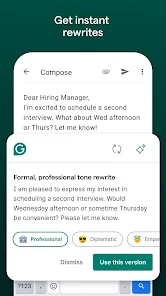
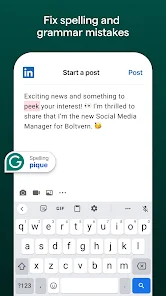
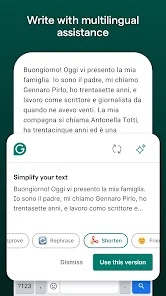
Grammarly isn't just a glorified spellchecker; it's a writing coach tucked into your pocket. It catches typos and grammatical errors with hawk-like precision, from misplaced commas to dangling modifiers. But it doesn't stop there. Grammarly goes beyond the red squiggles, suggesting alternative wordings that boost clarity and conciseness. It helps you ditch the clichés and overused phrases, replacing them with vibrant, impactful language. But Grammarly isn't just about grammar; it's about understanding the nuances of tone and style. It analyzes your writing and suggests adjustments to ensure your message lands exactly as intended. Want to sound authoritative in an email? Grammarly points you in the right direction. Craving a playful tone for your blog post? It's got your back. This level of versatility ensures your writing always hits the right note. And it's not just about the individual words. Grammarly helps you structure your sentences and paragraphs for maximum impact. It flags up complex sentences and suggests ways to break them down for easier reading. It identifies passive voice and encourages active voice for a more engaging narrative. This newfound awareness of sentence structure has transformed my writing, making it flow smoothly and resonate with my readers. But perhaps the most valuable lesson Grammarly has taught me is the importance of confidence. Knowing my writing is polished and professional has given me the courage to share my voice with the world. I no longer fear hitting publish, knowing that Grammarly has my back. How to use Grammarly mobile App? To use the Grammarly mobile app, follow these steps: Download the Grammarly app from the App Store or Google Play, depending on your device. Open the app and sign in with your Grammarly account. If you don't have a Grammarly account, you can create one for free. Once you're signed in, you'll be taken to the Grammarly dashboard, which is the main hub for managing your writing and checking your grammar and spelling. From the dashboard, you can access a range of features and tools to improve your writing. Some of the key features and tools available in Grammarly include: Writing assistant: Use the writing assistant to check your grammar, spelling, and punctuation, and to get suggestions for improving your writing. Vocabulary enhancement: Use the vocabulary enhancement tools to expand your vocabulary and improve your word choice. Plagiarism checker: Use the plagiarism checker to ensure that your writing is original and avoid accidental plagiarism. Writing statistics: Use the writing statistics to track your progress and see how your writing is improving over time. To access a specific feature or tool, simply tap on the relevant tab in the menu at the bottom of the screen. From there, you can use the various tools and features to improve your writing. Overall, Grammarly is a powerful and comprehensive tool for improving your writing. By following the steps outlined above, you can use the Grammarly mobile app to check your grammar and spelling, expand your vocabulary, avoid plagiarism, and track your progress. Whether you're a student, a professional, or a casual writer, Grammarly can help you write with confidence and clarity. Does it cost to use Grammarly Mobile app? Yes, Grammarly offers a mobile app for both iOS and Android devices. The app is available for download from the App Store and Google Play. While the basic version of Grammarly is free to use on the web, the mobile app is only available as a premium subscription service. This means that you will need to pay a monthly or annual fee to use the app on your mobile device. The cost of a Grammarly premium subscription varies depending on the subscription term and any promotions that may be available. You can check the latest pricing and sign up for a subscription on the Grammarly website. In addition to the mobile app, a Grammarly premium subscription also includes access to the web version of the tool, as well as additional features such as advanced grammar and spelling checks, vocabulary enhancements, and more. Pros & Cons Pros:
1. Grammarly is a great tool for students who want to improve their grammar skills.
2. Grammarly can help you proofread your work and identify any potential errors.
3. The app has a built-in dictionary that can help you with definitions and examples of proper grammar usage.
4. Grammarly is free to use, so there's no need to pay for the service.
5. The app supports English, Spanish, French, and German languages.
6. The app has a user-friendly interface that makes it easy to use even for beginners.
7. There are various tutorials that are available on the Grammarly website to help you get started with using the app.
8. The app can be installed on both Android and iOS devices, so it's available no matter where you are located in the world.
9. Overall, Grammarly is an excellent tool for improving your grammar skills and making sure your writing is error-free."
Cons:
1. Some users have complained about difficulty getting the app to work properly on their devices (Android and iOS).
2. Some users find the user interface confusing or difficult to use due to its complexity (for beginners).