This site uses cookies to enhance your user experience. By clicking any link on this site you are giving your consent to our cookie policy. Read more
Reject
Accept All

Advertiser and Editorial Disclosures

Holland America Line Navigator

Holland America Line Navigator

verified

Holland America Group

2.3
Rating
500,000+ Downloads
26.26.01 Version
  • category

    Category: Travel & Local

  • price

    Price: free

  • age rating

    Age Rating: Everyone

  • rating

    Rating: 2.3

  • available on

    Available on: /

  • updated on

    Updated on: Jun 25, 2026

Screenshot 1
Screenshot 2
Screenshot 3
Screenshot 4
Screenshot 5
Screenshot 6
Screenshot 7
Screenshot 8
Screenshot 9
Screenshot 10
Screenshot 11
Screenshot 12
Screenshot 13
Screenshot 14
Screenshot 15
Screenshot 16
Screenshot 17
Screenshot 18
Advertisement

Features & Highlights

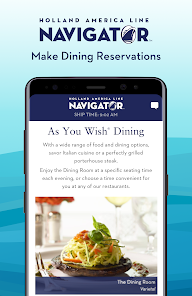
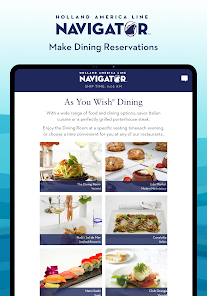
Dining Reservations Made Easy

Enjoy seamless dining experiences with the app’s reservation feature. You can easily browse dining options, view menus, and secure your table ahead of time, making it convenient to indulge in a variety of culinary delights onboard.

Interactive Deck Plans

Navigate your cruise experience with ease using the interactive deck plans feature. This allows you to explore the ship layout, locate essential amenities, and plan your activities, ensuring you never miss out on any exciting offerings during your journey.

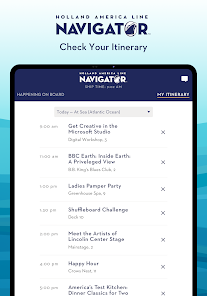
Personalized Itinerary Management

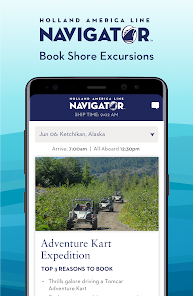
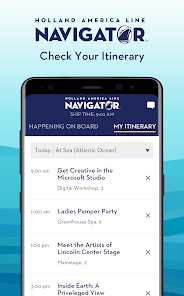
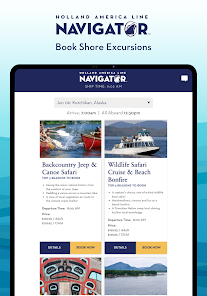
Customize your cruise experience with personalized itinerary management. The app allows you to schedule excursions, track your onboard activities, and receive tailored suggestions, ensuring that your time at sea is perfectly suited to your preferences.

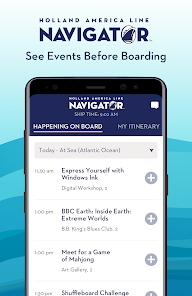
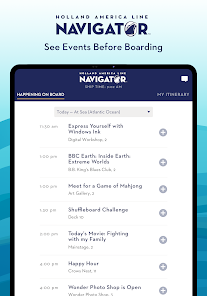
Real-Time Activity Updates

Stay informed about all the onboard happenings with real-time updates on activities and events. Whether it’s a cooking class or a live show, you’ll never miss a moment of fun and engagement during your cruise.

Advertisement

Pros & Cons

Pros
  • Personalized service enhances your cruise experience.
  • Diverse itineraries cater to various interests.
  • Culinary excellence with gourmet dining options available.
  • Enriching onboard activities for all ages.
  • Luxurious accommodations ensure comfort and relaxation.
Cons
  • Limited onboard activities for younger passengers
  • Higher price point compared to competitors
  • Older ship design feels dated and less luxurious
  • Less diverse dining options available onboard

Real Experience Using Holland America Line Navigator

Application Scenarios

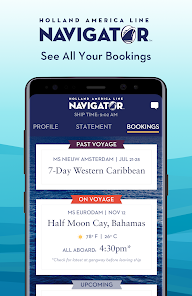
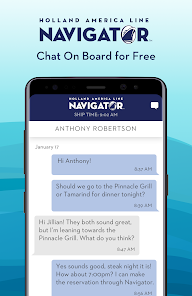
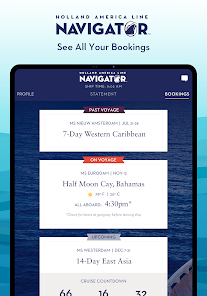
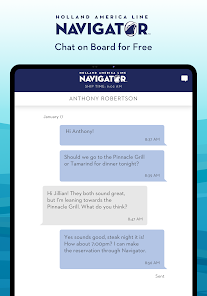
The Holland America Line Navigator app is designed to enhance the cruising experience for passengers aboard Holland America Line ships. Whether you are preparing for your journey or already sailing the seas, this app serves multiple purposes. Before departure, users can access essential information related to their itinerary, check-in procedures, and onboard activities. Once on board, the app provides real-time updates on dining options, entertainment schedules, and excursion bookings. Travelers can also use the app to chat with fellow passengers and engage in onboard activities, making it a versatile tool for both planning and enjoying the cruise experience. Additionally, the app supports a range of users, from first-time cruisers seeking guidance to seasoned travelers looking for the latest updates on their favorite activities.

User Experience

The user experience of the Holland America Line Navigator app is generally positive. The interface is intuitive and easy to navigate, catering to users of all ages. Upon downloading, users are greeted with a simple and straightforward onboarding process that quickly familiarizes them with the app's functionalities. The layout is visually appealing, featuring vibrant images and clear icons that guide users through various sections. One of the standout features is the ability to create a personalized daily itinerary, allowing users to customize their experience and receive reminders for events they want to attend. However, some users have reported occasional glitches, such as slow loading times during peak hours or difficulty in connecting to the ship's Wi-Fi. Despite these minor setbacks, most users find the app invaluable for enhancing their cruise experience.

Pricing

The Holland America Line Navigator app is free to download and use, making it accessible to all passengers sailing with the cruise line. There are no hidden fees or in-app purchases required to access its features, which is a significant advantage for travelers who want to manage their cruise experience without incurring additional costs. However, it is essential to note that while the app itself is free, onboard services, excursions, and specialty dining options may come with additional charges that users should be aware of when planning their trip.

Updates & Support

The app receives regular updates to enhance its functionality and address any issues reported by users. Holland America Line is committed to improving the app based on passenger feedback, ensuring that it remains an essential tool for cruisers. For support, users can access a dedicated help section within the app, which provides FAQs, troubleshooting tips, and contact information for customer service. Additionally, the cruise line actively engages with users on social media platforms, offering another avenue for support and information. Overall, the combination of regular updates and responsive customer service contributes to a positive user experience.

verified Security & Privacy Review

The Holland America Line Navigator app prioritizes user security and privacy through robust data protection measures. The app employs encryption protocols to safeguard sensitive information, ensuring that personal and payment details remain secure during transactions. Users are informed about the data collected, which primarily includes travel preferences, contact information, and device details, enabling a personalized experience while maintaining transparency. In terms of permissions, the app requests access to location services to enhance navigation features and provide real-time updates. Users can manage these permissions easily within their device settings, allowing for greater control over their privacy. Furthermore, the app adheres to industry standards for data handling, ensuring that user information is not shared with third parties without consent. The privacy policy is accessible within the app, detailing how user data is collected, used, and stored. Overall, the Holland America Line Navigator app demonstrates a commitment to protecting user data while providing a seamless cruising experience, making it a reliable choice for travelers concerned about security and privacy.
Advertisement

Compare APP

User Reviews

  • Kerry Miller
    2026/05/26

    Finicky and cumbersome to use. Appears to be designed with the intent to coerce you into buying their onboard WiFi. requires you to turn on Airplane Mode, enable only WiFi, and then connect to onboard WiFi, and then restart app again. Difficult to find anything, fails without any useful error messages things like trying to book shore excursions. A HUGE detriment to my cruising experience, to the point that it will discourage me from ever booking Holland America again.

  • B F
    2026/03/28

    Terrible. Sometimes enters zombie state where you are logged in but can't access all info. Day of departure boarding passes were no longer available so you can't show them to get on ship. Need to be on ship to connect to ship Wi-Fi to access boarding passes... Always make a screen capture of boarding pass before departure day when app works. When the app works it is useful to see itinnery, menus, deck plans, boarding pass, etc. but unfortunatly it random fails especially right before boarding.

  • Jon S
    2026/06/26

    New home page? Sure just once then old again. Ship time is not reliable. Don't say time zone. I know how to adjust. I have seen it just freeze for several hours and not change time. It will say 22 minutes after the hour and in reality it is 47 after. Don't use this app to watch ship time. if you get back late they will say app doesn't matter sorry.

  • L W
    2024/08/22

    Big hindrance - not helpful. Whole sections of the app disappear, gaps in itinerary, even when it's working ok, there's a complete lack of detail, times etc. The HA website is not better - you'd think the information would be the same but no. It's just so inconsistent and useless when you rely on it. So my advice is don't rely on it, go back to paper. For the many thousands of $£ spent on a cruise you really should expect more. Prepare to be disappointed. And angry!

  • Evan M. Parris
    2023/09/07

    9/2023 update: Currently on the Eurodam, and the app isn't much better. Deck plans won't load at all, chat doesn't work right most of the time, no online ordering, and I don't get notifications about messages or shore excursions until much later. As of late May, the app (on Android, at least) freezes on a blank white screen upon opening. It was working fine for me not long ago, so hopefully this is only a temporary setback. My cruise embarks soon, so hopefully it will be working before then.

Review Source: Google Play store public user reviews.
FAQ

1

Does Holland America Line Navigator collect my personal data?

Yes, the app may collect personal data to enhance user experience, but it adheres to privacy policies to protect your information and ensure compliance with data protection regulations.

2

Does Holland America Line Navigator offer a free trial or free version?

Holland America Line Navigator is free to download and use, but certain premium features may require in-app purchases or subscriptions.

3

Does Holland America Line Navigator require an internet connection?

The app can function offline for certain features, but an internet connection is required for real-time updates and to access some functionalities, such as messaging and booking excursions.

4

How can I contact support or send feedback for Holland America Line Navigator?

You can contact support or send feedback through the app's help section, or by visiting the Holland America Line website for customer service options.

5

How do I manage or cancel my Holland America Line Navigator subscription?

Since the app is free to use, you do not need to manage or cancel a subscription. However, for any premium features, you can manage purchases through your device's app store settings.

How to use Holland America Line Navigator

1

How do I activate the Holland America Line Navigator app?

You may need to create an account on the Holland America Line website or log in using your booking information to activate the app.

2

How do I contact customer service for the Holland America Line Navigator app?

You can contact customer service through the app's "Help" section or by calling the Holland America Line customer service number listed on their website.

3

How do I log in to the Holland America Line Navigator app?

Open the app and enter your email address and password associated with your Holland America Line account, then tap "Log In."

4

What is the customer number for Holland America Line?

The customer number can be found in your booking confirmation email or by logging into your account on the Holland America Line website.

What's New

We've made some minor performance enhancements and fixed some bugs below deck to make your experience even better. We regularly update the Navigator App so make sure you have the latest version. We are committed to providing a great cruise experience and we would love to know what you think.

Editor's Choice