This site uses cookies to enhance your user experience. By clicking any link on this site you are giving your consent to our cookie policy. Read more
Reject
Accept All

Advertiser and Editorial Disclosures

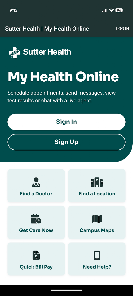
Sutter Health My Health Online

Sutter Health My Health Online

verified

Sutter Health

4.3
Rating
500,000+ Downloads
11.6.5 Version
  • category

    Category: Medical

  • price

    Price: free

  • age rating

    Age Rating: Everyone

  • rating

    Rating: 4.3

  • available on

    Available on: /

  • updated on

    Updated on: Apr 27, 2026

Screenshot 1
Screenshot 2
Screenshot 3
Screenshot 4
Screenshot 5
Screenshot 6
Advertisement

Features & Highlights

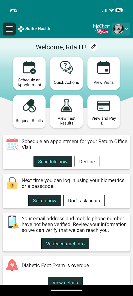
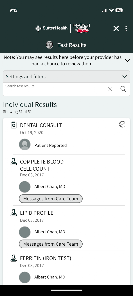
Access to Medical Records

View your medical records anytime and anywhere. With just a few clicks, you can access lab results, treatment histories, and immunization records, empowering you to take charge of your health and stay informed about your medical status.

Appointment Scheduling

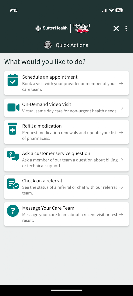
Easily schedule, reschedule, or cancel appointments at your convenience. The intuitive interface allows you to view available time slots, making it simple to find a time that fits your busy schedule while ensuring you never miss an important check-up.

Prescription Management

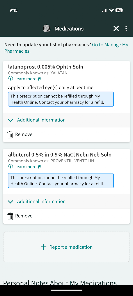
Manage your prescriptions with ease through the app. You can request refills, view medication details, and receive reminders for when to take your medications, ensuring you stay on track with your treatment plan.

Secure Messaging

Stay connected with your healthcare team through secure messaging. You can ask questions, request prescription refills, and get timely responses without the need for phone calls or in-person visits, making communication smoother and more efficient for your health needs.

Advertisement

Pros & Cons

Pros
  • Stay connected with your doctor
  • Access lab results anytime
  • Schedule appointments easily
  • Manage prescriptions on-the-go
  • Secure messaging for questions
Cons
  • Limited functionality for users
  • Occasional technical glitches
  • User interface can be confusing
  • Slow response times reported
  • Inconsistent customer support

Real Experience Using Sutter Health My Health Online

Real Experience Application Scenarios

The Sutter Health My Health Online app is designed to streamline healthcare management for its users. The app is particularly useful for patients who are looking to manage their appointments, access medical records, or communicate with their healthcare providers. For instance, users can schedule routine check-ups, view lab results, and request prescription refills from the convenience of their smartphones. Additionally, the app allows for secure messaging, making it easy for patients to ask non-urgent questions and receive timely responses from their healthcare team. This is especially beneficial for those with chronic conditions requiring regular monitoring, as they can keep track of their health metrics and engage more actively in their treatment plans.

User Experience

The user experience of the Sutter Health My Health Online app is generally well-received. The interface is intuitive and user-friendly, making navigation straightforward even for those who may not be tech-savvy. Users appreciate the clean design and organized layout, which helps them find relevant information quickly. Many users have reported that the login process is secure yet simple, with options for biometric authentication. The app’s performance is typically smooth, with minimal loading times, allowing users to access their health information without frustration. However, some users have noted occasional glitches or delays in data updates, particularly after appointments or lab tests, which can be a minor inconvenience.

Pricing

The Sutter Health My Health Online app is free to download and use, which is a significant advantage for patients looking to manage their healthcare without additional costs. There are no hidden fees or subscription models associated with the app, making it accessible to a broad audience. However, it is important to note that while the app itself is free, users may incur costs related to medical services accessed through the app, depending on their insurance plans and the nature of the services provided.

Updates & Support

The app is regularly updated to enhance functionality and address user feedback. Sutter Health is committed to maintaining the app’s performance, ensuring it stays compatible with the latest devices and operating systems. Users can easily find information about updates in the app store or within the app itself. Customer support is available for users experiencing issues or needing assistance. The support team can be reached through the app, providing a direct line for troubleshooting or inquiries. Overall, the Sutter Health My Health Online app actively works to improve user satisfaction through consistent updates and responsive customer support.

verified Security & Privacy Review

Security & Privacy Review The Sutter Health My Health Online app prioritizes user security and privacy through robust data protection measures. The application employs encryption protocols to safeguard sensitive information, ensuring that personal health data remains confidential during transmission and storage. Users are required to create strong passwords and are encouraged to enable two-factor authentication for an additional layer of security. The app's privacy policy clearly outlines how user data is collected, used, and shared, adhering to HIPAA regulations to protect patient information. The app requests specific permissions, such as access to location services and notifications, which enhance user experience while maintaining transparency about data usage. Users have control over their privacy settings, allowing them to manage what information is shared. Overall, Sutter Health My Health Online demonstrates a strong commitment to securing user data and maintaining privacy, making it a trusted option for managing personal health information.
Advertisement

Compare APP

User Reviews

  • Pamela Blankenship
    2020/07/22

    The app would be okay if I could log in regularly when I need to. However, half the time the app tells me my username or password is wrong even after I try it two or three times. Then I just go over to the website and log in with no problem. I can just save time, skip the app, and go directly to the website. The app has always been glitchy like this with me.

  • Sylvie Pagan
    2026/03/28

    Spent an hour attempting to schedule appointments with my providers on my day off. App kept redirecting me to call providers for scheduling. Its the weekend, no one in offices to take calls. Now I will need to use work days to call and try to set up appointments. This app is terrible. Make it make sense! To top it off, I am forced to give it a star for posting! 😠!

  • Crystal
    2022/02/09

    It's a great app. Needs a way to change/edit more information. The messaging is very responsive, getting answers within 24 hrs instead of waiting until your next visit is a stress saver. I like having access to test results, really helps with seeing the overall picture of health and the graphs make it easy to have a general idea even though I don't necessarily know what they all mean.



  • Debra Docherty
    2022/01/11

    I love the options available to me that this app offers. It makes things easier for me as a patient, to get information about my care. I can ask questions without sitting on hold. I can pay my bill, schedule appointments and even check in for an appointment when I arrive. It even has the option of Google Maps to locate an office that I've never been to, built right in. Whoever thought of this app is, in my opinion, brilliant! Thank you!

  • Kevin Andrews
    2025/12/05

    Messaging and scheduling are useless. I appreciate getting after care and test results in the app, but I have find the app to be completely useless for messaging and scheduling. My provider is always responsive via other channels, but using the app, I never hear back. I tried to call to schedule a CT scan, and the voice message said long wait to talk to someone and urged me to use the app instead. But when I went into the app, it told me I couldn't schedule online, and to call.🙄

Review Source: Google Play store public user reviews.

How to use Sutter Health My Health Online

1

How do I activate my Sutter Health My Health Online account?

To activate your account, visit the Sutter Health My Health Online website, click on "Activate Account," and follow the prompts using your personal information.

2

How do I contact customer service for Sutter Health My Health Online?

You can reach customer service at 1-866-978-8837 for assistance with your account or app-related inquiries.

3

How do I log in to Sutter Health My Health Online?

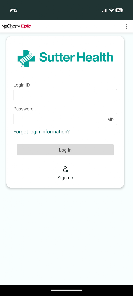
Visit the Sutter Health My Health Online website or app, enter your username and password, and click "Log In."

4

What is the customer number for Sutter Health My Health Online?

Your customer number is typically found on your billing statement or can be obtained by contacting customer service.

What's New

Miscellaneous fixes and improvements.

Editor's Choice