Home
Home  Apps
Apps  Games
Games  Topics
  About Us
  Cookies & Privacy Policy
  Terms of Service
 Community Support
Connect with others on a similar journey through myAir™'s community support feature. Share experiences, tips, and encouragement with fellow users, making your sleep apnea management feel less isolating and more collaborative.

Resmed
 4.2
4.2 
Category: Medical

Price: free

Age Rating: Everyone

Rating: 4.2

Available on: /

Updated on: Jun 17, 2026
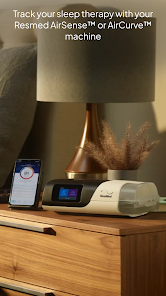
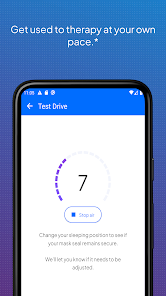
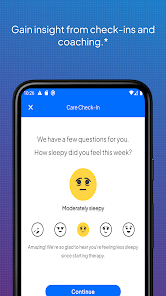
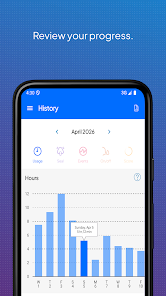
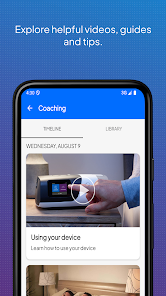
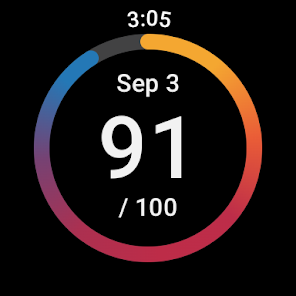
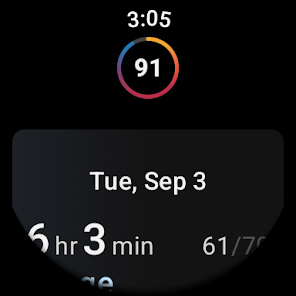
Connect with others on a similar journey through myAir™'s community support feature. Share experiences, tips, and encouragement with fellow users, making your sleep apnea management feel less isolating and more collaborative.
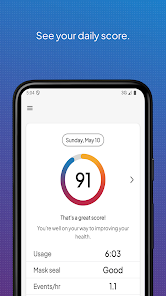
myAir™ provides tailored insights based on your sleep data and therapy usage, helping you understand how well your treatment is working. With easy-to-read graphs and feedback, you'll feel more empowered to manage your sleep apnea journey effectively.
Stay motivated with myAir™'s progress tracking feature, which allows you to monitor your sleep quality over time. By visualizing your improvements, you can celebrate milestones and remain committed to your therapy, ensuring you get the restful sleep you deserve.
Never miss a therapy session again with myAir™'s handy reminders. This feature sends you notifications for mask changes, equipment maintenance, and therapy updates, helping you stay on top of your treatment and maximize its effectiveness.

 Personalized sleep data for better insights Easy tracking of therapy progress and adherence User-friendly interface for seamless navigation Real-time feedback to enhance sleep quality Encourages consistent use of CPAP therapy
 Limited compatibility with certain CPAP devices Requires internet access for full functionality May have a learning curve for new users Data privacy concerns regarding user information
 myAir™ by Resmed is designed primarily for individuals who use CPAP (Continuous Positive Airway Pressure) therapy to manage sleep apnea. It serves as a companion app that tracks users' nightly sleep data, helping them understand their therapy effectiveness. Users can benefit from the app in various scenarios, such as monitoring their sleep patterns after a recent CPAP adjustment, checking compliance with therapy recommendations, or simply wanting to improve their overall sleep quality. The app provides personalized coaching and helpful tips based on the user's data, making it an invaluable resource for those new to CPAP therapy or those who are seasoned users looking to optimize their experience.
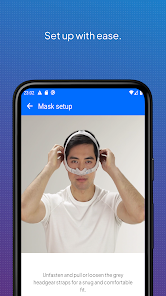
The user experience with myAir™ is generally positive, as it features an intuitive and user-friendly interface that simplifies navigation. Upon setting up the app, users can easily connect their CPAP device, often with just a few taps. The dashboard displays a summary of key metrics, such as hours of usage, mask fit, and apnea events, allowing users to quickly assess their progress. The personalized insights and notifications keep users engaged and motivated to adhere to their therapy. Additionally, the integration of educational resources helps users understand their condition better, empowering them to make informed decisions about their treatment. However, some users may experience occasional syncing issues with their devices, which can temporarily hinder the experience.
myAir™ is free to download and use, making it accessible to a wide range of users who require CPAP therapy. While the app itself incurs no cost, it is important to note that users must own a compatible Resmed CPAP device to fully utilize its features. The app does not include any hidden charges or subscription fees, which is a significant advantage for users seeking to manage their sleep apnea without incurring additional expenses. This transparency in pricing contributes to a positive perception of the app within the user community.
Resmed is committed to providing ongoing updates and improvements for the myAir™ app. Users can expect regular enhancements that address bugs, improve functionality, and introduce new features based on user feedback. The app also offers a robust support system, including FAQs, troubleshooting guides, and customer service contact options. This ensures that users can get help when needed, fostering a sense of reliability and trust in the app. Overall, the combination of frequent updates and responsive support enhances the overall user experience and satisfaction with myAir™.
Security & Privacy Review


Mostly very useful. It doesn't always line up with my sleep quality. Nights with lots of insomnia can still get scores in the high 90s. The inability to screenshot in the app is frustrating. Sometimes I want to share my score, or trend, with my wife and the app doesn't allow it for some inexplicable reason(s). Regardless of the explanation, it lessens the sense of "ownership" of the app and data. Fix those things and we're in the 4 star range.
It was working fine until the last update. This is the second time that it does not show where I used my machine. I am always 100% compliant, but it didn't register last night's data. I tried clearing cache, uninstalled and re-installed, unplugged and plugged back up. Are the servers down? 3/13/25 3/14/25 - I am still missing a whole day of data. (3/13/25)
The feature this app needs is a tracker and reminder for changing filters, masks and hoses. I never remember when I changed mine last. Other than that, the app tracks the sleep stats from your CPAP with nice insights and graphs and almost game-like points to keep you using your CPAP. I see notification settings for cleaning reminders, but they seem to be random, (no "last cleaned" tracker). Also, I wouldn't be upset if it had a dark mode. In fact, I'd be thrilled if there were a dark mode!
Edit - Once again the developers release an update that doesn't work. The data is not pulling in at all now. The latest update to the app and to the airsense 11 software is terrible. The machine no longer shows the night's data. It only shows the 30 day summary. The machine says the seal was great but the app says it was a 0 out of 20. Untested software upgrades make for a terrible user experience.
App worked fine until.the update on 6/25/2026. I restarted, deleted then uploaded the app again, and rescanned. In order for me to view last night's information, I need to have my Samsung S 24 on Bluetooth and my "Location" on. That wasn't required prior to the update on 6/25. Not sure what changed with the recent update but I'm not a fan of having to enable my location on my phone and Bluetooth to access information that wasn't required before. Thankfully, I can view info on the machine.
Review Source: Google Play store public user reviews.
myAir™ by Resmed does collect some personal data to provide personalized insights and improve the service, but it is committed to protecting your privacy and securing your information.
Yes, myAir™ by Resmed offers a free version that allows users to access basic features, while additional premium features may require a subscription.
Yes, myAir™ by Resmed requires an internet connection to sync data, access features, and receive updates.
You can contact myAir™ by Resmed support through the app or website, where you’ll find options for submitting feedback, accessing help articles, or reaching out to customer service directly.
You can manage or cancel your myAir™ by Resmed subscription through the app settings or your account settings on the website, following the provided instructions for subscription management.
You can contact customer service through the app or visit the ResMed website for support options.
To activate your account, follow the link in your welcome email and set up your password. If you didn't receive an email, check your spam folder.
Open the app and enter your email and password. If you forget your password, use the "Forgot Password?
Your customer number can typically be found in the app under account settings or in your welcome email from ResMed.
We’re always trying to improve your experience with myAir.This release also contains minor bug fixes and performance improvements.
 Google Play
  App Store