This site uses cookies to enhance your user experience. By clicking any link on this site you are giving your consent to our cookie policy. Read more
Reject
Accept All

Advertiser and Editorial Disclosures

Zocdoc

Zocdoc

verified

Zocdoc, Inc.

4.8
Rating
1,000,000+ Downloads
3.246.0 Version
  • category

    Category: Medical

  • price

    Price: free

  • age rating

    Age Rating: Everyone

  • rating

    Rating: 4.8

  • available on

    Available on: /

  • updated on

    Updated on: Jul 3, 2026

Screenshot 1
Screenshot 2
Screenshot 3
Screenshot 4
Screenshot 5
Screenshot 6
Screenshot 7
Advertisement

Features & Highlights

Comprehensive Doctor Listings

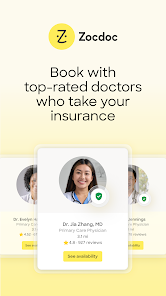
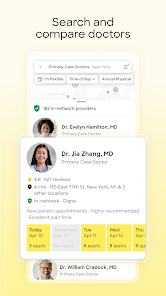
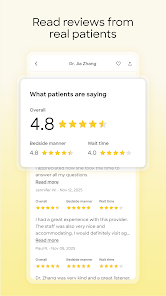
Zocdoc offers a vast directory of healthcare providers across various specialties. You can browse through detailed profiles, read patient reviews, and compare qualifications, ensuring you find the right doctor for your specific needs and preferences.

Instant Appointment Booking

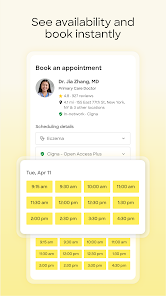
With Zocdoc, you can easily find and book appointments with doctors in your area in just a few taps. The platform allows you to see real-time availability, making it convenient to schedule visits that fit your busy lifestyle without the hassle of phone calls.

Insurance Compatibility

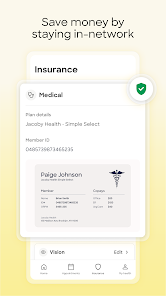
Navigating healthcare can be tricky, but Zocdoc simplifies it by allowing users to filter doctors based on insurance plans. This feature ensures that you find providers who accept your insurance, saving you time and reducing unexpected costs.

Telehealth Options

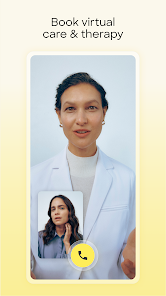
In today's fast-paced world, Zocdoc makes it easy to consult with doctors virtually. The app provides access to telehealth services, allowing you to have video appointments from the comfort of your home, which is perfect for minor health concerns or follow-ups.

Advertisement

Pros & Cons

Pros
  • Easily search for doctors based on specialty and location
  • View real-time availability for hassle-free booking
  • Read verified patient reviews to make informed choices
  • Receive appointment reminders and updates directly to your phone
  • Access telehealth options for convenient at-home consultations
Cons
  • Limited availability of certain specialists may lead to longer wait times
  • User interface can be confusing for some patients
  • Not all insurance plans are accepted, which may result in unexpected costs

Real Experience Using Zocdoc

Real Experience Application Scenarios

Zocdoc is a versatile platform that caters to a variety of healthcare needs. Whether you're feeling unwell and need a quick appointment with a primary care physician, or you're seeking a specialist for a specific condition, Zocdoc streamlines the process. Users can search for doctors based on their insurance, location, and the type of medical service required. It's especially useful for busy individuals who may struggle to find time to call multiple offices for availability. Additionally, Zocdoc is beneficial for those new to an area and unsure of where to find reputable healthcare providers. From routine check-ups to urgent care visits, the app covers a wide spectrum of medical services, making it a go-to resource for managing health care efficiently.

User Experience

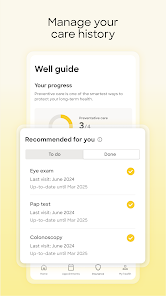
The user interface of Zocdoc is designed with simplicity in mind, making it easy for users to navigate. Upon opening the app, users are greeted with a clean layout that allows them to search for doctors or specialists quickly. The appointment booking process is straightforward, requiring just a few taps. Users can view doctor profiles, read patient reviews, and check availability in real-time. The integration of telehealth services also enhances user experience, allowing patients to have virtual consultations from the comfort of their homes. Notifications and reminders for upcoming appointments help keep users organized, reducing the likelihood of missed visits. Overall, the app provides a seamless experience that combines convenience with accessibility.

Pricing

Zocdoc is free to download and use, which is a significant advantage for users. While the app itself does not charge for booking appointments, the costs incurred will depend on the healthcare providers and the specific services rendered. Users can filter results based on their insurance plans, which helps in understanding potential out-of-pocket expenses. Many providers offer transparent pricing, allowing users to see costs associated with various treatments and services upfront. This transparency is particularly beneficial for individuals who are budget-conscious or managing healthcare expenses.

Updates & Support

Zocdoc regularly updates its app to enhance functionality and performance. Users can expect improvements in features, bug fixes, and new integrations that align with changing healthcare needs. The support system is robust, offering assistance through FAQs, customer service chat, and email support. The Zocdoc team is known for their responsiveness, ensuring that any issues users encounter are addressed promptly. Additionally, the app frequently incorporates user feedback into updates, demonstrating a commitment to continuous improvement and user satisfaction. Overall, Zocdoc’s dedication to providing excellent support and keeping the app current solidifies its position as a valuable healthcare resource.

verified Security & Privacy Review

Security & Privacy Review Zocdoc prioritizes user security and privacy, implementing robust measures to protect personal information. The app utilizes industry-standard encryption protocols to safeguard data during transmission, ensuring that sensitive information remains confidential. User data is stored securely, with access limited to authorized personnel only. When it comes to permissions, Zocdoc requests access to location services to provide tailored healthcare recommendations and appointment availability. Users are informed about the necessity of these permissions and can choose to grant or deny access. The app adheres to strict privacy practices, clearly outlining its data collection, usage, and sharing policies in its privacy policy. Zocdoc does not sell user data to third parties and only shares information with healthcare providers when necessary for appointment bookings or related services. Users have the option to manage their data preferences within the app, promoting transparency and control over personal information. Overall, Zocdoc demonstrates a commitment to maintaining user privacy while delivering a seamless healthcare experience.
Advertisement

User Reviews

  • Sarah Wheeland
    2026/05/29

    Seems great on paper. Good concept, app runs well and is polished but has issues that make it more hassle than it's worth. Booked an appointment and the doctor messaged me that that time wasn't actually available. I don't have insurance but there's no option to tell the app that so it just keeps asking me for my insurance info. No pricing information so I guess you just have to blindly make appointments and hope you can afford it.

  • Bowie Parker
    2026/03/08

    It has an unreliable system to check if you're covered by the provider selected, and many times I've tried to book with someone, they have cancelled and stated that they were not accepting clients. I've yet to find a provider due to this useless system. I'm genuinely so dissapointed and wouldn't reccomend ANYONE looking for therapists or anything having to do with mental health. You would have better luck contacting each person individually that you find on here and book outside of the app.

  • Vanessa Neiditch
    2024/03/06

    I have had a great experience using Zocdoc, it's helped me find providers who accept my insurance. I like being able to find and book appointments from my phone. I can reschedule visits, set up follow ups, it's been very convenient and helpful to use! Be aware that if you are a no-show, or cancel too many appointments, you may find your account is blocked. Avoid that by using their feature to add your appointments to your calendar immediately! Super helpful. I highly recommend it 👌

  • A Google user
    2020/01/13

    Although very helpful in reading reviews to select a doctor, the appointment system seems to never work. After selecting an appointment, while then selecting my insurance, it gives me an error message that the appointment is no longer available. Then once I did finally get one to work, it ended up being at a different location (over 30 minutes away) than what I had booked.

  • Matthew Gore-Kormanik
    2023/05/08

    App used to be great, now I have to log in every time I open it which is annoying as hell. Also can't book an appointment because I'm stuck in a login loop. Tells me to enter my google credentials, I do, it "logs me in" and then I'm right back to the sign in page. I was able to get into my account after trying over and over, went to book and appointment and after I hit book it just logs me out again. Looks like my appointment booking didn't go through. It's literally become unusable.

Review Source: Google Play store public user reviews.

FAQ

1

Can I submit suggestions or feedback to Zocdoc - Find and book doctors?

Yes, users can submit feedback or suggestions through the app or the Zocdoc website to help improve their services.

2

Does Zocdoc - Find and book doctors collect my personal data?

Yes, Zocdoc collects personal data to provide its services, including information necessary for booking appointments and verifying identities.

3

Does Zocdoc - Find and book doctors support offline use?

Zocdoc requires an internet connection to access its features, so it does not support offline use.

4

How do I cancel my Zocdoc - Find and book doctors subscription?

Since Zocdoc does not have a subscription model for users, there is no subscription to cancel; users can simply stop using the app at any time.


5

How much does a subscription to Zocdoc - Find and book doctors cost?

Zocdoc does not have a subscription fee for users, but certain healthcare services may incur charges.

How to use Zocdoc

1

Can I log in using my social media accounts?

Yes, you can log in using your Facebook or Google account if you linked them during registration.

2

How can I contact customer service for help with my account?

You can reach our customer service team through the "Help" section on the Zocdoc website or app for assistance with your account.

3

How do I activate my Zocdoc account after signing up?

To activate your account, check your email for a confirmation link and click on it. This will complete the activation process.

4

How do I update my customer number if it's incorrect?

Please contact customer service for assistance in updating your customer number to ensure it's accurate.

5

I can't log in to my Zocdoc account. What should I do?

If you're having trouble logging in, try resetting your password using the "Forgot Password?" link on the login page.

What's New

Get the latest update now for bug fixes and performance improvements - it’s the fastest, easiest way to find and book appointments with doctors in your area.

Editor's Choice