This site uses cookies to enhance your user experience. By clicking any link on this site you are giving your consent to our cookie policy. Read more
Reject
Accept All

Advertiser and Editorial Disclosures

FollowMyHealth

FollowMyHealth

verified

/

4.7
Rating
/ Downloads
24.3 Version
  • category

    Category: Medical

  • price

    Price: free

  • age rating

    Age Rating: 12+

  • rating

    Rating: 4.7

  • available on

    Available on: /

  • updated on

    Updated on: Jun 30, 2026

Screenshot 1
Screenshot 2
Screenshot 3
Screenshot 4
Screenshot 5
Screenshot 6
Screenshot 7
Screenshot 8
Screenshot 9
Screenshot 10
Advertisement

Features & Highlights

Appointment Scheduling

The app streamlines the appointment scheduling process by enabling users to book, reschedule, or cancel appointments directly from their mobile device. This feature reduces the hassle of phone calls and helps patients keep track of their upcoming visits, ensuring they never miss an important appointment.

Health Tracking Tools

The app offers a variety of health tracking tools that empower users to monitor vital signs, medications, and fitness goals. By keeping all health-related information in one place, patients can gain insights into their well-being and collaborate more effectively with their healthcare team.

Personal Health Records

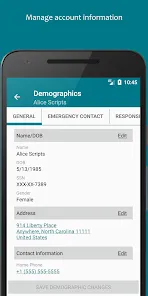
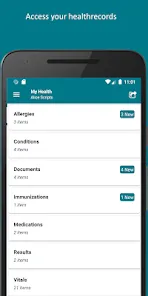
FollowMyHealth allows users to easily access and manage their personal health records all in one place. With a user-friendly interface, patients can view lab results, medications, and immunization histories, making it simpler to stay informed about their health status anytime, anywhere.

Secure Messaging

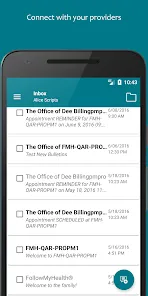
FollowMyHealth includes a secure messaging feature that connects patients with their healthcare providers. This allows for quick communication regarding health concerns, prescription refills, and follow-up questions, fostering a more personalized and responsive healthcare experience.

Advertisement

Pros & Cons

Pros
  • Access your health records anytime, anywhere for convenience and peace of mind.
  • Stay connected with healthcare providers through secure messaging for timely communication.
  • Schedule appointments quickly and easily, reducing wait times and hassle.
  • Manage prescriptions efficiently, ensuring you never miss a refill.
  • Receive personalized health reminders to help you stay on track with wellness goals.
Cons
  • Limited integration with some healthcare systems can hinder user experience.
  • Navigation may be complex for less tech-savvy users.
  • Inconsistent customer support can delay issue resolution.
  • Data privacy concerns may deter some users from full engagement.

Real Experience Using FollowMyHealth

Application Scenarios

FollowMyHealth serves as a comprehensive health management tool designed to facilitate seamless communication between patients and healthcare providers. Users can access their medical records, schedule appointments, and manage prescriptions all in one place. This app is particularly beneficial for individuals with chronic conditions who require regular monitoring and communication with their healthcare team. Families can also benefit from the app, as it allows for shared access to medical information, making it easier to manage the health of children or elderly family members. Additionally, fitness enthusiasts can use FollowMyHealth to track health metrics, integrate with wearable devices, and stay engaged with their wellness goals.

User Experience

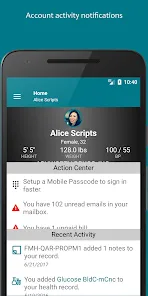
The user experience of FollowMyHealth is generally positive, characterized by an intuitive interface that is easy to navigate. Upon logging in, users are greeted with a dashboard that presents key health information at a glance, including test results, medication lists, and upcoming appointments. The app's design prioritizes clarity and usability, making it accessible for users of all ages. Notifications and reminders for upcoming appointments or medication refills help keep users on track with their health management. While the app offers a wealth of features, some users have reported occasional glitches, particularly with syncing data from third-party health devices. However, customer feedback indicates that the developers are responsive to these issues, and regular updates often address any concerns.

Pricing

FollowMyHealth is free to download, making it an attractive option for users seeking to take charge of their health without financial barriers. However, users should be aware that while the app itself is free, certain features may require payment or be dependent on the user's healthcare provider. Some providers may charge for specific services accessed through the app, such as telehealth consultations or advanced health tracking features. Overall, the pricing model is designed to be flexible, allowing users to choose the level of service that best suits their needs and budget.

Updates & Support

Regular updates are a cornerstone of FollowMyHealth's commitment to user satisfaction. The development team frequently releases new features and enhancements based on user feedback, ensuring the app remains relevant and functional. Support is readily available through various channels, including a help center, FAQs, and customer service options. Users can reach out via email or phone for assistance, and the response times are generally quick. This proactive approach to updates and support contributes significantly to the overall user satisfaction, as it shows that the developers value user feedback and are dedicated to improving the app continually.

verified Security & Privacy Review

Security & Privacy Review FollowMyHealth prioritizes user data security and privacy, employing robust encryption protocols to protect sensitive health information during transmission and storage. The app complies with HIPAA regulations, ensuring that personal health data is handled with the utmost confidentiality and integrity. Users are required to create strong passwords and can enable two-factor authentication for added security. FollowMyHealth also provides clear privacy policies outlining how personal data is collected, used, and shared, allowing users to make informed choices. The app requests permissions that are necessary for its functionality, such as access to contacts for appointment reminders. Users can manage these permissions easily, granting or revoking access as needed. FollowMyHealth does not sell user data to third parties, maintaining a strong commitment to user privacy. Overall, FollowMyHealth demonstrates a strong commitment to protecting user information, making it a reliable choice for individuals seeking a secure platform to manage their health records.
Advertisement

User Reviews

  • Eric S
    2026/06/08

    I generally leave as short and concise a review as I can, as clearly as I can. That's usually enough. If I was writing this anytime before this past May, there'd be at least 4 stars. I'd rate it at zero stars if I could now. This app was how I have been reliably renewing my medications, communicating with the specialists on my care team, and organizing the rather large amount of medical I have. Now the app is running at less than 1/4 speed, and can't do anything I need it for. Years. Gone now.

  • Yasmin Garcia Delgado
    2026/05/01

    this app need so much work that it didn't even let me give a feedback. I can't even find my referrals printing one page turns into ten pages with huge font. it looks like an amateur made it. I wish it was more easy to find everything in need in this app and linked it up to my chart like all my other doctors so they can keep up with my treatments.

  • PEACE W
    2026/05/09

    This is truly a good platform to get intouch with your providers & specialists. I luv that I can send & receive messages from my primary. it works for me. Some areas can use tweaking. You have to do a lot of clicking on a lot of dates or links to get what you need. It would be great if you clicked a date of service, and all the services appear like a drop down. Right now, if you have 50 dates of service, you would have to click on all 50, to get an idea of what's there. That's quite taxing.

  • A Google user
    2019/06/18

    I'll be honest here; I expected to download this app, and have it be just another app from a healthcare provider that has SOME useful information, but quite a few ads being pushed. I could not have been more wrong in my assumptions. This app is awesome! It contains helpful information such as doctors notes from previous visits and vitals broken down into each category (so you can compare). It also contains a section for your prescriptions, and can email your provider for a refill from the app!

  • Noah Wilson
    2023/11/16

    You can't see your own messages, and the messaging interface needs work; the "send" button is tiny and unlabeled, and the "Back" button, which erases the message you were writing, is big and easy to press. So I'm sure a lot of folks *don't* manage to send a message successfully to their provider. But even once you do, it never shows up on the app until your provider responds, so there's no paper trail (which leads to duplicates). Needs UX improvements on this key feature. Solid otherwise.

Review Source: Google Play store public user reviews.

FAQ

1

Does FollowMyHealth collect my personal data?

FollowMyHealth does collect personal data to provide services, but it adheres to privacy regulations and security measures to protect your information.

2

Does FollowMyHealth offer a free trial or free version?

FollowMyHealth is generally free to use, providing access to basic features without the need for a subscription; however, some premium features may require payment.

3

Does FollowMyHealth require an internet connection?

Yes, FollowMyHealth requires an internet connection to access your health information and use its features effectively.

4

How can I contact support or send feedback for FollowMyHealth?

You can contact FollowMyHealth support through the app or website by accessing the help section, where you can find options for customer support and feedback submission.

5

How do I manage or cancel my FollowMyHealth subscription?

To manage or cancel your FollowMyHealth subscription, you can log into the app or website, navigate to your account settings, and follow the instructions provided for subscription management.

How to use FollowMyHealth

1

How can I contact Customer Service for FollowMyHealth®?

You can reach FollowMyHealth® Customer Service by calling their support number or visiting their official website for assistance.

2

How do I activate my FollowMyHealth® account?

To activate your account, follow the activation link sent to your email after registration, and complete the required information.

3

How do I log in to my FollowMyHealth® account?

To log in, visit the FollowMyHealth® website or app, enter your username and password, then click the "Log In" button.

4

What is the Customer Number for FollowMyHealth®?

The Customer Number for FollowMyHealth® can be found on their website or within the app under the support section.

What's New

Thanks for using FollowMyHealth! This update includes further improvements and bug fixes.

Editor's Choice