This site uses cookies to enhance your user experience. By clicking any link on this site you are giving your consent to our cookie policy. Read more
Reject
Accept All

Advertiser and Editorial Disclosures

OptumRx

OptumRx

verified

Optum Inc.

4.3
Rating
1,000,000+ Downloads
4.56.0 Version
  • category

    Category: Medical

  • price

    Price: free

  • age rating

    Age Rating: Everyone

  • rating

    Rating: 4.3

  • available on

    Available on: /

  • updated on

    Updated on: May 29, 2026

Screenshot 1
Screenshot 2
Screenshot 3
Screenshot 4
Screenshot 5
Screenshot 6
Screenshot 7
Screenshot 8
Screenshot 9
Screenshot 10
Screenshot 11
Screenshot 12
Screenshot 13
Screenshot 14
Screenshot 15
Screenshot 16
Screenshot 17
Screenshot 18
Screenshot 19
Screenshot 20
Screenshot 21
Advertisement

Features & Highlights

24/7 Pharmacist Support

With round-the-clock access to licensed pharmacists, OptumRx ensures that users can get answers to their medication-related questions anytime. This feature provides peace of mind, allowing users to seek guidance on dosages, interactions, or any concerns they may have regarding their prescriptions.

Convenient Prescription Refills

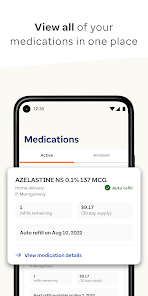
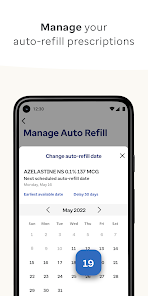
The app simplifies the prescription refill process, allowing users to order refills with just a few taps. With automated reminders and easy tracking, users can stay on top of their medications without the hassle, ensuring they never miss a dose.

Cost Transparency Tools

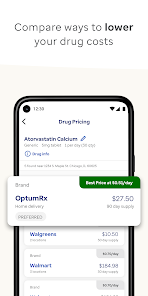
OptumRx provides users with cost transparency tools that help them understand the pricing of their medications. By comparing prices and exploring potential savings through different options, users can make informed choices and manage their healthcare expenses effectively.

Personalized Medication Management

OptumRx offers personalized medication management to help users understand their prescriptions better. Through tailored insights and recommendations, users can effectively manage their medications, ensuring adherence and minimizing potential side effects for a healthier lifestyle.

Advertisement

Pros & Cons

Pros
  • Cost-effective prescription options available
  • Wide range of medications covered
  • User-friendly online tools for easy management
  • Expert support from licensed pharmacists
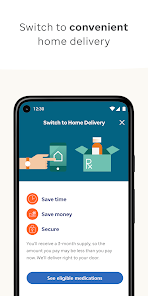
  • Home delivery service for added convenience
Cons
  • Limited drug formulary options available for patients
  • Customer service response times can be slow
  • Complicated prior authorization processes can frustrate users
  • Higher out-of-pocket costs for some medications

Real Experience Using OptumRx

Application Scenarios

The OptumRx app is designed to streamline the way users manage their prescriptions and medications. It is particularly beneficial for those who require ongoing medication management, including individuals with chronic conditions, families managing multiple prescriptions, or anyone looking to simplify their pharmacy experience. Users can easily refill prescriptions, track their medication history, and manage delivery options, making it ideal for busy individuals who need to stay on top of their health. Additionally, the app serves as a useful tool for caregivers who need to oversee the medication routines of their loved ones. Whether you’re at home or on the go, the OptumRx app ensures that managing your health is convenient and efficient.

User Experience

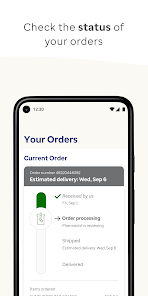
The user experience of the OptumRx app is generally positive, with a clean and intuitive interface that allows users to navigate with ease. The app features a straightforward dashboard where users can quickly access their prescription information, check the status of refills, and receive notifications for upcoming doses. The ability to scan medication labels for refills adds an extra layer of convenience. Many users appreciate the reminders and alerts that help them stay on track with their medication schedules. However, some users have reported occasional glitches and slow loading times, which can be frustrating. Overall, the user experience is designed to be user-friendly, promoting easy access to essential health information.

Pricing

The OptumRx app is free to download and use, making it accessible to a wide audience. However, users should be aware that the costs associated with medications depend on their specific insurance plans and pharmacy benefits. The app provides tools to compare prices and find the best options for their prescriptions. Additionally, users can take advantage of discounts and savings programs that may be available through their insurance. While the app itself incurs no costs, users may still need to keep an eye on their out-of-pocket expenses for medications, which can vary significantly based on their insurance coverage.

Updates & Support

OptumRx frequently updates the app to enhance its functionality and address user feedback. Regular updates often include bug fixes, performance improvements, and new features that enhance the overall user experience. Customer support is readily available through the app, offering assistance via chat or phone. Users can easily access help articles and FAQs to resolve common issues. The responsiveness of the support team is commendable, with many users reporting quick resolutions to their inquiries. Overall, the commitment to regular updates and robust support contributes to a reliable and user-centric experience for all OptumRx app users.

verified Security & Privacy Review

The OptumRx app prioritizes user security and privacy by implementing robust data protection measures. Personal information is encrypted during transmission and storage, ensuring that sensitive data remains secure. The app adheres to industry standards, including HIPAA compliance, to safeguard healthcare information, giving users confidence in their privacy practices. Users are informed about the data collected, which typically includes personal health details and prescription medications. OptumRx limits data access to authorized personnel only, reinforcing its commitment to confidentiality. The app requires necessary permissions to function effectively, such as access to location services for nearby pharmacy options, while allowing users to control their privacy settings. Regular updates and security assessments are conducted to address potential vulnerabilities, enhancing the app's resilience against cyber threats. Overall, the OptumRx app demonstrates a strong dedication to protecting user data and maintaining privacy, making it a reliable choice for managing prescription medications.
Advertisement

Compare APP

User Reviews

  • Sadie Pavel
    2024/09/10

    I love the service (depending on the month) but the app is terrible. I go a week early to the docs to get my meds on time, and if you forget to check the app, you may miss that they need you to verify the address or confirm payment. Half the time the app is down, the other half you do the password dance because it doesn't save it for you, and the biometric almost never works. There's only been maybe 2 times I didn't have any problem, and the meds showed up without an issue. It's so frustrating

  • Jim Kistler
    2021/07/27

    This app is non-intuitive. It is missing the most common information on the medication list such as remaining renewals and the last date the medication was ordered. The most infuriating thing that it does is log you off if you change focus for just a second to, as an example, go to a provider's site to request a renewal. If you have several to do, you either have to write them down, or go to the PC where the problem doesn't exist.

  • Patricius Oenus
    2023/12/22

    The app is difficult to navigate when you want to do anything other than view your previous orders or order status. The app doesn't allow you to change account information. If there is a problem with an order, there is no way to address it through the app. You have to call the company, and they employ a call center (in East Asia), whose attendents (or "advocates") aren't equipped with the skills or tools necessary to resolve anything but the most basic issues. I have to call for each Rx I get.

  • Lisa Ostroski
    2020/08/15

    The app is like the company, inefficient. You place your order via the app and inevitably have to call numerous times to deal with payment bugs, out-of-stocks, and copay issues. If I wanted to call I would. They contact via email, not app. You must utilize 3 forms of contact in a variety of ways to place a single order. Unacceptable. Slow. Not user friendly from start to finish. Other mailorder services are much more user friendly. This starts with the app.

  • A Google user
    2019/08/18

    When ordering a refill today I noticed that in small print it was setting me up for automatic refills (unless I unchecked a box). Seriously?? I don't always have the $25 that I need for it on a particular day so setting auto refills just doesn't work. I'm glad I saw it and unchecked it...everyone else, beware! Other than that, I mostly like the app except there is no way to permanently delete meds you no longer take, only hide them.

Review Source: Google Play store public user reviews.

FAQ

1

Does OptumRx collect my personal data?

Yes, OptumRx collects personal data to provide services such as prescription management and customer support, but they adhere to privacy policies to protect your information.

2

Does OptumRx offer a free trial or free version?

OptumRx does not typically offer a free trial, but the app itself is free to download and use for managing prescriptions and related services.

3

Does OptumRx require an internet connection?

Yes, an internet connection is required to access the features and functionalities of the OptumRx app, as it relies on real-time data and updates.

4

How can I contact support or send feedback for OptumRx?

You can contact OptumRx support through the help section in the app or website, which provides options for live chat, email, or phone support for any inquiries or feedback.

5

How do I manage or cancel my OptumRx subscription?

To manage or cancel your OptumRx services, you can log into your account on the app or website and follow the prompts in the account settings section.

How to use OptumRx

1

How can I contact OptumRx customer service?

You can reach OptumRx customer service at 1-800-791-7658 for assistance.

2

How do I find my customer number for OptumRx?

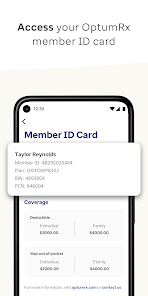
Your customer number is typically located on your OptumRx member ID card or in your account settings on the app.

3

How do I log in to the OptumRx app?

Open the app, enter your username and password, and tap 'Log In' to access your account.

4

Is there a way to activate my OptumRx account?

To activate your account, download the app, select 'Sign Up,' and follow the prompts to create your account.

What's New

Minor bug fixes and enhancements.

Editor's Choice