This site uses cookies to enhance your user experience. By clicking any link on this site you are giving your consent to our cookie policy. Read more
Reject
Accept All

Advertiser and Editorial Disclosures

Easy Pose - 3D pose making app

Easy Pose - 3D pose making app

verified

MadcatGames

3.6
Rating
10,000,000+ Downloads
1.7.8 Version
  • category

    Category: Graphics & Design

  • price

    Price: free

  • age rating

    Age Rating: Teen

  • rating

    Rating: 3.6

  • available on

    Available on: /

  • updated on

    Updated on: Jun 3, 2026

Screenshot 1
Screenshot 2
Screenshot 3
Screenshot 4
Screenshot 5
Screenshot 6
Screenshot 7
Screenshot 8
Screenshot 9
Screenshot 10
Screenshot 11
Screenshot 12
Screenshot 13
Screenshot 14
Screenshot 15
Screenshot 16
Screenshot 17
Screenshot 18
Screenshot 19
Screenshot 20
Screenshot 21
Screenshot 22
Screenshot 23
Screenshot 24
Advertisement

Features & Highlights

Customizable Models

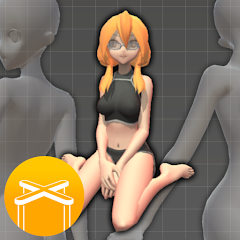
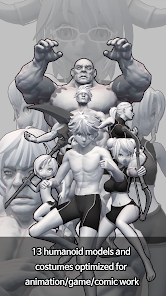
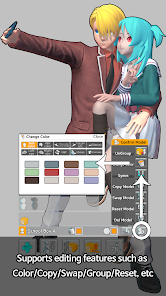
Easy Pose allows users to create and customize 3D human models to fit their artistic needs. You can adjust body proportions, clothing, and even facial expressions, ensuring that your characters come to life exactly as you envision them.

Diverse Pose Library

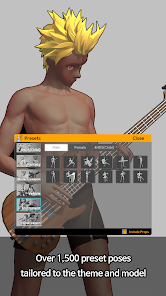
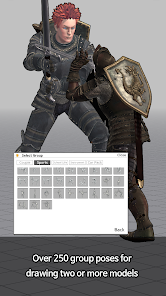
Easy Pose comes with a vast library of pre-set poses that cater to various scenarios and moods. Whether you're looking for dynamic action stances or serene standing poses, this feature provides a great starting point to inspire your artistic journey.

Intuitive Interface

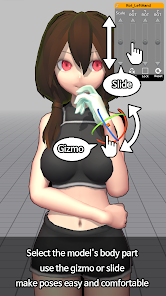
The app features a user-friendly interface that makes pose creation a breeze for both beginners and seasoned artists. With easy navigation and accessible tools, you can focus more on your creativity without getting bogged down by complicated controls.

Real-Time Adjustments

With real-time adjustments, you can tweak poses on the fly and see changes instantly. This responsiveness helps you perfect every angle and detail, making it easier to achieve the exact look you want for your artwork.

Advertisement

Pros & Cons

Pros
  • Easily create complex poses for 3D characters in minutes.
  • Intuitive interface simplifies pose adjustments for all skill levels.
  • Extensive library of pre-set poses saves time and inspires creativity.
  • Real-time adjustments allow for quick iterations and refinements.
  • Compatible with various devices for flexibility in creation.
Cons
  • Limited customization options may restrict creative expression in pose creation.
  • The app's interface can be unintuitive for new users.
  • Performance issues may arise on older devices, hindering usability.

Real Experience Using Easy Pose - 3D pose making app

Real Experience Application Scenarios

Easy Pose caters to a wide range of users, making it an invaluable tool for artists, animators, and even educators. Artists can utilize the app to create dynamic poses for their illustrations, ensuring accurate anatomy and perspective. Animators will find the ability to visualize characters in 3D poses particularly useful, as it helps streamline the animation process by providing a clear reference point. Additionally, educators can use Easy Pose to teach students about human anatomy and movement, making lessons more interactive and engaging. The versatility of this app allows it to be used for various creative projects, whether it’s for storyboarding, character design, or even as a fun way to explore different poses for personal artwork.

User Experience

The user experience of Easy Pose is intuitive and user-friendly, designed to cater to both beginners and seasoned professionals. Upon launching the app, users are greeted with a clean interface that allows for easy navigation. The app offers a variety of customizable features, such as adjusting body proportions, fine-tuning poses, and even changing the lighting and backgrounds for a more realistic display. Users can manipulate the 3D models with simple gestures, making it easy to rotate and view poses from different angles. Additionally, the app provides a library of preset poses that users can quickly access, which is particularly beneficial for those in need of inspiration or a quick reference. Overall, the seamless interaction and extensive customization options enhance the overall experience, making it enjoyable and efficient to use.

Pricing

Easy Pose operates on a freemium model, providing users with both a free version and a premium subscription option. The free version includes a decent selection of features and poses, which is sufficient for casual users or beginners looking to experiment with the app. However, to unlock the full potential of Easy Pose, including access to advanced features and an expanded library of poses, users can opt for the premium subscription. The pricing is competitive compared to other similar apps in the market, making it an attractive option for those serious about their art and animation projects. The ability to try out the basic features for free is a significant advantage, allowing users to assess the app’s utility before committing to a subscription.

Updates & Support

Easy Pose is frequently updated, with developers actively listening to user feedback to improve functionality and add new features. This commitment to continuous improvement ensures that users benefit from the latest enhancements and tools. The support team is responsive and available to assist with any inquiries or technical issues users may encounter. Additionally, the app includes a user guide and tutorial videos, which are incredibly helpful for new users who may need assistance navigating the various features. Overall, the combination of regular updates and reliable support contributes to a positive user experience, fostering a loyal community around the app.

verified Security & Privacy Review

Security & Privacy Review Easy Pose - 3D pose making app takes user security and privacy seriously. The app employs robust encryption protocols to safeguard user data during transmission, ensuring that sensitive information remains secure. The privacy policy clearly outlines data collection practices, detailing what information is gathered, how it is used, and the measures taken to protect it. In terms of permissions, Easy Pose requests access to the device's camera and storage, which are essential for creating and saving 3D poses. Users are informed about these permissions upfront, allowing for informed consent. Importantly, the app does not share personal data with third parties without explicit user consent, reinforcing its commitment to user privacy. Overall, Easy Pose demonstrates a strong focus on security and privacy, making it a trustworthy choice for users looking to create and share their 3D poses while maintaining control over their personal information.
Advertisement

User Reviews

  • Jason Mong
    2025/09/11

    It's a good app, don't get me wrong, but can y'all please let us be able to change their faces, they look weird just staring with either a smile or a frown on their faces. another thing, why limit us to only a few things for free and then have to pay? can't we just have most of it free and then like extra details you have to pay for? most of the things y'all advertise has to be bought, most as in 90%

  • mori / chase
    2026/06/18

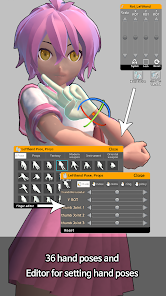
    Fantastically simple and easy to navigate. Virtually no ads, and it can be used offline. The free tier has everything you'd need, and the add-on packs really are just add-ons - no paying for necessities or being tricked by a falsely free software. It's a little old but honestly it works better than any of the "new" posing apps like Clip Studio Paint's poser. The only complaint I have is that the hand poser only has presets; you cant pose the joints, which would be really nice. 5 stars otherwise

  • Nexlyte
    2021/02/23

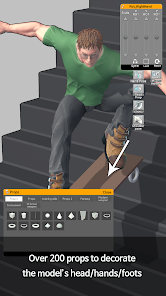
    It's a pretty good app. Easy to pose, and works well for simple drawings.. mainly because you have to pay for a lot of the props. I can't really do much. One thing I was really looking forward to though was the guitar prop. I had a great idea even! But none are free, not even with ads.. I understand some things you have to pay for, I just wish there were a few more prop options for people who can't buy that stuff. Maybe if there was an in app currency? It would be a lot more helpful

  • Charlotte Ritter
    2022/08/19

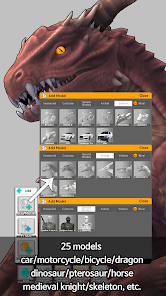
    I've been disappointed with the models of the horse, and all the dinosaurs. All the other models look so well made and then you go to those and they look like they were made by someone just starting to make 3D models and the animations for them are terrible. I would love to see an update with better models and animations. All the other animations look amazing, then there's the horse that looks half-a$$ed. I really hope there's a change for them.

  • Hazel Toph
    2022/09/14

    Pretty good, but missing one tiny thing I think it'd be nice to edit models proportions, I paid for premium to see If there were better options but I couldn't find a way. You can scale thing like hands and feet, so I don't see why we shouldnt be able to scale the waist, neck, chest, etc. Although I still love the app, helps a lot with art and is fun in it of itself somehow. 4/5 Nice!

Review Source: Google Play store public user reviews.

FAQ

1

Can I submit suggestions or feedback to Easy Pose - 3D pose making app?

Yes, users are encouraged to submit suggestions and feedback through the app's support section or via the official website, helping to improve future updates.

2

Does Easy Pose - 3D pose making app collect my personal data?

Easy Pose is designed with user privacy in mind and does not collect personal data unless explicitly provided by the user for specific features.

3

Does Easy Pose - 3D pose making app support offline use?

Yes, Easy Pose allows users to access its features offline, making it convenient for use without an internet connection.

4

How do I cancel my Easy Pose - 3D pose making app subscription?

Users can cancel their subscription through their app store account settings or directly within the Easy Pose app settings under subscription management.

5

How much does a subscription to Easy Pose - 3D pose making app cost?

The subscription cost varies depending on the plan chosen, typically offering monthly and yearly options at competitive rates.

How to use Easy Pose - 3D pose making app

1

Can I change my customer number?

Customer numbers are unique and cannot be changed. If you have concerns, please reach out to customer service for help.

2

How can I reach customer service for Easy Pose?

You can contact our customer service via the support section in the app or email us at support

3

How do I activate my Easy Pose account?

After registration, check your email for an activation link. Click it to activate your account. If you didn't receive it, contact customer service.

4

How do I update my customer information?

You can update your information in the app settings or contact customer service for further assistance.

5

I forgot my customer number; how can I retrieve it?

Please check your registration email for your customer number or contact customer service for assistance.

What's New

1.7.8Fixed an issue where a loading error could occur when using "Copy Model" on certain models.

Editor's Choice