This site uses cookies to enhance your user experience. By clicking any link on this site you are giving your consent to our cookie policy. Read more
Reject
Accept All

Advertiser and Editorial Disclosures

AI Video - AI Video Generator

AI Video - AI Video Generator

verified

HubX

4.4
Rating
/ Downloads
2.1.2 Version
  • category

    Category: Art & Design

  • price

    Price: 0

  • age rating

    Age Rating: Everyone

  • rating

    Rating: 4.4

  • available on

    Available on: /

  • updated on

    Updated on: Jun 25, 2026

Screenshot 1
Screenshot 2
Screenshot 3
Screenshot 4
Screenshot 5
Screenshot 6
Screenshot 7
Screenshot 8
Advertisement

Features & Highlights

AI-Powered Storytelling

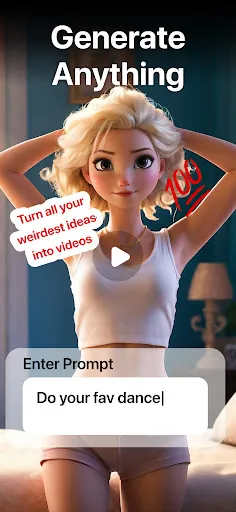
Transform your ideas into engaging videos effortlessly with AI Video's advanced storytelling capabilities. The generator analyzes your script and crafts a visually captivating narrative, ensuring that your message resonates with viewers. Whether for marketing or personal use, storytelling has never been this easy and effective.

Customizable Templates

Choose from a wide variety of professionally designed templates to kickstart your video creation process. Each template is fully customizable, allowing you to adjust colors, fonts, and layouts to fit your brand's aesthetic. This flexibility ensures that every video you create is unique and tailored to your vision.

Seamless Sharing Options

Once your video is complete, easily share it across multiple platforms with just a click. AI Video simplifies the distribution process, ensuring your content reaches your audience on social media, websites, and more. This streamlined sharing capability maximizes your video's impact and engagement.

Voiceover Integration

Add a professional touch to your videos with the integrated voiceover feature. With options for different accents and tones, the AI can generate high-quality voiceovers that enhance storytelling. This makes it simple to convey emotion and connect with your audience without the need for expensive recording equipment.

Advertisement

Pros & Cons

Pros
  • Creates videos in minutes with minimal effort
  • Enhances creativity through automated editing features
  • Offers high-quality visuals tailored to your needs
  • Simplifies content creation for marketers and educators
  • Accessible tools for users of all skill levels
Cons
  • Limited creativity in content generation
  • Often lacks emotional depth
  • Quality varies significantly between outputs
  • May require extensive editing for coherence

Real Experience Using AI Video - AI Video Generator

Application Scenarios

AI Video - AI Video Generator is a versatile tool that finds its utility in various scenarios. Content creators can leverage this app to produce engaging video content for social media platforms, enhancing their online presence. Marketers can utilize the app to generate promotional videos that capture audience attention and drive conversions. Educators can create informative tutorials and presentations, making learning more interactive and visually appealing. Additionally, businesses can use the app for internal communications, such as training videos or company announcements, streamlining their message delivery. The flexibility of AI Video allows users to adapt it to diverse needs, making it a valuable resource for anyone looking to create high-quality video content with ease.

User Experience

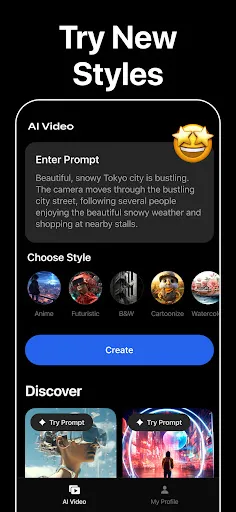
The user experience with AI Video is designed to be intuitive and user-friendly. Upon launching the app, users are greeted with a clean interface that makes navigation a breeze. The simple drag-and-drop functionality allows users to easily upload their media files, while the AI-driven features assist in automating video editing processes, significantly reducing production time. Users can choose from a wide range of templates tailored for different purposes, ensuring that even those with minimal video editing skills can create professional-looking content. The app also includes customization options, such as text overlays and transitions, empowering users to add a personal touch to their videos. Overall, the seamless integration of AI technology enhances the editing experience, making it enjoyable and efficient.

Pricing

AI Video - AI Video Generator offers a competitive pricing structure that caters to different user needs. The app provides a free trial, allowing users to explore its features without any financial commitment. Following the trial, users can opt for a subscription plan that unlocks additional functionalities, such as higher video resolution and access to premium templates. The pricing tiers are structured to accommodate both casual users and professional content creators, making it accessible for anyone looking to enhance their video production capabilities. Regular promotions and discounts may also be available, adding further value to the overall cost of the service.

Updates & Support

The developers of AI Video are committed to continually improving the app by releasing regular updates that enhance functionality and introduce new features. Users can expect timely enhancements based on feedback, ensuring that the app evolves to meet their needs. In terms of support, the app provides a comprehensive help center that includes tutorials, FAQs, and troubleshooting guides. For more personalized assistance, users can reach out to the support team through email or chat, ensuring that any issues or questions are addressed promptly. This dedication to user satisfaction significantly contributes to a positive overall experience with AI Video.

verified Security & Privacy Review

The AI Video - AI Video Generator app prioritizes user security and privacy, implementing robust measures to protect user data. The app adheres to industry-standard encryption protocols, ensuring that any personal information transmitted is safeguarded against unauthorized access. Upon installation, the app requests certain permissions, including access to the device’s camera and storage. Users are advised to review these permissions carefully, as they are essential for the app's core functionalities, such as video creation and editing. However, the app does allow users to customize permissions, enabling them to maintain control over their privacy. The developer has a clear privacy policy that outlines how user data is collected, used, and shared. Data is collected primarily for enhancing user experience and improving service quality. Importantly, the app does not sell user data to third parties, aligning with best practices in user data handling. Overall, AI Video - AI Video Generator demonstrates a commitment to maintaining user privacy and data security, making it a trustworthy choice for those looking to generate videos with AI technology.
Advertisement

User Reviews

  • Chental Mau-Moniz
    2026/04/14

    I don't like app. it costs too much and I don't think I should pay for the generated video if it's not satisfactory. I just wanted to try the app out and it cost me $4.99 for 1 week trial, then i would be charged weekly $14.99. Then yes you start with coins but have to use them to generate a video. if you don't like the video that was generated, too bad buy more coins to see more videos generated. Then tried to delete my account and it won't allow me.

  • Jesse Harper
    2026/05/13

    I'd skip this app if I were you. I paid the one week intro fee for 2 dance videos and 1 Jurassic Park Video (because I had just enough to pay for the past one). The videos were disappointing and after being made to wait "5 minutes" which was actually 10 minutes after the nebulous "nearly there" timeframe finished up. The AI was too noticeable and they didn't offer previews of the dance trends so some of us who missed them could understand what they entailed. I had to go back and forth to Tiktok.

  • Danny Gonsoulin
    2026/04/14

    I couldn't get one video to work. I couldn't find a search bar. I couldn't figure out what anything cost i.e. subscription, creating a video. I read the TOS top to bottom and it all contradicts the description. Some places it's free for a week, some places it's $4.99, some places it 600 coins, some places it's unlimited creations, some places it's 60 coins per day free!!! There are no directions or help! Nothing is intuitive. I'm cancelling my app, my account and I better not get charged!

  • William Villafana
    2026/04/14

    I liked the 2 videos made by the app; however nothing is mentioned that you are restricted to what they call 1500 coins, it is only good for 2 videos; by the way no preview is allowed, if you don't like it "too bad", you wasted your coins. I subscribed, made 2 videos, and was not allowed to make anymore unless I bought more coins. I immediately unsubscribed.

  • Patty Smith
    2026/04/22

    I loved the easy way of using this app and how great my pictures turned out. the problem was the 1. The fees 🙄 you are charging and 2. There is only a handful of songs or( I don't know what you call them) items you can choose from to manipulate your photo with making your app quite limited for the fees you are charging. please keep adding more songs to your library and work on the fees and I will be back.

Review Source: Google Play store public user reviews.

FAQ

1

Does AI Video - AI Video Generator collect my personal data?

AI Video - AI Video Generator may collect personal data as outlined in its privacy policy, which typically includes information necessary for account creation, usage analytics, and improving the service.

2

Does AI Video - AI Video Generator offer a free trial or free version?

Yes, AI Video - AI Video Generator often provides a free trial or a limited free version, allowing users to explore its features before committing to a paid subscription.
3

Does AI Video - AI Video Generator require an internet connection?

Yes, AI Video - AI Video Generator generally requires an internet connection to access its features and utilize the AI capabilities for generating video content.

4

How can I contact support or send feedback for AI Video - AI Video Generator?

Users can typically contact support or send feedback via the app's help section, which may provide options for email support, chat, or submitting a feedback form directly through the platform.

5

How do I manage or cancel my AI Video - AI Video Generator subscription?

Users can manage or cancel their subscription through the account settings within the app or the website, where they can follow the prompts to adjust their subscription preferences.

How to use AI Video - AI Video Generator

1

Can I access the app on multiple devices?

Yes, you can log in on multiple devices with the same account, but only one device can use it at a time.

2

Do I need to activate the AI Video Generator app after installation?

Yes, you need to activate the app using a provided activation code during the initial setup.

3

How can I change my account settings in the app?

Log in, go to 'Account Settings,' and update your preferences as needed.

4

How can I contact customer service for the AI Video Generator app?

You can reach customer service through the app's help section or by visiting our website for support options.

5

How do I log in to the AI Video Generator app?

Open the app, enter your registered email and password, then tap 'Log In' to access your account.

What's New

We’ve fixed some bugs and improved performance to make your experience even better.

Editor's Choice