This site uses cookies to enhance your user experience. By clicking any link on this site you are giving your consent to our cookie policy. Read more
Reject
Accept All

Advertiser and Editorial Disclosures

Cartoon Photo Editor-Toon Art

Cartoon Photo Editor-Toon Art

verified

Bilge Bulut Mobile

4.4
Rating
1,000,000+ Downloads
3.4 Version
  • category

    Category: Art & Design

  • price

    Price: free

  • age rating

    Age Rating: Everyone

  • rating

    Rating: 4.4

  • available on

    Available on: /

  • updated on

    Updated on: Jul 2, 2026

Screenshot 1
Screenshot 2
Screenshot 3
Screenshot 4
Screenshot 5
Screenshot 6
Screenshot 7
Screenshot 8
Screenshot 9
Screenshot 10
Screenshot 11
Screenshot 12
Screenshot 13
Screenshot 14
Screenshot 15
Screenshot 16
Screenshot 17
Screenshot 18
Screenshot 19
Screenshot 20
Screenshot 21
Screenshot 22
Screenshot 23
Screenshot 24
Screenshot 25
Screenshot 26
Screenshot 27
Screenshot 28
Screenshot 29
Screenshot 30
Screenshot 31
Screenshot 32
Advertisement

Features & Highlights

Artistic Filters

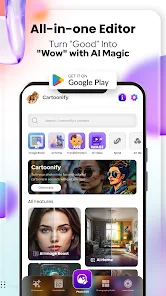
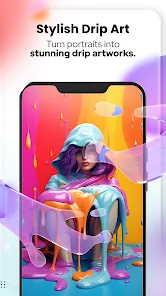
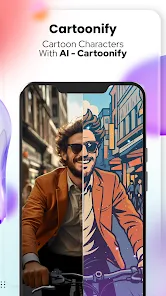
Transform your photos into stunning cartoon artworks with a variety of artistic filters. Each filter offers a unique style, allowing you to customize your images and express your creativity. Whether you prefer a whimsical look or a more dramatic tone, there’s a perfect filter for every mood.

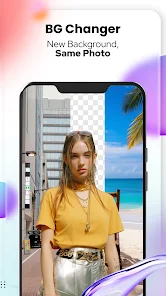
Background Remover

Seamlessly remove unwanted backgrounds from your images with the powerful background remover tool. This feature allows you to isolate subjects and apply new backgrounds, giving your photos a professional touch. It’s perfect for creating custom images or enhancing your cartoon creations for a polished finish.

Customizable Stickers

Add a playful touch to your photos with a wide selection of customizable stickers. From fun emojis to themed graphics, you can personalize your images to match your style. Mix and match stickers to create lively compositions that truly reflect your personality and creativity.

Photo Collage Maker

Easily create eye-catching collages by combining multiple images into one vibrant piece. The app provides intuitive tools to arrange, resize, and decorate your photos, making it fun and simple to showcase your favorite memories. Share your collages on social media to impress your friends and family!

Advertisement

Pros & Cons

Pros
  • Transform your photos into art
  • Wide range of cartoon styles
  • Easy-to-use interface for all
  • Share creations on social media
  • High-quality output and effects
Cons
  • Limited editing options available
  • In-app purchases can add up
  • Performance issues on older devices
  • Occasional bugs and glitches present

Real Experience Using Cartoon Photo Editor-Toon Art

Real Experience Application Scenarios

Cartoon Photo Editor-Toon Art is a versatile app that caters to a wide range of creative scenarios. Whether you are looking to transform your selfies into whimsical cartoon versions for social media or create unique artwork for personal projects, this app has you covered. It's ideal for users who want to add a playful touch to their photos, making it a popular choice for influencers and casual users alike. Additionally, the app can be used for creating fun invitations, greeting cards, or even digital art for websites, effectively bridging the gap between photography and illustration. The intuitive interface allows users to navigate seamlessly through various features, making it easy to experiment with different styles and effects, thus enhancing the overall creative experience.

User Experience

The user experience of Cartoon Photo Editor-Toon Art is generally positive, with a straightforward and easy-to-navigate interface. Upon opening the app, users are greeted with a simple layout that guides them through the photo editing process. The range of cartoon effects and filters available is impressive, allowing for significant customization. Users can adjust features like brightness, contrast, and saturation to achieve the desired look. Feedback from users highlights the app's speed and efficiency, with most edits being processed quickly without compromising quality. However, some users have noted occasional glitches or crashes, particularly when applying multiple effects simultaneously. Nonetheless, the app’s overall performance remains robust, making it a reliable tool for creating cartoon-inspired art.

Pricing

Cartoon Photo Editor-Toon Art offers a freemium model, providing users with a selection of basic features at no cost. This allows users to explore the app and test its capabilities before committing to any payments. For those seeking a more enhanced experience, premium features are available through a subscription model. The pricing is competitive compared to similar apps in the market, offering various subscription options that cater to different user needs. Many users find the premium features worthwhile, as they unlock an extensive library of filters and editing tools that elevate the overall editing experience. Additionally, users often appreciate the absence of intrusive ads in the premium version, allowing for uninterrupted creativity.

Updates & Support

The developers of Cartoon Photo Editor-Toon Art are committed to providing regular updates, ensuring that the app remains up-to-date with the latest features and improvements. Users can expect periodic enhancements that not only introduce new filters and effects but also address any bugs or performance issues. Moreover, customer support is readily accessible, with a dedicated team that responds quickly to user inquiries and feedback. This commitment to user satisfaction is reflected in the positive reviews regarding the app’s responsiveness to issues. Overall, the combination of frequent updates and excellent customer support contributes to a reliable and enjoyable user experience.

verified Security & Privacy Review

Security & Privacy Review Cartoon Photo Editor-Toon Art prioritizes user security and privacy by implementing industry-standard practices. The app utilizes encryption to protect user data during transmission, ensuring that personal information remains secure. However, users should be aware of the permissions requested upon installation, which include access to photos, media, and storage. This access is necessary for the app to function properly, but it may raise concerns for some users regarding data use. The app's privacy policy outlines how user data is collected, used, and shared. It is essential for users to review this policy to understand the extent of data collection and the purposes for which their information may be used. Additionally, the app does not appear to share personal data with third parties without user consent, reinforcing its commitment to user privacy. Overall, while Cartoon Photo Editor-Toon Art offers a fun experience, users are encouraged to remain vigilant about their permissions and data sharing preferences to safeguard their privacy.
Advertisement

User Reviews

  • Max Rowe
    2026/05/04

    lots of random pop-ups, also it makes you want to rate before even trying the app out first, then when I get try to cartoonify my photo, it took me to watch an ad, by time I was done clicking out of the ads, it said I've used up my time for today I wasn't even able to edit anything. it would be half a star if I was able to give it. don't waste your time unless you plan to spend money

  • Veeraps
    2026/05/16

    Full of Ads not even letting me enter the app. The free photo conversion limit of 1 photo per day is literally insane and for that too I had to wait for 3 Ads, finally it produced another image photo, asking me immediately to pay and use the services. This app is full of Ads and not a single photo service. Not even sure how other reviewers are able to use without Ads!! I uninstalled it, as the ads are annoying.

  • Andy Keeble
    2026/04/09

    Paid an annual subscription but most of the time I get an error message saying Daily Credit Limit exceeded - there was no mention of a limit when I subscribed. Occasionally I can process a few photos but then the message comes back. I have emailed their support team but get no response.

  • D A
    2026/05/18

    Forced to watch many adds, that you can't get out of. Once I, finally, got to add a photo I had to either watch several adds or buy the premium version. After watching the adds my photo looked the same.

  • Alan McMullan
    2026/04/17

    This app is not fit for the purpose. I paid less than 6 hours ago for the pro version in good faith and then find out that a daily limit , which was not mentioned before is in place. I managed maybe 5 or 6 images before it shut down. I would therefore like to have my money refunded please.

Review Source: Google Play store public user reviews.

FAQ

1

Are there any tutorials available for using the app?
Yes, the Cartoon Photo Editor-Toon Art app may provide tutorials or guides within the app to help users understand how to use its features effectively. Additionally, online resources, including video tutorials, are often available to assist new users.

2

Can I create animated cartoons with this app?

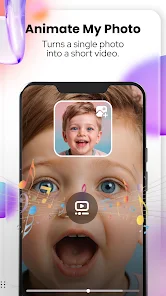
No, the Cartoon Photo Editor-Toon Art app focuses primarily on transforming photos into static cartoon images rather than creating animated cartoons. While it offers various cartoon styles, animation features are not included in the app.

3

Can I share my edited photos directly from the app?

Yes, users can share their edited photos directly from the Cartoon Photo Editor-Toon Art app to various social media platforms like Instagram, Facebook, and Twitter. The app provides easy sharing options, allowing you to showcase your creations with friends and followers instantly.

4

Does the app support multiple languages?

Yes, the Cartoon Photo Editor-Toon Art app supports multiple languages to cater to a diverse user base. Users can select their preferred language in the app settings, making it easier to navigate and utilize its features.

5

How does the app ensure photo privacy?

The Cartoon Photo Editor-Toon Art app prioritizes user privacy by not storing edited photos on its servers. All edits are performed locally on the device, ensuring that users maintain control over their images and personal data.

How to use Cartoon Photo Editor-Toon Art

1

Can I use the Cartoon Photo Editor-Toon Art app offline?

Some features may be available offline, but internet access is required for full functionality and updates.

2

Do I need to activate the Cartoon Photo Editor-Toon Art app?

Activation is usually not required, but some features may require a subscription. Check the app for any prompts regarding activation.

3

How can I contact customer service for the Cartoon Photo Editor-Toon Art app?

You can contact customer service through the app's support section or by emailing support

4

How can I reset my password for the Cartoon Photo Editor-Toon Art app?

You can reset your password by selecting "Forgot Password" on the login screen and following the instructions sent to your email.

5

How do I log in to the Cartoon Photo Editor-Toon Art app?

To log in, open the app and enter your credentials or sign in using social media accounts if available.

Editor's Choice