This site uses cookies to enhance your user experience. By clicking any link on this site you are giving your consent to our cookie policy. Read more
Reject
Accept All

Advertiser and Editorial Disclosures

Zoho CRM - Sales & Marketing

Zoho CRM - Sales & Marketing

verified

Zoho Corporation

3.7
Rating
1,000,000+ Downloads
3.6.56 Version
  • category

    Category: Business

  • price

    Price: free

  • age rating

    Age Rating: Everyone

  • rating

    Rating: 3.7

  • available on

    Available on: /

  • updated on

    Updated on: Jun 18, 2026

Screenshot 1
Screenshot 2
Screenshot 3
Screenshot 4
Screenshot 5
Screenshot 6
Screenshot 7
Advertisement

Features & Highlights

Integration Capabilities

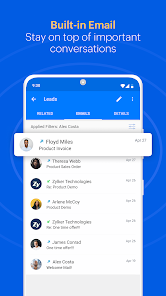
Zoho CRM offers seamless integration with various third-party applications, enhancing your existing workflows. Whether it's connecting to email platforms or social media, these integrations provide a comprehensive solution that suits your unique business needs.

Lead Scoring

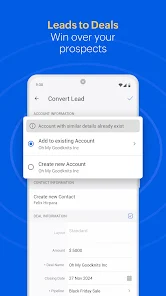
Prioritize your leads effectively with Zoho CRM's lead scoring feature, which evaluates prospects based on their interactions and engagement. This allows your sales team to focus on high-potential opportunities, maximizing conversion rates and sales efficiency.

Marketing Campaigns

Create and manage targeted marketing campaigns effortlessly with Zoho CRM. Utilize customizable templates and analytics to track performance, ensuring your marketing efforts are aligned with your sales goals and resonate with your audience.

Sales Automation

Zoho CRM streamlines your sales process with automation tools that help track leads, manage contacts, and close deals efficiently. By reducing manual tasks, your sales team can focus on what they do best—building relationships and driving revenue.

Advertisement

Pros & Cons

Pros
  • Zoho CRM streamlines sales processes for increased efficiency.
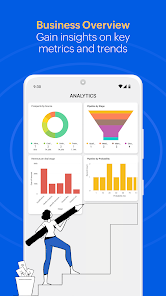
  • It offers robust analytics for informed decision-making.
  • Customizable workflows enhance productivity and team collaboration.
  • Multi-channel communication improves customer engagement and satisfaction.
  • Seamless integration with other Zoho apps and third-party tools boosts functionality.
Cons
  • Limited customization options may hinder unique business needs
  • Steep learning curve for new users can slow adoption
  • Integration challenges with other tools can disrupt workflow efficiency

Real Experience Using Zoho CRM - Sales & Marketing

Real Experience Application Scenarios

Zoho CRM is designed to cater to a wide range of business environments, making it an ideal choice for small to medium enterprises as well as larger corporations. Sales teams can utilize the platform to manage leads, track customer interactions, and automate repetitive tasks, allowing them to focus on closing deals. Marketing departments benefit from the integrated tools that facilitate campaign management, email marketing, and social media outreach, ensuring a cohesive strategy across various channels. Additionally, customer support teams can leverage the CRM to streamline support tickets, track customer inquiries, and maintain a comprehensive database of client interactions, enhancing overall customer satisfaction.

User Experience

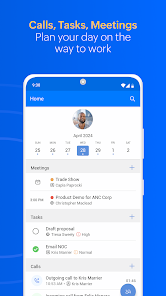
The user experience of Zoho CRM is largely positive, with its intuitive interface making it accessible for users of all technical skill levels. The dashboard is customizable, allowing users to prioritize the information that is most relevant to their roles. Navigation is straightforward, with clear labels and organized menus that help users find the features they need quickly. Mobile access is a standout feature, enabling sales representatives to update leads and contacts on-the-go. The integration with other Zoho applications and third-party tools enhances user experience, providing a seamless workflow for teams. While some users have reported a learning curve with advanced features, the extensive library of tutorials and documentation available helps ease the transition.

Pricing

Zoho CRM offers a competitive pricing structure that caters to businesses of varying sizes and budgets. With a free tier available for up to three users, small startups can get a taste of the platform without any financial commitment. Paid plans start with the Standard tier, which provides essential features for a modest monthly fee, scaling up to the Professional and Enterprise tiers that unlock advanced functionalities and customization options. This tiered pricing model ensures that businesses can choose a plan that aligns with their growth stage and specific requirements, making Zoho CRM an attractive option for many organizations.

Updates & Support

Zoho is committed to continually enhancing its CRM platform, regularly releasing updates that introduce new features, improve functionality, and address user feedback. The company actively engages with its user community, gathering insights to inform future developments. For support, Zoho offers a comprehensive help center, complete with FAQs, user guides, and video tutorials. Users can also access live chat and email support, ensuring that assistance is readily available when needed. This commitment to ongoing improvement and customer support has helped Zoho CRM maintain a strong reputation within the industry.

verified Security & Privacy Review

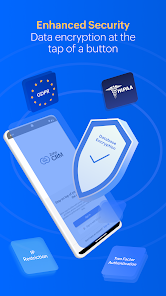
Security & Privacy Review Zoho CRM - Sales & Marketing prioritizes data security and user privacy with robust measures in place. The app employs advanced encryption protocols to safeguard sensitive information both in transit and at rest, ensuring that user data remains protected from unauthorized access. In terms of privacy practices, Zoho CRM adheres to strict data protection regulations, including GDPR, which reflects its commitment to user rights and data handling transparency. The app provides users with clear options to manage their data, including the ability to access, modify, or delete personal information at any time. Permissions required by the app are clearly stated, allowing users to understand what data is accessed and why. This transparency fosters trust, as users can make informed decisions regarding their data sharing preferences. Overall, Zoho CRM demonstrates a strong dedication to maintaining a secure and private environment for its users, making it a reliable choice for businesses concerned about data security.
Advertisement

User Reviews

  • Glenn Grahl (Lil' Joker)
    2022/09/19

    I wish it had a few tweeks though.... I notice that you can't search the whole database like you can in desktop mode. Could use a better way to take down customers calls but all in all a good application. Update: the statement provided below 👇 is a waste of time. Obviously no one still cares. Dozen skipped scheduled appointments, long holds times of hours even days to talk to someone and when you get someone they are usually the wrong person and need to transfer you to another long que.

  • Mohinder Singh
    2026/05/29

    It has been a week since I last opened this app. Whenever I try to open it, it closes automatically; the app simply won't open. This is the worst app ever.

  • Ryan Rockich
    2026/03/05

    App still needs certain basic functionalities. Can't rearrange/customize module shortcuts in the bottom/side nav bar on phone/tablet. No dark mode. Bigin app allows for both these options. Why not CRM? - - Update 3/5/26 added a star because both these requests are now reality! The Zoho team listens and responds. Thank you!

  • Hitesh Sharma
    2026/05/20

    App crashing every time plz improve app better and feed feature show 17 notification one time.

  • Heath van der Waerden
    2023/05/16

    Zoho's Android app has some real issues... it sucks. Can't search properly, sometimes it'll show only some contacts, sometimes none, and sometimes just keeps searching forever for entries that are found in 2sec on the desktop browser. Also, when you go to go 'back' to the main page when searching, it asks you to confirm if you want to exit the app, and there's no drop down menu in the top left. It really needs some work.

Review Source: Google Play store public user reviews.

FAQ

1

Can I submit suggestions or feedback to Zoho CRM - Sales & Marketing?

Yes, users can submit suggestions or feedback through the Zoho CRM interface or by visiting the Zoho support website, where they can share their thoughts and ideas for improvements.

2

Does Zoho CRM - Sales & Marketing collect my personal data?

Yes, Zoho CRM - Sales & Marketing collects personal data necessary for providing services, but it adheres to strict data privacy policies and regulations to protect user information.

3

Does Zoho CRM - Sales & Marketing support offline use?

Yes, Zoho CRM - Sales & Marketing offers offline capabilities through its mobile app, allowing users to access and update data even when they are not connected to the internet.

4

How do I cancel my Zoho CRM - Sales & Marketing subscription?

You can cancel your Zoho CRM - Sales & Marketing subscription through the billing settings in your account or by contacting Zoho's customer support for assistance.

5

How much does a subscription to Zoho CRM - Sales & Marketing cost?

The cost of a subscription to Zoho CRM - Sales & Marketing varies based on the chosen plan and the number of users, with options ranging from a basic plan to more comprehensive plans with added features.
How to use Zoho CRM - Sales & Marketing

1

Can I access customer service through the mobile app?

Yes, you can access customer service through the mobile app by going to the help section after logging in.

2

How can I access customer service for assistance with my account?

You can reach customer service by logging into your Zoho CRM account and using the support option in the help menu.

3

How can I log in to my Zoho CRM account?

To log in, visit the Zoho CRM website, enter your email and password, then click on the "Log In" button.

4

How do I find my customer service representative's contact information?

You can find your representative’s contact information in the account settings section after logging into your Zoho CRM account.

5

How do I update my customer number in Zoho CRM?

Customer numbers cannot be updated directly. Please contact customer support for help with any necessary changes.

What's New

Implemented minor client script enhancements.

Editor's Choice