This site uses cookies to enhance your user experience. By clicking any link on this site you are giving your consent to our cookie policy. Read more
Reject
Accept All

Advertiser and Editorial Disclosures

Zoom Workplace

Zoom Workplace

verified

zoom.com

4.1
Rating
1,000,000,000+ Downloads
6.7.2.36107 Version
  • category

    Category: Business

  • price

    Price: free

  • age rating

    Age Rating: Everyone

  • rating

    Rating: 4.1

  • available on

    Available on: /

  • updated on

    Updated on: Jul 6, 2026

Screenshot 1
Screenshot 2
Screenshot 3
Screenshot 4
Screenshot 5
Screenshot 6
Screenshot 7
Screenshot 8
Screenshot 9
Screenshot 10
Screenshot 11
Screenshot 12
Screenshot 13
Screenshot 14
Screenshot 15
Advertisement

Features & Highlights

Advanced Security Features

Security is a top priority with Zoom Workplace, which offers robust encryption and compliance with industry standards. This ensures that all communications and data shared within the platform remain secure, giving users peace of mind while working on sensitive projects.

Customizable Workspaces

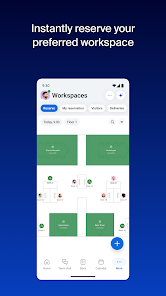
With Zoom Workplace, users can create personalized workspaces tailored to their specific needs. This feature allows for the organization of projects and communication in a way that suits each team member's workflow, enhancing overall efficiency and satisfaction.

Integrated Collaboration Tools

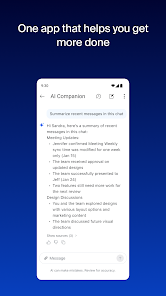
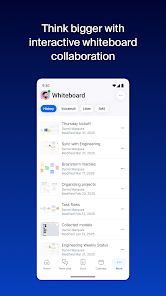
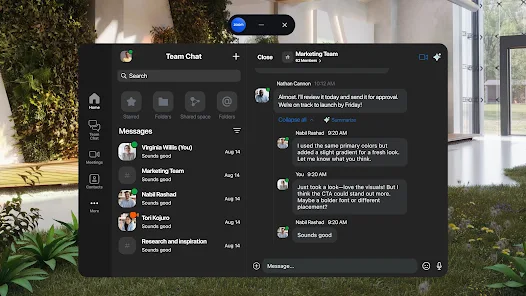
Zoom Workplace brings together video conferencing, chat, and file sharing in one seamless platform, allowing teams to collaborate effortlessly. This integration helps to reduce the clutter of using multiple apps, making it easier to stay connected and productive throughout the workday.

Real-Time Analytics

Zoom Workplace provides real-time analytics to help teams monitor engagement and productivity levels. Users can track meeting effectiveness and team interactions, allowing for informed decisions to optimize collaboration and streamline efforts, ultimately driving better results.

Advertisement

Pros & Cons

Pros
  • Enhances team collaboration with seamless video conferencing features
  • Integrates effortlessly with popular productivity tools and applications
  • Offers flexible scheduling options for global teams
  • Provides secure and reliable communication with advanced encryption
  • Facilitates easy screen sharing for effective presentations and discussions
Cons
  • Limited features for collaboration can hinder team productivity.
  • Frequent technical issues disrupt meetings and workflows.
  • Over-reliance on video can lead to fatigue and disengagement.

Real Experience Using Zoom Workplace

Application Scenarios

Zoom Workplace is a versatile application designed to facilitate collaboration in various settings. It is particularly useful for remote teams, allowing them to connect seamlessly regardless of their geographical locations. In corporate environments, Zoom Workplace serves as a central hub for meetings, brainstorming sessions, and project management. Educators and students also benefit from this app, as it enables interactive classrooms and virtual learning experiences. Additionally, organizations can leverage the platform for training sessions, webinars, and team-building activities, making it an all-in-one solution for diverse communication needs.

User Experience

The user experience of Zoom Workplace is designed to be intuitive and user-friendly. Upon launching the app, users are greeted with a clean interface that makes navigation straightforward. Features like screen sharing, virtual backgrounds, and breakout rooms enhance collaborative efforts, making remote interactions feel more personal and engaging. The integration with other productivity tools, such as calendar applications and project management software, streamlines workflows, enabling users to manage their tasks efficiently. However, some users have reported occasional connectivity issues during high-traffic hours, which can disrupt meetings. Overall, the app's functionality and ease of use make it a popular choice among various user demographics.

Pricing

Zoom Workplace offers a flexible pricing model tailored to meet the needs of different users. The app provides a free tier that includes basic features suitable for casual users or small teams, making it a great entry point for those new to the platform. For businesses and larger organizations, subscription plans are available that unlock advanced features such as enhanced security protocols, increased participant limits, and priority customer support. The pricing is competitive compared to similar platforms, ensuring that users receive good value for their investment, especially when considering the robust features offered.

Updates & Support

Regular updates are a hallmark of Zoom Workplace, with the development team frequently rolling out enhancements to improve user experience and security. These updates often include new features based on user feedback, which shows the company's commitment to continuous improvement. Additionally, the support system is comprehensive, offering users access to a resource center filled with tutorials, FAQs, and troubleshooting guides. For more personalized assistance, users can reach out to customer support via chat or email. The responsiveness of the support team has been positively noted, ensuring that any issues are addressed promptly, allowing users to get back to work with minimal disruption.

verified Security & Privacy Review

Zoom Workplace prioritizes security and privacy, implementing robust measures to protect user data. The app employs end-to-end encryption for meetings, ensuring that communications remain confidential and secure from unauthorized access. Additionally, user data is stored in secure servers with advanced access controls, safeguarding against potential breaches. The app requests minimal permissions, focusing on essential functionalities to enhance user experience while respecting privacy. Users have control over their data, with options to customize privacy settings and manage who can access their information. Zoom Workplace adheres to industry standards and regulations, including GDPR and CCPA, reinforcing its commitment to user privacy. Regular security audits and updates are conducted to address vulnerabilities promptly, ensuring a secure environment for all users. Overall, Zoom Workplace demonstrates a strong dedication to protecting user data and maintaining privacy, making it a reliable choice for organizations seeking a secure collaboration platform.
Advertisement

User Reviews

  • Caryn Davidson
    2024/09/04

    In the last few weeks, the app won't disconnect completely when I leave a meeting. I have to completely restart my phone every time, otherwise when I get into my car, the Bluetooth thinks it's in a call. And I can't join another meeting on zoom because it still thinks it's in the first one. This was never an issue for all the years I've been using this app so this is really frustrating. Samsung Galaxy S24+.

  • Ash
    2026/05/19

    Disappointed. I feel zoom is constantly making moves to make it more and more inconvenient for thoes who cant afford the pro. We used to have optional security things off no matter what, now its default a security room you need to turn off. There's a new feature where you have to wait 10 minutes to make a new zoom after hosting one. There's no point in this but to make it completely inconvenient. I don't like that, not everyone is gonna pay 100+ dollars. This app is getting greedy, once free.

  • Soar -
    2026/05/19

    Due to issues, my 5 Star review is now 3 Stars. How can I report them to a human who will take action?⚡Zoom is the one video conferencing app that always works, even when the others fail. Reliability is key, and Zoom nails it! I wish the app wasn't so large, but it's a small price to pay for such a reliable app. It's also great that no installation is needed on desktop & laptop computers. If everyone just used Zoom, we could all uninstall the many video conferencing apps that fill our devices!

  • Bryce Richardt
    2026/04/22

    Every time I need to go to miniplayer mode on mobile, there's a 30% chance it just crashes and takes a minute to set back up, and no matter what I've tried there doesn't seem to be a consistent way to avoid that. Also any time I join a meeting, the volume could be really quiet or really loud, and no matter what my phone's volume is at, the volume just always stays the same. The experience isn't much better on computer either, and something like Google meet works way better.

  • Mr Avocadoman
    2026/03/14

    May need some work. When leaving the app during a meeting, there is a pop up window to show the meeting. However, there used to be the option to remove the pop up window so as to listen to the meeting, but now doing so sends you back to open the app, or may cause it to crash and disconnect. Also, Bluetooth audio devices in use tend to disconnect and connect briefly, but during disconnecting, the volume jumps up to the loudest setting despite being left at a low setting.

Review Source: Google Play store public user reviews.

FAQ

1

Can I submit suggestions or feedback to Zoom Workplace?

Yes, users can submit suggestions or feedback through the app or the Zoom support website, contributing to future improvements and features.

2

Does Zoom Workplace collect my personal data?

Yes, Zoom Workplace collects certain user data to improve its services, but it adheres to privacy regulations and provides options for managing personal information.

3

Does Zoom Workplace support offline use?

No, Zoom Workplace primarily requires an internet connection to access its features, and offline functionality is limited.

4

How do I cancel my Zoom Workplace subscription?

You can cancel your Zoom Workplace subscription by navigating to your account settings on the Zoom website and following the cancellation prompts.

5

How much does a subscription to Zoom Workplace cost?

Subscription costs for Zoom Workplace vary based on the chosen plan and number of users; details can be found on the official Zoom website.

How to use Zoom Workplace

1

Can I update my customer number if needed?

Customer numbers cannot be changed. If you need assistance with your account, please contact customer service for help.

2

How can I reach customer service for Zoom Workplace?

You can contact customer service through the Help Center on our website or by calling the support number provided in your account.

3

How do I activate my Zoom Workplace account?

To activate your account, follow the link in the activation email sent to you after signing up. If you didn’t receive it, check your spam folder or request a new link.

4

How do I log in to Zoom Workplace from a new device?

To log in from a new device, enter your email and password as usual. You may need to verify your identity through a security code sent to your email.

5

I forgot my customer number. How can I retrieve it?

You can find your customer number in your account settings or by checking the confirmation email from when you signed up.

What's New

Bug fixes and improvements

Editor's Choice