This site uses cookies to enhance your user experience. By clicking any link on this site you are giving your consent to our cookie policy. Read more
Reject
Accept All

Advertiser and Editorial Disclosures

SuccessFactors

SuccessFactors

verified

SAP SE

3.5
Rating
5,000,000+ Downloads
17.0.7 Version
  • category

    Category: Business

  • price

    Price: free

  • age rating

    Age Rating: Everyone

  • rating

    Rating: 3.5

  • available on

    Available on: /

  • updated on

    Updated on: Jun 24, 2026

Screenshot 1
Screenshot 2
Screenshot 3
Screenshot 4
Screenshot 5
Screenshot 6
Screenshot 7
Screenshot 8
Advertisement

Features & Highlights

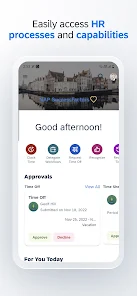
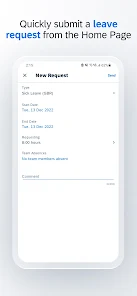
Employee Self-Service

Empower your workforce with employee self-service capabilities, enabling team members to update personal information, request time off, and view pay stubs directly from their mobile devices. This feature streamlines HR processes and gives employees greater control over their work-life balance.

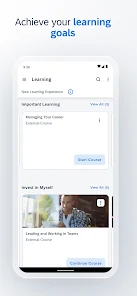
Learning On-the-Go

With SAP SuccessFactors Mobile, employees can access training materials and learning modules anytime, anywhere. This feature supports continuous learning and development, making it easier for users to enhance their skills and stay competitive in their roles.

Mobile Access

SAP SuccessFactors Mobile provides seamless access to HR functions from anywhere, allowing employees to manage their tasks on the go. With a user-friendly interface, it ensures that essential information is just a tap away, enhancing productivity and engagement in a fast-paced work environment.

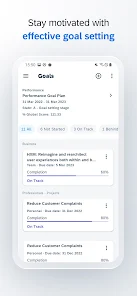
Performance Management

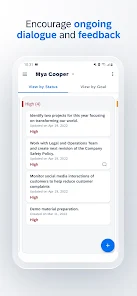
The app facilitates real-time performance management by allowing employees to set goals, provide feedback, and conduct performance reviews directly from their phones. This capability fosters a culture of continuous feedback, helping teams stay aligned and motivated throughout the year.

Advertisement

Pros & Cons

Pros
  • SuccessFactors enhances employee engagement through personalized development plans tailored to individual needs.
  • Its robust analytics provide actionable insights for informed decision-making and strategy refinement.
  • The platform streamlines recruitment processes, reducing time-to-hire significantly for organizations.
  • SuccessFactors fosters collaboration by integrating seamlessly with existing HR systems and tools.
  • Continuous updates ensure users benefit from the latest features and industry best practices.
Cons
  • Complex user interface can hinder user adoption and efficiency.
  • Integration issues with legacy systems may disrupt workflow.
  • High costs can be a barrier for smaller organizations and startups.

Real Experience Using SuccessFactors

Real Experience Application Scenarios

SAP SuccessFactors Mobile is designed to enhance the employee experience by empowering users to manage HR tasks on-the-go. It is particularly beneficial for organizations with a mobile workforce, enabling employees to access essential HR functions anytime, anywhere. Common scenarios include onboarding new hires, submitting time-off requests, and conducting performance reviews. The app also allows managers to review team performance, approve expenses, and access important employee data quickly. This flexibility is crucial for businesses that operate in dynamic environments where decisions need to be made rapidly and efficiently.

User Experience

The user experience of SAP SuccessFactors Mobile is characterized by its clean and intuitive interface. Users report that navigating through the app is straightforward, thanks to its well-structured menus and easily accessible features. The app provides personalized dashboards that display relevant tasks and notifications, ensuring that users stay updated on their responsibilities. Moreover, the responsive design means that it functions seamlessly on various devices, whether smartphones or tablets. However, some users have noted occasional performance lags, especially when loading large amounts of data. Despite this minor drawback, the overall sentiment is positive, with users appreciating the convenience it brings to their daily HR tasks.

Pricing

SAP SuccessFactors Mobile follows a subscription-based pricing model, which varies depending on the size of the organization and the specific modules required. While the app itself is free to download, users must have a valid SAP SuccessFactors subscription to access its full suite of features. This pricing structure may be a consideration for small to medium-sized businesses, as the total cost can escalate with the number of users and additional functionalities. However, many organizations find that the investment is justified by the time saved and improved employee engagement that the app facilitates.

Updates & Support

The SAP SuccessFactors Mobile app receives regular updates, which enhance functionality and address user feedback. These updates often include new features, performance improvements, and security enhancements, ensuring that the app remains competitive and secure. Users can easily access support through the SAP Help Portal, which offers comprehensive resources including FAQs, troubleshooting guides, and community forums. Additionally, SAP provides dedicated support for enterprise clients, ensuring that organizations can resolve issues promptly. Overall, the commitment to regular updates and robust support helps maintain high user satisfaction and confidence in the app's performance.

verified Security & Privacy Review

Security & Privacy Review SAP SuccessFactors Mobile prioritizes user data security and privacy through robust measures and transparent practices. The app employs advanced encryption protocols to protect sensitive information during transmission and storage, ensuring that employee data remains confidential. Regular security updates are implemented to address potential vulnerabilities, reflecting the developers' commitment to maintaining a secure environment. User permissions are clearly defined, allowing individuals to control access to their personal information. The app requests only essential permissions necessary for optimal functionality, minimizing exposure of user data. Additionally, SAP adheres to strict compliance standards, including GDPR, to ensure that user privacy rights are respected and upheld. Data handling practices are designed to safeguard personal information, with clear guidelines on data retention and deletion. Users can easily access their privacy settings, providing transparency and control over their data. Overall, SAP SuccessFactors Mobile demonstrates a strong commitment to security and privacy, making it a reliable choice for businesses seeking to manage employee information responsibly.
Advertisement

User Reviews

  • Leena Elhassan
    2025/05/05

    This app is really slow. I'd log in to get my paystubs, and it would take forever to load. I have a problem with my fingerprint, and the app would glitch after multiple tries, and I can't put in my password to substitute it. If the app ever glitches, good luck ever accessing it again. I keep trying to get into the application, but it keeps crashing and kicking me out.

  • Wade Scudder
    2021/08/15

    Absolutely unusable. The UI is very outdated and not user-friendly at all. It is very limiting on what information you can find overall. And the load times. Oh my God the load times. IF and I mean IF it loads your actual pay stub at all, it take SEVERAL MINUTES. Like 5 plus minutes.... to load a single screen. Absolutely useless. I don't know how they sold this to a single employer.

  • Jordan Smith
    2026/06/23

    this app is so incredibly slow. I only use it because the company I work for uses it. I can't recommend stay awau if you can. it runs slow. most times I have to force close and reopen it to make it do what I need it to. it just s really bad experience

  • Anonymous Fayme
    2026/06/20

    i've been locked out of my account for over 2 months, and HR, support, and my supervisor just give me the run around! ive spent HOURS trying to log in just to access my pay stubs! horrible app! i was finally able to do a password reset after having to download a whole seperate side app to do it! but still cant log in!!!

  • Saki Hanajima
    2026/04/21

    Pointless and annoying, doesn't function properly. My employer decided my payslips would only be sent through this disgrace of a service. It's a pain to log in, does not stay logged in even if you select that option, and randomly logs out within a minute. It's cruel and unusual torture, and a waste of my time.

Review Source: Google Play store public user reviews.

FAQ

1

Can I submit suggestions or feedback to SuccessFactors?

Yes, users can submit suggestions or feedback to SuccessFactors through their customer support channels or user community forums, allowing for input on product improvements and features.

2

Does SuccessFactors collect my personal data?

Yes, SuccessFactors collects personal data as part of its functionality to manage HR processes, but it adheres to privacy regulations and provides options for data management.

3

Does SuccessFactors support offline use?

SuccessFactors primarily operates in a cloud environment, which means offline functionality is limited; however, some features may allow for temporary offline access depending on the mobile app's capabilities.

4

How do I cancel my SuccessFactors subscription?

To cancel a SuccessFactors subscription, you usually need to contact your account representative or SAP customer support to initiate the cancellation process, following the terms outlined in your subscription agreement.

5

How much does a subscription to SuccessFactors cost?

The cost of a subscription to SuccessFactors varies based on the size of the organization and the specific modules selected, typically requiring potential customers to contact SAP for a tailored quote.

How to use SuccessFactors

1

Can I change my customer number in the mobile app?

Customer numbers cannot be changed in the app. Contact customer service for further assistance with any changes needed.

2

How can I activate my account for SAP SuccessFactors Mobile?

To activate your account, follow the link in the activation email sent to you and complete the instructions provided.

3

How do I find my customer service contact for SAP SuccessFactors?

You can find your customer service contact information in the app under the 'Help' section or on the SAP SuccessFactors website.

4

How do I log in to SAP SuccessFactors Mobile?

To log in, open the app, enter your company URL, and then your username and password. Tap 'Log In' to access your account.

5

How do I reset my password for SAP SuccessFactors Mobile?

To reset your password, use the 'Forgot Password' option on the login screen and follow the instructions sent to your registered email.

What's New

BUG FIXES• Fixes an issue where fields set to hidden were still visible on custom MDF cards under a certain category.


Editor's Choice