This site uses cookies to enhance your user experience. By clicking any link on this site you are giving your consent to our cookie policy. Read more
Reject
Accept All

Advertiser and Editorial Disclosures

Slidebox - Photo Cleaner

Slidebox - Photo Cleaner

verified

Slidebox LLC

4.5
Rating
500,000+ Downloads
3.17 Version
  • category

    Category: Photography

  • price

    Price: free

  • age rating

    Age Rating: Everyone

  • rating

    Rating: 4.5

  • available on

    Available on: /

  • updated on

    Updated on: Nov 23, 2025

Screenshot 1
Screenshot 2
Screenshot 3
Screenshot 4
Screenshot 5
Screenshot 6
Screenshot 7
Screenshot 8
Screenshot 9
Screenshot 10
Screenshot 11
Screenshot 12
Screenshot 13
Screenshot 14
Screenshot 15
Advertisement

Features & Highlights

Duplicate Photo Detection

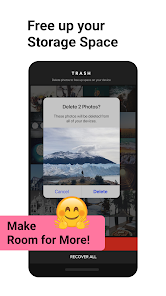
Eliminate unnecessary clutter with Slidebox's powerful duplicate photo detection feature. It scans your library for duplicate images and helps you make informed decisions about which ones to keep or delete, freeing up valuable storage space.

Quick Deletion Options

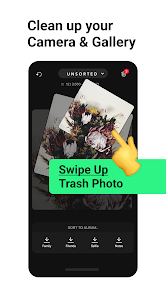
Say goodbye to unwanted photos effortlessly with Slidebox's quick deletion options. You can swipe left or right to remove images instantly, making the photo cleaning process not only fast but also surprisingly satisfying.

Smart Photo Sorting

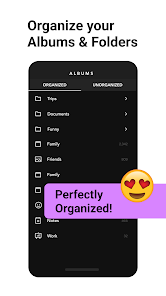
Slidebox makes organizing your photos effortless with its intuitive drag-and-drop interface. You can quickly categorize your images into albums, making it easier to find your favorite memories without scrolling through countless photos.

User-Friendly Interface

With a clean and simple design, Slidebox ensures that everyone can navigate its features with ease. Whether you're tech-savvy or a beginner, you'll appreciate how straightforward it is to clean up your photo library without any hassle.

Advertisement

Pros & Cons

Pros
  • Effortlessly organize photos with intuitive drag-and-drop functionality.
  • Easily create and manage albums for quick access to favorites.
  • Automatically back up images to ensure they’re safe and secure.
  • Quickly search and filter photos by date, location, or keywords.
  • Share albums seamlessly with friends and family for collaborative memories.
Cons
  • Limited cloud storage options may hinder large photo collections
  • User interface can be confusing for new users
  • Frequent bugs and crashes disrupt the organizing experience

Real Experience Using Slidebox - Photo Cleaner

Real Experience Application Scenarios

Slidebox - Photo Cleaner is an incredibly versatile app designed for anyone who struggles with photo management on their devices. Whether you're a smartphone photographer with thousands of pictures or an average user who captures memorable moments, this application comes into play when you need to declutter your photo library. Imagine a scenario where you return from a vacation with hundreds of images, many of which are duplicates or unworthy of keeping. Slidebox allows users to quickly swipe through their photos, deciding what to keep and what to delete, making the process of cleaning up your gallery a breeze. It’s particularly useful for users who often find themselves running out of storage space, as Slidebox efficiently identifies duplicates and similar images, saving both time and effort during the sorting process.

User Experience

The user experience with Slidebox is intuitive and seamless. The app features a clean and minimalistic interface that encourages users to dive right in without any steep learning curve. Users can easily swipe left to delete photos or swipe right to keep them, mimicking the swipe mechanics popularized by dating apps. This feature not only makes the process feel engaging but also efficient. Additionally, the app allows users to create albums, providing an organized way to categorize their favorite photos. The ability to compare similar images side by side is another standout feature, making it simple to choose the best shot. Overall, the app's design prioritizes user-friendliness, making photo management less of a chore and more of an enjoyable task.

Pricing

Slidebox offers a freemium model, allowing users to download and use the basic features at no cost. The free version provides ample tools for users to get started with cleaning up their photo libraries. However, for those seeking an enhanced experience, a premium subscription is available. This paid version unlocks additional features such as unlimited photo comparisons, advanced sorting options, and ad-free usage. The pricing is competitive compared to similar applications, making it accessible for users who wish to invest in a more comprehensive photo management tool.

Updates & Support

The developers of Slidebox are committed to continuously improving the app, regularly releasing updates that enhance functionality and user experience. Users can expect periodic enhancements that address any bugs and introduce new features based on user feedback. Customer support is also readily available through various channels, including in-app help sections and online forums. This ensures that users can get assistance whenever they face difficulties or have suggestions for improvement. Overall, the commitment to updates and customer support significantly adds to the positive experience of using Slidebox as a photo management tool.

verified Security & Privacy Review

Security & Privacy Review Slidebox - Photo Cleaner prioritizes user security and privacy, implementing various measures to safeguard personal data. The app requires minimal permissions, primarily accessing the photo library to facilitate its cleaning functions. This limited access helps to reduce potential vulnerabilities associated with broader permissions. User data is not collected or shared with third parties, ensuring that your images and personal information remain private. The app operates locally on your device, meaning that any deletions or modifications are processed without transmitting data over the internet. This design choice enhances user privacy and minimizes the risk of data breaches. Additionally, Slidebox employs industry-standard encryption protocols to protect any temporary data used during app operation. Users are encouraged to review the app's privacy policy for detailed insights into data handling practices, ensuring transparency and trust. Overall, Slidebox - Photo Cleaner demonstrates a strong commitment to maintaining user privacy while delivering its photo management services.
Advertisement

User Reviews

  • David Stewart
    2025/01/07

    Does what it reports to do, but only barely. Totally not worth a subscription. No user settings for filtering or sorting photos; can't select many photos at once for bulk organization; can't see an empty album or move photos to it, but you also can't recreate it. And why do you think that a scrolling bar at the bottom is the right way to show the album sorting buttons? What happens when you have more than say 10 albums? At least sort the bar by last used!!

  • Rowan
    2026/06/14

    Just what I needed! I love that I can swipe between pictures to compare duplicates and that I can easily put them into folders. 😌 I also love that I get a prompt at the end of the day to go through what I have taken and sort them. Its hard to explain how much less overwhelming organizing my photos is! At some point, I would love to be able to add tags to the photos. I would like to tag who is in a photo but put them all in one album. Thank you!

  • Wvruth
    2024/07/22

    This is an edit. I understand the need to make money; that's fair. But to change it from free to a weekly charge seems excessive. I would gladly pay for the app one time. Original review: Very Useful. Easy to use and brings great organizational tool to my gallery. Doesn't change photos, just keeps them in folders.

  • Aiden Severe
    2025/06/25

    This app has been really helpful in terms of organizing photos! You can choose which album they go into, delete them, and if you even change your mind on deleting a photo, you can click the reverse button and get it back! Another helpful feature is that you can specifically choose which month you took photos and access all of them right there! if there was one thing I didn't like is in order to access any month before 2025,you have to get premium. But other than that,I highly recommend this app!

  • Millennial Mike
    2025/05/12

    The interface and concept are exceptional, but the functionality is extremely limited, and on top of that, it is too expensive to justify. You can only organize a limited amount of folders, there's a tab that's called "more" where most of your folders will be, and you'll be able to clean those folders, but not organize them, which is the highlight of the app. The app needs some work but has promise.

Review Source: Google Play store public user reviews.

FAQ

1

Can I submit suggestions or feedback to Slidebox - Photo Organizer?

Yes, users can submit suggestions or feedback through the app’s support section or by contacting the customer service team directly.

2

Does Slidebox - Photo Organizer collect my personal data?

Slidebox - Photo Organizer has a privacy policy that outlines data collection practices, but generally, it aims to minimize personal data collection while ensuring a secure user experience.

3

Does Slidebox - Photo Organizer support offline use?

Yes, Slidebox - Photo Organizer can be used offline, allowing users to organize their photos without needing a constant internet connection.

4

How do I cancel my Slidebox - Photo Organizer subscription?

Users can cancel their subscription through their account settings in the app or via the app store where they initially subscribed.


5

How much does a subscription to Slidebox - Photo Organizer cost?

The subscription cost for Slidebox - Photo Organizer can vary based on the plan chosen, typically offering monthly and yearly options for premium features.

How to use Slidebox - Photo Cleaner

1

Can I activate my account using a mobile number?

Currently, account activation is done via email. Please check your inbox for the activation link.

2

Can I change my email after activating my account?

Yes, you can change your email in the account settings after activation.

3

How can I reach customer service for Slidebox?

You can contact customer service through the app or by visiting our website for support options.

4

How can I update my customer number?

Customer numbers cannot be changed. If you have concerns, please reach out to customer service for guidance.

5

How do I log in to my Slidebox account?

To log in, open the app and enter your registered email and password.

What's New

Fixed UI elements overlapping with navigation bar

Editor's Choice