This site uses cookies to enhance your user experience. By clicking any link on this site you are giving your consent to our cookie policy. Read more
Reject
Accept All

Advertiser and Editorial Disclosures

Amazon Photos: Photo & Video

Amazon Photos: Photo & Video

verified

Amazon Mobile LLC

4.7
Rating
50,000,000+ Downloads
2.42.813.0-aosp-942000391g Version
  • category

    Category: Photography

  • price

    Price: free

  • age rating

    Age Rating: Everyone

  • rating

    Rating: 4.7

  • available on

    Available on: /

  • updated on

    Updated on: Jun 19, 2026

Screenshot 1
Screenshot 2
Screenshot 3
Screenshot 4
Screenshot 5
Screenshot 6
Screenshot 7
Screenshot 8
Screenshot 9
Screenshot 10
Screenshot 11
Screenshot 12
Screenshot 13
Screenshot 14
Screenshot 15
Screenshot 16
Screenshot 17
Screenshot 18
Screenshot 19
Screenshot 20
Screenshot 21
Screenshot 22
Screenshot 23
Screenshot 24
Advertisement

Features & Highlights

Sharing Made Easy

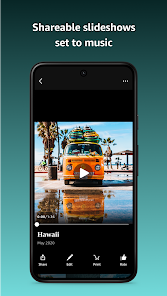
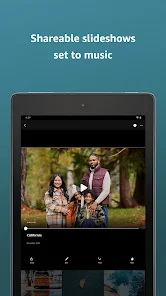
Sharing your favorite photos and videos with friends and family is a breeze with Amazon Photos. You can create shared albums or send individual images directly, making it simple to keep loved ones updated with your latest memories without the hassle of complicated sharing processes.

Smart Search Functionality

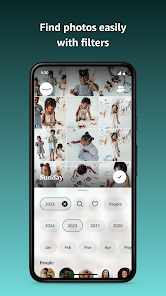
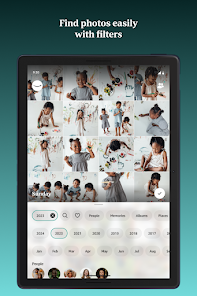
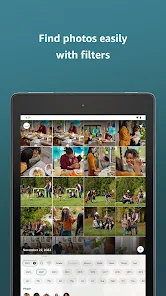
The app's smart search functionality lets you quickly find specific photos using keywords or even by recognizing faces, locations, or objects in your images. This intuitive feature saves you time and effort, allowing you to easily navigate through your extensive photo library to find exactly what you’re looking for.

Unlimited Photo Storage

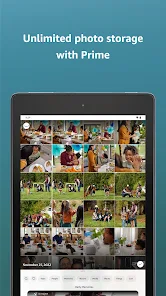
With Amazon Photos, you can store an unlimited number of photos at no extra cost, making it a perfect choice for photography enthusiasts. This feature ensures that all your cherished memories are safe and easily accessible whenever you need them, without worrying about running out of space.

Video Backup Support

Amazon Photos also allows you to back up your videos, ensuring that your special moments are preserved alongside your photos. This feature lets you store and organize both photos and videos in one place, making it easier to relive your memories anytime you want.

Advertisement

Pros & Cons

Pros
  • Unlimited photo storage for Amazon Prime members ensures you never run out of space.
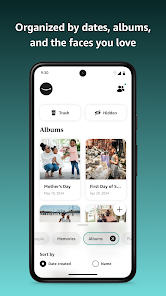
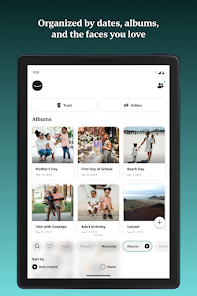
  • Easy organization with albums and tags helps you find your memories quickly.
  • Share photos and videos seamlessly with friends and family through shared albums.

  • Automatic backup protects your media from loss due to device failure.

  • Access your photos from any device, anywhere, with a user-friendly app.
Cons
  • Limited storage options for free users can lead to extra costs.
  • Organization features may be inadequate for large photo libraries.
  • Sharing options could be more intuitive for seamless collaboration.

Real Experience Using Amazon Photos: Photo & Video

Application Scenarios

Amazon Photos serves as a versatile platform for a variety of photo and video management needs. It is especially beneficial for families looking to preserve precious memories, as users can create shared albums for events like birthdays, holidays, and vacations. The app is also ideal for photographers, whether amateur or professional, who need a reliable space to store and organize their portfolios. Furthermore, with its integration into Amazon's ecosystem, users can seamlessly access their photos across multiple devices, making it easy to share memories on social media or with friends and family. For those who often travel, the app provides peace of mind with its automatic backup feature, ensuring that photos and videos are saved even in case of device loss or damage.

User Experience

The user experience of Amazon Photos is largely positive, characterized by its intuitive interface and ease of navigation. Upon launching the app, users are greeted with a clean and organized layout that allows for quick access to albums, shared content, and recent uploads. The search functionality is particularly impressive, enabling users to find specific photos through facial recognition and keyword searches. The app also offers editing tools that allow users to enhance their images before sharing. However, some users have reported occasional syncing issues, particularly when dealing with large volumes of photos. Despite this, the overall performance is generally smooth, and the app is responsive across various devices, contributing to a pleasant user experience.

Pricing

Amazon Photos offers a competitive pricing structure, especially for Amazon Prime members, who receive unlimited photo storage and 5GB of additional storage for videos and other file types. Non-Prime users can still enjoy a free tier with limited storage, which is suitable for casual users. For those who require more space, Amazon provides affordable plans that allow for additional storage at reasonable rates. This pricing model makes it accessible for a wide range of users, from casual photographers to those who require extensive storage solutions for professional use.

Updates & Support

Amazon is known for its commitment to continuous improvement, and Amazon Photos is no exception. The app receives regular updates that enhance features, improve functionality, and address user feedback. Users can expect new editing tools, enhanced sharing options, and better integration with other Amazon services over time. Customer support is readily available through various channels, including an extensive help center, community forums, and direct support options. This proactive approach to updates and customer service ensures that users can maximize their experience and resolve any issues promptly, making Amazon Photos a reliable choice for digital photo and video management.

verified Security & Privacy Review

Amazon Photos prioritizes user security and privacy, employing robust encryption protocols to protect data both in transit and at rest. The app ensures that your photos and videos are securely stored in the cloud, utilizing Amazon Web Services' advanced security features. Users are required to create an Amazon account, which is safeguarded by two-factor authentication options, adding an extra layer of security against unauthorized access. The app requests permissions primarily for accessing device storage and camera functionalities, ensuring that users are fully informed about what data is being accessed. Amazon's privacy policy outlines how user data is collected, used, and shared, maintaining transparency in its practices. While the app provides options to manage privacy settings, including the ability to delete content and control sharing features, users should remain vigilant about sharing settings and any third-party integrations. Overall, Amazon Photos demonstrates a commitment to protecting user data while providing a user-friendly experience.
Advertisement

Compare APP

User Reviews

  • Michelle K. Sublett
    2026/04/13

    I really love this app for saving pictures - especially with all the negative changes going on in other apps (Pin). I love the ability to create groups and the ease in saving pics. Occasionally my app kind of glitches but if I restart my phone it resets and works perfectly. I do wish I could reorganize the order of my groups, rather than just being by date created, but otherwise I'm super happy with this!

  • Deborah Mitchell
    2026/06/07

    I like this app, it is my favorite storage site, but it's only 4 stars as it is not great to navigate. I have several decades stored here. It's a repository backup, but wish I could get all the phone pics it stores to be as organized as my hard drive. When you have thousands& thousands, the slider gets tiny and hard to manipulate. so does everybody else's. If I know the time close enough, I just search for the year, or month. I do like the ability to search for faces tho.

  • Kelly Frieders
    2026/06/08

    While it's a nice backup so I don't lose photos, there is no way to upload directly into separate folders from my phone folders. Such a basic organizing feature I am dumbfounded it's missing. Makes the app useless as a primary storage without major work organizing into albums manually and then doing it again and again for every upload. So disappointing. I will need to find another storage solution.

  • Amy Walker
    2026/05/28

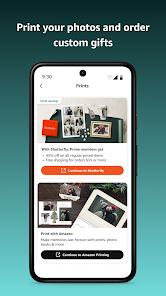
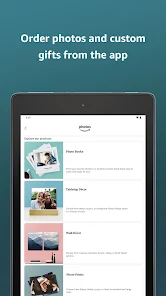
    1. Doesn't allow me to see all of the albums on my phone (maybe a quarter of them). I sort all of my photos and have all the images I wanted printed in a separate album - which doesn't show up. And 2. when I click the option to go to Amazon prints, it asks me if I want to go to Shutterfly (... why wouldn't I just open that if that's what I wanted?) or Amazon printing (the entire reason I downloaded this app), but when I click the 2nd option it just sits and loads... and never opens anything. 0/5

  • Bob Tan
    2026/05/23

    Bad design or buggy. It often doesn't recognize I have new photos to backup. I have to click on "View Uploads" -> 3 dots on upper right -> Upload Settings -> Device folders to Auto-Save, then click back to trigger it to rescan the Camera folder for new file. Simply just opening and closing the file won't work. Tried that multiple times. Side note: on amazon photos website, you can't just go there and view photo like Google photo. You have to click Sign in again every single time.

Review Source: Google Play store public user reviews.

FAQ

1

Can I submit suggestions or feedback to Amazon Photos: Photo & Video?

Yes, users can submit suggestions or feedback through the app's settings or by contacting Amazon customer support directly.

2

Does Amazon Photos: Photo & Video collect my personal data?

Yes, like many apps, Amazon Photos collects personal data to improve user experience, but users can review their privacy settings and manage data sharing preferences.

3

Does Amazon Photos: Photo & Video support offline use?

Yes, users can access their photos and videos offline by downloading them to their devices through the app.

4

How do I cancel my Amazon Photos: Photo & Video subscription?

Users can cancel their subscription by going to their Amazon account settings, navigating to "Your Memberships & Subscriptions," and selecting the option to cancel the Amazon Photos subscription.

5

How much does a subscription to Amazon Photos: Photo & Video cost?

An Amazon Prime subscription includes unlimited photo storage and costs $14.99 per year, while non-Prime users receive 5 GB of free storage and can purchase additional storage as needed.

How to use Amazon Photos: Photo & Video

1

Can I log in to my Amazon Photos account from multiple devices?

Yes, you can log in to your Amazon Photos account from any device using your Amazon credentials.

2

How can I contact customer service for help with my Amazon Photos account?

You can reach customer service through the Amazon website or app by navigating to the Help section and selecting 'Contact Us'.

3

How do I activate my Amazon Photos account?

To activate your Amazon Photos account, log in to your Amazon account and follow the prompts to set up your photo storage.

4

How do I find my customer number for support with Amazon Photos?

Your customer number is available in your account settings. Log in to your Amazon account and check under 'Your Account' for details.

5

I forgot my customer number. How can I retrieve it to log in?

You can retrieve your customer number by checking your account settings in the Amazon app or website under 'Your Account'.

What's New

General bug fixes and improvements.

Editor's Choice