This site uses cookies to enhance your user experience. By clicking any link on this site you are giving your consent to our cookie policy. Read more
Reject
Accept All

Advertiser and Editorial Disclosures

Falling Filter: Loop Me Effect

Falling Filter: Loop Me Effect

verified

AI Master Lab

4.3
Rating
1,000,000+ Downloads
1.0.1 Version
  • category

    Category: Photography

  • price

    Price: free

  • age rating

    Age Rating: Everyone

  • rating

    Rating: 4.3

  • available on

    Available on: /

  • updated on

    Updated on: May 20, 2026

Screenshot 1
Screenshot 2
Screenshot 3
Screenshot 4
Screenshot 5
Screenshot 6
Advertisement

Features & Highlights

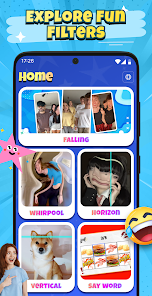
Customizable Filters

With a variety of customizable filters at your fingertips, you can tailor each effect to match your personal style. Adjust colors, speeds, and transitions to create a unique loop that reflects your creativity and vision, ensuring your content stands out.

Dynamic Loop Effects

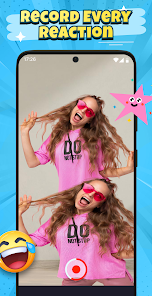
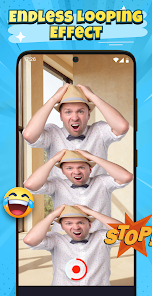
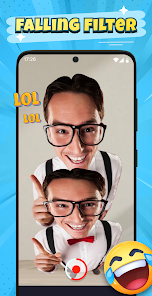
Falling Filter: Loop Me Effect brings your photos to life with stunning looping animations that capture attention. Whether you're creating a fun social media post or a unique video, these effects add a playful touch that keeps viewers engaged and coming back for more.

One-Tap Sharing

Once your masterpiece is ready, share it instantly with a single tap. The app seamlessly integrates with popular social media platforms, making it easy to showcase your creations and connect with friends and followers without the fuss.

User-Friendly Interface

Designed with simplicity in mind, the app's user interface allows anyone to navigate effortlessly. Whether you're a seasoned creator or just starting out, you'll find it easy to apply effects and share your creations without any hassle.

Advertisement

Pros & Cons

Pros
  • Experience stunning visuals with our unique loop me effect
  • Create mesmerizing falling filters effortlessly
  • Customize your effects with vibrant colors
  • Share your creations on social media easily
  • User-friendly interface for all skill levels
Cons
  • Limited customization options
  • Ads can disrupt user experience
  • Performance issues on older devices
  • Lacks advanced editing features

Real Experience Using Falling Filter: Loop Me Effect

Real Experience Application Scenarios

The Falling Filter: Loop Me Effect app shines in various creative scenarios, making it ideal for both casual users and professional content creators. Users can employ the app to enhance their social media posts, whether it’s for Instagram stories, TikTok videos, or Snapchat snaps. The unique loop effect adds a mesmerizing touch to the content, captivating viewers and increasing engagement. Moreover, the app is perfect for creating memorable video greetings or invitations, allowing users to inject a personal touch into their digital communications. Event planners and marketers can also leverage the app to produce eye-catching promotional materials, showcasing their events in a fun and dynamic way. With its versatility, the app caters to a wide audience, from influencers wanting to stand out to everyday users looking to share delightful moments.

User Experience

User experience is where Falling Filter truly excels. The app features an intuitive interface that makes navigation a breeze, even for those who are not tech-savvy. Upon opening the app, users are greeted with a clean layout that allows for quick access to various filters and editing tools. The process of applying the loop effect is streamlined, requiring just a few taps for stunning results. Users can preview their edits in real-time, enabling precise adjustments to achieve the desired look. The smooth functionality ensures that even longer videos can be processed without lag, making the entire editing experience enjoyable. Additionally, the app offers a variety of customization options, allowing users to tweak settings such as speed, brightness, and contrast, giving them the flexibility to create unique content that reflects their style.

Pricing

Updates & Support The developers of Falling Filter are committed to providing regular updates to enhance functionality and introduce new features. Users can expect frequent enhancements based on feedback and emerging trends in video editing. The app's support team is also highly responsive, offering assistance through in-app messaging and email. Users can access a comprehensive FAQ section that addresses common concerns and troubleshooting tips, ensuring that help is readily available. The commitment to user satisfaction is evident, as the developers actively engage with the community, frequently soliciting feedback for future updates. Overall, the combination of consistent updates and proactive support makes for a reliable user experience.

verified Security & Privacy Review

Security & Privacy Review The Falling Filter: Loop Me Effect app prioritizes user security and privacy through stringent data handling practices. The app collects minimal personal information, primarily required for functionality and user experience enhancement. Users are advised to review the privacy policy to understand the specifics of data collection and usage. In terms of permissions, the app requests access to the device's camera and storage, which are essential for its core features. However, users can manage these permissions through their device settings, allowing for greater control over their personal data. The app employs encryption protocols to protect any data transmitted over the internet, ensuring that user information remains secure during interactions. Furthermore, the Falling Filter app does not sell user data to third parties, aligning with best practices in data privacy. Regular updates and security patches are implemented to address vulnerabilities, reinforcing the app's commitment to safeguarding user information. Overall, users can feel confident in their privacy while using the Falling Filter: Loop Me Effect app.
Advertisement

User Reviews

  • Kurt “Blissful Cyanide”
    2026/01/13

    I can't stress this enough! Please save your data and time. Don't download this, it takes you TEN whole ads to get to the camera and it doesn't even work as advertised. worst app I've ever downloaded. I'd rather take a turd in my hand and clap

  • Megan Justus
    2026/06/03

    off my phone so I think they should really fix the answer mine was like 1200 ads I like I don't even get it I have this much stuff when you don't even have like games on it like it's only pictures don't even get I got in trouble my sister got fall down she said that I pushed her but I did not do a single thing so thank you very much but that's why I gave you a four-star rating so please help you also guys and Taylor Swift

  • Shelly
    2026/06/01

    The app might as well be an ad! Every two seconds I get an ad!(especially when I click the options)😭 I swear what is up with apps these days??🐚🐚 It's SO annoying!🫩

  • Calhoun Sykes
    2026/06/08

    absolutely terrible can't open the app without a 45 second long ad and it won't even let me use it after DO NOT install.

  • Kaylee Stewart
    2026/03/28

    this app is terrible i just started using it for 2 days and its already bad theres so much adds and alot of lagging the game freezes which makes me mad and stop putting so much adds if tge game didnt freeze or anything then the rating would be a 4

Review Source: Google Play store public user reviews.

FAQ

1

Can I share my creations directly from the Falling Filter: Loop Me Effect app?

Yes, the app allows users to share their edited photos and videos directly to various social media platforms such as Instagram, Facebook, and TikTok. After creating your content, simply tap the share button and select your desired platform to post your work easily.

2

Can I use the Falling Filter: Loop Me Effect app offline?

While some basic features may be available offline, most of the app's functionalities, especially those requiring downloading new filters or sharing content, may require an internet connection. It's best to use the app online for full access to all features.

3

How do I download the Falling Filter: Loop Me Effect app?

You can download the Falling Filter: Loop Me Effect app from the Apple App Store for iOS devices or Google Play Store for Android devices. Simply search for the app by name, click on the download button, and follow the installation instructions. Make sure your device meets the app’s requirements for optimal performance.

4

How do I report a bug or issue with the Falling Filter: Loop Me Effect app?

If you encounter a bug or issue while using the app, you can report it through the app's settings or help section. There should be a contact option or feedback form where you can describe the problem and provide your device information to assist the developers in resolving the issue.

5

Is the Falling Filter: Loop Me Effect app available in multiple languages?

The app may support multiple languages to cater to a diverse user base. Check the app's settings or description to see if your preferred language is available. Language options can enhance user experience by making the app more accessible.

How to use Falling Filter: Loop Me Effect

1

How can I contact Customer Service for the Falling Filter: Loop Me Effect app?

You can reach Customer Service by emailing support

2

How do I log in to the Falling Filter: Loop Me Effect app?

Open the app and tap on the "Login" button, then enter your registered email and password.

3

Is there a way to activate premium features in the app?

Yes, you can activate premium features by purchasing a subscription through the app's Store section.
4

What is the customer number for support inquiries?
The customer support number is listed in the app under Settings > Help.

What's New

Release

Editor's Choice