This site uses cookies to enhance your user experience. By clicking any link on this site you are giving your consent to our cookie policy. Read more
Reject
Accept All

Advertiser and Editorial Disclosures

Picsart AI Photo Editor, Video

Picsart AI Photo Editor, Video

verified

PicsArt, Inc.

4.0
Rating
1,000,000,000+ Downloads
30.2.6 Version
  • category

    Category: Photography

  • price

    Price: free

  • age rating

    Age Rating: Teen

  • rating

    Rating: 4.0

  • available on

    Available on: /

  • updated on

    Updated on: Jul 2, 2026

Screenshot 1
Screenshot 2
Screenshot 3
Screenshot 4
Screenshot 5
Screenshot 6
Screenshot 7
Screenshot 8
Screenshot 9
Screenshot 10
Screenshot 11
Screenshot 12
Screenshot 13
Screenshot 14
Screenshot 15
Screenshot 16
Screenshot 17
Screenshot 18
Screenshot 19
Screenshot 20
Screenshot 21
Screenshot 22
Screenshot 23
Screenshot 24
Advertisement

Features & Highlights

AI-Powered Editing

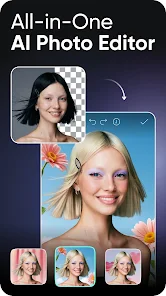
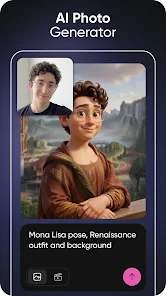
Leverage advanced AI technology to enhance your images and videos effortlessly. The intelligent algorithms suggest edits and adjustments tailored to your content, making it easy for users of all skill levels to achieve stunning results with just a few taps.

Collage Maker

Design beautiful collages with ease using Picsart's intuitive collage maker. Choose from various templates and layouts to showcase your favorite memories, and customize your creation with stickers, backgrounds, and text to make it truly your own.

Creative Tools Galore

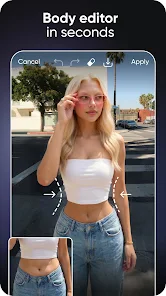
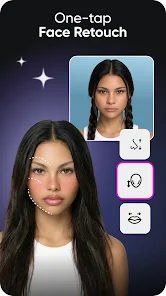
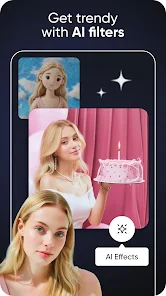
Explore a wide array of creative tools, from filters and effects to stickers and text overlays. Whether you're looking to add flair to a photo or create engaging video content, Picsart provides everything you need to express your unique style.

Video Editing Features

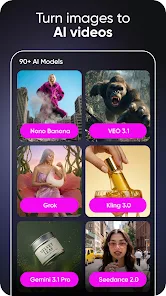
Elevate your video projects with powerful editing features that allow you to trim clips, add music, and apply stunning transitions. Whether creating a short video for social media or a longer project, Picsart equips you with the tools to make your vision come to life.

Advertisement

Pros & Cons

Pros
  • Easily enhance photos with powerful AI-driven tools for stunning results.
  • Create engaging videos using intuitive editing features that save time.
  • Access a vast library of templates and effects for creative inspiration.
  • Seamlessly share your creations across social media platforms in one click.
  • Enjoy a user-friendly interface designed for both beginners and pros alike.
Cons
  • Limited advanced editing features compared to professional software
  • Occasional inaccuracies in AI-generated edits
  • Subscription costs may deter casual users

Real Experience Using Picsart AI Photo Editor, Video

Application Scenarios

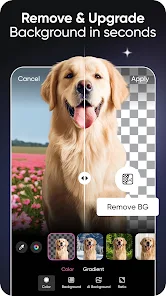
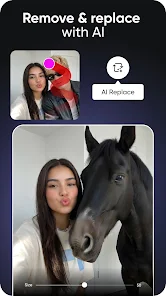
Picsart AI Photo Editor and Video is an incredibly versatile tool that caters to a wide range of creative needs. Whether you’re a casual user looking to enhance personal photos for social media, a professional photographer aiming to edit high-quality images, or a content creator wanting to produce engaging videos, this app offers a plethora of features to suit your requirements. Users can easily apply filters, add stickers, and utilize AI-driven tools to remove backgrounds or enhance image quality. For video editing, the app provides intuitive options to trim clips, add music, and apply effects, making it ideal for creating quick social media content or even short films. The variety of templates and effects available allows users to explore their creativity without needing extensive editing skills, making it accessible for everyone.

User Experience

The user experience of Picsart is notably seamless and intuitive. The interface is clean and organized, allowing users to navigate effortlessly through the various features. Tutorials and tips are readily available for beginners, which helps in minimizing the learning curve associated with advanced editing tools. The app’s responsiveness is commendable, with minimal lag even when applying complex edits or handling high-resolution images. Users have particularly praised the AI features, which streamline processes like background removal and object recognition. Moreover, the community aspect of the app allows users to share their creations, gather feedback, and draw inspiration from others, fostering a collaborative environment among creatives.

Pricing

Picsart offers both a free version and a premium subscription model. The free version is robust, providing access to a significant number of features and tools. However, users looking for an ad-free experience and additional premium content, such as exclusive filters, templates, and advanced editing tools, can opt for the subscription. The pricing is competitive compared to other photo and video editing apps, and there are often promotions or discounts available, making it an attractive option for users who want to maximize their editing capabilities without breaking the bank.

Updates & Support

The development team behind Picsart is proactive in rolling out updates that enhance functionality and introduce new features based on user feedback. Regular updates ensure that users have access to the latest tools and trends in photo and video editing. Additionally, the app provides a comprehensive help center, including FAQs, tutorials, and customer support options. Users can reach out for assistance through various channels, ensuring that any issues or queries are addressed promptly. This commitment to user support and continuous improvement makes Picsart a reliable choice for anyone looking to elevate their editing experience.

verified Security & Privacy Review

The Picsart AI Photo Editor, Video app takes user security and privacy seriously, employing a range of measures to protect personal information. The app utilizes encryption to safeguard user data both in transit and at rest, ensuring that sensitive information remains secure from unauthorized access. In terms of permissions, Picsart requests access to various device features, such as the camera, storage, and microphone. Users are encouraged to review these permissions carefully and only grant access that is necessary for their intended use of the app. The app also provides clear information on how collected data is used, typically for enhancing user experience and personalizing content. Users have the ability to manage their privacy settings directly within the app, allowing them to control data sharing and visibility. Additionally, Picsart adheres to relevant data protection regulations, emphasizing transparency and user consent in its data handling practices. Overall, while the app offers robust tools for creativity, it also prioritizes the privacy and security of its users.
Advertisement

User Reviews

  • Jesse Lopez
    2026/04/30

    It's a very good app even with just the free version alone, Ive been using it for years and I love how convenient and easy it is! With that being said, Im not happy with the heavy ai integration, it's gotten to a point where I can't even find regular images because everything is clogged with ai and the no ai filters aren't working. Also I might be wrong but I was certain the free mode had much more storage because I run out so fast now

  • Willow
    2025/05/04

    A great app, easiest way to edit things and make images. however, I've been having some bugs lately. The first bug I've had is when I tried to post something and it wouldn't let me make it free to edit. The other bug which happened today was that I was trying to post something and it kept saying there was an error. I restarted my phone after trying countless times to post it, and it's still not letting me post it. Please fix this, thank you.

  • Stella Rose
    2026/06/06

    No longer saves photos when you use the College, since now everything costs money. It used to be free to save, but now you can't do that anymore. Used to upload a lot of stickers on it, but that also costs money to do now. Was good years ago, but I guess I have to find a better "Free" Photoshop app again. Especially for College to add more than 1 photos together. Can't even save an edit either. Smh. It's a pay in order to do anything now, especially for edits.

  • Nick
    2026/06/06

    Ads prevent you from using the app. Got an ad for some of those typical mobile games that you have to play for a bit in order to close it out. But even after the ad opened up Google play to download the game, I go back to the app but I can't get out of the ad. there's no X to close it, ad just stays up. look for a different app for your photo editing needs.

  • sue wyllie
    2026/05/31

    2.5 - The last update (or two) changed the GUI, which while pretty, has made "seeing" what you're getting/choosing more difficult on Create (past the home screen), and in areas of the Editor/Canvas. Also, basic things like being able to choose border colors are now gone. I've been using Picsart for years and this is the first time I've been disappointed and frustrated like this. I've recommended it to numerous people. As it stands now...

Review Source: Google Play store public user reviews.

FAQ

1

Can I submit suggestions or feedback to Picsart AI Photo Editor, Video?

Yes, users can submit suggestions or feedback through the app's support section, or by contacting customer service via the official Picsart website.

2

Does Picsart AI Photo Editor, Video collect my personal data?

Yes, Picsart AI Photo Editor, Video may collect personal data as outlined in its privacy policy, which typically includes information like usage data and user-generated content.

3

Does Picsart AI Photo Editor, Video support offline use?

Picsart AI Photo Editor, Video requires an internet connection for some features, especially those related to AI processing and updates, but it does offer basic editing capabilities offline.

4

How do I cancel my Picsart AI Photo Editor, Video subscription?

To cancel your Picsart AI Photo Editor, Video subscription, you can go to your account settings within the app or through the app store where the subscription was purchased and follow the cancellation instructions.
5

How much does a subscription to Picsart AI Photo Editor, Video cost?

The subscription cost for Picsart AI Photo Editor, Video can vary based on the plan chosen, but it generally offers monthly and annual options with a free trial available for new users.

How to use Picsart AI Photo Editor, Video

1

Can I activate my account using my customer number?

Yes, you can activate your account by entering your customer number during the sign-up process. If you face issues, please contact customer service.

2

Can I log in to my Picsart account using social media?

Yes, you can log in using your social media accounts. If you encounter issues, please reach out to customer service for support.

3

How can I reach customer service for assistance with my Picsart account?

You can reach customer service through the app’s support section or visit our website for contact options.

4

How can I update my customer information in my Picsart profile?

To update your customer information, log in to your account, go to settings, and edit your profile. For further help, contact customer service.

5

How do I activate my Picsart account after signing up?

After signing up, check your email for an activation link. Click the link to activate your account. If you don’t see it, check your spam folder or contact customer service.

What's New

Most of what we build doesn't wait for an app update. While this one tidies up a few bugs, the real action happens behind the scenes-new features, fresh content, stickers, and templates dropping all the time. Stay close to our socials so you don't miss a thing.

Editor's Choice