Home
Home  Apps
Apps  Games
Games  Topics
  About Us
  Cookies & Privacy Policy
  Terms of Service
 Customizable Filters
Personalize your sketches with a range of adjustable filters. You can tweak brightness, contrast, and other settings to achieve the exact artistic effect you desire, giving your photos a unique touch that reflects your style.

Minerva Studios Private Limited
 4.6
4.6 
Category: Photography

Price: free

Age Rating: Everyone

Rating: 4.6

Available on: /

Updated on: Jan 16, 2026
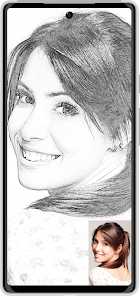

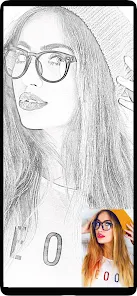
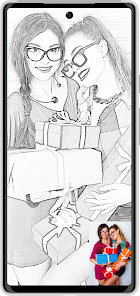



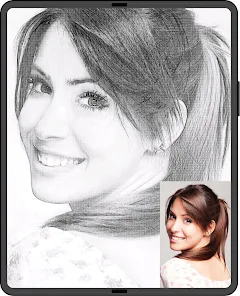
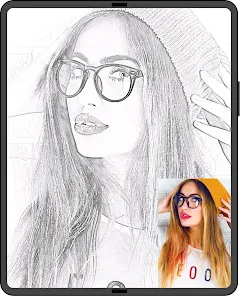
Personalize your sketches with a range of adjustable filters. You can tweak brightness, contrast, and other settings to achieve the exact artistic effect you desire, giving your photos a unique touch that reflects your style.
Navigate through the app with ease thanks to its user-friendly design. Whether you're a seasoned artist or a casual user, you'll find that applying effects and editing photos is a breeze, making your editing experience enjoyable.
Once you've perfected your sketch, share it instantly on social media platforms. The app makes it simple to showcase your creativity with friends and family, ensuring your art gets the recognition it deserves.
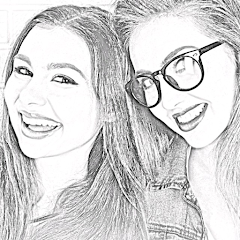
Transform your photos into stunning pencil sketches with just a few taps. The app offers a variety of realistic sketch styles, allowing you to choose the perfect look for your images and unleash your creativity effortlessly.

 Transform photos into stunning pencil sketches effortlessly Enjoy a user-friendly interface for easy navigation Experiment with various artistic styles and effects Share your creations directly on social media Save and print your sketches in high resolution
 Limited editing options may restrict creativity in refining sketches. The app's performance can lag on older devices, affecting user experience. Some users may find the interface unintuitive, complicating the drawing process.
 Pencil Sketch Photo Editor is an incredibly versatile tool that caters to a wide array of users, from amateur photographers to professional artists. Whether you're looking to transform a simple snapshot into a stunning pencil sketch for social media or create intricate designs for art projects, this app has you covered. It’s ideal for those who want to add a unique touch to their travel photos, family portraits, or even special events like weddings and birthdays. Users can easily apply sketches to their images, making it a great choice for graphic designers who need quick visual concepts or for students looking to enhance their presentations with artistic flair. The app's features are not limited to just converting photos; users can also adjust brightness, contrast, and saturation to achieve the perfect sketch effect. This level of customization makes it suitable for almost any creative endeavor.
The user experience of Pencil Sketch Photo Editor is seamless and intuitive. Upon launching the app, users are greeted with a clean interface that allows for easy navigation. The editing tools are straightforward, ensuring that even those who are not tech-savvy can quickly grasp how to enhance their images. Users can select from various sketch styles and apply them with just a few taps. The real-time preview feature allows for immediate feedback, ensuring satisfaction with the final output. Additionally, the app offers options to save and share creations directly to popular social media platforms, enhancing user engagement. The community aspect is also worth noting, as users can showcase their work and draw inspiration from others, creating a vibrant environment for creativity.
Pencil Sketch Photo Editor is available for free, offering a range of basic features that will satisfy casual users. However, for those who wish to unlock premium features such as additional sketch styles, advanced editing tools, and ad-free usage, the app offers a subscription model. This pricing is quite competitive compared to similar apps in the market, making it accessible for users of all budgets. The subscription plans are flexible, allowing users to choose between monthly or annual payments, ensuring that they only pay for the features they need. Overall, the pricing structure is designed to offer great value for both casual and professional users alike.
The developers of Pencil Sketch Photo Editor are committed to providing a high-quality user experience through regular updates and ongoing support. Users can expect periodic updates that introduce new features, enhance functionality, and improve performance. The app also has a dedicated customer support team that is responsive to inquiries and feedback. Users can reach out via email or through the app’s feedback feature, ensuring that their concerns are addressed promptly. This level of support and commitment to improvement makes Pencil Sketch Photo Editor a reliable choice for anyone looking to delve into the world of digital sketching.
Security & Privacy Review
 Google Play
  App Store


I tried a picture of a pet and human to see the different effects. I wanted a coloring book effect. I like the fact that the App is easy to use and select the different filters that's close to the sketch effects that you like. The sketches look great and seems to capture the images well. You can see what the sketch looks like before you actually save it. What's also great is that credits are not involved, no pressured sign ups, and no penalizing for trying different images.
This is probably the best sketch app that I have come across. It's very easy to use, there are many style choices to choose - from different styles of pencil sketches to crayons to colored pencils to watercolors to cartoon, etc. Each style has a slider bar that allows you to fine-tune the amount of the style you apply. The app also includes Filter and Editor functions. I like this app so much that I paid for the version without ads, which was reasonably priced. I would definitely recommend this.
There are lots of different options to change your pictures into drawings or color art! There are ads and if you want to save your picture in HD you need to pay with credits, but the free option looks just fine to me. For a free app, I can't complain. I just gave 4 stars because of the ads and charges (only if you choose to pay, NOT required!) I'd definitely recommend this.
Very easy to use,great effects,alot of fun and you end up with cool looking pictures. tried all effects out on a variety of photos, some are better on certain pics, some are better on others,always find something that looks good.cheers.,mix different effects and filters on top of each other for some awesome unreal pictures...get it to where you like it,save it,then try more onto again, saving it when you like it is key,.try out editor different intensity makes a vast difference most of the time.
Nice for a quick photo pencilling with predefined filters, it gives you option to further edit the image. But if you want to change a photo, you have to start it from the scratch. If you do a crop of an image, process it and want to save it in any other resolution, it brings up entire image discarding the cropped selection. Technicslly it may impose some restrictions so this is just remark for folks who may expect something more from that additional add-on. Prompting for rating all the the time.
Review Source: Google Play store public user reviews.
Yes, users can submit suggestions or feedback through the app's feedback section or by contacting customer support directly.
Pencil Photo Sketch : Drawing may collect some minimal data for functionality and improvement purposes, but it prioritizes user privacy and data security.
Yes, Pencil Photo Sketch : Drawing can be used offline, allowing users to create sketches without an internet connection.
To cancel your subscription, you can go to the app store settings on your device and manage your subscriptions from there.
The subscription cost for Pencil Photo Sketch : Drawing varies based on the selected plan, typically offering monthly and yearly options at competitive prices.
Yes, you can activate your account using your registered email and the activation link sent to you.
Yes, you can log in to your account from any device using your registered email and password.
You can reach our customer service team via the support email provided in the app or visit our website for live chat options.
You will need to contact customer service to update your customer number associated with your new email.
After download, check your email for an activation link. Click the link to activate your account.
some of the crashes are fixed.
Picsart Photo & Video Editor
PhotoArt-Editor de fotos IA
Picsart: AI Photo Video Editor
Picsart AI Photo Editor, Video
AI Mirror-AI Art Photo Editor
AI Mirror: Hugs Video & Photo
AI Mirror: AI Photo & Video

Amazon Photos
Amazon Photos: Photo & Video

PixVerse: AI Video Generator
Gallery - Photo Gallery, Album

PhotoRoom Studio Photo Editor