This site uses cookies to enhance your user experience. By clicking any link on this site you are giving your consent to our cookie policy. Read more
Reject
Accept All

Advertiser and Editorial Disclosures

Okta Mobile

Okta Mobile

verified

Okta Inc.

3.0
Rating
1,000,000+ Downloads
3.14.1 Version
  • category

    Category: Productivity

  • price

    Price: Share

  • age rating

    Age Rating: Everyone

  • rating

    Rating: 3.0

  • available on

    Available on: /

  • updated on

    Updated on: Aug 12, 2025

Screenshot 1
Screenshot 2
Screenshot 3
Screenshot 4
Screenshot 5
Screenshot 6
Advertisement

Features & Highlights

Multi-Factor Authentication

With built-in Multi-Factor Authentication (MFA), Okta Mobile adds an extra layer of security to user accounts. By requiring additional verification methods, it helps protect sensitive information from unauthorized access, ensuring that your data remains safe even if passwords are compromised.

Seamless Integration

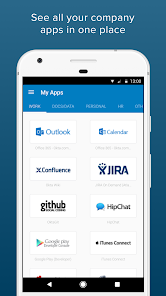
The app seamlessly integrates with a wide range of third-party applications, providing a unified experience for users. This flexibility allows organizations to customize their workflow and enhance productivity, as employees can access all their essential tools in one place.

Single Sign-On

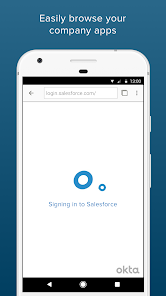
Okta Mobile simplifies the login process with Single Sign-On (SSO), allowing users to access multiple applications with one set of credentials. This not only enhances security but also saves time, making it easier for employees to stay productive throughout their workday.

User Management

Okta Mobile offers robust user management capabilities, allowing administrators to easily provision, deprovision, and manage user access to applications. This ensures that only the right users have access to the right resources, streamlining onboarding and offboarding processes for organizations.

Advertisement

Pros & Cons

Pros
  • Okta Mobile enhances security with robust identity management solutions.
  • It simplifies access to applications through single sign-on capabilities.
  • Users enjoy a seamless experience across all devices and platforms.
  • The platform supports secure collaboration among teams and partners.
  • Okta Mobile offers customizable features to fit diverse organizational needs.
Cons
  • Limited offline access can hinder productivity for mobile users.
  • Complex setup process may overwhelm less tech-savvy users.
  • Potentially high costs for small businesses seeking advanced features.

Real Experience Using Okta Mobile

Real Experience Application Scenarios

Okta Mobile is designed primarily for enterprises seeking a secure and efficient way to manage their mobile workforce. It is particularly beneficial in scenarios where employees need to access sensitive company resources from their mobile devices, such as email, documents, and internal applications. Businesses in sectors like finance, healthcare, and technology can utilize Okta Mobile to ensure that their data is protected while enabling employees to work remotely. Additionally, the app is ideal for organizations with Bring Your Own Device (BYOD) policies, allowing IT departments to maintain control over data security while employees enjoy the flexibility of using their personal devices for work.

User Experience

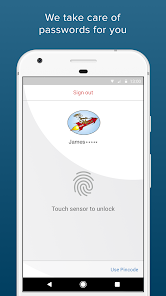
The user experience of Okta Mobile is generally positive, with a clean interface that prioritizes usability. Upon launching the app, users are greeted with a straightforward login process that supports single sign-on capabilities, making it easy to access multiple applications without repetitive logins. The app emphasizes security with features like multi-factor authentication, which adds an extra layer of protection. Navigation within the app is intuitive, allowing users to quickly locate and launch their required applications. However, some users have reported occasional glitches, particularly with app loading times and connectivity issues, especially in areas with weak internet signals. Overall, the design and functionality cater well to the needs of busy professionals, ensuring that they can stay productive on-the-go.

Pricing

Okta Mobile operates on a subscription-based pricing model, which varies depending on the size of the organization and the specific features required. While the app does offer a free trial, potential users should be prepared for costs that can scale significantly with the number of users and the level of service needed. Larger enterprises may find that their investment pays off through enhanced security and streamlined access to applications, but small businesses might consider the pricing a bit steep compared to alternative solutions. It is advisable for organizations to evaluate their specific needs and budget before committing to a subscription.

Updates & Support

Okta is committed to providing regular updates to enhance the app's performance and security features. Users can expect frequent improvements based on feedback and technological advancements. The company also offers robust customer support, including a comprehensive knowledge base, video tutorials, and responsive customer service representatives. In case of issues, users can reach out via multiple channels, including email and live chat, ensuring that assistance is readily available. While most updates are seamless, some users have experienced minor disruptions during major updates, but these are generally resolved quickly. Overall, the company's dedication to support and updates reinforces its reliability as a mobile security solution.

verified Security & Privacy Review

Security & Privacy Review Okta Mobile prioritizes user security and data privacy, employing industry-standard encryption methods to safeguard sensitive information both in transit and at rest. The app integrates with the Okta Identity Cloud, which offers robust authentication protocols, including multi-factor authentication (MFA), to enhance account security and reduce unauthorized access. Privacy practices are transparent, with clear policies outlining data collection and usage. Okta Mobile collects minimal user data necessary for functionality, ensuring that personal information is not unnecessarily exposed. The app requires standard permissions, such as access to the device's network and storage, which are essential for optimal performance. Users are empowered to manage their data preferences through the app settings, allowing for greater control over personal information. Regular updates and security patches further bolster the app's defenses against potential vulnerabilities. Overall, Okta Mobile demonstrates a strong commitment to maintaining user trust through diligent security measures and transparent privacy practices.
Advertisement

Compare APP

User Reviews

  • Chris Cote
    2021/05/09

    So far this app is useless. The 4 apps that are suppose to be in there don't show up. With Biometrics enabled, I should not have to put in a dam code every time. There is no account page. Verification should happen with in this app. There should be no need for a stupid verification app. Now I have lost access to 2 out of the 4 apps. I will go back to logging into each app separately. So much easier.

  • lee Citizen
    2020/05/11

    Was..ok, now trash. Always ran heavy and slow but now i can't log into my workday or any other app within OKTA. Last couple days i tried to connect to workday and it times out. Updated and now it just crashes. Cleared cache and data to no avail. Mandatory for us at work but going to try and find alternative. Usually dont review many apps but this one is necessary for jobs.

  • Alastair Charles
    2021/12/02

    Fails to install on my device. Tried clearing cache, restarting phone, and multiple different internet connections and it still will come up with an error. Based on experiences of other reviewers who actually managed to install, you're probably just better off accessing Okta through your phones native browser. A shame that Okta does not go through the effort of supporting older devices.

  • A Google user
    2019/12/05

    Stupid app. I was asked to download and I downloaded. It then asked me to enter my octa domain and credentials but there I have never set up anything like that or asked to set up any. No place to set up domain, user name or password. After said and done, I have to uninstall it and never get to my documents after spending several hours on it. So I am not pleased with the app. Not happy at all. So disappointed.

  • Katherine Taylor
    2022/11/03

    Never works, always asks for credentials even after setting up PIN and finger print ID. Waste of time as i cant access the app for workday or dimensions and have to use a computer browser. Cant look at shifts on the go, pretty much sits on my phone unused so, to put it down to one word; useless. Unfortunate really.

Review Source: Google Play store public user reviews.

FAQ

1

Can I submit suggestions or feedback to Okta Mobile?

Yes, users can submit suggestions or feedback through the Okta support portal or by contacting customer support for their input to be considered in future updates.

2

Does Okta Mobile collect my personal data?

Okta Mobile may collect certain information to provide its services, but it is designed to protect user privacy and security. Personal data collection is governed by Okta's privacy policy.

3

Does Okta Mobile support offline use?

Yes, Okta Mobile allows users to access certain applications and data offline, depending on the specific app's capabilities and configuration.

4

How do I cancel my Okta Mobile subscription?

To cancel your Okta Mobile subscription, you need to contact your organization's administrator or Okta support, as subscriptions are managed at the organizational level.

5

How much does a subscription to Okta Mobile cost?

The cost of a subscription to Okta Mobile varies based on the plan chosen by the organization, and it is best to consult Okta's pricing page or contact their sales team for specific details.

How to use Okta Mobile

1

Can I activate my account through the Okta Mobile app?

Yes, you can activate your account by following the activation link sent to your email and completing the setup in the Okta Mobile app.

2

How can I contact customer service for technical issues with Okta Mobile?

You can contact customer service via the support option in the app or through our website for technical assistance.

3

How can I reach customer service for Okta Mobile?

You can contact customer service through the support section of the Okta Mobile app or visit our website for additional resources.

4

How do I log in to my Okta Mobile account?

To log in, open the Okta Mobile app, enter your credentials, and tap "Log in" to access your account.

5

How do I update my customer number in Okta Mobile?

Customer numbers cannot be updated directly in Okta Mobile. Please contact customer service for assistance with any updates.

Editor's Choice