This site uses cookies to enhance your user experience. By clicking any link on this site you are giving your consent to our cookie policy. Read more
Reject
Accept All

Advertiser and Editorial Disclosures

Google Voice App

Google Voice App

verified

Google LLC

4.2
Rating
10,000,000+ Downloads
2026.06.20.935496172 Version
  • category

    Category: Productivity

  • price

    Price: free

  • age rating

    Age Rating: Everyone

  • rating

    Rating: 4.2

  • available on

    Available on: /

  • updated on

    Updated on: Jul 1, 2026

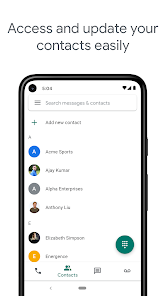
Screenshot 1
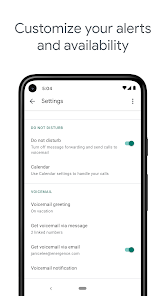
Screenshot 2
Screenshot 3
Screenshot 4
Screenshot 5
Screenshot 6
Advertisement

Features & Highlights

Call Forwarding

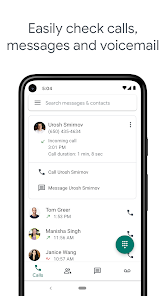
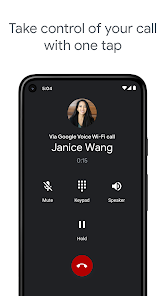
Google Voice allows you to forward calls to multiple devices, ensuring you never miss an important call. Whether you’re at home, in the office, or on the go, you can stay connected effortlessly by managing incoming calls through your preferred devices with ease.

International Calling

Need to make calls abroad? Google Voice simplifies international calling with competitive rates and a straightforward interface. You can connect with loved ones around the world without worrying about complicated dialing procedures or hefty phone bills.

Text Messaging

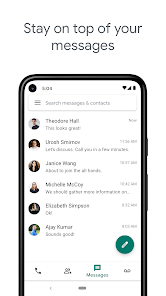
With Google Voice, sending and receiving text messages is a breeze. You can communicate with friends and family through SMS or MMS right from your Google Voice number, making it easy to keep in touch without needing to switch between different messaging apps.

Voicemail Transcription

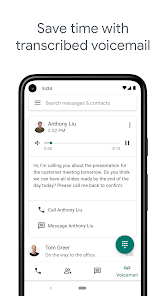
Google Voice offers a unique voicemail transcription feature that automatically converts your voicemail messages into text. This way, you can quickly read through your messages and decide which ones require your immediate attention, saving you time and keeping you organized.

Advertisement

Pros & Cons

Pros
  • Affordable calling and texting options available.
  • Unified communication across devices and platforms.
  • Voicemail transcription for easy message management.
  • Customizable settings for call forwarding and screening.
  • Integration with Google services enhances productivity.
Cons
  • Limited customer support options available
  • Only works well in the U.S.
  • Lacks advanced features of traditional phone systems
  • Voicemail transcriptions may be inaccurate

Real Experience Using Google Voice App

Application Scenarios

Google Voice serves a diverse set of use cases, making it a versatile tool for both personal and professional communication. For individuals, it offers a single phone number that can be used across multiple devices, allowing seamless connectivity whether you are at home, at work, or on the go. This is particularly useful for those who want to separate personal and work communications without needing multiple devices. Small business owners benefit from Google Voice by establishing a professional presence without the need for a dedicated business phone line. Features like voicemail transcription and call forwarding enhance productivity, enabling users to manage calls efficiently. Additionally, remote workers find Google Voice invaluable for maintaining communication with colleagues or clients, ensuring that they never miss an important call regardless of their location.

User Experience

The user experience of Google Voice is generally smooth and intuitive. The app's interface is clean and straightforward, allowing users to navigate through features with ease. Setting up a Google Voice number is a quick process, and the integration with other Google services further enhances usability. Users appreciate the ability to send and receive text messages, make calls, and access voicemails all from one platform. The voicemail transcription feature is particularly praised, as it allows users to read messages at a glance. Some users, however, have reported occasional connectivity issues, which can impact call quality. Overall, Google Voice provides a user-friendly experience that meets the needs of a wide range of users.

Pricing

Google Voice offers a competitive pricing structure that caters to various user needs. For personal use, the app is free, providing essential features such as a phone number, voicemail, and unlimited text messaging. However, for businesses, Google Voice offers subscription plans that start at a modest monthly fee. These plans include additional features like increased storage for voicemail and call routing capabilities, making them worthwhile for teams looking to enhance their communication. The cost-effectiveness of Google Voice, especially for small businesses, makes it an attractive alternative to traditional phone services.

Updates & Support

Google Voice is consistently updated, with new features and improvements introduced regularly based on user feedback. The development team actively addresses bugs and connectivity issues to enhance the overall functionality of the app. Support resources are easily accessible through Google’s help center, where users can find FAQs, troubleshooting tips, and community forums. For more direct assistance, users can reach out via email or chat support, although response times may vary. Overall, Google’s commitment to maintaining and improving Google Voice ensures that users have access to reliable communication tools backed by ongoing support.

verified Security & Privacy Review

The Google Voice app prioritizes user security and privacy through a robust set of practices. It employs end-to-end encryption for calls and messages, ensuring that your conversations remain confidential. Google regularly updates its security protocols to address emerging threats, which enhances the app’s resilience against unauthorized access. Regarding permissions, Google Voice requires access to your contacts, microphone, and storage, which are essential for its core functionalities. Users are encouraged to review and manage these permissions through their device settings to maintain control over personal data. Google adheres to strict privacy policies and complies with regulations like GDPR, giving users transparency about how their data is collected and used. Additionally, Google offers two-factor authentication for added account security, allowing users to protect their accounts from potential breaches. Users can also easily delete their Google Voice account and associated data if they choose, which reflects a commitment to user autonomy. Overall, Google Voice provides a secure environment for communication while emphasizing user privacy and data protection.
Advertisement

Compare APP

User Reviews

  • Derek
    2026/04/29

    The app works just fine. I use it as my professional number to give to clients. I can't imagine it being better. (edit):Over two years in and I still use the app. It has caller screening, do not disturb that operates independently of your actual number, call recording, and a nice widget for one of your homescreens. The one thing I need, not just want-to-see: the ability to change my Voice number more than once without paying for it.

  • Jenn R
    2024/11/16

    Google voice has been my go to app for VoIP since day 1. I use it on my laptop with Chrome and have used it on many Android devices with no issues. I like that you get a different number besides your cell number too. I can send unlimited messages, make unlimited calls and receive pics, gifs, and files. When my mobile device doesn't have service somewhere, Google Voice backs me up. Thanks! I highly recommend this app versus text now or telegram. There's no ads, it's free and no scammers!!

  • Adam Schellhas
    2026/06/15

    I can't see phone #'s anymore after update! Specifically with Voicemail but with Call History too. When I check a voicemail all I get is a name and a message. It helps to see the phone # associated with that name. Especially with Voicemail. My call History too. Everything looks dumbed down like a cheap App. All phone #'s should be available and shown regardless if they are in your Contacts or not. What purpose is there in getting rid of that. It's literally the definition of useful information!

  • Kevin “MNLegions”
    2026/06/22

    I got a response from this review with links that I can't even use on here.Support can't help me unless I get a developer who can fix the mistake of not letting people see the numbers of those who call them. I can no longer click on a caller and get the number. now it takes you to a separate screen just to give you a look at how long the call was. To get the number I have to copy it then past it somewhere else to see it. it was a pointless move.

  • Paul E. Drecksler
    2026/06/03

    What will it take to get the Decline button to work on incoming calls? Honestly, it's been years. Voice feels like such an afterthought of Google. The only thing good about it is the price is right. Consistently terrible call quality, can't text videos, can't compress normal photos. Come on Google. Use AI to make Voice better. I know you've got some.

Review Source: Google Play store public user reviews.

FAQ

1

Does Google Voice collect my personal data?

Google Voice does collect some personal data, such as your phone number and usage statistics, but it is governed by Google's privacy policy.

2

Does Google Voice offer a free trial or free version?

Yes, Google Voice offers a free version that includes basic features for personal use, while additional features are available through paid subscription plans.

3

Does Google Voice require an internet connection?

Yes, Google Voice requires an internet connection to function, as it operates over the internet rather than through traditional phone lines.

4

How can I contact support or send feedback for Google Voice?

You can contact support for Google Voice through the Help Center on the Google website or by using the feedback options available in the Google Voice app.

5

How do I manage or cancel my Google Voice subscription?

You can manage or cancel your Google Voice subscription by going to the Google Voice settings on the web or in the app, where you'll find options for subscription management.

How to use Google Voice App

1

How do I activate Google Voice?

To activate Google Voice, download the app or visit the website, sign in with your Google account, and follow the prompts to set up your phone number.

2

How do I contact Google Voice customer service?

You can reach Google Voice customer service through the Google Support website or by visiting the Google Voice Help Center for assistance.

3

How do I log in to my Google Voice account?

Visit the Google Voice website or open the app, then sign in with your Google account credentials.

4

What is the customer number for Google Voice support?

Google Voice does not have a direct customer service number; support is primarily provided online through their Help Center.

What's New

• Stability and performance improvements

Editor's Choice