This site uses cookies to enhance your user experience. By clicking any link on this site you are giving your consent to our cookie policy. Read more
Reject
Accept All

Advertiser and Editorial Disclosures

My Verizon

My Verizon

verified

Verizon Consumer Group

4.6
Rating
100,000,000+ Downloads
21.9.6 Version
  • category

    Category: Tools

  • price

    Price: free

  • age rating

    Age Rating: 17+

  • rating

    Rating: 4.6

  • available on

    Available on: /

  • updated on

    Updated on: Jun 13, 2026

Screenshot 1
Screenshot 2
Screenshot 3
Screenshot 4
Screenshot 5
Screenshot 6
Screenshot 7
Screenshot 8
Screenshot 9
Screenshot 10
Screenshot 11
Screenshot 12
Screenshot 13
Screenshot 14
Screenshot 15
Screenshot 16
Screenshot 17
Screenshot 18
Screenshot 19
Screenshot 20
Screenshot 21
Advertisement

Features & Highlights

Account Management

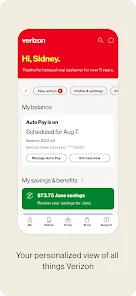
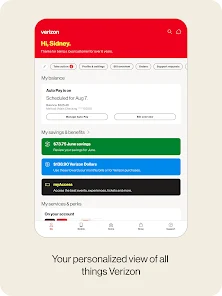
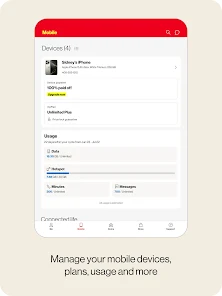
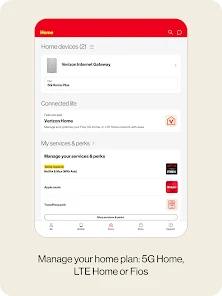
Easily manage your Verizon account right from your smartphone with My Verizon. You can view your billing details, update your plan, and add or remove services without any hassle, making it simple to stay on top of your mobile needs.

Bill Pay Made Easy

Paying your bill has never been easier with My Verizon's streamlined payment options. Set up automatic payments, view your billing history, and receive reminders to ensure you never miss a due date, giving you peace of mind regarding your expenses.

Data Usage Tracking

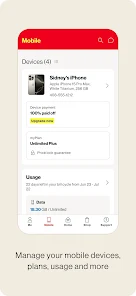
Keep an eye on your data consumption with the intuitive data usage tracker. My Verizon provides real-time updates on your data usage, helping you avoid overage charges and allowing you to adjust your habits to stay within your plan limits.

Device Support & Upgrades

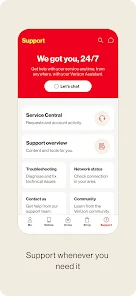
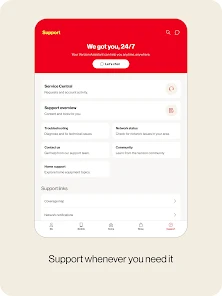
Stay informed about your device's performance with My Verizon's dedicated support features. You can troubleshoot issues, check for software updates, and explore upgrade options, ensuring that you always have the best technology at your fingertips.

Advertisement

Pros & Cons

Pros
  • Manage your account anytime, anywhere with ease.
  • Enjoy personalized data usage insights for better control.
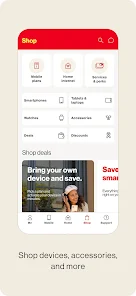
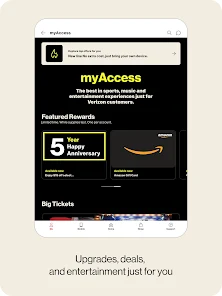
  • Access exclusive deals and discounts for savings.
  • Easily troubleshoot issues with integrated support options.
  • Track billing and payments seamlessly within the app.
Cons
  • Limited customer service options available
  • High prices for some plans
  • Complicated billing and payment processes
  • Frequent app glitches and crashes

Real Experience Using My Verizon

Application Scenarios

The My Verizon app is designed to cater to a wide range of users, primarily those who are Verizon customers. It serves as a comprehensive tool for managing your Verizon account efficiently. Whether you need to check your data usage, pay your bill, or upgrade your device, the app simplifies these tasks. For individuals on family plans, the app allows for seamless management of multiple lines, enabling users to track usage per line and set data limits. The app also comes in handy for those who want to explore Verizon’s various plans and promotions, making it easy to find the best deal for your specific needs. Additionally, the app is useful for business users who require quick access to account information and billing details while on the go.

User Experience

Users generally find the My Verizon app to be user-friendly and intuitive. The interface is clean and organized, making navigation straightforward even for those who are not tech-savvy. The dashboard provides a quick overview of your account status, displaying important information such as data remaining, billing due dates, and recent transactions. One of the standout features is the personalized recommendations based on user habits, which can help in managing data more effectively. However, some users have reported occasional glitches, such as slow loading times or difficulties in making payments. Despite these minor setbacks, the overall experience tends to be positive, with many users appreciating the convenience of managing their accounts from their mobile devices.

Pricing

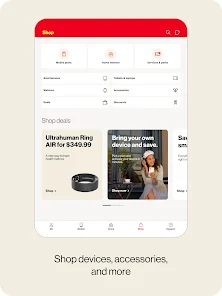
The My Verizon app is free to download and use, catering exclusively to Verizon customers. While the app itself does not have a subscription fee, users should be aware that any transactions made through the app, such as bill payments or plan upgrades, will incur the standard charges associated with their Verizon plans. Verizon offers a variety of pricing options for their services, so users can select a plan that fits their budget and needs. Promotions are frequently available, and the app is an excellent platform for discovering these deals, which can lead to significant savings for customers.

Updates & Support

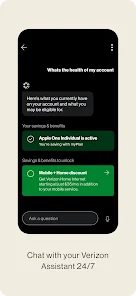
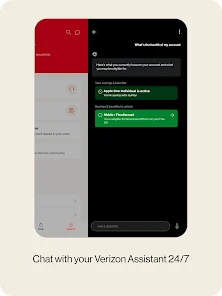
My Verizon receives regular updates aimed at enhancing user experience and introducing new features. These updates often fix bugs and improve functionality, ensuring that the app remains efficient and reliable. Customer support is readily accessible through the app, where users can chat with a representative or browse a comprehensive FAQ section for quick answers to common questions. This level of support is crucial for resolving issues that may arise during account management. Overall, the combination of regular updates and robust customer support enhances the overall reliability and effectiveness of the My Verizon app, making it an essential tool for Verizon users.

verified Security & Privacy Review

The My Verizon app places a strong emphasis on security and privacy, ensuring users can manage their accounts with confidence. The app utilizes encryption protocols to protect sensitive information during transmission, safeguarding user data from potential breaches. Verizon implements multi-factor authentication, adding an extra layer of security by requiring users to verify their identity through a secondary method, such as a text message or email verification. In terms of permissions, the app requests access to specific device features, such as location services and contacts, which enhance user experience but may raise privacy concerns. Users are encouraged to review these permissions and adjust them according to their comfort levels. Verizon is transparent about its data handling practices, providing users with clear information on what data is collected and how it is used. The company adheres to industry standards and regulations, ensuring user data is not sold to third parties without consent. Overall, the My Verizon app demonstrates a commitment to protecting user information while offering convenient features, making it a reliable choice for managing Verizon accounts securely.
Advertisement

Compare APP

User Reviews

  • Frank Drebin
    2025/07/23

    500 characters are not enough to fully articulate the problems I have with this app, so I'll give a short run-down. They make it difficult to log in, they throw unwanted ads in your face, the app itself regularly freezes or fails to load, and they force you to save a payment method, when maybe I'd rather just input my information manually. Bottom line, I only use this to pay my bill, but Verizon acts like they don't want my money. Avoid this if you can.

  • Natolya Barber
    2025/06/24

    This is probably one of the worst apps I have ever had the misfortune to use. It's so buggy. You'd think they gave this to their summer interns with how many times it just doesn't work. If you just need to look at your information, theres a good chance it will function correctly. But if you ever need help or troubleshooting, just call Verizon. Their live agent call staff is phenomenal, even though sometimes wait times can be long.

  • Amy Eades (Beloved1976)
    2026/06/19

    DO NOT for any reason use this company! It is tempting because they will be running ads that seem to good to be true. Once you become a customer they keep increasing your bill. Even after paying almost $20 a month for mobile protection and OVER TWO YEARS of paying on my phone, almost completely paying it off, they still charged me $500 for a replacement! I can keep going! A total nightmare! This company is nothing but fraud and desperately needs sued!

  • kellierey.
    2026/07/02

    i deleted app updates, cleared cache and data and it still won't let me sign in. it says we're sorry it looks like we're having trouble connecting. it won't turn on biometrics, i can't login 97% of the time and when i do press the back button on the we're sorry page, it sometimes pulls up the login page, i fill in my info, select remember me, and sometimes it'll let me in but most times not. when it does let me in, everything i press says in red failed to load? it's never worked properly for me.

  • Rich Higgins
    2026/06/19

    Too buggy. I used to like this app. Now when trying to use bill pay feature, the app crashes. Have to call and pay by phone and they want a convenience fee of $7.50 to do so! No you're going to wave that fee! I'm not paying your fee because your app doesn't work properly! Time to switch to another provider. Verizon is going downhill.

Review Source: Google Play store public user reviews.

FAQ

1

Does My Verizon collect my personal data?

Yes, My Verizon collects personal data to personalize the user experience, manage accounts, and improve services, but it follows strict privacy policies to protect your information.

2

Does My Verizon offer a free trial or free version?

My Verizon does not offer a free trial or free version; it is a free app that allows Verizon customers to manage their accounts without any additional cost.

3

Does My Verizon require an internet connection?

Yes, My Verizon requires an internet connection to access your account and utilize its features, whether through Wi-Fi or mobile data.

4

How can I contact support or send feedback for My Verizon?

You can contact support through the My Verizon app, by calling Verizon customer service, or by visiting the Verizon support website to submit feedback or inquiries.

5

How do I manage or cancel my My Verizon subscription?

You can manage or cancel your subscription directly through the My Verizon app or by visiting the Verizon website, where you can access your account settings.

How to use My Verizon

1

How do I activate my Verizon service using the My Verizon app?

Launch the app, log in, and navigate to the "Activate Device" section. Follow the on-screen instructions to complete the activation process.

2

How do I contact Customer Service through the My Verizon app?

You can contact Customer Service by tapping on the "Menu" icon, selecting "Support," and then choosing "Contact Us." From there, you can chat or call for assistance.

3

How do I find my Customer Number in the My Verizon app?

Open the app, tap on the "Account" tab, and your Customer Number will be displayed under your account details.

4

How do I log in to the My Verizon app?

Launch the app, enter your Verizon mobile number or email, and input your password. Tap "Sign In" to access your account.

What's New

- Enhancements to Connected Life, making it easier for customers to navigate between Verizon Apps - Unlock even more benefits and savings.

Editor's Choice