This site uses cookies to enhance your user experience. By clicking any link on this site you are giving your consent to our cookie policy. Read more
Reject
Accept All

Advertiser and Editorial Disclosures

Move to iOS

Move to iOS

verified

Apple

3.7
Rating
100,000,000+ Downloads
4.0.3 Version
  • category

    Category: Tools

  • price

    Price: free

  • age rating

    Age Rating: Everyone

  • rating

    Rating: 3.7

  • available on

    Available on: /

  • updated on

    Updated on: May 19, 2025

Screenshot 1
Screenshot 2
Screenshot 3
Screenshot 4
Screenshot 5
Screenshot 6
Advertisement

Features & Highlights

App Recommendations

Upon transferring your data, Move to iOS provides tailored suggestions for apps that match your previous Android experience. This feature streamlines the onboarding process, making it easier to find and download familiar apps on your new iPhone, enhancing your user experience right from the start.

Secure Data Transfer

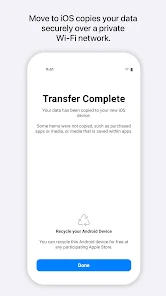
Move to iOS ensures a secure and seamless migration of your data from an Android device to your new iPhone. It encrypts your information during the transfer process, protecting your personal data from unauthorized access, so you can switch devices with peace of mind.

Transfer Various Data Types

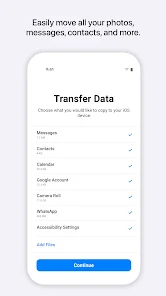
With Move to iOS, you can effortlessly transfer a wide range of data types, including contacts, messages, photos, and videos. This comprehensive approach ensures that you don’t lose any important information while switching to your new device, making the transition smoother and hassle-free.

User-Friendly Interface

The app boasts an intuitive, user-friendly interface that guides you through each step of the migration process. Even if you’re not tech-savvy, you’ll find the setup straightforward and easy to follow, ensuring that your transition to iOS is as seamless as possible.

Advertisement

Pros & Cons

Pros
  • Seamlessly transfers data from Android to iOS devices
  • Preserves contacts, messages, and photos effortlessly
  • Simplifies your transition to a new iPhone
  • Ensures a secure and private data transfer
  • User-friendly interface makes setup easy for everyone
Cons
  • Transfer speed can be slow for large data.
  • Limited compatibility with non-Apple devices.
  • Certain apps might not transfer seamlessly.
  • Requires a stable Wi-Fi connection to function.

Real Experience Using Move to iOS

Application Scenarios

The Move to iOS app is designed to facilitate a seamless transition for users switching from an Android device to an iPhone. This application is particularly beneficial for individuals who are upgrading their smartphones and wish to retain their essential data, such as contacts, messages, photos, videos, and more. For families looking to standardize devices for easier management or individuals who have decided to embrace the Apple ecosystem, this app simplifies the transfer process significantly. The application is also useful for businesses that provide employees with iPhones, ensuring that vital information is not lost during the switch. Additionally, it comes in handy for users looking to make a fresh start on a new device without the hassle of manually transferring data one file at a time.

User Experience

Users generally report a positive experience with the Move to iOS app, praising its straightforward interface and efficient functionality. The setup process is intuitive, guiding users through each step with clear instructions. Once both devices are connected to the same Wi-Fi network, the app quickly scans for available data to transfer, making the process feel smooth and hassle-free. Users appreciate the ability to select specific types of content to move, allowing for customization based on individual needs. However, some users have encountered minor connectivity issues or longer-than-expected transfer times, depending on the amount of data being moved. Overall, the app garners favorable reviews for its effectiveness, ease of use, and the peace of mind it offers during the transition.

Pricing

Move to iOS is a free application available on the Google Play Store. There are no hidden fees or premium features that require payment, making it an accessible tool for anyone looking to switch from Android to iOS. The free nature of the app is a significant advantage, as users can take advantage of its comprehensive data transfer capabilities without worrying about incurring additional costs. This aspect contributes to the app’s appeal, especially for those who may be hesitant about investing in new technology.

Updates & Support

The Move to iOS app receives regular updates from Apple to ensure compatibility with the latest Android and iOS versions. Users can rely on these updates to improve functionality and fix any bugs that may arise. Apple also provides support resources, including a detailed FAQ section and troubleshooting guides, to assist users who may encounter issues during the transfer process. The combination of regular updates and accessible support reflects Apple’s commitment to enhancing user satisfaction and ensuring a smooth transition for all who utilize the app.

verified Security & Privacy Review

The Move to iOS app prioritizes user privacy and data security during the transfer process from Android to iOS devices. The app employs end-to-end encryption, ensuring that data transferred between devices remains secure and inaccessible to unauthorized parties. Users can transfer contacts, messages, photos, and more without risking exposure of their personal information. In terms of permissions, Move to iOS requires access only to essential data on the Android device, such as contacts and media. This limited scope helps to minimize potential privacy risks. The app does not store any transferred data on its servers; everything is handled locally during the transfer session. Apple's commitment to user privacy extends to this app, as it does not collect or track user data beyond the transfer process. Users can feel confident that their personal information remains private and secure while transitioning to an iOS environment. Overall, Move to iOS demonstrates a strong dedication to protecting user data throughout the migration experience.
Advertisement

User Reviews

  • Colin
    2026/06/23

    This app is a terrible way to transfer your a data from Android to iPhone. The app will freeze multiple times during the process and sometimes even refuses to start the process and I even tried the wired way using a cable to connect the two but that still doesn't work. Apple if you want more people to be on iPhone, fix this broken app.

  • Steven Mobbs
    2022/02/20

    What an awful, awful app. As much as Apple may hate Android, you would think they might put a modicum of effort into an app that is meant to switch people to their own platform. And yet, here we are. Seriously, this must've been made by the bottom of the barrel of their software team. There was no thought (limited thought at the most) put into the data transfer process. Why in the hell can data only be transferred over Wi-Fi? Was the reasoning supposed to be security? Because nothing is more secure than a direct cable connection, and it also happens to be faster. Perhaps their thought was that a user might accidentally yank out the cable in the middle of the transfer and have to start the process over again - which might be fine IF their Wi-Fi transferring worked. As you might be able to tell from the plethora of other reviews, it almost never works. When you do manage to connect, the estimated time is absurdly long, and often drops connection or runs into an error during the middle of the transfer. It's awful, and I hate that this is the only free way to transfer text messages from an Android phone. But seriously, it's 2022. Almost every Android phone from the past 5 years has been using USB-C, and the cable you get in the box for new iPhones is USB-C to Lightning. You'd think that a data transfer using the cable included in the box (that conveniently has both connections most people would need) would be a no-brainer. But I guess it's a tiny-amount-of-brainer, because the no-brains who design and update this app still manage to miss the mark. Hope they fix the Wi-Fi issues and add a cable transfer method, because this is an awful way to introduce people to the iPhone ecosystem, and I imagine it'll drive away many people who can't figure out alternate ways to transfer data.

  • cynthia muaka
    2022/03/20

    I am tech support and help clients move to IOS. And let me tell you I have tried using app over 1000+. I have never been able to transfer simple things like photos or important Documents. First of all the estimation are always wrong. The app say 15 minutes until completed . But after an hour. You get an error and have to start all over... waste of time. And it leaves the clients unsatisfied of move to IOS. Especially after such a hype to get an IOS device.

  • Jenny Aiken
    2023/01/10

    This app is garbage. I have done every bit of troubleshooting but it keeps getting stuck at 1 minute left (for 7+hours) until I give up, cancel it, and try again. My WiFi connection is absolutely not the problem, nor is the amount of data being transferred, yet here we are. This is my first iPhone ever and this nightmare of a transfer process has made me seriously question my decision to switch to iOS.

  • Garrett Stephens
    2022/03/30

    At this point it's pretty well noted that the app basically doesn't work. What the creaters could probably easily do is allow transfer of small amounts of data at a time, so when it inevitably fails, you can pick back up where you left off--whether it be transferring photos, contacts, etc. At the moment it forces an all or nothing strategy, which pretty clearly explains its current rating. Very sad that there aren't better options.

Review Source: Google Play store public user reviews.

FAQ

1

Does Move to iOS collect my personal data?

Move to iOS does not collect personal data during the transfer process; the data is transferred directly between devices without being sent to Apple servers.

2

Does Move to iOS offer a free trial or free version?

Yes, Move to iOS is completely free to download and use, with no trial period or hidden costs involved.

3

Does Move to iOS require an internet connection?

No, Move to iOS does not require an internet connection for the transfer process, as it creates a private Wi-Fi network between the two devices for data transfer.

4

How can I contact support or send feedback for Move to iOS?

You can contact Apple Support for assistance with Move to iOS or provide feedback through the Apple Support website or the Feedback app on your iOS device.

5

How do I manage or cancel my Move to iOS subscription?

Since Move to iOS does not involve any subscriptions, there is no need to manage or cancel anything related to payments or plans.

How to use Move to iOS

1

Do I need to log in to use the Move to iOS app?

No, you do not need to log in to use the Move to iOS app; it works seamlessly without an Apple ID.

2

How can I contact customer service for the Move to iOS app?

You can reach customer service through Apple Support's website or by calling the Apple Support number specific to your region.

3

How do I activate the Move to iOS app?

The app activates automatically when you select "Move Data from Android" during the iPhone setup process. Follow the on-screen instructions to complete the transfer.

4

What is the customer number for Move to iOS support?

There isn't a specific customer number for Move to iOS; instead, use the general Apple Support numbers available on their website for assistance.

What's New

• Faster data migration using a cabled connection between your iPhone and your Android phone (USB-C or USB-C to Lightning)• Connect over WiFi or Personal Hotspot• iOS tips are now displayed during migration• Call history and Dual SIM labels are now migrated• Voice recordings are now migrated to the Voice Memos app or the Files app depending on the file format• New languages supported: Bangla, Gujarati, Kannada, Malayalam, Marathi, Odia, Punjabi, Tamil, Telugu, and Urdu

Editor's Choice