This site uses cookies to enhance your user experience. By clicking any link on this site you are giving your consent to our cookie policy. Read more
Reject
Accept All

Advertiser and Editorial Disclosures

Life360: Find Family & Friends App

Life360: Find Family & Friends App

verified

Life360

4.4
Rating
100,000,000+ Downloads
26.24.0 Version
  • category

    Category: Tools

  • price

    Price: free

  • age rating

    Age Rating: Everyone

  • rating

    Rating: 4.4

  • available on

    Available on: /

  • updated on

    Updated on: Jul 6, 2026

Screenshot 1
Screenshot 2
Screenshot 3
Screenshot 4
Screenshot 5
Screenshot 6
Screenshot 7
Screenshot 8
Advertisement

Features & Highlights

Driving Safety Alerts

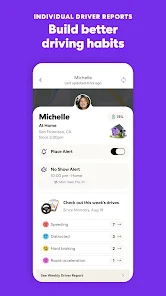
Life360 enhances your peace of mind with driving safety alerts that notify you of your loved ones' driving habits. Whether it's speeding, harsh braking, or other risky behaviors, you'll receive timely updates to help keep everyone safe on the road.

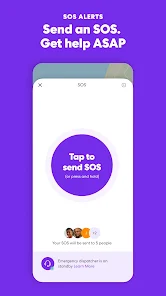
Emergency SOS Feature

In critical situations, the Emergency SOS feature provides a lifeline by allowing users to quickly alert emergency services and designated contacts. This ensures that help is on the way when it matters most, giving you and your family an added layer of security.

Location Sharing

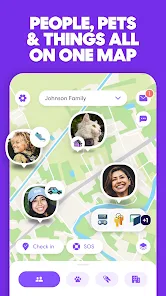
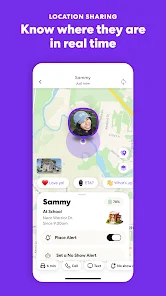
Stay effortlessly connected with your loved ones through real-time location sharing. Life360 allows family members to see each other's locations on a private map, ensuring everyone feels safe and informed, especially during busy days or emergencies.

Private Messaging

Communicate effortlessly with your family using the private messaging feature. Life360 offers a secure platform for sending messages and sharing updates, ensuring that important information is always just a tap away, fostering better connections among family members.

Advertisement

Pros & Cons

Pros
  • Stay connected with family and friends through real-time location updates.
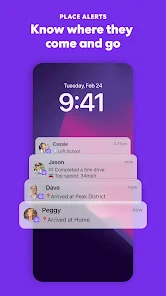
  • Enhance safety with timely alerts for arrivals and departures.
  • Easily coordinate meetups or events by sharing exact locations.
  • Enjoy peace of mind knowing loved ones are just a tap away.
  • Access location history for added security and awareness.
Cons
  • Privacy concerns arise as location data may be shared with third parties.
  • Battery drain can occur due to continuous GPS usage.
  • Dependence on mobile data may limit functionality in poor connectivity areas.

Real Experience Using Life360: Find Family & Friends App

Application Scenarios

Life360 is designed for families and friends who want to stay connected and ensure each other's safety. One common scenario is when parents use the app to track their children's location, especially during school hours or while they are out with friends. Whether it's a quick check-in or a notification when a child arrives at a designated location, Life360 provides peace of mind. Another scenario is for groups of friends or family members who are traveling together, allowing them to share their locations in real time and coordinate meet-ups effortlessly. The app also features location history, which is useful for reviewing past locations and ensuring everyone made it to their destinations safely.

User Experience

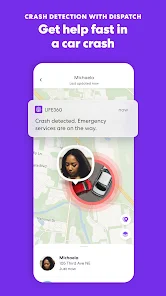
The user experience of Life360 is generally positive, with a clean and intuitive interface that makes navigation easy for users of all ages. Setting up the app is straightforward; users can create "Circles" to manage groups of people they want to share their locations with. The app offers various features, including location sharing, driving reports, crash detection, and emergency alerts. Users appreciate the ability to customize notifications, which allows them to receive alerts when family members arrive or leave certain locations. Additionally, the in-app messaging feature enhances communication, making it easier to coordinate plans without needing to switch to other messaging apps. However, some users have reported concerns about battery consumption, as continuous location tracking can drain the phone's battery more quickly.

Pricing

Life360 operates on a freemium model, offering a basic version at no cost, which includes essential location-sharing features. For users seeking enhanced functionality, such as location history, driving analysis, and emergency services, there are premium subscription plans available. The paid tiers are reasonably priced, with options ranging from monthly to annual subscriptions. Most users find the cost justified, especially given the added safety features and peace of mind that comes with real-time location sharing. The app frequently runs promotions, making it accessible for those who may want to try premium features before committing to a longer subscription.

Updates & Support

Life360 is regularly updated to improve user experience and introduce new features. The developers are attentive to user feedback, often incorporating suggestions into their updates. The app's customer support is commendable, providing assistance through a comprehensive help center, FAQs, and direct support options. Users can easily access help for common issues, and response times for inquiries are generally quick. Regular updates not only address bugs but also enhance security features, ensuring users feel safe and protected while using the app. Overall, Life360 demonstrates a commitment to continual improvement, making it a reliable choice for families and groups looking to stay connected and safe.

verified Security & Privacy Review

The Life360 app prioritizes user security and privacy through a series of robust measures. It employs end-to-end encryption for location data, ensuring that only authorized family members can access real-time location information. The app’s data is stored securely, and users have full control over their personal information, with the ability to edit or delete data as desired. Life360 requires several permissions to function effectively, including access to location services, contacts, and notifications. Users are informed about these permissions during the setup process, allowing for informed consent. Importantly, the app does not sell personal data to third parties, adhering to strict privacy policies that prioritize user confidentiality. Additionally, Life360 offers customizable privacy settings, enabling users to manage who sees their location and when. Enhanced features, such as driving reports and crash detection, come with added privacy considerations, ensuring that sensitive information is handled securely. Overall, Life360 demonstrates a commitment to safeguarding user data while providing essential connectivity features for families.
Advertisement

User Reviews

  • Joe Lewin
    2026/04/14

    Overall the app is great at showing where someone is, but there are minor glitches. It will give a notification someone has arrived home when they're still 1/4 mile away. Can't add a strip mall that far away because it thinks it's home. If someone is riding a train it says they're driving. If two people ride together in a car, they're both driving.

  • Brandi Keesee
    2026/04/15

    Was working great until the last week. Every morning it keeps saying a person on my life360 has left and returned home when they haven't left at all. Also shows a map as if some of us are moving around on our properties all night and it is saying we are driving way faster than we are. This is going to get kids in trouble when they are actually not speeding. My app is completely updated. I've already uninstalled and reinstalled but it didn't help. How do I fix this?

  • Amber Woiwode
    2025/10/30

    So untrustworthy and inaccurate. The location can be "accurate" within a distance of about half a mile. Not helpful in many situations. That's if the app updates a person's location at all. Often, it shows my husband or one of my kids still at our home or at a place they were much earlier in the day and it stays stuck at that location for many hours. We always check for updates when it starts acting up and there aren't any. We've had to log out and back in or even uninstall the app and reinstall

  • John Seiler
    2025/04/09

    Used to be a good app. Lately, the app loses connection with locations. The screen comes up blank. I can not see the location of anyone in my circle. I have to force the app to stop and then go back into the app. It will work a few times, then stop again. Very annoying. So I was asked to contact support, I did. Their solution was basically to log out and log back in. I have to do this several times a week. What a pain. Well, now the app crashes every time it comes up. No longer works on android.

  • LISA DAVID
    2025/09/03

    For the most part, I love the app as it gives me peace of mind in knowing where my family is, especially when they are traveling. However, it's not always accurate. My family member can be in one place (verified) but the app will show otherwise (and no their phones were not left behind). There are delays (lagging) in the app, as well. I have the Gold membership, because of the added benefits due to the amount of traveling my family does. Really wish this app would improve its accuracy.

Review Source: Google Play store public user reviews.

FAQ

1

Can I submit suggestions or feedback to Life360: Stay Connected & Safe?

Yes, users can submit suggestions or feedback through the app's support section or by visiting the Life360 website to share their thoughts with the development team.

2

Does Life360: Stay Connected & Safe collect my personal data?

Yes, Life360: Stay Connected & Safe collects personal data such as location information and user profiles to provide its services and improve user experience.

3

Does Life360: Stay Connected & Safe support offline use?

Life360: Stay Connected & Safe requires an internet connection to function fully, so it does not support offline use for its location sharing features.

4

How do I cancel my Life360: Stay Connected & Safe subscription?

Users can cancel their subscription through their account settings in the app or by contacting customer support, depending on how they subscribed.

5

How much does a subscription to Life360: Stay Connected & Safe cost?

Subscription costs vary based on the plan chosen, with options for monthly or annual payments, typically starting at a few dollars per month for premium features.

How to use Life360: Find Family & Friends App

1

Can I change my customer number in Life360?

Customer numbers cannot be changed. If you need assistance, please contact customer service for help with your account.

2

How can I contact customer service for Life360?

You can reach Life360 customer service by visiting the help section in the app or on their website for support options.

3

How can I log in to my Life360 account?

To log in, open the app and enter your email and password. If you have trouble, use the 'Forgot Password' option for help.

4

How do I activate my Life360 account once I sign up?

After signing up, check your email for the activation link. Click it to activate your account and start using the app.

5

How do I reach customer service if I have an issue with my account?

You can contact customer service through the help section in the app or visit the Life360 website for support options.

What's New

In this update, we've squashed some bugs and fine-tuned the performance, ensuring a smoother and more efficient experience for you.

Editor's Choice