This site uses cookies to enhance your user experience. By clicking any link on this site you are giving your consent to our cookie policy. Read more
Reject
Accept All

Advertiser and Editorial Disclosures

LetsView- Wireless Screen Cast

LetsView- Wireless Screen Cast

verified

WangxuTech

2.8
Rating
5,000,000+ Downloads
1.5.27 Version
  • category

    Category: Tools

  • price

    Price: free

  • age rating

    Age Rating: Everyone

  • rating

    Rating: 2.8

  • available on

    Available on: /

  • updated on

    Updated on: Jun 5, 2026

Screenshot 1
Screenshot 2
Screenshot 3
Screenshot 4
Screenshot 5
Screenshot 6
Screenshot 7
Advertisement

Features & Highlights

Multiple Device Support

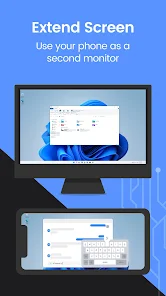
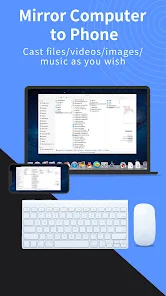
This app supports a wide range of devices, including Android, iOS, Windows, and Mac. This versatility ensures that you can connect and share content across different platforms seamlessly, making it a great choice for mixed-device households or offices.

Real-Time Screen Sharing

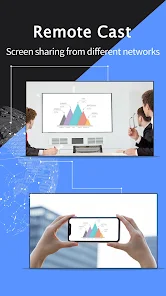
Experience real-time screen sharing with minimal lag, allowing for smooth presentations and engaging interactions. Whether you're collaborating on a project or sharing photos with friends, LetsView ensures that your content is displayed instantly and without interruptions.

User-Friendly Interface

LetsView boasts a clean and intuitive interface that makes it easy for anyone to start casting their screen. You don't need to be tech-savvy to navigate the app, ensuring a stress-free experience for users of all ages.

Wireless Mirroring

LetsView allows you to effortlessly mirror your device's screen to a larger display, making it perfect for presentations, movie nights, or gaming. With just a few taps, you can enjoy your content on a bigger screen without the hassle of tangled wires.

Advertisement

Pros & Cons

Pros
  • Easy setup with no cables required
  • Supports multiple devices for versatile use
  • High-definition streaming for clear visuals
  • Real-time casting for seamless presentations
  • User-friendly interface for effortless navigation
Cons
  • Limited compatibility with certain devices and platforms
  • Occasional lag during screen mirroring sessions
  • Requires a stable Wi-Fi connection for optimal performance
  • User interface can be confusing for beginners

Real Experience Using LetsView- Wireless Screen Cast

Application Scenarios

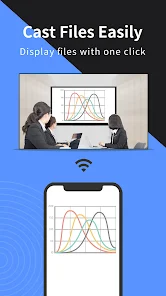
LetsView - Wireless Screen Cast is a versatile application designed to cater to a variety of screen mirroring needs. Whether you're a student wishing to display a presentation on a larger screen, a gamer eager to share your gameplay with friends, or a business professional conducting a virtual meeting, LetsView has got you covered. The app supports multiple platforms, including Android, iOS, Windows, and Mac, ensuring that users can connect their devices seamlessly. You can use it for educational purposes, streaming movies and videos, or even for sharing photos during family gatherings. The application is particularly beneficial in environments like classrooms or conference rooms, where displaying content on a larger screen can enhance engagement and interaction.

User Experience

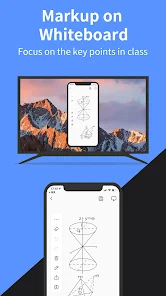
The user experience with LetsView is generally smooth and intuitive. The app's interface is user-friendly, allowing users to connect with just a few taps. Once the devices are connected, the mirroring process is straightforward, with minimal lag and high-quality resolution. Users have reported the ability to stream content without significant buffering, making it ideal for watching videos or playing games. Additionally, the app offers features such as screen recording and annotation tools, which further enhance its usability. However, some users have encountered occasional connectivity issues, particularly when multiple devices are connected to the same network. Overall, the app provides an efficient screen mirroring solution that meets the needs of various users.

Pricing

LetsView is available as a free application, making it accessible to a broad audience. The free version provides a robust array of features, including screen mirroring, recording, and annotation tools. However, like many free apps, it does come with advertisements, which some users may find intrusive. For those who prefer an ad-free experience, the app offers a premium version at a reasonable subscription price. The pricing is competitive compared to similar applications in the market, providing good value for those who utilize the app frequently. Overall, the pricing structure caters to both casual users and those who require advanced features.

Updates & Support

LetsView is regularly updated to enhance performance and introduce new features. The development team is responsive to user feedback, which leads to continuous improvements in the app's functionality. Users can easily access support through the app’s help section, which offers FAQs and troubleshooting tips. Additionally, the app often rolls out updates that address bugs and connectivity issues, ensuring a smoother user experience. While some users may wish for quicker response times from customer support, the overall commitment to enhancing the app is evident. With consistent updates and a focus on user satisfaction, LetsView remains a reliable choice for wireless screen casting.

verified Security & Privacy Review

LetsView - Wireless Screen Cast prioritizes user security and privacy through its design and operational practices. The app requires minimal permissions to function, primarily access to local network connections, which are essential for screen casting. This approach minimizes the potential vulnerabilities associated with overreaching permissions. The app does not require any personal information to use, which enhances user privacy. Users can cast their screens without creating an account or sharing sensitive data, thus reducing the risk of data breaches. Furthermore, the app employs encryption protocols during the screen casting process to safeguard the transmitted data from unauthorized access. However, users should be cautious when connecting to public Wi-Fi networks, as these can expose their devices to potential threats. LetsView advises using secure and trusted networks for optimal safety. Overall, while LetsView takes significant steps to protect user data and privacy, maintaining awareness of network security remains essential for users to fully benefit from the app's features.
Advertisement

Compare APP

User Reviews

  • Tommy Morris
    2024/09/08

    It is a Gamble on one phone, if it will work. On the other, I had to figured out a work around. If you are having trouble keeping it connected, try playing YouTube for a few minutes and then do what you wanted. If audio is an issue, try playing just some music or audio by itself for a minute. Other than that, it will sometimes just crash as soon as you start playing something. My current phone, does not like this app unfortunately.

  • Yael
    2020/11/27

    It's not perfect, but I was quite impressed on how well it worked. I mean, you really shouldn't be expecting too much when all you're using is Wi-Fi as your connection. I think most bad reviews are becasue of outdated or unoptimized hardware/software and not the program itself. It's actually pretty easy to use, my only problem being that it freezes sometimes. Pro tip: try to be close to your router/hotspot for a fairly better connection.

  • Angelina Farmer
    2024/03/04

    Works great and does what it claims. It also makes my android too hot to touch after using it and one other app for a literal 3 minutes. Most of the time I have to use the code to send my phone's screen to my laptop even though they are on the same network and see each other. The 2 stars is because of the heating my phone up issue which is a bit new. First few times it didn't heat up. No other app is running but my camera and was working so well I went Pro for 3 years on it. Now I'm scared 2 use

  • Melissa S
    2023/09/16

    App worked for me for a few weeks with only an occasional crash. More recently mirroring fails to connect every time I try. I've uninstalled and reinstalled the app on my laptop and Galaxy S10+, made sure I'm connected to the same wifi on both, and even tried a 2nd wifi at the office and nothing. Very frustrating. But it gives me the chance to instead try AirDrop Cast.

  • Chris X
    2026/06/08

    Been using LetsView for a while, and it's honestly one of the most convenient screen-mirroring tools I've tried. The connection between my phone and PC is smooth, and the image quality stays sharp even during long sessions. I use it for streaming, presentations, and sometimes gaming, and it rarely lags. The interface is clean and beginner-friendly, which makes setup quick. I also appreciate that it's free and doesn't bombard you with ads. Overall, LetsView is a reliable app with best outputs.

Review Source: Google Play store public user reviews.

FAQ

1

Does LetsView- Wireless Screen Cast collect my personal data?

LetsView- Wireless Screen Cast is designed to respect user privacy and does not collect personal data without consent. However, users are encouraged to review the privacy policy for complete details.

2

Does LetsView- Wireless Screen Cast offer a free trial or free version?

Yes, LetsView- Wireless Screen Cast offers a free version with basic features, allowing users to access the app's core functionalities without any cost.

3

Does LetsView- Wireless Screen Cast require an internet connection?

LetsView- Wireless Screen Cast does not require an internet connection for screen mirroring, as it utilizes a local Wi-Fi network to connect devices, making it suitable for offline use.

4

How can I contact support or send feedback for LetsView- Wireless Screen Cast?

You can contact support or send feedback for LetsView- Wireless Screen Cast through the app's help section, or by visiting the official website, where you can find contact forms and customer service options.

5

How do I manage or cancel my LetsView- Wireless Screen Cast subscription?

You can manage or cancel your LetsView- Wireless Screen Cast subscription through the app settings or the app store where you purchased the subscription, following the provided instructions for account management.

How to use LetsView- Wireless Screen Cast

1

How can I contact customer service for LetsView?

You can reach LetsView customer service through their official website or by emailing their support team directly. Check the "Contact Us" section for details.

2

How do I activate LetsView on my device?

To activate, simply download the app on both your casting and receiving devices, connect to the same Wi-Fi, and follow the on-screen instructions to start casting.

3

How do I find the customer number for LetsView?

The customer number can typically be found in the app settings or on the official website under support or help sections.

4

Is there a login required for LetsView?

No login is necessary to use LetsView; you can start casting right away without creating an account.

Editor's Choice