

Google LLC
 4.2
4.2 
Category: Photography

Price: free

Age Rating: Everyone

Rating: 4.2

Available on: /

Updated on: Jun 24, 2026

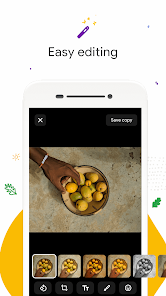
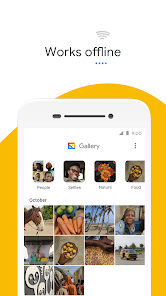
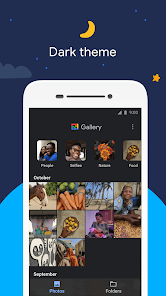

 Gallery Go is lightweight and fast for quick access to your photos. It works offline, allowing access without internet connectivity. Smart organization automatically sorts photos by date and location. User-friendly interface makes navigation simple and intuitive for everyone. Powerful editing tools enhance photos directly within the app.
 Limited editing features restrict advanced photo enhancements. Lacks support for certain file formats, causing accessibility issues. Offline functionality is minimal, requiring internet for full features.
  Google Play
  App Store


I use this app for work and now you've made it so I can't edit the brightness and contrast on my photos manually, I can only use your crumby "automatic filters" which make the colors on my paintings look awful. Come on man. And I also can no longer see edited photos when I try to share them on social media, I have to go into this app and share it, which makes it impossible to upload consecutive comic pages (my job.) I don't know how you can say you made "fixes" when it's worse in every way.
This app is kind of terrible but it's the only one I found that can organize my photos on my phone. Even though that is a sub par, I can't move my photos into folders when I bring up a photo, only when I'm looking at all the thumbs nails. so sometimes it's hard to tell with similar photos. And now my back button on the phone doesn't seem to work with the app it just closes the app wherever I'm at and goes to my home screen. I really have to research a new app.
Ehh it's OK... It would be so much better if every 2 to 6 weeks my favorites wouldn't get deleted. Without fail, every few weeks out of the blue, every single one of my favorites will be unfavorited. I have thousands of pictures saved for art, motivation, etc.. I favorite a couple hundred pictures that I'm currently working on or getting ready to work on. And like I said, every few weeks I'll go on to gallery, and my favorite tab will be completely empty. if not for this, I'd rate much higher.
would be so much better if you could at LEAST modify the view settings and have 5 rows rather than the default 4. I know it sounds trivial but some of us like things in a precise way. And the lack of customisation on this app lets it down. Also no option to turn the bin off or give you the option to permanently delete rather than sitting in the bin. it's great otherwise.
This app is almost perfect as a lightweight and simple gallery app, there are just two issues preventing me from giving it five stars: - Hitting the "back" button on my phone sends me straight home rather than to the previous screen (for example, if I'm viewing a photo, it sends me home rather than back to the gallery). I'm on a Google Pixel phone so I'd expect the integration to be flawless, but it just isn't there. - You can't exclude folders (e.g. I don't want my TV shows in my gallery).
Review Source: Google Play store public user reviews.
Yes, users can submit suggestions or feedback through the app’s support channels or by visiting the official website to share their thoughts.
Gallery Go respects user privacy and does not collect personal data; it focuses on local storage and management of photos.
Yes, Gallery Go can be used offline, allowing users to access and manage their photos without an internet connection.
Since Gallery Go is a free app and does not have a subscription model, there is no need to cancel anything. Users can simply uninstall the app if they choose not to use it anymore.
Gallery Go does not require a subscription, as it is a free app with no hidden fees or premium features that require payment.
Yes, you can activate your account by entering your customer number on the activation page.
Yes, you can change your login information in the account settings after logging in.
You can reach customer service by emailing support
If you didn't receive an activation email, check your spam folder. If it’s not there, please contact customer service for help.
To log in, visit our website, enter your email and password, then click the "Log In" button.
• Bug fixes and minor improvements

Picsart Photo & Video Editor
PhotoArt-Editor de fotos IA
Picsart: AI Photo Video Editor
Picsart AI Photo Editor, Video

AI Mirror-AI Art Photo Editor
AI Mirror: Hugs Video & Photo
AI Mirror: AI Photo & Video

Amazon Photos
Amazon Photos: Photo & Video

PixVerse: AI Video Generator

Gallery - Photo Gallery, Album

PhotoRoom Studio Photo Editor

 Home
Home  Apps
Apps  Games
Games  Topics
  About Us
  Cookies & Privacy Policy
  Terms of Service