This site uses cookies to enhance your user experience. By clicking any link on this site you are giving your consent to our cookie policy. Read more
Reject
Accept All

Advertiser and Editorial Disclosures

Forest: Focus for Productivity

Forest: Focus for Productivity

verified

Seekrtech

4.4
Rating
10,000,000+ Downloads
5.20.1 Version
  • category

    Category: Productivity

  • price

    Price: free

  • age rating

    Age Rating: Everyone

  • rating

    Rating: 4.4

  • available on

    Available on: /

  • updated on

    Updated on: Jul 6, 2026

Screenshot 1
Screenshot 2
Screenshot 3
Screenshot 4
Screenshot 5
Screenshot 6
Screenshot 7
Screenshot 8
Advertisement

Features & Highlights

Collaborative Features

Forest offers collaborative options that allow you to connect with friends or colleagues while working. You can plant trees together, making it a fun and engaging way to support each other in staying productive and accountable.

Daily Progress Tracking

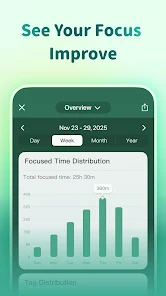
With daily progress tracking, you can easily visualize your productivity patterns and accomplishments. This feature allows you to reflect on your achievements, helping you identify peak focus times and areas for improvement in your work habits.

Focus Timer

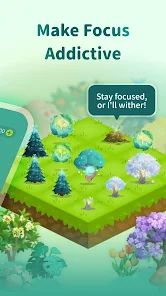
The built-in focus timer helps you stay on track by allowing you to set specific work intervals. As you concentrate, a virtual tree grows, motivating you to maintain your focus and avoid distractions, turning productivity into a rewarding experience.

Gamified Productivity

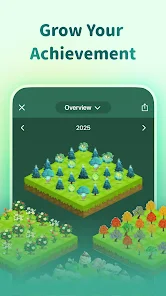
Forest turns productivity into a game, where each focused session grows a virtual forest. This unique approach not only makes staying focused enjoyable but also encourages users to build a beautiful forest over time, showcasing their dedication to productivity.

Advertisement

Pros & Cons

Pros
  • Enhances focus by gamifying productivity and minimizing distractions.
  • Encourages consistent work habits through visual progress tracking.
  • Promotes a healthy work-life balance by setting time limits.
  • Fosters a sense of achievement with virtual tree growth for tasks completed.
  • Integrates seamlessly with existing tools for effortless productivity management.
Cons
  • Limited integrations with other productivity tools can hinder workflow efficiency.
  • It may lack advanced features found in competitive productivity software.
  • Users might find the interface less intuitive, affecting overall usability.

Real Experience Using Forest: Focus for Productivity

Application Scenarios

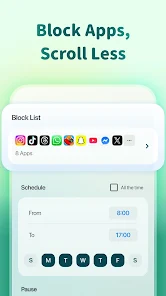
Forest: Focus for Productivity is ideal for a myriad of scenarios where concentration and time management are paramount. Whether you're a student preparing for exams, a professional working on a demanding project, or even a parent juggling multiple responsibilities, this app serves as a practical tool for enhancing focus. Users can set specific time intervals to work on tasks, during which a virtual tree grows. If the user leaves the app to check social media or other distractions, the tree dies, creating a compelling incentive to stay on task. The app is particularly beneficial when studying for long hours, working in an open office, or during creative brainstorming sessions. Furthermore, it can be effectively utilized during meetings, ensuring that participants remain engaged without the temptation of their smartphones. By promoting a structured work environment, Forest fosters a productive atmosphere wherever you are.

User Experience

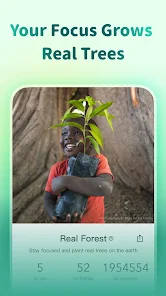
The user experience with Forest is both intuitive and rewarding. Upon launching the app, users are greeted with a clean and aesthetically pleasing interface. The simplicity of setting a timer and selecting the duration for focus sessions makes it accessible for everyone, regardless of tech-savviness. Gamification elements, such as growing trees and earning coins, add an enjoyable aspect to productivity. Users can also plant real trees through their earned virtual coins, bridging the gap between personal productivity and environmental impact. Notifications and reminders help keep users on track, while the statistics feature allows them to track their focus time over days, weeks, and months. This visual representation of progress not only encourages users to maintain their focus but also cultivates a sense of achievement.

Pricing

Forest operates on a freemium model, providing users with a basic version for free that includes essential features for time management and productivity. For those seeking a more enriched experience, a premium version is available through a one-time purchase or subscription. The premium features include additional tree species, customizable backgrounds, and advanced statistics, enhancing the overall user experience. Given the app's unique blend of productivity and environmental consciousness, many users find the premium options worth the investment. The pricing strategy makes it accessible for those who wish to enhance their focus without a significant financial commitment.

Updates & Support

Forest is consistently updated to improve functionality and user satisfaction. The developers actively listen to user feedback, incorporating new features and refining existing ones to enhance the overall experience. Regular updates ensure compatibility with the latest devices and operating systems, keeping the app running smoothly. Customer support is readily available through various channels, including email and social media, allowing users to resolve any issues promptly. The community surrounding Forest is also vibrant, with users sharing tips and encouraging one another, which adds to the overall positive experience. Such ongoing support and commitment to improvement underscore Forest's dedication to helping users achieve focus and productivity effectively.

verified Security & Privacy Review

Security & Privacy Review Forest: Focus for Productivity prioritizes user privacy and data security by implementing robust measures to safeguard personal information. The app collects minimal data, primarily required for functionality, such as user preferences and progress tracking. This information is stored securely and is not shared with third parties without explicit consent. The app requires permissions such as access to notifications to help users manage their focus sessions effectively. However, it does not request unnecessary access to sensitive data, which enhances user trust. Importantly, Forest employs encryption for data transmission, ensuring that user information remains protected against unauthorized access. Moreover, the developers are transparent about their privacy practices, providing a clear privacy policy that outlines data collection, usage, and retention. Users can delete their accounts and associated data at any time, reinforcing their control over personal information. Overall, Forest demonstrates a commitment to maintaining user privacy while delivering an effective productivity tool.
Advertisement

User Reviews

  • John Soria
    2025/04/21

    I bought the premium version because I love the idea of this app, but I keep getting a bug when trying to double my coins. also, the UX needs a lot of work. I have a lot of trees, and I don't know what they are unless I go back to the store. I also wish you could use this app when growing trees. And why can't we move trees around? That would double the fun. I also wish we could more easily see different tree stages. I could say more, but I'm near my character limit.

  • Tiffany King
    2025/02/26

    ok, so I've been using Forest for at least a year, if not longer. Would've absolutely given 5 stars and a glowing review up until a week or so ago, when they released the newest update to the app. Now, the app keeps crashing over and over and barely working. So, I did what is always recommended - uninstall and reinstall. NOW, I can't even log in and get all my stuff, despite having purchased the pro version ages ago. Not cool, guys.

  • J Ameoba-Tato-Tot
    2026/06/30

    Love the app, been using it for years for school and studying and other times I need to focus on a task. As someone with ADHD, it has helped immensely! I just wish the app didn't stop the timer randomly. I have it so the trees still grow when the app is closed, but I have had times I go to check on it and no longer growing. The worst is when it does it halfway through a 3 hour timer and I go to end it - expecting 4 trees - and then having to use coins to remove all the dead trees from it

  • Gunnar Middleton
    2026/05/27

    Loved it initially, but the constant premium upsells have pushed me to look for alternatives. I'm here to use your app, not be pestered into upgrading. If I'm sticking to free features, that's my choice. Respect it. If you actually care about user experience, add a "Do not ask me again" option for subscription prompts. It's a small fix that would go a long way.

  • Prerona (Sol)
    2026/05/26

    Love the concept of this app, especially how it blocks access to other apps, but it is pretty glitchy and often crashes in the middle of my focus sessions, and when that happens it doesn't register any of the focus time I was doing. Also I wish there was a way to plant real trees without getting premium, like if we could purchase a real tree with our coins or time crystals. I will keep using the app despite the bugs because it really is great for helping me focus.

Review Source: Google Play store public user reviews.

FAQ

1

Can I submit suggestions or feedback to Forest: Focus for Productivity?

Yes, users can submit suggestions or feedback directly through the app or by contacting the support team via their official website.

2

Does Forest: Focus for Productivity collect my personal data?

Forest: Focus for Productivity prioritizes user privacy and does not collect unnecessary personal data; it primarily collects information needed for functionality and app improvement.

3

Does Forest: Focus for Productivity support offline use?

Yes, Forest: Focus for Productivity can be used offline, allowing users to focus without needing an internet connection.

4

How do I cancel my Forest: Focus for Productivity subscription?

You can cancel your Forest: Focus for Productivity subscription through your app store account settings or by following the cancellation instructions provided within the app.

5

How much does a subscription to Forest: Focus for Productivity cost?

The subscription cost for Forest: Focus for Productivity varies based on the plan chosen, typically offering monthly and yearly options, with discounts often available for long-term subscriptions.

How to use Forest: Focus for Productivity

1

Can I change my customer number?

Unfortunately, customer numbers are automatically generated and cannot be changed. If you need further assistance, contact customer service.

2

Can I log in from multiple devices?

Yes, you can log in to your Forest account from multiple devices using the same credentials. Just ensure you're logged out from other devices if needed.

3

How can I activate my Forest account?

After signing up, check your email for an activation link and click it to activate your account.

4

How do I log in to my Forest account?

You can log in to your Forest account using your registered email and password on the app or website.

5

How do I update my email address for customer service communications?

You can update your email in your account settings, or contact customer service if you need assistance with the update.

What's New

This update includes fixes for known issues and general performance improvements to make your Forest experience more stable and smooth.

Editor's Choice