This site uses cookies to enhance your user experience. By clicking any link on this site you are giving your consent to our cookie policy. Read more
Reject
Accept All

Advertiser and Editorial Disclosures

Cleanup: Phone Storage Cleaner

Cleanup: Phone Storage Cleaner

verified

Deep Flow Apps

4.2
Rating
5,000,000+ Downloads
1.0.8 Version
  • category

    Category: Tools

  • price

    Price: free

  • age rating

    Age Rating: Everyone

  • rating

    Rating: 4.2

  • available on

    Available on: /

  • updated on

    Updated on: Jul 2, 2026

Screenshot 1
Screenshot 2
Screenshot 3
Screenshot 4
Screenshot 5
Screenshot 6
Screenshot 7
Screenshot 8
Screenshot 9
Screenshot 10
Screenshot 11
Screenshot 12
Screenshot 13
Screenshot 14
Screenshot 15
Advertisement

Features & Highlights

Large File Finder

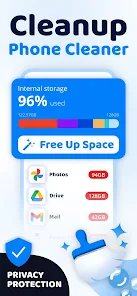
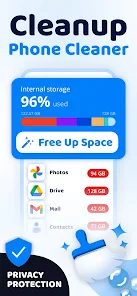
The Large File Finder feature helps you pinpoint the biggest files taking up space on your phone. By quickly scanning your storage, it provides a clear overview of the largest culprits, allowing you to make informed decisions about what to keep or remove. It's a great way to optimize storage without losing important content.

Photo Organizer

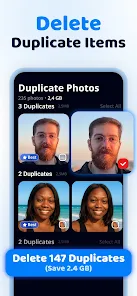
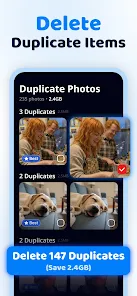
With Cleanup's Photo Organizer, you can effortlessly manage and declutter your photo library. The app allows you to find and delete duplicate images, blurry photos, and screenshots, making it easier to locate your favorite memories. Say goodbye to the chaotic photo gallery and hello to a more organized collection.

Real-Time Storage Monitoring

Cleanup offers real-time monitoring of your device’s storage, keeping you informed about how much space you have left. This proactive approach helps you manage your storage efficiently, alerting you when you're nearing capacity. Stay ahead of the game and avoid the frustration of running out of space when you need it most.

Smart Junk Removal

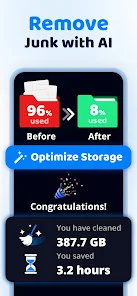
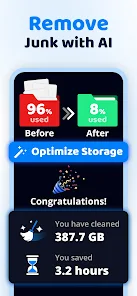
Cleanup intelligently identifies and removes unnecessary junk files, freeing up valuable storage space on your device. Its advanced algorithms work seamlessly in the background, ensuring your phone runs smoothly without the clutter that often accumulates over time. You'll be amazed at how much space you can recover with just a few taps.

Advertisement

Pros & Cons

Pros
  • Optimize your phone's storage
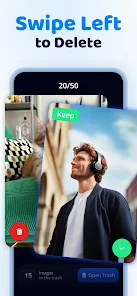
  • Easily delete unwanted files
  • Boost device performance quickly
  • User-friendly interface design
  • Schedule regular cleanups easily
Cons
  • Limited free features available
  • Aggressive ads can be intrusive
  • May slow down older devices
  • Inaccurate file detection issues

Real Experience Using Cleanup: Phone Storage Cleaner

Application Scenarios

Cleanup: Phone Storage Cleaner is designed for users who frequently find their devices running low on storage space. This app is particularly useful in scenarios where users download numerous apps, photos, or media files but fail to manage them efficiently. For instance, if you’re a photography enthusiast, you may take hundreds of pictures during a weekend trip, quickly filling up your phone’s storage. Cleanup helps identify and remove duplicate photos, blurry images, and unnecessary files, allowing you to reclaim valuable space. Additionally, it is invaluable for those who stream music and videos; by removing cached files and unused apps, users can optimize their device's performance while ensuring a smoother media consumption experience.

User Experience

The user experience with Cleanup is intuitive and straightforward. Upon launching the app, users are greeted with a clean interface that guides them through the cleaning process. The app offers one-tap cleaning options, which makes it accessible even for those who may not be tech-savvy. Users can view detailed analysis reports, highlighting the amount of space to be freed and the types of files that can be deleted, such as temp files, unused apps, and large downloads. Moreover, the app allows for customization, letting users choose what to delete and what to keep. The speed of the cleaning process is commendable, and most operations can be completed within moments, ensuring minimal disruption to the user’s daily routine.

Pricing

Cleanup: Phone Storage Cleaner offers a freemium model, providing basic features at no cost while offering premium services for a subscription fee. The free version is suitable for casual users who only need to perform occasional cleanups. However, for those seeking advanced features, such as automatic cleaning schedules and priority customer support, the premium subscription is reasonably priced. The premium option enhances the user experience by offering additional benefits, such as deeper system scans and ad-free access. Overall, the pricing structure is competitive, making it accessible for all users looking to optimize their device storage.

Updates & Support

The developers of Cleanup are committed to continuous improvement, regularly releasing updates that enhance functionality and address user feedback. Users can expect frequent updates that improve the app's performance and user interface, ensuring it stays up-to-date with the latest technology and user needs. The support system is robust, featuring a comprehensive FAQ section and responsive customer service. Users can quickly reach out for assistance through in-app support channels, ensuring that any issues or queries are addressed promptly. This level of support contributes significantly to the app's overall reliability and user satisfaction.

verified Security & Privacy Review

Security & Privacy Review Cleanup: Phone Storage Cleaner takes user privacy and data security seriously. The app does not require extensive permissions beyond what is necessary for its functionality. Users are only asked for access to storage, ensuring that the app can effectively identify and remove unnecessary files without infringing on personal data. The app follows industry-standard encryption protocols to safeguard any sensitive data processed during usage. Cleanup does not store or share personal user data with third parties, which reinforces its commitment to user privacy. Additionally, the app provides clear information regarding its data handling practices in the privacy policy, allowing users to make informed decisions about their data. Regular updates ensure that any potential security vulnerabilities are addressed promptly, contributing to an overall secure user experience. Users can confidently utilize Cleanup to optimize their phone storage without compromising their privacy or security.

Advertisement

User Reviews

  • Tracie Brantley
    2026/06/24

    THIS IS NOT A FREE APP! Don't advertise that it's free to draw people in to boost your download counts. Lying right off makes me automatically not trust you. And $10 per week is pretty expensive when I can do this myself....no thanks. I'm uninstalling especially when I cannot get past the page where you have to have my card #....yeah free for 7 days. Just be honest.

  • koda kilbury
    2026/06/28

    First thing, an $11 weekly subscription is insane... I used the apps free trial to clean up my phone and free up space, but even after deleting hundreds of files, photos, and videos, it didn't actually free up any storage on my phone. It still shows my phones storage is at 121gb out of 128gb. It seemingly helped me get rid of what I don't need, but somehow, it did not actually free up space.

  • Joauqin Espinoza
    2026/06/08

    I am a paying subscriber to this service, and unfortunately, the app completely fails at its core promise of storage management. I just spent a significant amount of time using the app's cleanup tools to delete hundreds of photos, videos, and duplicate files. Within the app, it showed that the files were successfully removed and that my storage was cleaned up. ​However, when I open my phone’s native gallery, absolutely nothing has changed.



  • Kerry Goodwin
    2026/06/03

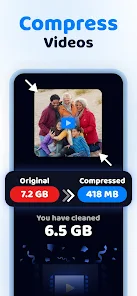
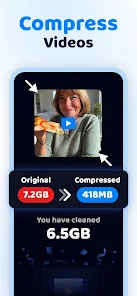
    While "compressing" videos, the Orignals are moved to your trash....sometimes...other times they don't. I had to compress the same videos over and over, and they still show the full video size, even though I moved the original to trash and emptied the trash. When you get back in the app, the original size video is back and needs to be compressed again. Then, others wouldn't even show up in trash after I told the app to delete them. It hasn't helped with any storage recovery.

  • Holly Harris
    2026/06/24

    this takes just as long as if you go through everything manually. the only part that was fast is the "duplicates" category. everything else takes forever to go through, and the pics/videos the app chose as being the "best one" was always the unedited ones. for $10 A WEEK it kinda sucks. Def not worth paying weekly.

Review Source: Google Play store public user reviews.

FAQ

1

Can Cleanup app recover deleted files?

No, Cleanup does not have the capability to recover deleted files. It is primarily focused on identifying and removing unnecessary files to optimize storage.

2

Can Cleanup help improve app loading times?

Yes, by freeing up storage space and removing unnecessary files, Cleanup can potentially improve app loading times and overall device responsiveness.

3

Can Cleanup help with battery life?

While Cleanup primarily focuses on storage optimization, indirectly, by removing unnecessary files, it may help improve battery life by allowing the device to operate more efficiently.

4

Can Cleanup identify duplicate files?

Yes, Cleanup includes features that allow it to scan for and identify duplicate files, giving users the option to delete them and free up additional space.

5

Can I customize what Cleanup removes?

Yes, Cleanup allows users to customize their cleaning preferences by selecting specific file types or categories they want to include or exclude from the cleaning process.

How to use Cleanup: Phone Storage Cleaner

1

How can I contact customer service for the Phone Storage Cleaner app?

You can reach customer service via the app's support section or email support

2

How do I activate the Phone Storage Cleaner app after installation?

After installing, open the app and follow the on-screen prompts to create an account or log in to activate it.

3

How do I log in to my account on the Phone Storage Cleaner app?

Open the app and tap "Log In" on the home screen, then enter your registered email and password.

4

Is there a customer number I can call for assistance with the app?

Currently, there is no customer service number; please use the email support option for inquiries.

What's New

We've improved overall app performance and fixed minor issues for a smoother experience.

Editor's Choice