This site uses cookies to enhance your user experience. By clicking any link on this site you are giving your consent to our cookie policy. Read more
Reject
Accept All

Advertiser and Editorial Disclosures

Bing: Chat with AI & GPT-4

Bing: Chat with AI & GPT-4

verified

Microsoft Corporation

4.6
Rating
100,000,000+ Downloads
32.7.440115006 Version
  • category

    Category: Tools

  • price

    Price: free

  • age rating

    Age Rating: Everyone

  • rating

    Rating: 4.6

  • available on

    Available on: /

  • updated on

    Updated on: Jul 3, 2026

Screenshot 1
Screenshot 2
Screenshot 3
Screenshot 4
Screenshot 5
Screenshot 6
Screenshot 7
Screenshot 8
Advertisement

Features & Highlights

Integrated News Feed

Stay up-to-date with the latest happenings through Bing's integrated news feed, which curates articles and updates from various sources based on your search queries. This feature allows you to easily access trending topics and important news without having to navigate away from your search results.

Personalized Recommendations

Bing offers personalized recommendations based on your search history and preferences, ensuring that you receive the most relevant results tailored to your interests. This feature enhances your browsing experience by anticipating your needs and helping you discover new content that resonates with you.

Smart Answers

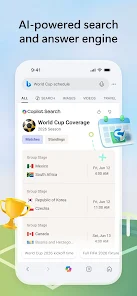
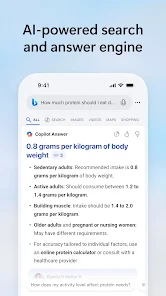
Bing Search provides smart answers directly on the results page, delivering concise information without the need for further clicks. Whether you're looking for quick facts, definitions, or summaries, smart answers enhance your search experience by offering immediate insights at your fingertips.

Visual Search

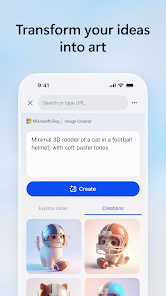
With Bing's Visual Search, you can search using images instead of text, making it easier to find visually similar items or gather information about an image's content. Just upload a photo or use your camera, and Bing will help you discover related visuals or products effortlessly.

Advertisement

Pros & Cons

Pros
  • Bing Search offers visually rich image and video results for better engagement.
  • Enjoy personalized search results tailored to your interests and browsing history.
  • Discover integrated answers with quick access to facts and information.
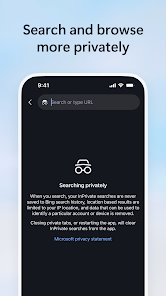
  • Benefit from robust privacy features that protect your search data.
  • Experience seamless integration with Microsoft products for enhanced productivity.
Cons
  • Limited search results compared to Google, affecting comprehensive research.
  • User interface can be less intuitive and cluttered.
  • Fewer integrations with third-party apps and services, limiting functionality.

Real Experience Using Bing: Chat with AI & GPT-4

Application Scenarios

Microsoft Bing Search is a versatile search engine that caters to a variety of user needs, from casual browsing to in-depth research. It serves well in academic settings where students and researchers can locate scholarly articles, studies, and citations. Professionals in various industries use Bing to find relevant news, market trends, and company information, making it a valuable tool in the business environment. Additionally, the app is equipped with features that enhance everyday tasks, such as finding local services, directions, and even recipes. Whether you’re planning a vacation, shopping online, or just looking for the latest information on a specific topic, Bing adapts to meet your specific requirements efficiently.

User Experience

The user experience on Microsoft Bing Search is polished and intuitive. The interface is user-friendly, with a clean design that allows users to navigate effortlessly. The search results are typically relevant and well-organized, featuring rich snippets that provide quick answers and insights. Users can also benefit from integrated features such as image search, video previews, and a news section that aggregates information from various sources. Furthermore, the personalized search experience, which considers previous searches and preferences, enhances the overall usability of the app. Whether you are a novice or an experienced user, Bing’s search capabilities make information retrieval both fast and enjoyable.

Pricing

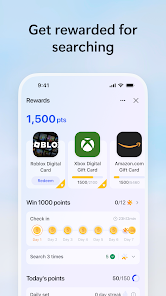
One of the most compelling aspects of Microsoft Bing Search is that it is completely free to use. There are no subscription fees or hidden costs associated with utilizing the app's search functionalities. This makes it accessible for all users, regardless of their financial situation. Users can take advantage of additional features, such as Bing Rewards, which allows them to earn points for searches that can be redeemed for gift cards and discounts. With no financial barriers, Bing encourages widespread use and exploration of its various features, making it a cost-effective choice for anyone seeking reliable information online.

Updates & Support

Microsoft consistently updates Bing Search to enhance functionality and user experience. Regular updates ensure that the search engine remains competitive, integrating the latest in AI technology and user feedback to improve search algorithms and results. Support is readily available through various channels, including a comprehensive help center, user forums, and direct customer service options. Users can report issues or provide feedback, ensuring that their voices are heard and contributing to the app's continuous improvement. Overall, Microsoft’s commitment to maintaining and enhancing Bing Search ensures that it remains a relevant and effective tool for users worldwide.

verified Security & Privacy Review

The Microsoft Bing Search app prioritizes user security and privacy through robust data handling practices. It employs encryption protocols to protect data transmitted between the app and Microsoft servers, ensuring that user queries and personal information are safeguarded from unauthorized access. In terms of permissions, the app requests access to location services to enhance search results based on the user's geographical context. However, users have the option to limit this access, maintaining control over their data. The app also clearly outlines its data collection practices in its privacy policy, which details how user information is used, including for personalized ads and improving search algorithms. Microsoft commits to transparency by providing users with tools to manage their privacy settings. Users can review and delete their search history, as well as opt out of targeted advertising. Overall, the Microsoft Bing Search app demonstrates a responsible approach to user data security and privacy, making it a trustworthy choice for those concerned about their online safety.
Advertisement

User Reviews

  • Bryce Hiebert
    2026/04/12

    I dont know what's going on with this app but a few months ago even on great wifi it has taken up to 10 minutes to load a simple search. I dont know if its all the forced AI or servers or what but its quite infuriating when I just need to look something quick up. Other browser apps work flawless with load time up to 10 seconds during high traffic. I've tried all solutions to get it to work with no avail. Bing has gone downhill, even without getting into points...

  • Lisa Rankin
    2026/06/25

    I like bing search and I use it mainly for my Microsoft rewards. The one thing I absolutely do not like is the saves. You can't organize your bookmarks so you just have to go up and down till you find the one you was wanting to use. That's very aggravating and time consuming. Also you cannot share images without downloading them. So if you're not a bookmark or image sharing kind of person this app is probably for you!!

  • Kelly W.
    2026/04/20

    The app is sooooo glitchy! I enjoy using the app when it's actually working well, but that's becoming a rare occurrence. I've uninstalled and reinstalled to see if that would help, but now, when I try to sign back in, all I'm getting is that annoying spinning blue circle! I'll probably uninstall it permanently, at this point. Not worth the hassle.

  • Ashley L.
    2026/03/09

    How are you out DIGITAL gift cards for "large Online Retailer"? Never mind all the errors and the points being nerfed. Honestly it isn't as infuriating as the searches they have you do to earn more points (which, btw, don't even register all the time). It looks like the "unavailable" stock has been an issue for months. I just didn't notice until recently. It's okay beyond that.

  • Praveen Potturu
    2026/02/16

    When I previously searched for something and left the tab open (it is default when you use back gesture to close the app), the next time you open, it goes into those search results by default. But when it does that, it doesn't switch to that old tab but instead it opens a new tab with the same page. If you keep doing that a million times, you will endup with a million of those tabs pointing to same search results. It is a junk app. Microsoft is busy adding AI rather than fixing issues.

Review Source: Google Play store public user reviews.

FAQ

1

Can I submit suggestions or feedback to Microsoft Bing Search?

Yes, users can submit suggestions or feedback through the app or by visiting the Microsoft support website to enhance their experience with Bing Search.

2

Does Microsoft Bing Search collect my personal data?

Yes, Microsoft Bing Search may collect personal data to improve user experience and provide personalized search results, but users can manage their privacy settings.

3

Does Microsoft Bing Search support offline use?

The Microsoft Bing Search app primarily requires an internet connection to function, and offline capabilities are limited.

4

How do I cancel my Microsoft Bing Search subscription?

Since Microsoft Bing Search is free, there is no subscription to cancel; however, users can manage their accounts and settings through the Microsoft account portal for any linked services.

5

How much does a subscription to Microsoft Bing Search cost?

Microsoft Bing Search itself does not have a subscription cost, as it is a free app; however, certain premium features may be available through other Microsoft services.

How to use Bing: Chat with AI & GPT-4

1

Can I access my Bing account without my customer number?

Yes, you can log in using your email and password without needing your customer number.

2

How can I activate my Bing account?

To activate your Bing account, follow the instructions sent to your email upon registration.

3

How can I contact customer service for help with my Bing account?

You can reach Bing customer service through the help section on their website for assistance.

4

How do I activate my Bing rewards account?

To activate your Bing rewards account, log in and follow the activation prompts in your account settings.

5

I forgot my customer number; how can I retrieve it?

You can retrieve your customer number by logging into your account settings or contacting customer support for help.

What's New

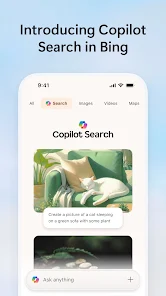
Introducing Copilot Search in Bing. A new way to search that delivers fast, intelligently curated answers and makes it easier than ever to discover more.

Editor's Choice