This site uses cookies to enhance your user experience. By clicking any link on this site you are giving your consent to our cookie policy. Read more
Reject
Accept All

Advertiser and Editorial Disclosures

Auto Clicker - Automatic tap

Auto Clicker - Automatic tap

verified

True Developers Studio

4.6
Rating
100,000,000+ Downloads
2.3.0 Version
  • category

    Category: Tools

  • price

    Price: free

  • age rating

    Age Rating: Everyone

  • rating

    Rating: 4.6

  • available on

    Available on: /

  • updated on

    Updated on: Sep 26, 2025

Screenshot 1
Screenshot 2
Screenshot 3
Screenshot 4
Screenshot 5
Screenshot 6
Advertisement

Features & Highlights

Customizable Click Intervals

The app offers customizable click intervals that let you set the exact speed and frequency of taps according to your needs. Whether you need rapid clicks for gaming or slower options for other tasks, this flexibility ensures you can optimize your experience for maximum efficiency.

Multi-Scenario Support

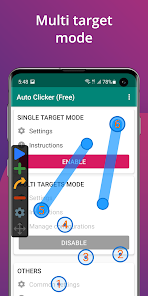
This app supports multiple scenarios, enabling you to save different tap configurations for various tasks. Whether you’re gaming, browsing, or testing apps, you can switch between setups with ease, making it a versatile tool for countless applications.

One-Tap Functionality

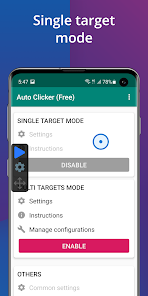
With Auto Clicker's one-tap functionality, users can effortlessly automate repetitive tasks with just a single tap. This feature allows for seamless interaction with apps and games, reducing the strain on your fingers and saving valuable time on monotonous tasks.

User-Friendly Interface

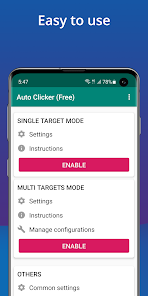
Auto Clicker features a clean, intuitive interface that makes it easy for anyone to get started. You don’t need to be tech-savvy to navigate through the options, allowing users of all skill levels to quickly set up their desired automation without hassle.

Advertisement

Pros & Cons

Pros
  • Increases productivity by automating repetitive clicking tasks.
  • Saves time and effort, allowing focus on more important activities.
  • Customizable settings enhance user experience and flexibility.
  • Reduces strain on hands and fingers, promoting better ergonomics.
  • Compatible with various applications, making it versatile for different needs.
Cons
  • Auto Clicker Apps can lead to account bans in online games.
  • They may cause unintended actions, disrupting your workflow.
  • Excessive use can promote laziness and reduce manual skills.

Real Experience Using Auto Clicker - Automatic tap

Application Scenarios

The Auto Clicker - Automatic Tap app is designed to streamline repetitive tasks across various applications, making it an essential tool for users who frequently engage in activities that require constant tapping. Whether you're playing mobile games that demand repetitive clicking, automating mundane tasks like scrolling through social media feeds, or even filling out forms, this app proves its versatility. Gamers often find it particularly helpful in titles that require grinding for resources or leveling up characters, as it can significantly reduce the time and effort needed to achieve in-game objectives. Moreover, users looking to enhance productivity in work-related tasks, such as data entry or survey completion, can also benefit from its automated tapping feature. Overall, the app caters to a wide range of scenarios, making it a valuable asset for both casual users and dedicated gamers.

User Experience

User experience with the Auto Clicker app is generally positive, owing to its intuitive interface and user-friendly design. Upon installation, users are greeted with a straightforward setup process that allows them to customize the tapping speed, duration, and location with ease. The app provides a preview of the tapping actions, ensuring that users can make adjustments before commencing automation. Users appreciate the reliability of the app, as it performs its tasks without glitches or crashes. The ability to create multiple profiles for different applications enhances its functionality, allowing users to switch between various tasks seamlessly. Additionally, the app's accessibility features, such as adjustable tap intervals, cater to users with different needs and preferences, making it suitable for a diverse audience.

Pricing

Updates & Support The developers of Auto Clicker - Automatic Tap are committed to providing regular updates that enhance functionality and address any emerging issues. Users can expect periodic enhancements that improve the app's performance and compatibility with the latest operating system updates. Additionally, the app includes a comprehensive support section that offers FAQs and troubleshooting guides, helping users resolve common issues independently. For more complex queries, users can reach out to customer support through the app, ensuring that assistance is readily available. This dedication to updates and customer support fosters a sense of trust and reliability, making the Auto Clicker app a dependable choice for users seeking automation solutions.

verified Security & Privacy Review

The Auto Clicker - Automatic Tap app prioritizes user security and privacy by implementing a range of best practices. It requires minimal permissions, primarily focusing on accessibility features necessary for its core functionality. Users are advised to review the permission requests during installation, ensuring they align with their privacy preferences. The app does not collect personal data or sensitive information from users, which significantly reduces the risk of data breaches. Furthermore, it operates offline for most of its features, enhancing user privacy by limiting data transmission over the internet. However, users are encouraged to remain vigilant and utilize the app in accordance with their device security settings. Transparency is key, and the developers maintain a clear privacy policy that outlines data handling practices. Regular updates ensure that any potential security vulnerabilities are addressed promptly. Overall, Auto Clicker - Automatic Tap demonstrates a strong commitment to safeguarding user privacy while delivering its automation services effectively.
Advertisement

User Reviews

  • Cristo Flores
    2026/06/04

    This app is the best because it's fast and it's not to complicated. Just accept their accessibility access and enable the clicker. One thing that happened to me is that I was using it on a game when it turned off and I couldn't disable it so It just started clicking stuff until I had to restart my phone that took like 3 minutes to do. But it could be because I was playing with the clicker for almost 4 hours while actively playing in it.

  • Tyler Hoehnen (Shogun)
    2026/06/17

    perfect app for games that require constant tapping for game prgression without having to be at the phone constantly. Add however many you want and how often it taps then click play and watch it go. You can set it as low as 1ms per clicks and you can have a LOT going at once. Not sure the max amount of click areas you can add but its A LOT. AND THATS JUST THE FREE VERSION. The only ads I've seen are when adjusting settings within the app. Each spot can have its own click rate too. DRAINS BATTERY

  • Devante Weary
    2025/10/20

    Used it a few years ago to do battle pass stuff in a game and it worked. Using it years later in 2025 and it's... just the same as always. Perfect. You can make simple loops or you can do complex series of gestures. Once you figure out how to set clicks up, it's ezpz. YOu can save profiles so if you have different games, instantly load up the "macro" you want. There's nothing this can't do except maybe multi-touch.

  • TheKrazyKrow TTV (On Twitch & YT)
    2023/05/30

    Dude. It's free, I haven't even seen an ad after days of relentless use, and take note of that... relentless use. It does exactly what I want it to. I do have one suggestion. For multi-target use, maybe allow us options to alternate the automated clicks or give them different timings, as when I go to use that feature, it just ends up resizing the screen or making it jump around. Other than that though, SPOT ON and I appreciate you for giving us this! Thanks!

  • A Google user
    2020/02/27

    App does what it's supposed to. But it also does things that I wish it didn't. When auto clicker isn't in play mode, it still keeps my phone in awake mode. making my battery drain way faster. I have to force close. When app is in play mode and I get a txt or a notification, the clicker freezes and I have to restart it up again to keep going. Also I wish the controls were smaller, the controls get in the way. A feature to make the app shut down after the user set interval should be considered.

Review Source: Google Play store public user reviews.

FAQ

1

Can I submit suggestions or feedback to Auto Clicker - Automatic tap?

Yes, users can submit suggestions or feedback through the app's support section or contact information provided within the app.

2

Does Auto Clicker - Automatic tap collect my personal data?

Auto Clicker - Automatic tap is designed with user privacy in mind and does not collect personal data without user consent.

3

Does Auto Clicker - Automatic tap support offline use?

Yes, Auto Clicker - Automatic tap can be used offline, as it does not require an internet connection to perform its functions once downloaded.

4

How do I cancel my Auto Clicker - Automatic tap subscription?

You can cancel your subscription through the app store where you purchased it, following the cancellation instructions provided by that platform.

5

How much does a subscription to Auto Clicker - Automatic tap cost?

The subscription costs may vary, but typically there are options for monthly and yearly plans to access premium features. Please check the app for the most current pricing.

How to use Auto Clicker - Automatic tap

1

Can I log in from multiple devices?

Yes, you can log in from multiple devices using the same credentials, but ensure you log out from devices you no longer use.

2

How can I retrieve my password if I can’t log in?

Click on "Forgot Password" on the login page and follow the instructions to reset it. If needed, contact customer service for help.

3

How do I activate my Auto Clicker account?

To activate your account, follow the link sent to your email during registration. If you didn't receive it, check your spam folder or contact customer service.

4

How do I contact customer service for Auto Clicker?

You can reach our customer service team via the contact form on our website or through the support email provided in your account settings.

5

How do I update my customer information?

You can update your customer information by logging into your account and navigating to the settings section.

Editor's Choice