This site uses cookies to enhance your user experience. By clicking any link on this site you are giving your consent to our cookie policy. Read more
Reject
Accept All

Advertiser and Editorial Disclosures

YNAB

YNAB

verified

ynab.com

4.6
Rating
1,000,000+ Downloads
26.24.1 Version
  • category

    Category: Finance

  • price

    Price: free

  • age rating

    Age Rating: Everyone

  • rating

    Rating: 4.6

  • available on

    Available on: /

  • updated on

    Updated on: Jun 30, 2026

Screenshot 1
Screenshot 2
Screenshot 3
Screenshot 4
Screenshot 5
Screenshot 6
Screenshot 7
Advertisement

Features & Highlights

Cross-Device Syncing

YNAB seamlessly syncs across all your devices, so you can access your budget anytime, anywhere. Whether you're at home or on the go, this feature ensures you can always stay updated with your finances and make adjustments as needed.

Detailed Reporting

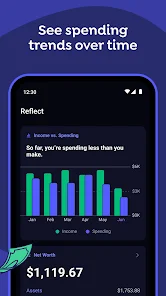
YNAB offers robust reporting tools that allow you to analyze your spending patterns over time. By visualizing your financial data, you can identify trends, make informed adjustments, and ultimately gain deeper insights into your financial health and habits.

Goal Tracking

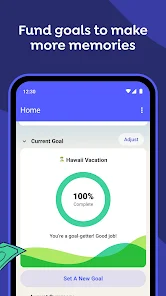
With YNAB, you can set specific financial goals and track your progress towards achieving them. Whether you're saving for a vacation, paying off debt, or building an emergency fund, this feature provides a clear pathway and motivation to reach your milestones.

Real-Time Budgeting

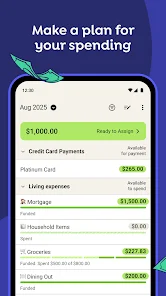
YNAB allows you to create a budget that updates in real-time, giving you immediate insights into your spending habits. This feature helps you stay on top of your financial goals, adjusting as you make purchases or receive income, ensuring you're always in control of your money.

Advertisement

Pros & Cons

Pros
  • YNAB promotes proactive budgeting, helping you plan for future expenses effectively.
  • It enhances financial awareness, allowing you to track spending easily.
  • The app encourages saving, ensuring you have funds for unexpected costs.
  • YNAB fosters better financial habits, leading to long-term money management success.
  • Accessible across devices, it allows seamless budgeting anytime, anywhere.
Cons
  • YNAB can be complex for new users to grasp quickly.
  • Monthly subscription fees may deter budget-conscious users.
  • Limited automation features require more manual input and tracking.

Real Experience Using YNAB

Real Experience Application Scenarios

YNAB (You Need A Budget) is designed for a variety of budgeting scenarios, making it a versatile tool for users looking to take control of their finances. Whether you are a college student managing limited funds, a young professional saving for a down payment, or a family planning for a vacation, YNAB provides tailored solutions to fit your needs. Users can create specific budgets for different categories, track expenses in real-time, and adjust their plans as their financial situations evolve. Additionally, YNAB facilitates goal-setting, allowing users to allocate funds toward savings goals, debt repayment, or even holiday spending. Its flexibility makes it suitable for anyone seeking to implement a structured approach to managing their finances.

User Experience

The user experience with YNAB is largely positive, thanks to its intuitive interface and robust features. Upon signing up, users are greeted with a clean dashboard that provides an overview of their financial health. The app encourages proactive financial management with its unique "give every dollar a job" philosophy, prompting users to assign every dollar to a specific category or goal. This approach fosters discipline and awareness of spending habits. Users appreciate the seamless syncing with bank accounts, which simplifies the tracking of transactions. Additionally, the mobile app is user-friendly, allowing users to enter expenses on the go. However, some users may find the learning curve steep at first, as it requires a shift in how they think about budgeting.

Pricing

YNAB operates on a subscription-based model, offering a free trial for the first 34 days, which allows potential users to explore the app without any commitment. After the trial period, users can choose to continue with a monthly or annual subscription. The pricing is competitive, especially when considering the potential savings it can generate by helping users manage their budgets effectively. While some may hesitate at the cost, many users find the return on investment to be worthwhile, as it often leads to improved financial stability and reduced stress related to money management.

Updates & Support

YNAB is known for its regular updates and commitment to user feedback, ensuring that the app evolves with the changing needs of its user base. The development team frequently adds new features and enhancements, keeping the app fresh and relevant. In terms of support, YNAB offers a wealth of resources, including detailed tutorials, webinars, and an active online community where users can share tips and strategies. For those needing immediate assistance, customer support is responsive and available through various channels, making it easy to resolve issues or get guidance when needed. Overall, the combination of consistent updates and robust support makes YNAB a reliable choice for anyone serious about budgeting.

verified Security & Privacy Review

Security & Privacy Review YNAB (You Need A Budget) takes user security and privacy seriously, employing robust measures to protect sensitive financial information. The app utilizes bank-level encryption to safeguard data during transmission and storage, ensuring that users' financial details remain secure. In terms of privacy practices, YNAB adheres to strict data handling protocols. User data is not sold to third parties, and the app emphasizes transparency in its data usage policies. Users can easily access and manage their privacy settings, allowing for customization of what information is shared. Regarding permissions, YNAB requires access to users' bank accounts for budgeting purposes. However, it implements read-only access, meaning that the app cannot make transactions or alter account settings. This minimizes potential risks while still providing the necessary functionality for effective budgeting. Overall, YNAB demonstrates a commitment to maintaining user privacy and data security, making it a trustworthy choice for individuals looking to manage their finances effectively.
Advertisement

User Reviews

  • Alexis Holloman
    2026/06/27

    it is definitely a learning curve, I feel like if there were tutorial videos to walk you through how to use the app it would be easier for alot more people. I worked in accounting so I was able to figure it out pretty quick because their setup reminded me of Quickbooks. I manually add in income & our bills & our purchases ect. I havent tried adding my bank just because I prefer to enter them myself. I do love this app it has helped me keep track of what we are spending our money on & budgeting.

  • Brock Belmonte
    2026/06/22

    I'm updating my review once again. previously it went from 5 stars to 2 stars. We are now unfortunately down to 1 star. My last review mentioned the home page feeling like an ad even though this is a paid service and there are no tiers in aware of. The team responded telling me that was educational content and not ads. This morning as I logged in to start budgeting I had an actual pop up ad to order their new book. I guess the price increases were not enough, ads are now in the platform too.

  • Adarsh Kuruppath
    2026/05/20

    This app is incredible. Its honestly a slightly bigger learning curve than other apps, simply because the concept of assigning money is a bit non-intuitive, but once you get the hang of it its amazing! This really works as advertised. It really does make you feel less guilty about spending, and Im saving a lot more money now! I will be honest I used ChatGPT for 1 month to guide me through how to use YNAB, because I didnt get it at first, but after that its been really smooth.

  • Scot Mayer
    2026/02/27

    paid for the subscription so I could link my accounts automatically, but they rarely / never work. Im constantly resetting them or adding transactions manually. I want to like it but overall its very frustrating. I reached out via the live chat and the customer service rep said I'd just have to enter my bank transactions manually. Then I had a one on one consult, which was very helpful with learning some of the ins and outs. but the bank connections still don't work at all.

  • Scott Mason
    2026/03/03

    Not very automatic. I read that this was a great app for bi-weekly budgets, from multiple forums and reviews. With that I expected that I could put in my pay dates, and my monthly bills, and it would automatically allocate my bills for that pay period. It does now. It still does it for the month and you constantly have to manual make adjustments and assign transactions. There's hardly any automation for a biweekly budget.

Review Source: Google Play store public user reviews.

FAQ

1

Can I submit suggestions or feedback to YNAB (You Need A Budget)?

Yes, YNAB encourages users to submit suggestions and feedback through their website or community forums to improve the app and user experience.

2

Does YNAB (You Need A Budget) collect my personal data?

YNAB prioritizes user privacy and does not sell personal data. They collect only necessary information to provide their services, complying with privacy regulations.

3

Does YNAB (You Need A Budget) support offline use?

YNAB requires an internet connection for full functionality, but users can access some features offline through the mobile app and sync their data once they are back online.

4

How do I cancel my YNAB (You Need A Budget) subscription?

Users can cancel their YNAB subscription through their account settings on the YNAB website or mobile app, following the provided instructions.

5

How much does a subscription to YNAB (You Need A Budget) cost?

A subscription to YNAB typically costs $14.99 per month or $98.99 per year, with occasional discounts or promotions available.

How to use YNAB

1

Can I change my Customer Number if needed?

Unfortunately, Customer Numbers cannot be changed. If you have concerns, please contact Customer Service for assistance.

2

Can I change the email associated with my Customer Number?

Yes, you can change your email in your account settings after logging in. If you need help, contact Customer Service.

3

How can I contact Customer Service for help with my YNAB account?

You can reach our Customer Service via the help section on our website or by emailing support

4

How can I get support if I have issues activating my YNAB account?

If you're having trouble activating your account, please reach out to Customer Service for help via email or the YNAB help center.

5

I forgot my Customer Number; how can I retrieve it?

You can find your Customer Number in the YNAB app under account settings or your email confirmation when you signed up.

What's New

We’ve squashed some bugs and made a few improvements to make it easier than ever to get good at money.If your bank connection runs into trouble and a reset is the fix, we'll now prompt you to do it right in the app.

Editor's Choice