This site uses cookies to enhance your user experience. By clicking any link on this site you are giving your consent to our cookie policy. Read more
Reject
Accept All

Advertiser and Editorial Disclosures

Woodforest Mobile Banking

Woodforest Mobile Banking

verified

Woodforest National Bank

4.8
Rating
1,000,000+ Downloads
26.05.04 Version
  • category

    Category: Finance

  • price

    Price: free

  • age rating

    Age Rating: Everyone

  • rating

    Rating: 4.8

  • available on

    Available on: /

  • updated on

    Updated on: Apr 29, 2026

Screenshot 1
Screenshot 2
Screenshot 3
Screenshot 4
Screenshot 5
Screenshot 6
Screenshot 7
Screenshot 8
Advertisement

Features & Highlights

Account Management

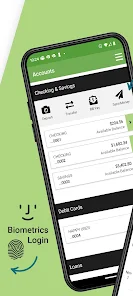
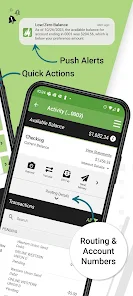
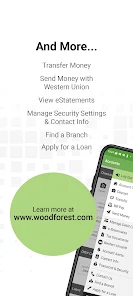
Stay on top of your finances with intuitive account management features. The app allows you to view balances, transaction history, and even set up alerts for important activities, making it easier to track your spending and stay organized.

Bill Pay Convenience

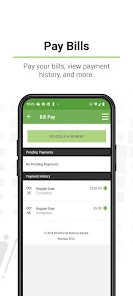
Pay your bills with just a few taps using the Woodforest Mobile Banking app. You can set up one-time or recurring payments, ensuring you never miss a due date while saving time and effort in managing your monthly expenses.

Mobile Check Deposit

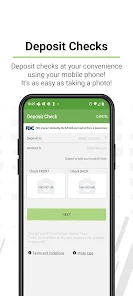
Easily deposit checks from the comfort of your home with the Woodforest Mobile Banking app. Simply snap a photo of your check, and the funds will be available quickly, allowing you to manage your finances without the hassle of visiting a branch.

Secure Messaging

Communicate securely with Woodforest representatives through the app's messaging feature. Whether you have questions or need assistance, you can chat directly with customer service in a safe environment, ensuring your inquiries are handled promptly and confidentially.

Advertisement

Pros & Cons

Pros
  • Access your account anytime, anywhere with ease
  • Secure transactions protect your personal information
  • Deposit checks quickly using your mobile camera
  • Track spending and manage budgets effortlessly
  • Instant alerts keep you informed on account activity
Cons
  • Limited features compared to traditional banking methods
  • Occasional app stability issues reported by users
  • Customer service response times can be slow
  • Requires reliable internet access for functionality

Real Experience Using Woodforest Mobile Banking

Application Scenarios

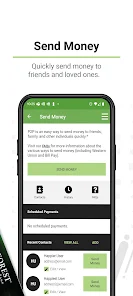
The Woodforest Mobile Banking app is designed to accommodate a variety of banking needs, making it an essential tool for both personal and small business banking. Users can conveniently manage their finances while on the go, allowing for seamless transactions whether at home, at work, or during travel. From checking account balances to transferring funds between accounts, the app streamlines the banking experience. Additionally, users can deposit checks simply by taking a photo, which is particularly useful for those who might not have time to visit a physical branch. The app also offers features tailored for small business owners, such as tracking expenses and managing payroll, providing a comprehensive solution in one platform.

User Experience

The user interface of the Woodforest Mobile Banking app is intuitively designed, making navigation straightforward for users of all ages. Upon logging in, users are greeted with a clean dashboard that displays key account information, including balances and recent transactions. The app's responsiveness is commendable, with minimal loading times and smooth transitions between features. Users have noted the convenience of setting up alerts for transactions and low balances, which enhances financial management. However, some users have mentioned occasional glitches, particularly during high-traffic periods. Overall, the app prioritizes user experience, with a focus on ease of use, security, and efficiency.

Pricing

Woodforest Mobile Banking is free to download and use, which is a significant advantage for customers looking for a cost-effective banking solution. There are no monthly maintenance fees associated with the app itself, although standard banking fees may apply depending on the user's account type and transactions. For instance, certain services, such as wire transfers or overdraft protection, may incur additional charges. It's important for users to review their account agreements to understand any applicable fees. Overall, the app provides excellent value, especially when considering its extensive features and user-friendly design.

Updates & Support

The Woodforest Mobile Banking app receives regular updates to ensure optimal performance and security. These updates often include new features, bug fixes, and enhancements based on user feedback. The customer support team is responsive and available through multiple channels, including phone and email. Users have reported positive experiences with the support staff, who are knowledgeable and eager to resolve issues. Additionally, the app includes a comprehensive FAQ section, which addresses common concerns and helps users navigate features effectively. Staying updated with the latest version of the app is recommended to take full advantage of its capabilities and improvements.

verified Security & Privacy Review

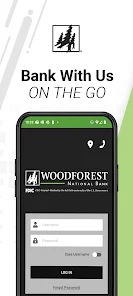
Woodforest Mobile Banking prioritizes security and privacy, implementing robust measures to safeguard user data. The app utilizes advanced encryption protocols to protect sensitive information during transmission, ensuring that personal and financial details remain confidential. Additionally, the app incorporates biometric authentication, such as fingerprint and facial recognition, providing an extra layer of security for user accounts. In terms of privacy practices, Woodforest adheres to stringent guidelines and regulations to protect user data. The app clearly outlines its privacy policy, detailing how user information is collected, used, and shared. Users can rest assured that their data will not be sold or shared with third parties without explicit consent. Regarding permissions, Woodforest Mobile Banking requests only essential access to device features, such as camera and location services, to enhance user experience. Users have the ability to manage permissions, ensuring control over what data is shared. Overall, Woodforest Mobile Banking demonstrates a strong commitment to protecting user security and privacy, making it a reliable choice for mobile banking needs.
Advertisement

Compare APP

User Reviews

  • Dawn Wadsworth
    2026/03/02

    I have banked at many different institutions and locations all over this country for 60 years). I changed banks after a move, mostly for logistical reasons (convenience of being at the center of where I work, live & shop), but I'm so glad I chose Woodforest. I have had this account for 6 years, and I have absolutely loved it. The customer service is exceptional, both in person at my local branch, and over the toll-free number. I would (and have!!) recommend this bank to anyone!

  • Sharon Thorpe
    2021/10/01

    Can't access my account. Get a message saying...System error An unhandled exception has occurred. Or.... An unexpected connection error has occurred. Please try again later. Tried calling Woodforest, entered my account # as requested and that was it, wouldn't go any further. Called back over and over just kept getting a fast busy signal. Not the 1st, 2nd or 3rd time this has happened. I need to know my account balance so I can pay my bills!!!!

  • Harbinger Collins
    2020/07/07

    I've been with Woodforest Bank for the last 8 years and I've never had any problem using the Woodforest Mobile Banking app. Until the beginning of this week, the app would constantly crash, I couldn't even open it anymore. I'm unable to check my bank account anymore I have to do it through a computer. I hope this is fix very soon, this is very inconvenient. *Update* After a week of installing and reinstalling,the app is finally working again. I'll change the star rating of it continues to work.

  • Shannon G
    2020/12/26

    I've been using (or trying to use) this app for over a year now. I have the most recent update (and always do), but 9 out of 10 times opening the app results in the spinning circle of death that never stops. Closing and restarting doesn't usually work. Restarting my phone doesn't either. My husband (same exact phone, service, and app updates) almost never has this problem. All other apps work fine.

  • David Masteller
    2024/10/03

    I would give the app a higher rating if they would ever fix the issue with the balance not updating when a new transaction occurs while you have the app open and signed in. I always have to sign out and back in to the app to get the balance to update. I've emailed them three different times about it over the course of about a year and a half. Hasn't been fixed yet. Seems like it should be a relatively simple fix.

Review Source: Google Play store public user reviews.

FAQ

1

Does Woodforest Mobile Banking collect my personal data?

Yes, Woodforest Mobile Banking collects certain personal data to provide services and enhance user experience, but it adheres to privacy policies to protect your information.

2

Does Woodforest Mobile Banking offer a free trial or free version?

Woodforest Mobile Banking is free to download and use for all Woodforest Bank customers, with no trial period or subscription fee required.

3

Does Woodforest Mobile Banking require an internet connection?

Yes, Woodforest Mobile Banking requires an internet connection to access your accounts and use its features.

4

How can I contact support or send feedback for Woodforest Mobile Banking?

You can contact Woodforest Mobile Banking support through the app, by visiting their official website, or by calling their customer service hotline for assistance and feedback.

5

How do I manage or cancel my Woodforest Mobile Banking subscription?

Since there are no subscriptions or fees associated with Woodforest Mobile Banking, there is no cancellation process; you can simply stop using the app at any time.

How to use Woodforest Mobile Banking

1

How do I activate the Woodforest Mobile Banking app?

Download the app, then follow the prompts to enter your account information and create a password for activation.

2

How do I contact Customer Service for the Woodforest Mobile Banking app?

You can contact Woodforest Customer Service at 1-877-968-7962 for assistance with your mobile banking needs.

3

How do I log in to the Woodforest Mobile Banking app?

Open the app, enter your username and password, then tap "Log In" to access your account.

4

What is the Customer Number for Woodforest Mobile Banking?

Your Customer Number is typically your account number; if you need help, contact Customer Service.

What's New

Thank you for using the Woodforest Mobile App! This version includes minor enhancements and bug fixes.Communicate with us:Woodforest monitors and responds to app reviews regarding any issues to ensure the best possible app experience for you. Please let us know how we can help make your mobile banking experience a great one by sending us an email at [email protected] you for your continued feedback!

Editor's Choice