This site uses cookies to enhance your user experience. By clicking any link on this site you are giving your consent to our cookie policy. Read more
Reject
Accept All

Advertiser and Editorial Disclosures

Walgreens

Walgreens

verified

Walgreens Co

4.6
Rating
10,000,000+ Downloads
114.0 Version
  • category

    Category: Shopping

  • price

    Price: free

  • age rating

    Age Rating: Everyone

  • rating

    Rating: 4.6

  • available on

    Available on: /

  • updated on

    Updated on: Jun 17, 2026

Screenshot 1
Screenshot 2
Screenshot 3
Screenshot 4
Screenshot 5
Screenshot 6
Screenshot 7
Advertisement

Features & Highlights

Photo Services

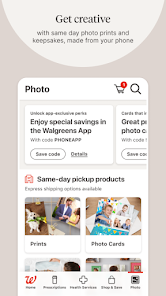
Transform your favorite memories into high-quality prints and photo gifts directly from the app. Upload your photos, choose your preferred products, and pick them up at your nearest Walgreens location, making it a breeze to personalize your home or find the perfect gift.

Prescription Management

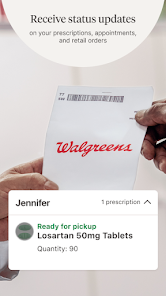
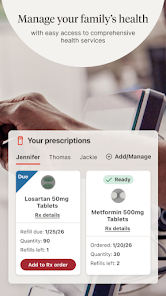
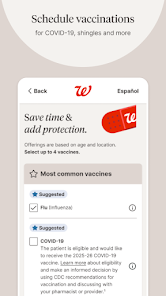
Easily manage your prescriptions with the Walgreens app, allowing you to refill, transfer, or track your medications with just a few taps. Set reminders for when it's time to take your meds, ensuring you never miss a dose and stay on top of your health needs.

Store Locator

Finding a Walgreens store near you is simple with the app's built-in store locator. Whether you're on the go or planning a visit, just enter your location to see nearby stores, their hours, and available services, making your shopping experience seamless and convenient.

Weekly Deals

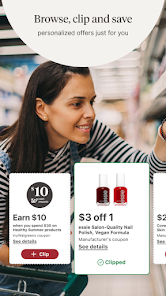
Stay updated on the latest discounts and promotions with the Walgreens app's weekly deals feature. Browse through current offers, create a shopping list, and save big on your favorite products, ensuring you get the best value for your money every time you shop.

Advertisement

Pros & Cons

Pros
  • Wide range of health and wellness products available
  • Convenient locations for easy access and shopping
  • 24/7 pharmacy services for urgent needs
  • User-friendly mobile app for prescription management
  • Loyalty program offers rewards on purchases
Cons
  • High prices compared to other pharmacies
  • Limited product selection in some locations
  • Long wait times for prescriptions
  • Inconsistent customer service experiences

Real Experience Using Walgreens

Application Scenarios

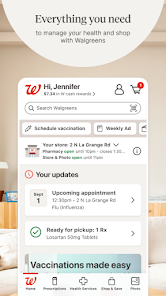
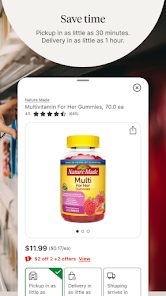
The Walgreens app serves multiple purposes, catering to a wide range of user needs. Primarily, it is designed for customers to manage their pharmacy prescriptions efficiently. Users can easily refill prescriptions, set up automatic refills, and receive reminders when it’s time to pick up their medications. Beyond pharmacy services, the app also allows users to shop for over-the-counter health products, beauty items, and everyday essentials. Users can browse weekly ads, access digital coupons, and take advantage of special promotions to save on their purchases. For those who prefer convenience, the app includes a feature for ordering photo prints and personalized gifts directly from their smartphones. Additionally, users can locate nearby Walgreens stores and check product availability, making it a versatile tool for shopping and health management.

User Experience

The user experience of the Walgreens app is generally intuitive and user-friendly, providing a seamless interface that allows for easy navigation. Upon opening the app, users are greeted with a clean layout that highlights essential features such as prescription management, shopping categories, and weekly deals. The prescription refill process is straightforward, requiring just a few taps to complete. The app's search functionality is efficient, enabling users to find products quickly. However, some users have reported occasional glitches, particularly when it comes to loading product images or processing payments. Despite these minor issues, the overall design and functionality are commendable, with a focus on accessibility for users of all ages.

Pricing

The Walgreens app is free to download and use, making it accessible to anyone with a smartphone. While the app itself does not charge users, the pricing for products and services available through the app varies. Customers can take advantage of competitive pricing on pharmacy items, health products, and beauty items, often with special discounts and promotions. The app also features a rewards program, allowing users to earn points on their purchases that can be redeemed for discounts on future transactions. This integration of savings and rewards enhances the app's value, encouraging users to shop more frequently at Walgreens.

Updates & Support

Walgreens is committed to enhancing its app experience through regular updates that address user feedback and improve functionality. These updates often include bug fixes, new features, and security enhancements to ensure a smooth experience. Additionally, the app provides robust customer support options, including a comprehensive FAQ section and a direct line to customer service for any inquiries or issues. Users can also reach out via social media channels, making it easy to get assistance. Overall, Walgreens demonstrates a dedication to app improvement and user satisfaction, making it a reliable companion for both health management and shopping needs.

verified Security & Privacy Review

The Walgreens app demonstrates a strong commitment to user security and privacy. It employs encryption protocols to safeguard sensitive information, such as personal health data and payment details, during transmission. The app requires users to create an account, which is protected by robust password requirements and optional two-factor authentication, enhancing account security. In terms of permissions, the Walgreens app requests access to the device's location, camera, and contacts. While location services enhance the user experience by providing relevant store information and offers, users are encouraged to review and manage these permissions according to their comfort level. The app also clearly outlines its data collection practices in its privacy policy, detailing what information is collected and how it is utilized. Walgreens is transparent about its user data handling, stating that personal information may be shared with trusted partners for operational purposes, but it ensures that all third parties adhere to strict confidentiality standards. Overall, the Walgreens app offers a reliable platform for managing health and pharmacy needs while prioritizing user security and privacy.
Advertisement

User Reviews

  • Maine E
    2026/04/28

    Update 4/28/26: The app is horrible now, lags A LOT & keeps making me sign in to view order history (even though I'm already signed in) but then it won't let me actually sign in. It also never lets me place orders anymore. I have to go to the website to order --Original Review: EXCELLENT APP!!!! Walgreens put a lot of thought into this app and it shows. Everything from coupons, actual store prices, and prescriptions all in one app. Plus you can order online directly from the app if you need to!!

  • Nyah Williams
    2025/07/20

    My only complaint is that the app needs a little more work on its system. The app randomly crashes, or errors will pop in when trying to search products, or do online orders. Overall, I recommend the Walgreens app all the time. You save money with coupons, able to keep track of your cash rewards, deals/sales that are going on within the stores. You get access for prescription updates, or the ability to request refills online. The app is really useful and simple. When it works lol

  • Franklin Smith
    2025/03/08

    It's frustratings when I open the app, sign in, choose a store location and then there's no icon to click to shop, not even on the home screen. After proceed to checkout the price is more, my coupons the app added to my order disappeared. I called the 24 hr service and I was told my cart was empty. I spent hours trying to order 3 bottles of Scope. When I typed Scope mouthwash in the search box the app said there is no match. I don't want an apology. I would like to hear "improvements a go"

  • Craig Koehrsen
    2025/07/01

    Had a hard time changing my store for pickup. I was able to change it, then when I went to change it back, the app stopped working. Also had problem looking at item in my cart. Kept getting cryptic error code. Not sure if that was an app or server error. Went back to the app and then it worked. Almost gave up before completing my transaction.

  • Dennis Hoage
    2025/05/06

    Can't refill prescriptions with the app or on the website either. I uninstalled and reinstalled the app, but that didn't make any difference. Not being able to order a refill (without going to the pharmacy) totally defeats the purpose of having an app or website. Calling the pharmacist to request refills results in going through the automated system and then being put on hold to wait for someone to pick up. That can be 5-30 mins.

Review Source: Google Play store public user reviews.

FAQ

1

Does Walgreens collect my personal data?

Yes, Walgreens collects personal data to provide services, process transactions, and improve user experience, but they have measures in place to protect your information.

2

Does Walgreens offer a free trial or free version?

Walgreens does not specifically offer a free trial, but the app itself is free to download and use without a subscription.

3

Does Walgreens require an internet connection?

Yes, Walgreens requires an internet connection to access most of its features, including prescription management and online shopping.

4

How can I contact support or send feedback for Walgreens?

You can contact Walgreens support through the app, their official website, or by calling their customer service hotline. Feedback can also be submitted through the app or website.

5

How do I manage or cancel my Walgreens subscription?

You can manage or cancel your Walgreens subscription by logging into your account through the app or website and navigating to the subscription settings.

How to use Walgreens

1

How can I contact Walgreens customer service for help with the app?

You can reach Walgreens customer service by calling 1-877-250-5823 or visiting their website for live chat support.

2

How do I find my Walgreens customer number in the app?

Your Walgreens customer number can be found in the account settings section of the app under "Profile."

3

How do I log in to the Walgreens app?

Open the app, tap "Log In," enter your email and password, then tap "Sign In."

4

Is there an activation process for the Walgreens app?

Yes, after downloading, you need to create an account by providing your email and setting a password to activate the app.

What's New

We've made several improvements and fixes to help you shop, save, and manage your health with ease.


Editor's Choice