This site uses cookies to enhance your user experience. By clicking any link on this site you are giving your consent to our cookie policy. Read more
Reject
Accept All

Advertiser and Editorial Disclosures

Uber - Request a ride

Uber - Request a ride

verified

Uber Technologies, Inc.

4.7
Rating
1,000,000,000+ Downloads
4.634.10003 Version
  • category

    Category: Maps & Navigation

  • price

    Price: free

  • age rating

    Age Rating: Everyone

  • rating

    Rating: 4.7

  • available on

    Available on: /

  • updated on

    Updated on: Jul 2, 2026

Screenshot 1
Screenshot 2
Screenshot 3
Screenshot 4
Screenshot 5
Screenshot 6
Screenshot 7
Screenshot 8
Screenshot 9
Screenshot 10
Screenshot 11
Screenshot 12
Screenshot 13
Screenshot 14
Screenshot 15
Screenshot 16
Screenshot 17
Screenshot 18
Advertisement

Features & Highlights

Easy Ride Request

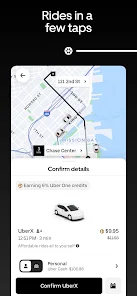
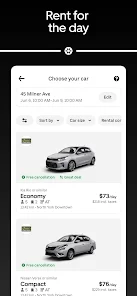
With just a few taps on your smartphone, you can request a ride in seconds. The user-friendly interface ensures that getting a ride is as simple as entering your destination and confirming your pickup location, making it accessible for everyone, whether you're a seasoned user or new to the app.

In-App Safety Features

Your safety is a top priority with Uber, which includes several in-app features designed to keep you secure. From sharing your trip details with friends to an emergency assistance button, you can feel confident knowing that help is just a tap away during your journey.

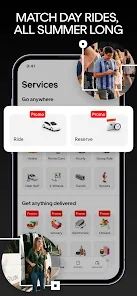
Multiple Ride Options

Choose from a variety of ride options to suit your needs and budget, whether you prefer a solo trip or need to accommodate a group. Options range from economical rides to premium experiences, ensuring there's something for everyone, no matter the occasion.

Real-Time Tracking

Uber allows you to track your driver's location in real time, giving you peace of mind as you wait. You can see their estimated arrival time and get updates on their progress, so you'll know exactly when to head outside, making the whole experience smooth and stress-free.

Advertisement

Pros & Cons

Pros
  • Convenient rides available at any time, day or night.
  • Quick and easy booking through a user-friendly app.
  • Affordable pricing with transparent fare estimates before rides.
  • Safe and reliable transportation with professional drivers.
  • Flexible ride options to suit your needs and preferences.
Cons
  • Surge pricing can make rides unexpectedly expensive during peak hours.
  • Limited availability in less populated areas may lead to longer wait times.
  • Driver quality and safety can vary significantly between rides.

Real Experience Using Uber - Request a ride

Application Scenarios

Uber has revolutionized the way people commute, making it an essential app for various scenarios. Whether you're heading to work, catching a flight, or enjoying a night out with friends, Uber provides a reliable solution for transportation needs. The app is particularly useful in urban areas where public transport may be limited or inconvenient. During peak hours or inclement weather, users can quickly request a ride from their location, avoiding the hassle of waiting for buses or trains. Additionally, Uber caters to different needs with options like UberPOOL for shared rides and UberXL for larger groups, making it versatile for both solo travelers and families. The convenience of booking a ride from anywhere and tracking the driver in real-time enhances the overall experience, ensuring that users can plan their journeys seamlessly.

User Experience

The user experience of Uber is designed to be intuitive and user-friendly. Upon launching the app, users are greeted with a clean interface that allows for easy navigation. The ride request process is straightforward: simply enter your destination, select the type of ride you prefer, and confirm your pickup location. The app provides estimated arrival times and fare prices, which helps users make informed decisions. In addition, the driver profiles, including ratings and vehicle details, add a layer of safety and transparency. The ability to share ride details with friends or family enhances security, especially for solo riders. Payment is a breeze, with options for credit cards, debit cards, and even mobile wallets, ensuring that users can complete their transactions without any hassle.

Pricing

Uber’s pricing model is dynamic, adjusting based on demand, distance, and time of day. While this can lead to higher fares during peak hours or special events, the app also offers transparent pricing information before confirming a ride. Users can compare different ride options to find one that fits their budget, such as opting for UberPOOL to save money by sharing a ride. Promotions and referral discounts often enhance affordability, making Uber an attractive choice for users looking to reduce transportation costs. However, it's essential for users to be mindful of surge pricing during high-demand periods, as fares can significantly increase.

Updates & Support

Uber regularly updates its app to enhance functionality and improve user experience. Recent updates have included features like in-app messaging with drivers, ride scheduling, and enhanced safety protocols. The company is committed to addressing user feedback and continually refining its services. In terms of support, Uber provides a comprehensive help section within the app, addressing common issues and queries. For more complex concerns, users can reach out to customer support through in-app options or via email. The responsiveness of the support team generally receives positive reviews, ensuring that users feel heard and valued.

verified Security & Privacy Review

Security & Privacy Review Uber takes user security and privacy seriously, implementing a range of measures to protect personal information. The app utilizes end-to-end encryption for data transmission, ensuring that ride details and payment information remain confidential. User data is stored securely on servers with advanced security protocols to prevent unauthorized access. When installing the app, users must grant permissions for location access, contacts, and notifications. While these permissions enhance the user experience, they raise privacy concerns. Users are encouraged to review and manage permissions through their device settings to limit data exposure. Uber's privacy policy outlines data collection practices, detailing how user information is used for service improvement, customer support, and targeted marketing. Users can opt out of certain data sharing practices, but some information is retained for legal compliance and safety purposes. Overall, while Uber provides a robust security framework, users should remain vigilant about their privacy settings and be aware of the data they share within the app.
Advertisement

User Reviews

  • elijah fields
    2025/05/27

    I couldn't find a way to say something without calling customer support. The last few times I've reserved a ride for the evening and then the ride would do something stupid like driving all the way here to just cancel or not move. I've been waiting for a hour and 10 minutes after my reserved time. This is seems to be very common, but if I just order one then and there, I can get one in 15 min with awesome drivers. I reserved rides so I can not stress about rides. and I'm stressed. Taxi > Uber

  • Andy Park
    2024/09/06

    The uber drivers are not at fault for this review. I believe that the user interface for the app is terrible. There should be options to switch to a more convenient or faster path instead of changing the trip every other ride(when going to the same location). Also, the cost of the trip always increases afterwards so you can't trust the pre-determined cost. Overall, could be a lot better as an app.

  • Frances Garner
    2025/02/11

    Worst customer service ever. I was only checking prices to see what it would cost on my PC, and I all of a sudden had an account which I instantly got locked out of. Trying to restore the account I clicked on the link shown on the website and got 404 not found. I tried downloading the app and got the same thing. No way I can find to communicate with them.

  • John T
    2024/09/05

    I had good experiences with this app until recently. The drive share feature allows you to save a few bucks, which I thought was nice. However, the ETA for the driver is way off. I had requested one, ant the ride showed up roughly 10 minutes earlier than I anticipated. I was still getting ready , when it said my ride had been canceled. I got chared and had to request another ride, so it defeated me saving the money.

  • Chris Meggs
    2026/06/19

    app always lies about pick up time, often to charge you for canceling when time is double what they claim. New airport policy to not allow you to call it, even when walking time is far less than time it takes for car to arrive is garbage and inefficient. I take hundreds of flights a year, you think I don't know how long it takes to walk from the gate? you own app is telling you that you will get there before the car, yet still can't order.

Review Source: Google Play store public user reviews.

FAQ

1

Can I submit suggestions or feedback to 优步 - 在您的城市随时叫车出行?

Yes, users can submit suggestions or feedback through the app's help or support section, which is designed for user inquiries and improvements.

2

Does 优步 - 在您的城市随时叫车出行 collect my personal data?

Yes, 优步 - 在您的城市随时叫车出行 collects personal data such as your name, phone number, and location to facilitate ride bookings and improve user experience.

3

Does 优步 - 在您的城市随时叫车出行 support offline use?

优步 - 在您的城市随时叫车出行 requires an internet connection to function, so it does not support offline use for booking rides.

4

How do I cancel my 优步 - 在您的城市随时叫车出行 subscription?

Since there is no subscription model, users do not need to worry about cancellation; simply stop using the app when desired.

5

How much does a subscription to 优步 - 在您的城市随时叫车出行 cost?

优步 - 在您的城市随时叫车出行 does not typically offer a subscription model; charges are based on per-ride fares.

How to use Uber - Request a ride

1

Can I activate my account without a phone number?

A phone number is required for account activation, as it helps with verification and communication.

2

How can I activate my Uber account?

To activate your account, follow the sign-up process in the app and confirm your email and phone number.

3

How can I log in if my email is not recognized?

If your email isn't recognized, ensure it's the same one used during sign-up, or try using your phone number to log in.

4

How do I contact customer service if my ride was canceled?

You can reach customer service through the app by selecting the canceled ride and choosing "Help" for assistance.

5

How do I log in if I forgot my password?

Tap on "Forgot password?" on the login screen to receive a password reset link via email.

What's New

We update the Uber app as often as possible to help make it faster and more reliable for you. This version includes several bug fixes and performance improvements.Love the app? Rate us! Your feedback helps us to improve the Uber app.Have a question? Tap Help in the Uber app or visit help.uber.com.

Editor's Choice