This site uses cookies to enhance your user experience. By clicking any link on this site you are giving your consent to our cookie policy. Read more
Reject
Accept All

Advertiser and Editorial Disclosures

TSB Mobile Banking

TSB Mobile Banking

verified

TSB Bank plc.

4.4
Rating
/ Downloads
7.3.1 Version
  • category

    Category: Finance

  • price

    Price: free

  • age rating

    Age Rating: 4+

  • rating

    Rating: 4.4

  • available on

    Available on: /

  • updated on

    Updated on: Jun 11, 2026

Screenshot 1
Screenshot 2
Screenshot 3
Screenshot 4
Screenshot 5
Screenshot 6
Screenshot 7
Screenshot 8
Advertisement

Features & Highlights

Budgeting Tools

Take control of your finances with built-in budgeting tools that help you track your spending and set financial goals. These tools provide insights into your spending habits, making it easier to manage your money and work towards achieving your financial objectives.

Easy Fund Transfers

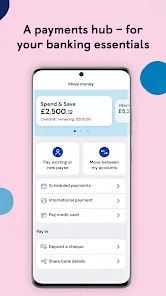
Transferring money between your accounts or sending funds to others is a breeze with TSB Mobile Banking. The intuitive interface allows for quick and hassle-free transactions, ensuring that your money moves exactly where you need it, when you need it, all from the palm of your hand.

Instant Notifications

Stay informed with instant notifications that alert you to important account activities, such as transactions and balance updates. This feature helps you keep track of your spending and ensures you're always aware of your financial status, making it easier to manage your budget effectively.

Secure Log-In

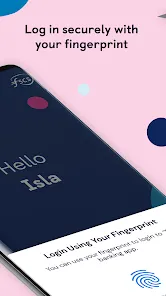
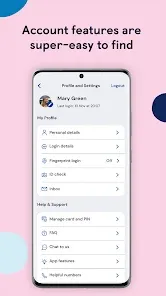
TSB Mobile Banking offers a secure and user-friendly log-in process, utilizing advanced encryption technology to protect your sensitive information. With options for biometric authentication, accessing your accounts is both quick and safe, giving you peace of mind while managing your finances on the go.

Advertisement

Pros & Cons

Pros
  • Secure access to your accounts anytime, anywhere
  • Easy transfer of funds between accounts
  • Instant notifications for transactions and alerts
  • User-friendly interface for seamless navigation
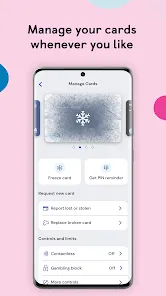
  • Manage bills and payments effortlessly from your phone
Cons
  • Limited functionality compared to desktop version
  • Frequent app crashes reported by users
  • Slow customer support response times
  • Security concerns with mobile banking apps

Real Experience Using TSB Mobile Banking

Application Scenarios

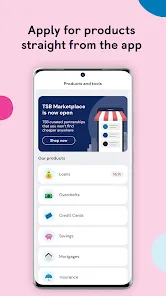
The TSB Mobile Banking app is designed to cater to a wide range of banking needs, making it suitable for various application scenarios. Users can seamlessly manage their everyday banking activities, including checking account balances, transferring money, and paying bills. The app is particularly beneficial for users who are always on the move, as it allows them to access their accounts anytime and anywhere. Whether you're a busy professional looking to pay bills during a lunch break or a student wanting to keep track of your finances, TSB Mobile Banking offers a convenient solution. Additionally, the app supports features such as setting up notifications for transactions and account activity, ensuring users stay informed and in control of their finances.

User Experience

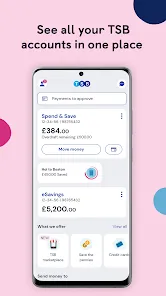
The user experience on the TSB Mobile Banking app is generally positive, characterized by its intuitive interface and ease of navigation. Upon logging in, users are greeted with a clean dashboard that presents essential information at a glance. The app's layout is user-friendly, allowing users to locate features quickly without any confusion. Most users appreciate the biometric login option, which enhances security while providing quick access. The app's performance is also commendable, with minimal lag times and smooth transitions between different sections. However, some users have reported occasional bugs and glitches during updates. Overall, the TSB Mobile Banking app prioritizes user experience, making banking accessible for everyone.

Pricing

One of the key advantages of the TSB Mobile Banking app is that it is free to download and use for TSB account holders. There are no hidden fees associated with using the app for standard banking services, such as checking balances, making transfers, or setting up direct debits. However, users should be aware of any potential fees related to specific transactions or services offered through the bank that may not be directly tied to app usage. Overall, the app provides excellent value for those who are already TSB customers, making banking convenient without incurring additional costs.

Updates & Support

TSB is committed to regularly updating its mobile banking app to enhance features and improve functionality based on user feedback. Users can expect periodic updates that address bugs, introduce new features, and enhance security measures. The support for the TSB Mobile Banking app is robust, with multiple channels available for users seeking assistance. The in-app help section provides answers to frequently asked questions, and users can easily contact customer support through chat or phone options. Overall, TSB demonstrates a proactive approach in maintaining the app and ensuring users have access to reliable support whenever needed.

verified Security & Privacy Review

The TSB Mobile Banking app prioritizes security and privacy, employing robust measures to protect user data. It utilizes advanced encryption protocols to safeguard sensitive information during transmission, ensuring that personal and financial details remain confidential. The app also incorporates biometric authentication options, such as fingerprint and facial recognition, providing an additional layer of security for user accounts. In terms of privacy practices, TSB is transparent about its data handling policies. The app clearly outlines what user data is collected, how it is used, and the circumstances under which it may be shared with third parties. Users have control over their privacy settings and can manage permissions related to location services and notifications, ensuring they are comfortable with the app's access to their data. Furthermore, TSB adheres to stringent data protection regulations, including GDPR, reinforcing its commitment to user privacy. Regular security updates and monitoring help to mitigate potential threats, making the TSB Mobile Banking app a secure choice for managing finances on the go.
Advertisement

Compare APP

User Reviews

  • Car SalesIt
    2024/11/28

    When entering a payment to a new recipient, app loses all the information I entered on the New Payee screen whenever I switched to email to look up the information because I was returned to the Top level screen for entering a new payment. I was forced to jot down all the new payee information on a scrap of paper (security risk) because I can't retain several items of information like Recipient Company, Account No , Sort code etc in my head. Please improve this aspect of the app, it's annoying.

  • Hannah Willis
    2026/06/04

    when trying to add a new payee when you have received the details from a different app is incredibly frustrating. you can't switch between apps without the tsb app forgetting everything you've put in, so you have to either write it down or carefully view the other app without switching screens. it's taken multiple attempts to get even part of the way and when my phone call ended the app minimised itself and forgot all of the information. I cannot express how stupid that is. other bank apps cope.

  • Daniel Edwards
    2026/06/06

    When entering account details for a new payee, exiting the app takes you back to the beginning of the process. This means that it is impossible to switch between different banking apps to add yourself as a payee. You have to go through the difficulty of copying and pasting details from another app into TSB.

  • Mark 3186
    2026/06/13

    upgraded my phone and it's physically impossible to login, update a password, update a question or complete any process whatsoever to gain access. there isn't even a chat function to request help. sitting here with an inbox full of pointless verification codes that achieve nothing.

  • Deb B
    2026/06/06

    The app works well but I find that I cannot approve a payment by fingerprint using my s23ultra. my fingerprint sensor is where the reject box is at the bottom of the screen so it never allows fingerprint to work.This means I need to use my old phone to approve a payment with a side fingerprint sensor which is not practical and very annoying as I dont carry my old phone on me. TSB needs to sort this problem asap.

Review Source: Google Play store public user reviews.

FAQ

1

Does TSB Mobile Banking collect my personal data?

Yes, TSB Mobile Banking collects personal data to provide services and enhance user experience, but it adheres to strict privacy policies to protect your information.

2

Does TSB Mobile Banking offer a free trial or free version?

TSB Mobile Banking is free to download and use for TSB customers, with no subscription fees required for accessing basic banking features.

3

Does TSB Mobile Banking require an internet connection?

Yes, TSB Mobile Banking requires an internet connection, either through Wi-Fi or mobile data, to access your account and perform banking activities.

4

How can I contact support or send feedback for TSB Mobile Banking?

You can contact TSB Mobile Banking support through the app’s help section, visit the TSB website for customer service options, or call their customer support line for assistance and feedback.

5

How do I manage or cancel my TSB Mobile Banking subscription?

Since TSB Mobile Banking does not have a subscription model, there is no need to manage or cancel a subscription; you can simply stop using the app at any time.

How to use TSB Mobile Banking

1

How do I activate the TSB Mobile Banking app?

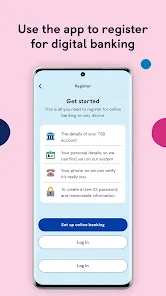
To activate the app, download it from your app store, open it, and follow the prompts to register using your customer number and personal details.

2

How do I contact TSB Mobile Banking customer service?

You can contact TSB customer service by calling 0345 975 8758 or using the live chat option in the app.

3

How do I log in to the TSB Mobile Banking app?

Open the app, enter your username and password, then tap 'Log In'. You may need to verify your identity with a code sent to your registered mobile number.

4

What is TSB's customer number?

TSB's customer number is 0345 975 8758 for general inquiries and support.

What's New

Introducing a new way to explore what you can borrow with us! Now you can quickly check how likely you are to be approved for an unsecured loan and see how much you could borrow. It‘ll help you plan with greater confidence and make more informed decisions. Please post a review of our app if you have a moment.

Editor's Choice