This site uses cookies to enhance your user experience. By clicking any link on this site you are giving your consent to our cookie policy. Read more
Reject
Accept All

Advertiser and Editorial Disclosures

Spendee - Budget and Expense T

Spendee - Budget and Expense T

verified

SPENDEE a.s.

4.3
Rating
1,000,000+ Downloads
5.6.4 Version
  • category

    Category: Finance

  • price

    Price: free

  • age rating

    Age Rating: Everyone

  • rating

    Rating: 4.3

  • available on

    Available on: /

  • updated on

    Updated on: May 22, 2026

Screenshot 1
Screenshot 2
Screenshot 3
Screenshot 4
Screenshot 5
Screenshot 6
Advertisement

Features & Highlights

Budget Planning Made Easy

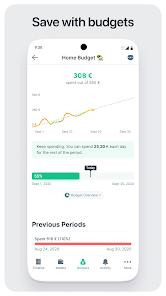
With Spendee, you can create customized budgets tailored to your lifestyle and financial goals. The app provides real-time updates on your spending against these budgets, ensuring you always know where you stand financially and can adjust your habits accordingly to avoid overspending.

Multi-Currency Support

Traveling or dealing with multiple currencies? Spendee has you covered with its multi-currency support feature. You can effortlessly manage your expenses in different currencies, making it easier to track your spending while abroad or when dealing with international transactions without the hassle of manual conversions.

Shared Wallets for Group Expenses

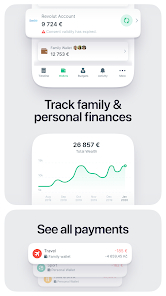
Spendee allows users to create shared wallets for managing group expenses, perfect for trips with friends or family. This feature lets everyone contribute and track shared costs transparently, making it simple to settle balances and keep financial responsibilities clear among group members.

Smart Expense Tracking

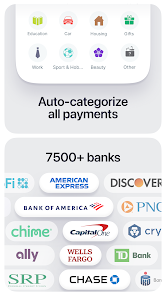
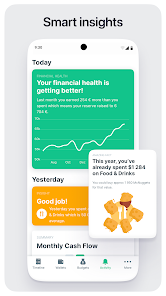
Spendee simplifies expense tracking by allowing users to easily categorize and record their transactions. With a user-friendly interface, you can quickly input expenses and monitor your spending habits, giving you valuable insights into your financial behavior and helping you stay on top of your budget.

Advertisement

Pros & Cons

Pros
  • Easily track your spending habits for better financial awareness.
  • Create custom budgets to manage your finances effectively.
  • Sync bank accounts for real-time updates on your transactions.
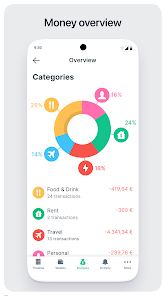
  • Visualize your expenses with intuitive charts and reports.
  • Collaborate with family or friends for shared budget management.
Cons
  • Limited features in the free version restrict comprehensive budgeting capabilities.
  • User interface can be overwhelming for new users unfamiliar with budgeting apps.
  • Lack of direct bank integration may complicate expense tracking for some users.

Real Experience Using Spendee - Budget and Expense T

Real Experience Application Scenarios

The Budget App & Tracker: Spendee is designed for a variety of financial management scenarios, catering to individuals, families, and even small businesses. Users can easily track their daily expenses, set budgets for specific categories, and monitor their financial health over time. Whether you are planning a vacation, managing household bills, or trying to save for a major purchase, Spendee offers a user-friendly interface that simplifies the budgeting process. The app is particularly useful during events like holidays or special occasions when spending can spiral out of control. Users can create shared wallets, making it ideal for couples planning a trip together or families managing shared expenses. The integration of bank accounts also allows for real-time tracking, making it easier to stay on top of finances.

User Experience

Spendee offers an intuitive and visually appealing user experience. Upon downloading, users are greeted with a clean interface that makes navigation straightforward. The app allows users to categorize expenses with ease, and the use of colorful graphs and charts helps users visualize their spending habits at a glance. The onboarding process is seamless, guiding users through the setup of their accounts and wallets. Customization options further enhance user experience, allowing individuals to tailor their budgets according to personal preferences. Notifications and reminders ensure users stay informed about their financial goals, while the ability to sync with bank accounts takes the hassle out of manual entry. Overall, Spendee provides a delightful user journey that encourages better financial habits.

Pricing

Spendee operates on a freemium model, offering a free version with essential features for basic budget tracking. However, for those seeking advanced functionalities, such as syncing with bank accounts, creating shared wallets, or accessing premium reports, a subscription is necessary. The pricing is competitive, with options for monthly or annual subscriptions that provide flexibility for users. Many find value in the premium features, especially if they are serious about enhancing their financial management skills. Overall, the pricing structure reflects the quality of tools and support offered by the app.

Updates & Support

The development team behind Spendee is committed to regularly updating the app with new features and improvements. Users can expect periodic updates that address bugs and enhance functionality based on feedback. In terms of support, Spendee provides a comprehensive FAQ section, along with a responsive customer service team ready to assist with any inquiries. Additionally, the app encourages community engagement through forums and social media channels where users can share tips and suggestions. This proactive approach ensures that users feel supported and heard, contributing to an overall positive experience with the app.

verified Security & Privacy Review

Security & Privacy Review The Budget App & Tracker: Spendee takes user security and privacy seriously, implementing several measures to protect sensitive financial information. All data transmitted between the app and its servers is encrypted using industry-standard SSL protocols, ensuring that user details remain confidential during transmission. In terms of privacy practices, Spendee commits to transparency regarding data usage. Users are informed about the types of data collected, which primarily include transaction history and budgeting preferences. The app does not share personal information with third parties without user consent, adhering to strict privacy policies. Regarding permissions, Spendee requires access to essential features such as location services for expense tracking purposes. Users can manage these permissions through their device settings, granting control over what data the app can access. Overall, Spendee demonstrates a strong commitment to safeguarding user data while providing a seamless budgeting experience.
Advertisement

User Reviews

  • Trina Heide
    2026/06/06

    This app was supposed to have a 7 day free trial but it charged my card immediately. I have cancelled the subscription and requested a refund. It also is trying to charge me a second time after I connected with my bank account. Then it keeps saying 3 times to connect to my account and I already did. It's not that good of an app

  • Justin Lam
    2026/04/02

    [Edit: Uh oh - major bug, it keeps defaulting to the earliest date ~2016 of entries everyone I open the app, and now the edit page is too big I can't delete expenses because it's covered by my notification bar. Help!] This is a handy app to keep track of your transactions and I can recommend. Credit where it's due, the developer has done a good job in debugging and maintaining this app.

  • Erick Sánchez
    2025/02/09

    Do not buy this app, is completely useless... All the transactions are done automatically if you set them up, but you cannot fix anything, so you don't have control of your transactions. The customer service reply but only to ask you for screenshots end at the end there's no improvement since some transactions are difficult to correct. If you are using different currencies... Don't even try, since when trying to fix the amounts, they will change only to the main currency of the account...

  • Rhoxeic
    2025/03/24

    Well this looks like a great app if and only if you only link bank accounts with cash balances. I linked my bank accounts where I have savings/checking accounts, and also credit cards. The app is reporting the balance I have on my credit card as if it were cash I had on some checking or savings account. The app is also reporting the payments I made to those credit card balances as if they were income. No, that's not right. That is money going out, not in. This app doesn't work with credit cards.

  • Jorge Solís
    2021/01/11

    What started as a great app, slowly and steadily started falling behind. Nothing truly new to show for in the past years. Location tags never came back, the app update was a total DISASTER, it's slower and things that were fine before don't work now. Hashtags are gone and labels can't be edited. They claim "new bank connections" are coming, they have been saying that for over 2 years now. "Lifetime Membership" subscription seems like the last attempt to get more money and keep it afloat.

Review Source: Google Play store public user reviews.

FAQ

1

Can I submit suggestions or feedback to Spendee - Budget and Expense T?

Yes, Spendee encourages users to submit suggestions or feedback through the app or their official website to help improve the service.

2

Does Spendee - Budget and Expense T collect my personal data?

Spendee does collect some personal data to enhance user experience and provide personalized insights, but it adheres to strict privacy policies to protect user information.

3

Does Spendee - Budget and Expense T support offline use?

Yes, Spendee allows users to track expenses and manage budgets offline, with data syncing available when an internet connection is restored.

4

How do I cancel my Spendee - Budget and Expense T subscription?

Users can cancel their subscription through the app's settings or their account settings in the app store from which they purchased the subscription.

5

How much does a subscription to Spendee - Budget and Expense T cost?

Subscription costs may vary based on the plan selected, but typically range from a monthly fee to a discounted annual fee.

How to use Spendee - Budget and Expense T

1

Can I log in to Spendee using my social media account?

Yes, you can log in to Spendee using your social media accounts such as Facebook or Google. Just select the appropriate option on the login page.

2

Can customer service help if I can't remember my login details?

Absolutely! Our customer service team can assist you in recovering your login details. Just reach out for help.

3

How can I contact customer service for Spendee?

You can reach our customer service via the support section in the app or through our website's contact form. We’re here to help!


4

How do I activate my Spendee account?

To activate your account, click the activation link sent to your email after registration. If you didn't receive it, check your spam folder or contact customer service.

5

How do I update my customer number if I change my email?

If you change your email, please contact customer service to update your customer number in our system. They will guide you through the process.

What's New

Quick Bug Fix Release :)

Editor's Choice