This site uses cookies to enhance your user experience. By clicking any link on this site you are giving your consent to our cookie policy. Read more
Reject
Accept All

Advertiser and Editorial Disclosures

Skillshare - Online Classes

Skillshare - Online Classes

verified

Skillshare, Inc

4.1
Rating
1,000,000+ Downloads
5.4.81 Version
  • category

    Category: Education

  • price

    Price: free

  • age rating

    Age Rating: Everyone

  • rating

    Rating: 4.1

  • available on

    Available on: /

  • updated on

    Updated on: Aug 14, 2025

Screenshot 1
Screenshot 2
Screenshot 3
Screenshot 4
Screenshot 5
Screenshot 6
Screenshot 7
Screenshot 8
Screenshot 9
Screenshot 10
Screenshot 11
Screenshot 12
Screenshot 13
Screenshot 14
Screenshot 15
Screenshot 16
Screenshot 17
Screenshot 18
Screenshot 19
Screenshot 20
Screenshot 21
Advertisement

Features & Highlights

Community Interaction

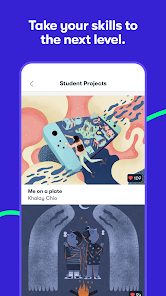
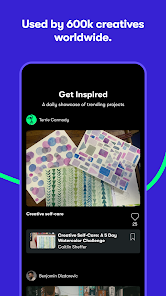
The Skillshare community is vibrant and supportive, providing opportunities to share your projects, ask for feedback, and connect with fellow learners and instructors. This interaction fosters collaboration and motivation, making your learning journey more enjoyable and enriching.

Explore Diverse Courses

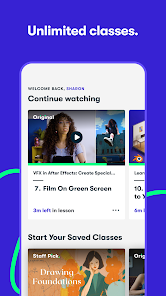
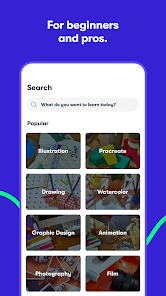
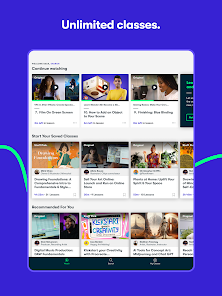
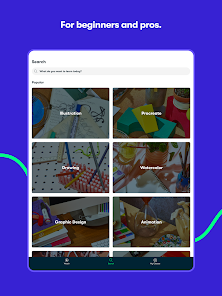
Skillshare offers an extensive range of online classes across various subjects, from creative arts to business skills. You can easily find courses that match your interests and skill level, ensuring a tailored learning experience that keeps you engaged and motivated to learn more.

Offline Access

With Skillshare's offline access feature, you can download classes and watch them anytime, anywhere—perfect for learning on the go. This flexibility ensures that you can continue your education without being tethered to an internet connection, fitting seamlessly into your busy lifestyle.

Project-Based Learning

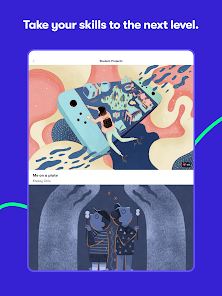
Each class on Skillshare emphasizes practical, project-based learning, allowing you to apply your new skills in real-world scenarios. This hands-on approach not only enhances understanding but also builds a portfolio of work that showcases your creativity and expertise to potential employers or clients.

Advertisement

Pros & Cons

Pros
  • Access a diverse range of creative classes taught by industry professionals.
  • Learn at your own pace with flexible scheduling and on-demand content.
  • Engage with a vibrant community for feedback and support on projects.
  • Explore various subjects, from design to business, enhancing your skillset.
  • Enjoy affordable subscription plans that provide unlimited class access.
Cons
  • Limited course depth may not satisfy advanced learners
  • Inconsistent instructor quality affects learning experience
  • Subscription model can be costly for occasional users

Real Experience Using Skillshare - Online Classes

Real Experience Application Scenarios

Skillshare is designed for a diverse range of learning scenarios, making it suitable for both casual learners and dedicated professionals. Whether you're looking to pick up a new hobby, enhance your skills for career advancement, or explore creative endeavors, Skillshare offers something for everyone. Users can access classes on topics ranging from graphic design, photography, and writing to business and technology. For instance, a budding photographer can take a course on portrait photography to refine their skills, while an entrepreneur might find value in classes focused on marketing strategies. The flexibility of the platform allows learners to engage with content at their own pace, fitting conveniently into busy schedules.

User Experience

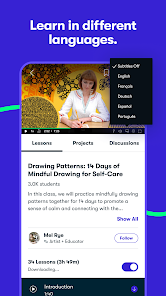
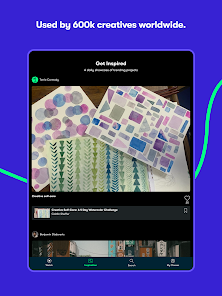
The user experience on Skillshare is generally intuitive and user-friendly. Upon entering the app, users are greeted with a clean interface that makes navigation straightforward. Courses are neatly categorized, and a robust search function allows learners to find specific topics or instructors quickly. Each class typically includes video lessons, supplemental materials, and community projects, fostering an interactive learning environment. Users can comment on lessons, ask questions, and share their projects, enhancing the sense of community. However, some users have reported that the video quality can vary between classes, and occasionally, the audio might not be as clear as desired. Overall, the platform encourages a collaborative spirit, allowing users to connect with instructors and peers alike.

Pricing

Skillshare operates on a subscription-based model, which can be a significant factor for potential users. The app offers a free trial period, allowing new users to explore its features and content risk-free. Following the trial, users can choose between monthly or annual subscription plans. While some may find the pricing slightly high compared to other platforms, the extensive library of courses justifies the cost for many. Additionally, Skillshare often runs promotions and discounts, making it more accessible for those hesitant about committing to a subscription. Overall, for individuals serious about learning and skill development, the investment can be worthwhile.

Updates & Support

Skillshare is committed to continuous improvement, frequently rolling out updates that enhance the overall user experience. These updates often address user feedback, adding new features or refining existing ones. In terms of support, Skillshare provides a comprehensive help center where users can find answers to common questions and troubleshoot issues. Furthermore, the platform offers customer support through email, ensuring that users can get assistance when needed. While response times may vary, the support team is generally responsive and helpful. This dedication to user satisfaction helps build trust and encourages ongoing engagement with the platform.

verified Security & Privacy Review

Security & Privacy Review The Skillshare app prioritizes user security and privacy by employing industry-standard encryption techniques to protect sensitive information during transmission. The app requires minimal permissions, primarily focusing on access to the device's internet connection, which is essential for streaming classes and accessing content. Skillshare's privacy policy outlines its commitment to safeguarding user data, stating that personal information is collected only when necessary for account creation and course participation. Users have control over their data, with options to manage account settings and privacy preferences effectively. Moreover, Skillshare does not sell personal information to third parties, and any shared data is typically anonymized or aggregated for analytics purposes. Regular updates and security audits are conducted to ensure the app remains resilient against potential threats. Overall, Skillshare demonstrates a strong commitment to maintaining user privacy and data security, making it a reliable platform for online learning.
Advertisement

User Reviews

  • Rebecca
    2026/06/14

    I absolutely adore this app and rely on it for so many things. I've learned a ton from it and spend time every day on either the app or the website during the free trial version. The only reason for knocking off one star is that the price for a year long membership is simple untenable for a lot of people, and you're missing out on people who would be loyal customers with such a high barrier to entry. even the monthly price is difficult for a lot of us, and I'll be saying goodbye again soon.

  • Julie H
    2026/04/17

    I love the actual site, but the app is horrible! poor navigation, broken links, no ability to save to lists, can't hit "back" arrow or "x" because of the way the UI is. Impossible to navigate through the app. You guys have GOT to put some work into it. It's silly for an app to be so broken in 2026.

  • Brooke Lynn
    2026/02/13

    will not work with an android phone! When going into the app it kicks you out. So I paid $168 for an app I cant use! I would like to get a refund and will be looking for the contact information for Skillshare. It wouldn't be such a huge blow if it was a monthly fee not a yearly fee. More than extremely disappointed. Actually quite furious. *** To follow up on my review: I sent an email to Skillshare and they did refund my money to my account within a day.

  • Goinne Woods
    2026/04/04

    I've been wanting to use skillshare for a long while, but since they switched to a yearly only plan online, I wasn't able to. Low income, can't afford that exorbitant price. then I heard that if you download the app, you get the monthly subscription option back! I was super excited, I can budget $12, $14 a month, cool. Except no, the monthly price is $49. $49 a month. That is Adobe levels of greed. I'd be fine with a version with ads if the issue is paying the teachers, but $49 a month is insane

  • Marilyn Martin
    2023/01/20

    I love the classes! Maneuvering around the site is not intuitive for me. Specifically, when I click on my app icon it often goes to the first class I took and starts the lesson again. I'm not sure how to edit my profile. I didn't realize my full name would be posted with my projects. (No biggie; just want the option. ) I have trouble posting more than 1 photo for a class. These are my difficulties. Other than that, it's great.

Review Source: Google Play store public user reviews.

FAQ

1

Can I submit suggestions or feedback to Skillshare - Online Classes?

Yes, Skillshare encourages users to submit suggestions and feedback through their support channels or community forums to help improve the platform and user experience.

2

Does Skillshare - Online Classes collect my personal data?

Yes, Skillshare collects personal data such as your name, email address, and payment information to create an account and process subscriptions, but it also has privacy policies in place to protect your information.

3

Does Skillshare - Online Classes support offline use?

Yes, Skillshare allows users to download certain classes for offline viewing on mobile devices, enabling learning without an internet connection.

4

How do I cancel my Skillshare - Online Classes subscription?

You can cancel your subscription by going to your account settings on the Skillshare website or app and following the cancellation process outlined there.

5

How much does a subscription to Skillshare - Online Classes cost?

The subscription cost typically varies based on the plan chosen, with options for monthly or annual payments, and promotions may be available from time to time.

How to use Skillshare - Online Classes

1

Can I change my customer number if I need to?

Customer numbers are unique and cannot be changed. If you have issues, please contact customer service for further assistance.

2

Can I log in using social media accounts?

Yes, you can log in using your Google or Facebook account if you linked them during sign-up. If you're having issues, contact customer service for help.

3

How can I contact customer service for help with my account?

You can reach customer service through the help section in the app or by emailing support

4

How do I activate my Skillshare account?

After signing up, check your email for an activation link. Click the link to activate your account and start using Skillshare.

5

How do I update my email address for logging in?

To update your email address, log in to your account, go to settings, and change your email. For further assistance, contact customer service.

What's New

This release we've fixed some bugs and improved app stability. Stay tuned for more improvements—we're working hard to make life easier for creatives like you to learn and create!



Editor's Choice