This site uses cookies to enhance your user experience. By clicking any link on this site you are giving your consent to our cookie policy. Read more
Reject
Accept All

Advertiser and Editorial Disclosures

Offline Music Player: Play MP3

Offline Music Player: Play MP3

verified

Dairy App & Notes & Audio Editor & Voice Recorder

4.5
Rating
50,000,000+ Downloads
1.02.146.0629 Version
  • category

    Category: Utilities

  • price

    Price: free

  • age rating

    Age Rating: Teen

  • rating

    Rating: 4.5

  • available on

    Available on: /

  • updated on

    Updated on: Jun 30, 2026

Screenshot 1
Screenshot 2
Screenshot 3
Screenshot 4
Screenshot 5
Screenshot 6
Screenshot 7
Screenshot 8
Advertisement

Features & Highlights

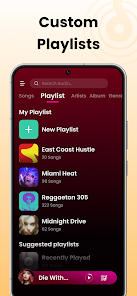
Custom Playlists

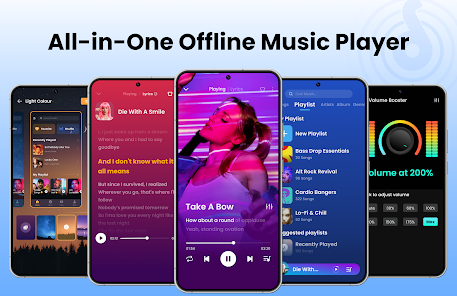
Create personalized playlists to suit your mood and activities. With the ability to organize your music into custom playlists, you can easily curate the perfect soundtrack for any occasion, whether it's a workout, a party, or a quiet evening in.

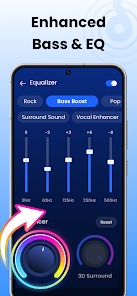
Equalizer Settings

Enhance your listening experience with adjustable equalizer settings. The Offline Music Player offers various preset options and manual adjustments, allowing you to fine-tune the sound to your liking, so every song sounds just right.

Offline Playback

Enjoy your favorite music without an internet connection. The Offline Music Player allows you to download and store MP3 files directly on your device, making it easy to listen to your playlists anywhere, whether you're on a road trip or just relaxing at home.

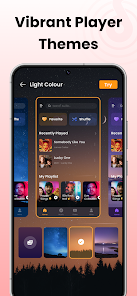
User-Friendly Interface

Navigate effortlessly through your music library with an intuitive design. The app's user-friendly interface makes finding and playing your favorite tracks a breeze, ensuring you spend less time searching and more time enjoying your music.

Advertisement

Pros & Cons

Pros
  • Enjoy music without internet connectivity
  • Simple and intuitive user interface
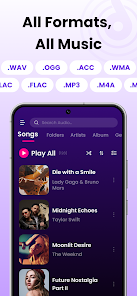
  • Supports various audio formats beyond MP3
  • Easy playlist creation and management
  • Minimal battery consumption for extended listening
Cons
  • Limited to stored files only
  • Lacks streaming options
  • No social sharing features
  • May consume device storage

Real Experience Using Offline Music Player: Play MP3

Application Scenarios

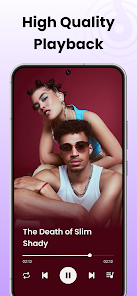
The Offline Music Player: Play MP3 app is designed for music enthusiasts who prefer to enjoy their favorite tracks without relying on an internet connection. This app is perfect for various scenarios such as commuting, exercising, or relaxing at home. Whether you're on a long train ride, working out at the gym, or lounging at the beach, this app allows you to access your music library seamlessly. It supports multiple audio formats, making it a versatile choice for users with diverse music collections. Additionally, the app is ideal for those who are conscious of their data usage or are in areas with limited connectivity. It encourages users to download their favorite songs and create personalized playlists, ensuring that great music is always at your fingertips.


User Experience

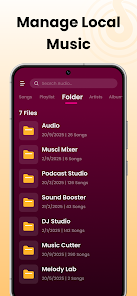
The user experience offered by Offline Music Player: Play MP3 is commendable. Upon launching the app, users are greeted with a clean and intuitive interface that makes navigation a breeze. The app allows for easy importing of music files from various sources, including cloud storage and local devices. Users can quickly create playlists or browse through their library by artist, album, or genre. The built-in equalizer enhances sound quality, enabling users to customize their listening experience. The app also features background play, allowing users to multitask without interruptions. However, while the overall experience is smooth, some users have reported occasional glitches, particularly when handling large music libraries. Nonetheless, the app's simplicity and focus on offline playback make it a reliable choice for music lovers.

Pricing

Offline Music Player: Play MP3 adopts a freemium model, offering a basic version for free while providing additional features through in-app purchases. The free version includes essential functionalities such as music playback and playlist creation, which are sufficient for casual users. However, to unlock premium features like advanced equalizer settings, ad-free experience, and unlimited playlist length, users can opt for a one-time purchase or a subscription plan. The pricing is competitive compared to similar apps in the market, making it an appealing option for users looking for value for money. Overall, the pricing structure is designed to accommodate various user needs without compromising on quality.

Updates & Support

The developers of Offline Music Player: Play MP3 are committed to providing regular updates to enhance user experience and address any potential bugs. Frequent updates not only introduce new features but also improve the app's performance and stability. Users can easily access the support section within the app, where they can find FAQs and troubleshooting guides. For more personalized assistance, the app also provides a customer support email, allowing users to report issues or suggest improvements. The responsiveness of the support team has been noted positively by users, contributing to a sense of community and trust. Overall, the app's commitment to updates and user support plays a crucial role in maintaining a high level of user satisfaction.

verified Security & Privacy Review

The "Offline Music Player: Play MP3" app places a strong emphasis on user security and privacy. The app does not require an internet connection to function, which inherently reduces the risk of data breaches and unauthorized access to personal information. Users can enjoy their music library without the concern of online tracking or data collection. In terms of permissions, the app primarily requests access to local storage to facilitate the playback of MP3 files stored on the device. This minimal permission requirement ensures that users' personal data remains secure, as there are no unnecessary permissions that could expose sensitive information. Additionally, the app does not engage in data mining or share user data with third parties, which is a significant plus for privacy-conscious users. Overall, the "Offline Music Player: Play MP3" app prioritizes user privacy by limiting data access and maintaining a minimalistic approach to permissions, allowing users to enjoy their music safely and securely.
Advertisement

User Reviews

  • ObsidianJadeDragon
    2026/06/17

    I'm currently dealing with an issue where the smart hide music feature keeps hiding my music. I don't want those songs hidden, but nearly every day they're hidden again. I change the setting, and it changes back on its own. it also keeps bringing up the purchase option, even though I already purchased the lifetime option. once again, nearly every single day. would really appreciate it if those are addressed. Other than that, I really enjoy this app.

  • Asmita wagh
    2026/06/11

    Too many ads when you just open the app and you have no chance that you can start the song. Same ad will play 2 times, never ending!!! what app gives you too many ads right after opening it and not performing no - literally no action on it. If you want to change the song, open the app and you'll see ad and you'll see the same ad again. when it ends and you click once with whatever you do and upon second click again 2 ads back to back.. like really??????????

  • Gage Hellerud
    2026/06/26

    Same QOL features as the last one I switched off of, difference is the lifetime purchase wasn't gutted in favor of a subscription service. Since ADs are why I left the last app, I don't know the exact frequency of them on here, but I do appreciate you left in the lifetime purchase option as it immediately reeled me in. Great app for music!

  • Waheed A
    2026/06/15

    not a bad mp3 player, but the ads kill it. if I'm going in to pause the music, I shouldn't have to watch an ad. but the biggest problem is that it has ads with audio that stops the music that is currently playing. that should never be a thing. want to listen to a song in another folder? back out of currently folder-ad - open folder- another ad- open album folder - 3rd ad.......

  • Jacquine Shippy
    2026/03/14

    Overall it's great, I used it for a long time, but the ads are HIGHLY invasive. Every click is an ad that takes several clicks to close out. I know ads are how revenue is generated, but this is a ridiculous amount of ads. The dealbreaker that made me finally decide to uninstall was that the ads would disable my car's onscreen controls; so if there's an ad that pops up, I can't change songs or do anything until it's closed out, which I can't do while I'm driving. It's not worth paying for, sorry.

Review Source: Google Play store public user reviews.

FAQ

1

Does Offline Music Player: Play MP3 collect my personal data?

Offline Music Player: Play MP3 is designed with user privacy in mind and does not collect personal data unless explicitly provided by the user for certain features.

2

Does Offline Music Player: Play MP3 offer a free trial or free version?

Yes, Offline Music Player: Play MP3 offers a free version with basic features, and users can also take advantage of a free trial for premium features.

3

Does Offline Music Player: Play MP3 require an internet connection?

No, Offline Music Player: Play MP3 does not require an internet connection, allowing you to listen to your downloaded music anytime, anywhere.

4

How can I contact support or send feedback for Offline Music Player: Play MP3?

You can contact support or send feedback for Offline Music Player: Play MP3 through the app's support section, which includes options for email and in-app messaging.

5

How do I manage or cancel my Offline Music Player: Play MP3 subscription?

You can manage or cancel your Offline Music Player: Play MP3 subscription through your account settings in the app or directly through the app store where you made the purchase.

How to use Offline Music Player: Play MP3

1

How can I contact customer service for the Offline Music Player: Play MP3 app?

You can reach our customer service at support

2

How do I log in to my account on the Offline Music Player app?

Open the app and click on the 'Log In' button. Enter your registered email and password to access your account.

3

Is activation required for the Offline Music Player app?

No activation is required. Simply download the app, and you can start using it immediately!

4

What is the customer number for account inquiries?

Your customer number is available in the app under 'Account Settings' or in your confirmation email. If you can't find it, contact support.

Editor's Choice