This site uses cookies to enhance your user experience. By clicking any link on this site you are giving your consent to our cookie policy. Read more
Reject
Accept All

Advertiser and Editorial Disclosures

Monzo - Mobile Banking

Monzo - Mobile Banking

verified

Monzo

4.2
Rating
10,000,000+ Downloads
7.33.0 Version
  • category

    Category: Finance

  • price

    Price: free

  • age rating

    Age Rating: Everyone

  • rating

    Rating: 4.2

  • available on

    Available on: /

  • updated on

    Updated on: Jul 2, 2026

Screenshot 1
Screenshot 2
Screenshot 3
Screenshot 4
Screenshot 5
Screenshot 6
Screenshot 7
Screenshot 8
Advertisement

Features & Highlights

Budgeting Tools

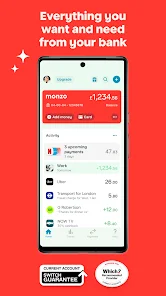
Take control of your spending with customizable budgets that help you manage your money like a pro. Monzo allows you to set limits for different categories, giving you insights into your habits and encouraging smarter financial decisions.

Fee-Free Spending Abroad

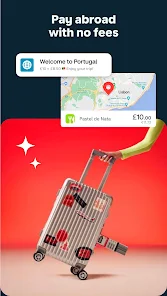
Travel with peace of mind knowing that Monzo offers fee-free spending in multiple currencies. Whether you’re exploring a new city or just grabbing a coffee abroad, you can use your Monzo card without worrying about hidden charges or unfavorable exchange rates.

Instant Notifications

Stay on top of your spending with real-time notifications for every transaction. Monzo sends you instant alerts whenever money leaves your account, helping you track your finances effortlessly and avoid any surprises at the end of the month.

Savings Pots

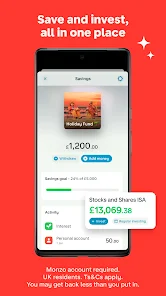
Easily save for your goals with dedicated Savings Pots that help you set aside money for specific purposes. Whether it’s a vacation or a rainy day fund, Monzo lets you create these separate spaces while earning interest, making saving feel effortless.

Advertisement

Pros & Cons

Pros
  • User-friendly app for easy banking management
  • Real-time transaction notifications for instant updates
  • No monthly fees with a transparent pricing model
  • Instant spending categorization for better budgeting
  • Built-in savings tools to help reach financial goals
Cons
  • Limited cash deposit options available
  • No physical branches for assistance
  • Customer support can be slow at times
  • Some features may lack advanced functionality

Real Experience Using Monzo - Mobile Banking

Application Scenarios

Monzo is designed for anyone looking for a modern banking experience tailored to the digital age. Whether you are a student managing your finances for the first time, a busy professional juggling multiple expenses, or someone who travels frequently and needs an efficient way to handle currency exchanges, Monzo caters to a variety of banking needs. Users can effortlessly track their spending in real-time, categorize expenses, and set budgets, making it a valuable tool for financial management. Furthermore, its seamless integration with various payment platforms makes it an excellent choice for those who regularly make online purchases or dine out.

User Experience

The user experience of Monzo is one of its standout features. The app boasts a clean, intuitive interface that makes navigating through accounts, transactions, and budgeting tools a breeze. Users appreciate the instant notifications after every transaction, allowing them to remain aware of their spending habits. The app also provides easy access to features like setting up savings pots, which encourages users to save for specific goals. Many users report feeling more in control of their finances due to the app's visually engaging graphs and spending summaries. Customer support is readily available through the app, with a dedicated chat feature that enables users to resolve issues quickly. Overall, Monzo's user experience blends functionality with simplicity, making banking accessible and enjoyable.

Pricing

Monzo operates on a freemium model that offers a robust free tier, which includes essential banking services such as a current account, debit card, and instant notifications. For users seeking additional features, Monzo offers a premium subscription that unlocks perks like travel insurance, higher interest rates on savings, and exclusive access to new features. The premium plan is competitively priced, making it an attractive option for those who frequently travel or seek enhanced banking capabilities. Overall, Monzo’s pricing structure is transparent, with no hidden fees, allowing users to choose a plan that best fits their financial needs.

Updates & Support

Monzo is committed to continuous improvement, regularly releasing updates that enhance user experience and introduce new features. Users can expect regular app updates that address bugs, improve performance, and incorporate user feedback. The support system is robust, with an extensive help section within the app that provides answers to common questions. Additionally, users can reach out to customer support via in-app chat for more personalized assistance. This proactive approach to updates and support fosters a sense of trust and reliability among users, ensuring they feel valued and heard in their banking journey.

verified Security & Privacy Review

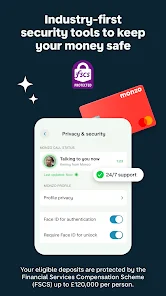
Monzo takes security and privacy seriously, implementing robust measures to protect user data and financial information. The app uses advanced encryption techniques to safeguard transactions and sensitive data, ensuring that all user communications are secure. Additionally, Monzo employs two-factor authentication (2FA) to add an extra layer of security, requiring users to verify their identity through a secondary method when logging in or making significant changes to their account. Regarding privacy practices, Monzo is transparent about data collection and usage. The app clearly outlines its privacy policy, detailing how user data is collected, processed, and stored. Users have control over their data, with options to manage permissions and understand what information is shared. Monzo does not sell personal data to third parties, reinforcing its commitment to user privacy. Permissions requested by the app are limited to what is necessary for functionality, such as location access for card transactions. Users can easily manage these permissions through their device settings, providing added reassurance regarding their privacy. Overall, Monzo demonstrates a strong commitment to protecting user data and maintaining transparency in its privacy practices.
Advertisement

Compare APP

User Reviews

  • Sapphire Blue
    2026/04/30

    I started using Monzo recently, I like it. There's a lot of features and a nice customizable layout. One thing I would love to see added is an indication of what your balance was before each payment (both incoming and outgoing), as it can get difficult to work out when a few payments have gone through. I hope an update like this gets added soon!

  • Crystal Jackson
    2025/02/16

    Had an account for a couple weeks now and I liked them. Customer service was prompt and I liked the app. At least I liked them until today when they completely closed my account without explanation. I cannot get an answer and cannot reopen my account. I gave all my legal and correct info and completed all the verifications and did everything I was supposed to. I'm really disappointed but oh well.

  • Caroline Fitch
    2025/04/24

    After having used this bank for over 2 years, we have decided to switch. We have loved using them, but now all of the features we have received for free they have now decided to charge for monthly. Where I came from it was free to receive our payroll check 2 days early. Everything is now a subscription. Also, their customer service is slow (takes days to get back to you), & they don't have mobile check deposit anyway. I can get all the same features & more for FREE at Capital One!

  • Anthony Collias
    2023/05/11

    Sometimes, a bank shouldn't act like a startup. It's INSANE that (for what is clearly a cost-cutting measure) they make it impossible to actually talk to customer support. Calling directs you to the app, the app directs you to a chat, the chat directs you to an article which, after you say "this doesn't solve my problem", they just say "thanks for the feedback!". This is supposed to be a bank. It should 100% just be contactable without needing to prove the extent of your issue. INFURIATING

  • Edd Mowbray
    2025/01/20

    The app doesn't work, I can't progress to opening an account. I get sent a magic link to my email, then get a page saying "sorry about this... Something's gone wrong" it's been like that for a month I spoke to customer service who were supposed to arrange a call back to fix things and never heard anything. I tried calling again and went down a phoneline rabbit hole that doesn't accept non customer calls.

Review Source: Google Play store public user reviews.

FAQ

1

Does Monzo - Mobile Banking collect my personal data?

Monzo collects personal data to provide banking services, comply with regulations, and enhance user experience, but they prioritize user privacy and data security.

2

Does Monzo - Mobile Banking offer a free trial or free version?

Monzo offers a free version of their banking app, which includes essential features for managing your finances without any subscription fees.

3

Does Monzo - Mobile Banking require an internet connection?

Yes, Monzo requires an internet connection to access your account, view transactions, and perform banking operations through the app.

4

How can I contact support or send feedback for Monzo - Mobile Banking?

You can contact Monzo support through the app, where you can chat with a customer service representative, or you can send feedback via their official website.

5

How do I manage or cancel my Monzo - Mobile Banking subscription?

You can manage or cancel your subscription directly in the Monzo app under the account settings section, where you can find options related to your subscription plan.

How to use Monzo - Mobile Banking

1

How can I contact Monzo customer service?

You can reach Monzo customer service through the in-app chat or by emailing help

2

How can I find Monzo's customer number?

Monzo does not have a traditional customer service number; support is primarily through the app.

3

How do I activate my Monzo card?

To activate your Monzo card, simply open the app, select your card, and tap 'Activate'. Follow the on-screen instructions.

4

How do I log in to my Monzo account?

Open the Monzo app, enter your email, and follow the prompts to log in securely.

What's New

We're always keeping things running smoothly with regular bug fixes and maintenance. If there's something new, we'll shout about it. (Not literally. Apps can't shout).

Editor's Choice