This site uses cookies to enhance your user experience. By clicking any link on this site you are giving your consent to our cookie policy. Read more
Reject
Accept All

Advertiser and Editorial Disclosures

Money Network Mobile App

Money Network Mobile App

verified

Fiserv, Incorporated

3.0
Rating
5,000,000+ Downloads
20.0.0 Version
  • category

    Category: Finance

  • price

    Price: free

  • age rating

    Age Rating: Everyone

  • rating

    Rating: 3.0

  • available on

    Available on: /

  • updated on

    Updated on: Jun 24, 2026

Screenshot 1
Screenshot 2
Screenshot 3
Screenshot 4
Screenshot 5
Screenshot 6
Screenshot 7
Advertisement

Features & Highlights

Budgeting Tools

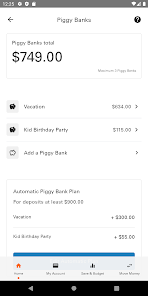
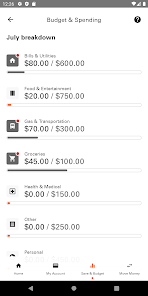
Take control of your finances with built-in budgeting tools that help you set and track spending goals. The app provides insights into your spending habits, empowering you to make informed financial decisions and stay on top of your budget effortlessly.

Instant Balance Access

With the Money Network® Mobile App, users can quickly check their account balance without the hassle of logging in. This feature allows for easy financial management on the go, ensuring that you always know how much money you have available at a glance.

Mobile Check Deposit

Easily deposit checks from anywhere using your smartphone's camera. The Money Network® Mobile App allows users to snap a photo of their check and submit it for deposit, making banking convenient and efficient without the need to visit a physical location.

Transaction Alerts

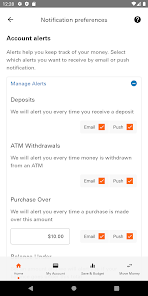
Stay informed about your spending with real-time transaction alerts. The app notifies you of any account activity, helping you track your finances and detect unauthorized transactions immediately. This feature enhances your security and gives you peace of mind while managing your money.

Advertisement

Pros & Cons

Pros
  • Easy access to funds anytime, anywhere
  • Instant money transfers between users
  • Track spending and manage budgets effortlessly
  • Receive direct deposits quickly and securely
  • User-friendly interface for seamless navigation
Cons
  • Limited customer support options available.
  • Frequent app glitches and crashes occur.
  • Navigation can be confusing for new users.
  • Transaction fees may apply unexpectedly.

Real Experience Using Money Network Mobile App

Application Scenarios

The Money Network® Mobile App is designed to streamline financial management for users who prefer a digital solution for their banking needs. It is particularly useful for individuals who receive their paychecks via direct deposit, as the app allows for instant access to funds. Users can manage their finances on the go, making it ideal for those who travel frequently or have variable working hours. The app also caters to families, enabling parents to monitor their children's spending habits if they have a linked account. Additionally, gig economy workers can benefit from the app's features, allowing them to receive and manage payments from multiple sources seamlessly.

User Experience

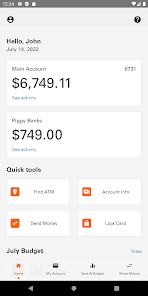
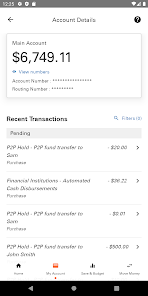
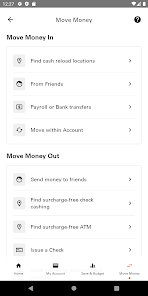
Upon launching the Money Network® Mobile App, users are greeted with a clean and intuitive interface that simplifies navigation. The layout is user-friendly, making it easy to access key features such as balance checks, transaction history, and fund transfers. The app's performance is generally smooth, with minimal lag times, enhancing the overall user experience. Notifications and alerts keep users informed about account activity, ensuring they remain engaged and aware of their financial status. However, some users have reported occasional glitches, particularly when loading transaction details, which can be frustrating. Overall, the app strikes a balance between functionality and ease of use, providing a satisfactory experience for most users.

Pricing

The Money Network® Mobile App is free to download and use, making it an attractive option for individuals seeking a budget-friendly financial management tool. Users can take advantage of various features without incurring monthly fees, although there may be transaction fees for certain services, such as ATM withdrawals or card replacements. It is essential for users to review the terms and conditions to understand any potential charges associated with their specific account usage. Overall, the app provides valuable financial services without the burden of high costs, making it accessible to a wide range of users.

Updates & Support

The developers of the Money Network® Mobile App are committed to continuous improvement, regularly releasing updates that enhance functionality and security. Users can expect periodic enhancements that address bugs, improve performance, and introduce new features based on customer feedback. Support options are readily available within the app, including FAQs and direct contact with customer service. While response times can vary, many users appreciate the support team’s assistance in resolving issues quickly. The combination of regular updates and dedicated support contributes to a reliable user experience, ensuring that users feel supported in managing their finances effectively.

verified Security & Privacy Review

The Money Network® Mobile App prioritizes user security and privacy through robust measures designed to protect sensitive information. The app employs advanced encryption protocols to safeguard personal and financial data during transmission and storage, ensuring that unauthorized access is minimized. User privacy is further reinforced by the app's stringent data handling practices. The Money Network® team adheres to industry standards and regulations, including those set forth by the Payment Card Industry Data Security Standard (PCI DSS). This compliance demonstrates a commitment to maintaining the confidentiality and integrity of user information. Regarding permissions, the app requires only essential access to function effectively. Users are informed about the permissions requested, allowing for informed consent before proceeding. The app does not sell or share personal information with third parties without explicit user consent, thereby fostering trust and transparency. Overall, the Money Network® Mobile App provides users with a secure environment to manage their finances while prioritizing privacy and data protection.
Advertisement

Compare APP

User Reviews

  • Darryl Binkley
    2026/02/13

    *Update* The app still refuses to let me log in as of 11/11/25 This app is completely worthless! I have not been able to get logged in, can't get logged in, can't do anything. It will not let me enter my password completely. I've deleted the app and reinstalled it along with other things to attempt logging in, all with no success. Very bad!! I can't even rate the optional items because I haven't been able to experience the app at all. UPDATE 02/13/26 STILL THE WORST APP I HAVE EVER USED!

  • Jason Valle
    2024/08/21

    This is the what app I've ever used. It constantly crashed, takes 3-4 sign in attempts to log on, passwords don't work at random, card number details don't work at random/anymore, logging in has completely failed altogether, there's Zero customer service, you have to call and get your balanace now, I'm unable to get any bank statements at all. It's really not all that surprising though lol. A govt sponsored money app, i mean who are we kidding here lol, they don't care about us.

  • Beth Rhineer
    2026/06/04

    This app is aggravating. When setting up my account, I had to retype my info like 5 or 6 times per line. I'd fill it out and then it would suddenly be erased. It did this for everythingggggg...and there's a lot of stuff to fill out because they're overkill and have 6+ frigging security questions. I ended up creating a username that was different than I wanted because it erased what I typed and I didn't catch it. It took 50 gazillion steps just to get to my account.

  • Steve Reding
    2026/04/08

    Extremely and deliberately slow and frustrating to use. The filters for transaction view give options to see 90 days but they aren't listed for more than 30 days. With PC online also. I can't see other past transactions. On hold for 30 minutes then disconnected. Automated system is too slow and rigged to try to call back to speak to a human. There's an option to hear info for next deposit. If you use the option, it tells you to contact EDD and disconnects. Then try all over again. It's BROKEN!!!

  • Peter Stalcup
    2026/05/05

    This is the worst app I have ever encountered. it is as if the company doesn't WANT to exist. I have a card, I cannot create an account because the app says "something went wrong try again later." It says this ALL THE TIME. I HAVE BEEN TRYING FOR TWO WEEKS. I try to contact customer service but it is automated and will only help if I have an EXISTING account, and it doesn't have an option to bypass to a representative nor an option to help with Account Creation! Do Not do business with them!

Review Source: Google Play store public user reviews.

FAQ

1

Does Money Network® Mobile App collect my personal data?

Yes, the app collects personal data necessary for account management and transaction processing, but it adheres to privacy policies to protect user information.

2

Does Money Network® Mobile App offer a free trial or free version?

The Money Network® Mobile App is free to download and use, with no subscription fees; however, certain features may incur transaction fees.

3

Does Money Network® Mobile App require an internet connection?

Yes, the Money Network® Mobile App requires an internet connection to access account information, make transactions, and utilize its features.

4

How can I contact support or send feedback for Money Network® Mobile App?

Users can contact support through the app itself or visit the official Money Network® website for assistance and to submit feedback.

5

How do I manage or cancel my Money Network® Mobile App subscription?

Since there are no subscription plans associated with the Money Network® Mobile App, there is no need to manage or cancel a subscription; users can simply stop using the app at any time.

How to use Money Network Mobile App

1

How do I activate my Money Network Mobile App account?

To activate your account, download the app, tap on "Activate," and follow the prompts, entering your card number and other required information.

2

How do I contact Customer Service for the Money Network Mobile App?

You can contact Customer Service by calling the number on the back of your card or by visiting the official Money Network website for support.

3

How do I log in to the Money Network Mobile App?

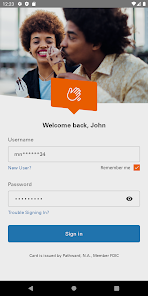
Open the app, enter your username and password, then tap "Log In." If you don't have an account, you can create one in the app.

4

What is the customer number for Money Network?

The customer service number is typically printed on the back of your card. Please check your card for the exact number.

What's New

Security enhancements and bug fixes.

Editor's Choice