This site uses cookies to enhance your user experience. By clicking any link on this site you are giving your consent to our cookie policy. Read more
Reject
Accept All

Advertiser and Editorial Disclosures

Keepa - Amazon Price Tracker

Keepa - Amazon Price Tracker

verified

Keepa.com

4.2
Rating
1,000,000+ Downloads
4.4.1 Version
  • category

    Category: Shopping

  • price

    Price: free

  • age rating

    Age Rating: Teen

  • rating

    Rating: 4.2

  • available on

    Available on: /

  • updated on

    Updated on: May 6, 2026

Screenshot 1
Screenshot 2
Screenshot 3
Screenshot 4
Screenshot 5
Screenshot 6
Advertisement

Features & Highlights

Amazon Deals Finder

Keepa™ includes a robust deals finder that highlights current discounts and special offers across Amazon. Whether you’re looking for lightning deals or seasonal sales, this feature helps you discover hidden gems and maximize your savings while shopping online.

Price Drop Alerts

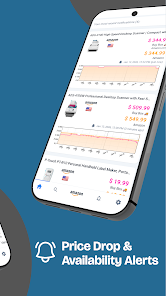
With Keepa™, users can set up personalized price drop alerts for specific products. This handy feature notifies you via email or push notification when the price drops to your desired level, making it easier than ever to snag that perfect item at a bargain price.

Price History Charts

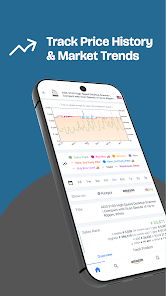
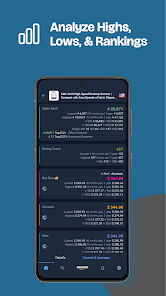
Keepa™ offers comprehensive price history charts that allow users to track the price fluctuations of products over time. This feature empowers shoppers to make informed purchasing decisions by revealing patterns and identifying the best times to buy, ensuring they never miss a great deal.

Product Comparison Tool

The product comparison tool in Keepa™ enables users to compare multiple items side by side. By evaluating features, prices, and historical data, shoppers can make smarter choices, ensuring they select the best product that meets their needs and budget.

Advertisement

Pros & Cons

Pros
  • Tracks price history for informed buying decisions
  • Alerts for price drops and deals in real-time
  • Compares prices across Amazon sellers easily
  • Visualizes trends for smarter shopping strategies
  • Helps identify the best time to purchase
Cons
  • Limited to Amazon products only
  • Requires browser extension for full features
  • Data may not reflect real-time price changes
  • Interface can be overwhelming for new users

Real Experience Using Keepa - Amazon Price Tracker

Application Scenarios

Keepa™ - Amazon Price Tracker is an essential tool for anyone who frequently shops on Amazon or is looking to make informed purchasing decisions. Whether you are a bargain hunter looking for the best deals, a tech enthusiast waiting for the price drop on the latest gadgets, or simply someone who wants to keep track of their favorite products, Keepa offers a versatile solution. Users can set alerts for price drops on specific items, allowing them to purchase at the optimal time without having to constantly check the website. Additionally, Keepa’s detailed price history charts enable users to analyze trends over time, making it easier to decide when to buy. This functionality is especially useful for seasonal purchases or Black Friday deals, where timing can significantly impact savings.

User Experience

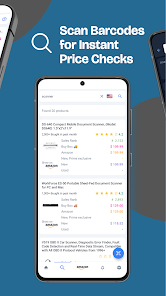
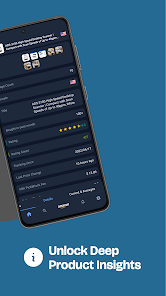
The user experience of Keepa is intuitive and user-friendly. Upon installation, users are greeted with a clean interface that makes navigation straightforward. The app offers a plethora of features, including price tracking, product comparison, and price history graphs, all easily accessible. Users appreciate the visual representation of price fluctuations, which helps them understand market trends at a glance. The ability to filter search results by price range or specific criteria further enhances the shopping experience, ensuring users can find the best deals tailored to their needs. Furthermore, the app's performance is smooth, with minimal lag, making it an enjoyable tool for both casual shoppers and serious deal seekers alike.

Pricing

Keepa offers a freemium model, which allows users to access basic features at no cost. For those who require more advanced functionalities, such as unlimited price tracking or detailed analytics, a premium subscription is available at a reasonable monthly fee. This fee is competitive compared to similar services, providing excellent value for money given the wealth of information and tools available. Users have reported that the subscription pays for itself quickly through the savings achieved by informed purchasing decisions, making it a worthwhile investment for frequent Amazon shoppers.

Updates & Support

Keepa is consistently updated to improve user experience and expand its functionality. The developers are responsive to user feedback, frequently rolling out updates that enhance features or fix any bugs. The app also provides a comprehensive support section, where users can find FAQs, troubleshooting guides, and contact information for further assistance. This commitment to customer support ensures that users feel valued and can utilize the app to its full potential. Overall, Keepa remains a reliable companion for anyone looking to optimize their Amazon shopping experience.

verified Security & Privacy Review

Keepa™ - Amazon Price Tracker takes user security and privacy seriously, implementing robust measures to protect sensitive information. The app does not require excessive permissions, ensuring that users can maintain control over their data. It primarily accesses necessary data related to price tracking and historical information without infringing on personal user data. User data is handled with care; Keepa™ does not collect personally identifiable information unless explicitly provided by the user for account-related functionalities. The app employs encryption protocols to safeguard any data transmitted between the user’s device and its servers, minimizing the risk of unauthorized access. Additionally, Keepa™ adheres to industry-standard privacy practices, offering transparency regarding its data use policies. Users can review these policies to understand how their data is managed. Overall, Keepa™ provides a secure environment for tracking Amazon prices while prioritizing user privacy and data protection.
Advertisement

Compare APP

User Reviews

  • Brittany Bailey
    2026/02/12

    The recent downgrade of the service is one thing, but it's like they don't care about their customers at all. If you're only tracking 300 items, now you can't even edit your tracking without paying over $35 USD per month. And there's no easy way to delete your old tracked items. The price is absolutely insane, with no lower tier!

  • Nathan Perkins
    2020/07/07

    Great extension and the app is good so far but is still in beta. The notifications come through really quick, and the Telegram integration works great as well. Disclaimer: Sometimes deals get sniped so fast that unless you open it really quickly, it'll be gone by the time you get to Amazon to buy it (which I believe is why some of the reviews complain about notifications when the price isn't actually low). Wish there was a more affordable premium, would love to support the devs. 1-time fee?

  • Alex Kobayashi
    2025/03/10

    I love this service, but the app is not giving me a good experience out of the box... The UI is not straightforward and I keep getting angry red error banners at the top. It also opens "within" the Amazon app (if you use the share links function), at least as far as the recently used apps menu of Android is concerned (and it takes waaay too many back gestures just to get back to Amazon proper!) I'll keep trying, but it makes me just want to shop on my laptop where it's easier...

  • Rebecca Johnson
    2024/05/12

    This is the app I needed to make sure that my Subscribe & Save purchases are actually good deals. I can use this app to track prices of products that I frequently buy, or even something special that I have my eye on, and then I'll get an alert telling me that this thing that I wanted to buy is suddenly much cheaper. It's great. Sometimes product prices will change right in the middle of the day - sometimes I have to pounce and buy it right away before the price goes up again in an hour.

  • Praveen Potturu
    2025/12/01

    The back navigation throughout the app only works sometimes, frustrating when it doesn't. Also, typing in price amount to track also requires multiple tries. Not sure what kind of framework it uses, basic things like typing in doesn't work means it is time to switch to a different framework. The more I use this app, the more I get frustrated from the back button not working and lack of mobile optimized website. Now I have to force stop the app for it to open. I have no time to contact support.

Review Source: Google Play store public user reviews.

FAQ

1

Does Keepa™ - Amazon Price Tracker collect my personal data?

Keepa™ is committed to user privacy and does not collect personal data unless explicitly provided by the user for specific features.

2

Does Keepa™ - Amazon Price Tracker offer a free trial or free version?

Yes, Keepa™ offers a free version with limited features, and users can also opt for a premium subscription that unlocks additional functionalities.

3

Does Keepa™ - Amazon Price Tracker require an internet connection?

Yes, Keepa™ requires an internet connection to access live data, view price history, and receive alerts.

4

How can I contact support or send feedback for Keepa™ - Amazon Price Tracker?

You can contact Keepa™ support through their official website, where you can submit a support ticket or send feedback via the provided contact form.

5

How do I manage or cancel my Keepa™ - Amazon Price Tracker subscription?

You can manage or cancel your subscription through your account settings on the Keepa™ website. Instructions for cancellation are typically provided in the subscription management section.

How to use Keepa - Amazon Price Tracker

1

How can I contact Keepa customer service?

You can reach Keepa customer service through their website's contact form or by emailing support

2

How do I activate my Keepa subscription?

After purchasing a subscription, log into your Keepa account, and your subscription should be activated automatically.

3

How do I find my Keepa customer number?

Keepa does not assign customer numbers; you can use your registered email for account-related queries.

4

How do I log into my Keepa account?

To log in, visit the Keepa website, click on the "Login" button, and enter your email and password.

What's New

We're constantly improving our app to provide the best possible experience for our users. In this update, we've fixed some bugs and made some performance enhancements to make the app even better. If you have any feedback or experience any issues, please let us know by sending an email to [email protected]. We're always here to help and appreciate your input!

Editor's Choice