This site uses cookies to enhance your user experience. By clicking any link on this site you are giving your consent to our cookie policy. Read more
Reject
Accept All

Advertiser and Editorial Disclosures

GPS Speedometer and Odometer (Pro)

GPS Speedometer and Odometer (Pro)

verified

COOL NIKS

4.9
Rating
50,000+ Downloads
16.0 Version
  • category

    Category: Maps & Navigation

  • price

    Price: $7.49

  • age rating

    Age Rating: Everyone

  • rating

    Rating: 4.9

  • available on

    Available on: /

  • updated on

    Updated on: Aug 26, 2024

Screenshot 1
Screenshot 2
Screenshot 3
Screenshot 4
Screenshot 5
Screenshot 6
Screenshot 7
Screenshot 8
Advertisement

Features & Highlights

Customizable Interface

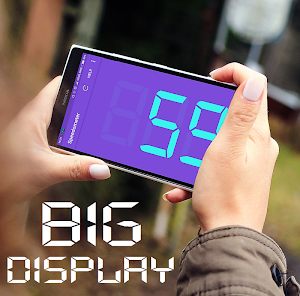
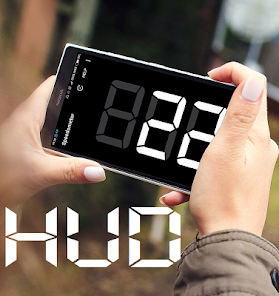
The app boasts a customizable interface, allowing users to select their preferred layout and color schemes. This personalization not only enhances user experience but also makes it easier to read the information at a glance, whether you're driving during the day or night.

Historical Data Tracking

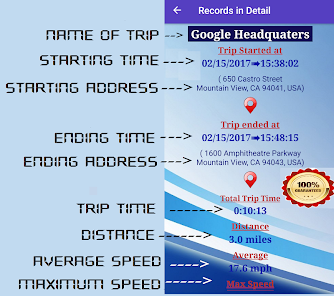
GPS Speedometer Odometer (Pro) allows you to track and review historical speed and distance data, providing insights into your driving habits over time. This feature is beneficial for those looking to improve their fuel efficiency or simply understand their driving behaviors better.

Real-Time Speed Tracking

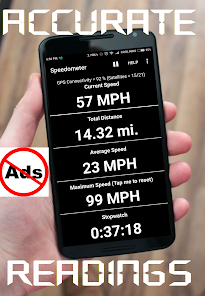
GPS Speedometer Odometer (Pro) offers precise real-time speed tracking, ensuring you always know your current speed while driving. This feature is perfect for monitoring speed limits and helps enhance your driving experience, keeping you safe on the road while providing accurate readings at all times.

Trip Odometer Functionality

With a built-in trip odometer, users can easily track the distance traveled during any journey. This feature is great for road trips, allowing you to measure your travel progress and plan breaks or refuels accordingly, making your trips more enjoyable and organized.

Advertisement

Pros & Cons

Pros
  • Accurate speed tracking ensures compliance with speed limits.
  • Real-time distance measurement helps plan efficient routes.
  • User-friendly interface makes navigation simple and intuitive.
  • Customizable settings cater to individual driving preferences.
  • Historical data analysis improves driving habits over time.
Cons
  • Inaccurate readings can occur in areas with poor satellite coverage
  • Battery drain can affect long trips
  • Reliance on GPS signals may complicate usage in remote regions

Real Experience Using GPS Speedometer and Odometer (Pro)

Application Scenarios

The GPS Speedometer Odometer (Pro) app is designed for a variety of real-world applications, making it an indispensable tool for different types of users. Whether you're a cyclist tracking your speed and distance, a driver wanting to monitor your vehicle's performance, or a hiker navigating through trails, this app caters to all. It excels in situations where traditional speedometers may fall short, such as when using bicycles or motorcycles without built-in speed tracking. The app can also be utilized for outdoor sports like running or walking, enabling users to gauge their pace and distance accurately. Additionally, for those who enjoy road trips, the GPS Speedometer Odometer (Pro) offers features that help in tracking mileage and fuel efficiency, making it a valuable resource for travel enthusiasts.

User Experience

User experience with the GPS Speedometer Odometer (Pro) is largely positive, with many users praising its intuitive design and straightforward interface. Upon launching the app, users are greeted with a clean layout that displays essential information such as current speed, distance traveled, and trip duration in real-time. The GPS tracking is impressively accurate, providing reliable data that enhances the overall experience. Customization options allow users to choose from various display formats and units of measurement, catering to personal preferences. Furthermore, the app's ability to store historical data and analyze trends over time adds a layer of functionality that many users find beneficial. However, some users have noted occasional issues with GPS signal loss in urban environments, which can temporarily affect speed and distance readings.

Pricing

The pricing model for GPS Speedometer Odometer (Pro) is competitive and offers good value for its features. The app is available for a one-time purchase, making it accessible to users who prefer not to deal with subscription models. This upfront payment provides users with access to all features without hidden costs or in-app purchases, which is a significant advantage. For those who are unsure about committing, a free version is also available, allowing users to explore basic functionalities before upgrading to the Pro version. This transparency in pricing helps build trust with users and encourages them to invest in the full experience.
Updates & Support

The developers of GPS Speedometer Odometer (Pro) are committed to providing regular updates to enhance the app's functionality and user experience. Users can expect periodic improvements that include bug fixes, performance enhancements, and new features based on user feedback. Support is readily available through multiple channels, including email and social media, ensuring that users can easily access assistance when needed. The developers actively engage with their user community, demonstrating a willingness to address concerns and implement suggestions. This proactive approach not only improves the app but also fosters a loyal user base, making GPS Speedometer Odometer (Pro) a reliable choice for tracking speed and distance.

verified Security & Privacy Review

The GPS Speedometer Odometer (Pro) app prioritizes user security and privacy by implementing robust data handling practices. It collects location data to provide accurate speed and distance measurements, but this information is processed locally on the device and not stored on external servers, ensuring minimal exposure to potential breaches. The app requests essential permissions such as access to the device's GPS and, in some cases, storage for saving trip data. Users are informed about these permissions during the installation process, allowing for informed consent. Importantly, the app does not require unnecessary permissions that could compromise user privacy. Furthermore, the app adheres to standard privacy policies that outline how user data is used and safeguarded. No personal identification information is collected, and any data shared with third parties is anonymized. Users can feel confident knowing that their location and usage information is handled with care, providing a balance between functionality and privacy. Overall, GPS Speedometer Odometer (Pro) demonstrates a commitment to protecting user information while delivering a reliable service.
Advertisement

Compare APP

User Reviews

  • Justin Anderson
    2021/11/06

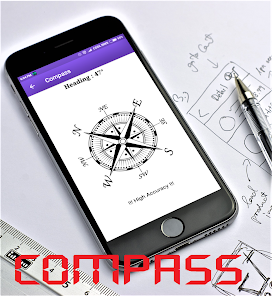
    To operate, very very accurate! A lot of additional features that make the paid Persian worth it! The only possible upgrade I can see that would be beneficial because more background color options and read out color options. The odometer, the trip meter, the compass, the elevation, and the speed read out are all amazing features! Highly highly recommend! I downloaded it for my iPhone as well!

  • Harry Rezzemini
    2021/07/25

    This is an almost great app. I use it to monitor my driving mileage for business use. Easy to use, nice big numbers and very accurate. BUT, it occasionally locks up mid-trip, usually after stopping for a few minutes. It retains data captured up to that point, but it stops recording everything from that point. If you don't notice it quickly it can throw off the reading for an entire trip. Only fix I've found is to uninstall it, then reinstall. Not difficult, but it requires finding a safe place.

  • A Google user
    2020/04/01

    Opted for the ad free version because I use this app on my motorcycle. My gloves don't allow me to click anything on my phone so when I'd get an ad riding, I'd have to pull over and take my gloves off just to hit the X. But with no ads, no problem! I would reccomend maybe like a 5 second "timeout" kind of thing for the app you do have ads in. That way when the ad is done playing you don't have to use the phone while driving. Just wait 5 seconds and it goes back to the speedo. Just my 2 cents.

  • A Google user
    2019/03/05

    Unlike other GPS apps, this one won't take the GPS feed away from Google Maps (My Itinerary), so my travel history will be accurate. I wish it would automatically pause recording when car stops, and resume if moving again. That in addition to manually pause and resume. Also, better design for split screen on a smartphone. Right now some controls are missing and some values overflow into the next line.

  • A Google user
    2019/09/04

    Very accurate so far. A huge part of my job is driving g, and I get reimbursed for my mileage. The instrument panel in my car is going out so I frequently lose both my speedometer and trip meter. This app is a lifesaver for me! During the periods when my instrument panel is actually functioning, I compared it to this app and they matched EXACTLY, both speed and mileage. Very impressed! Best $1.10 I've spent!

Review Source: Google Play store public user reviews.

FAQ

1

Can I submit suggestions or feedback to GPS Speedometer Odometer (Pro)?

Yes, users are encouraged to submit suggestions and feedback through the app's feedback feature or by contacting customer support directly via their official website or app store page.

2

Does GPS Speedometer Odometer (Pro) collect my personal data?

GPS Speedometer Odometer (Pro) is designed to prioritize user privacy and does not collect personal data unless explicitly stated in the privacy policy.

3

Does GPS Speedometer Odometer (Pro) support offline use?

Yes, GPS Speedometer Odometer (Pro) can function offline as it uses GPS data from your device, allowing users to track their speed and distance without an internet connection.

4

How do I cancel my GPS Speedometer Odometer (Pro) subscription?

To cancel your subscription, you can go to your device’s app store, navigate to your subscriptions, and select the option to cancel the GPS Speedometer Odometer (Pro) subscription.

5

How much does a subscription to GPS Speedometer Odometer (Pro) cost?

The subscription cost for GPS Speedometer Odometer (Pro) may vary depending on the chosen plan, but it generally offers monthly and yearly subscription options.

How to use GPS Speedometer and Odometer (Pro)

1

Can I change my customer number if I need to?

Unfortunately, customer numbers cannot be changed. For any issues, please contact customer service for further assistance.

2

Can I retrieve my account if I lose access to my email?

Yes, if you lose access to your email, please contact customer service with your customer number for account recovery options.

3

How can I contact customer service for help with my GPS Speedometer Odometer (Pro)?

You can reach our customer service by emailing support

4

How do I activate my account after purchasing the GPS Speedometer Odometer (Pro)?

To activate your account, click on the activation link sent to your email after purchase and follow the instructions provided.

5

How do I log in to my GPS Speedometer Odometer (Pro) account?

Simply open the app and enter your registered email and password in the login section to access your account.

What's New

- Fixed background restrictions- Fixed app freeze on rotating screen- Added troubleshooting guide - Added FAB to go back to the home display

Editor's Choice