Home
Home  Apps
Apps  Games
Games  Topics
  About Us
  Cookies & Privacy Policy
  Terms of Service
 Emergency SOS Button
In case of an emergency, family members can quickly send out an SOS alert with their location to designated contacts. This feature adds an extra layer of safety, ensuring that help is just a tap away when it’s needed the most.

GZ TECH
 4.1
4.1 
Category: Lifestyle

Price: free

Age Rating: Everyone

Rating: 4.1

Available on: /

Updated on: Jun 29, 2026
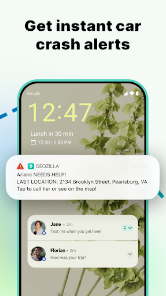
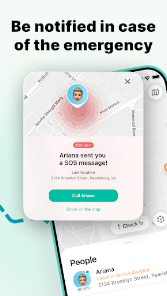


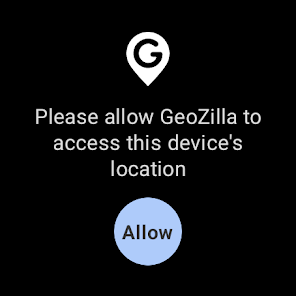
In case of an emergency, family members can quickly send out an SOS alert with their location to designated contacts. This feature adds an extra layer of safety, ensuring that help is just a tap away when it’s needed the most.
Set up customizable geofences to receive instant notifications when a family member enters or leaves designated areas. This feature helps you keep track of your loved ones, providing peace of mind whether they're at school, home, or out with friends.
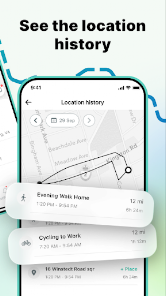
With Geozilla, you can access the location history of family members, offering insights into their daily routines. This feature is particularly useful for ensuring safety and understanding travel patterns, helping you to plan family activities more effectively.
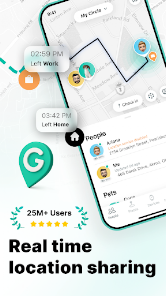
Geozilla offers real-time GPS tracking, allowing you to see your family members' locations on a live map. This feature ensures you can stay connected and informed about your loved ones' whereabouts, making it perfect for families with children or elderly relatives who may need extra care.

 Real-time location tracking ensures peace of mind for families. User-friendly interface makes navigation simple for everyone. Geofencing alerts notify you when loved ones arrive or leave designated areas. SOS feature allows quick assistance in emergencies for added safety. Location history provides insights into your family's movements over time.
 Limited battery life can disrupt tracking reliability. Occasional GPS inaccuracies may cause location confusion. Subscription fees add ongoing costs for users.
 Geozilla - Family GPS Locator is designed for a variety of practical scenarios, catering primarily to families who want to stay connected and ensure the safety of their loved ones. For instance, parents can track their children’s whereabouts in real-time, providing peace of mind during school commutes or outings. The app is particularly useful for busy families, allowing them to coordinate schedules and share locations effortlessly. Additionally, it can serve as a valuable tool for caregivers looking after elderly family members, enabling them to monitor their movements and ensure they are safe. The app's geofencing feature allows users to receive notifications when family members enter or leave designated areas, making it easier to manage daily activities and ensure safety.
The user experience of Geozilla is generally positive, with a user-friendly interface that simplifies navigation and operation. Upon launching the app, users are greeted with an intuitive layout that allows easy access to tracking features and settings. The real-time location tracking is reliable, providing accurate updates that help users feel secure about their loved ones' safety. Notifications are timely and customizable, allowing users to set alerts based on their preferences. Furthermore, the app accommodates various user needs, with options for private messaging and location sharing, promoting seamless communication among family members. However, some users have reported occasional connectivity issues, which may affect the app's performance in less populated areas or during poor network conditions.
Geozilla offers a range of pricing options to suit different user needs. The app is free to download and provides basic features, making it accessible for families who want to try it out without financial commitment. For users seeking enhanced functionalities, such as unlimited location sharing and advanced geofencing options, a subscription plan is available. The pricing is competitive compared to similar apps in the market, and the monthly or annual subscription options provide flexibility for users. The value offered by the premium features justifies the cost for many families, especially those who prioritize safety and connectivity.
The Geozilla team is committed to continuous improvement, regularly releasing updates to enhance app performance and introduce new features. Users can expect timely updates that address bugs and optimize functionality, ensuring a smooth experience. The support system is robust, with a dedicated help center that provides FAQs, troubleshooting guides, and customer service options. Users can reach out via email or through the app for assistance, and responses are generally prompt. This level of support adds to the overall positive experience, as users can rely on the team to resolve any issues or concerns they may encounter.
Security & Privacy Review
 Google Play
  App Store


This app isn't a scam-it is highly rated by testers and has important features. However, the advertised "free" version doesn't exist during setup. Maybe you can opt for the free version after the trial period, but I didn't want to find out. I wasn't even able to set up an account, so no data shared.
This company uses deceptive business practices to dupe you into thinking you might get to try something out and easily cancel it if it doesn't work out. Not only does the app not even allow you to get in to try to track anyone, ot continuously asks you to sign up for the trial, making you believe that your sign up didn't go through. You have to do a deep search to find how to get into your account. then, after you report the bug, they still refuse to refund you.
I was considering purchasing a subscription but realized upon downloading and installing the app that there's no free version of the app and therefore I am not only unable to assess even the most basic features, but I'm unable to verify whether or not any features are even capable of meeting my specific needs. It may be a wonderful app, but I'm not particularly interested in paying for a trial effectively just to find out if I'm willing to pay for the subscription.
I'm a truck driver, my wife likes to see sometimes that I'm still moving down the road. This is the only tracking app that we have actually been able to see that in real time. Thanks so much for ability to do just that !! 👍👍 Wow, after updates and such this thing really went downhill, used to be perfect when we first starting using it. Now get prompts all the time about ads and going to premium version. My wife's location has been stuck in the same location for days.. What a shame..
Deceptive Advertising / Demo ZERO STARS The demo portrays you simply enter a phone number, and the number can be tracked. However, after you purchase the app, you discover that you MUST INVITE people to track their phone number. Therefore, the app is of no use to me, and I never used it because I can get past the invite friends screen. Their customer service replied, "Unfortunately, according to our Terms of Use, we're unable to issue a refund."
Review Source: Google Play store public user reviews.
Yes, users can submit suggestions or feedback through the app's support or contact section, where the team reviews input for future updates.
Yes, Geozilla collects personal data such as location information and user profiles to provide its services, but it adheres to privacy policies to protect user information.
Geozilla requires an internet connection for real-time tracking and communication features, so it does not support offline use.
You can cancel your subscription through the app store where you purchased it, typically found in the subscription management section of your account settings.
Subscription costs may vary based on the plan chosen, with options for monthly and yearly subscriptions available at competitive rates.
Customer Numbers cannot be changed. If you need assistance, please contact Customer Service for further help.
Activation can be completed via the link sent to your email. If you need further assistance, please contact Customer Service.
You can contact Customer Service through the support section of our app or by emailing support
Once logged in, go to the account settings section in the app to update your information. If you need help, contact Customer Service.
To log in, open the app and enter your registered email and password. If you’ve forgotten your password, use the “Forgot Password?” link.
GeoZilla is getting better, so update and share your thoughts via [email protected]. Your feedback makes a difference.