This site uses cookies to enhance your user experience. By clicking any link on this site you are giving your consent to our cookie policy. Read more
Reject
Accept All

Advertiser and Editorial Disclosures

ebtEDGE

ebtEDGE

verified

Fidelity Information Services LLC

2.0
Rating
1,000,000+ Downloads
4.5 Version
  • category

    Category: Finance

  • price

    Price: free

  • age rating

    Age Rating: Everyone

  • rating

    Rating: 2.0

  • available on

    Available on: /

  • updated on

    Updated on: Aug 15, 2025

Screenshot 1
Screenshot 2
Screenshot 3
Screenshot 4
Screenshot 5
Screenshot 6
Screenshot 7
Screenshot 8
Screenshot 9
Screenshot 10
Screenshot 11
Screenshot 12
Screenshot 13
Screenshot 14
Screenshot 15
Screenshot 16
Screenshot 17
Screenshot 18
Screenshot 19
Screenshot 20
Advertisement

Features & Highlights

Comprehensive Resource Center

The app includes a comprehensive resource center filled with helpful articles, FAQs, and guides to assist users in navigating the EBT system. This feature empowers users with knowledge, ensuring they can fully utilize their benefits and understand their rights.

Real-Time Transaction Tracking

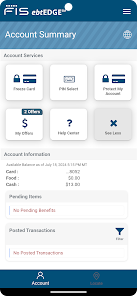
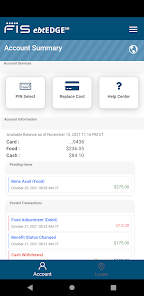
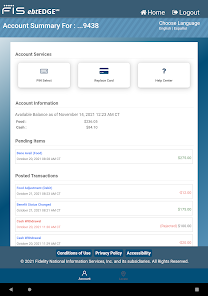
Stay informed with ebtEDGE's real-time transaction tracking feature, which allows users to monitor their purchases and available balance instantly. This capability ensures that users can make informed decisions while shopping, avoiding any surprises at the checkout.

Secure Account Management

Security is a top priority with ebtEDGE, which offers robust account management tools to keep personal information safe. Users can easily manage their credentials and set up alerts for any unusual activity, giving them peace of mind while accessing their benefits.

User-Friendly Interface

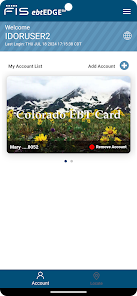
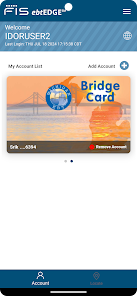
ebtEDGE boasts an intuitive and user-friendly interface that simplifies navigation for users of all experience levels. With clear menus and organized sections, accessing vital information and services becomes a breeze, making it easier for users to manage their benefits efficiently.

Advertisement

Pros & Cons

Pros
  • Streamlined access to electronic benefits information
  • User-friendly interface enhances navigation and efficiency
  • Real-time updates ensure accurate benefit tracking
  • Secure data management protects sensitive information
  • Comprehensive reporting tools aid in decision-making
Cons
  • Limited user interface options hinder customization
  • Slow loading times frustrate users
  • Inconsistent customer support response times
  • Frequent technical glitches disrupt transactions

Real Experience Using ebtEDGE

Application Scenarios

ebtEDGE is designed primarily for individuals and families who rely on government assistance programs, such as the Supplemental Nutrition Assistance Program (SNAP) and Temporary Assistance for Needy Families (TANF). Users can easily manage their benefits, check their balances, and access important information related to their assistance programs. The app is particularly useful for those who need to shop for groceries and want to ensure that they are utilizing their benefits effectively. Additionally, ebtEDGE serves as a valuable resource for case managers and social workers who assist clients in navigating their benefits. This makes the app a versatile tool in both personal and professional contexts, allowing users to stay informed and organized in managing their assistance needs.

User Experience

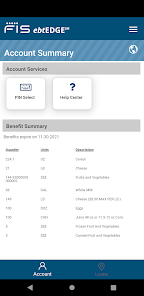
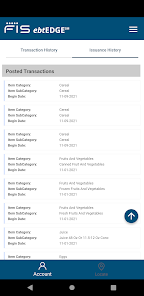
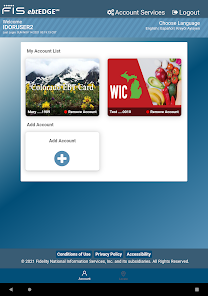
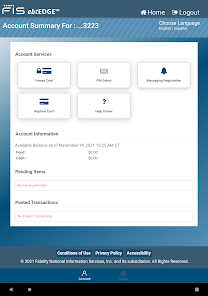
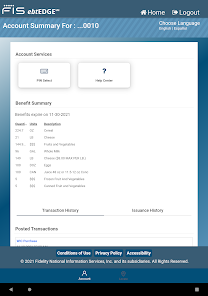
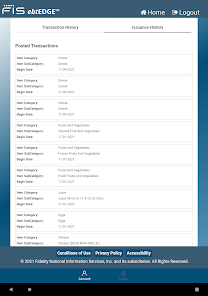
The user experience of ebtEDGE is straightforward and intuitive, emphasizing ease of navigation. Upon launching the app, users are greeted with a clean interface that allows them to quickly access their account information. The dashboard provides a summary of benefits, recent transactions, and notifications, making it easy for users to stay updated on their assistance. Users have reported that the app's design is user-friendly, even for those who may not be tech-savvy. Features such as the ability to view transaction history and access educational resources further enhance the overall experience. However, some users have noted occasional glitches or slow loading times, which can hinder the smoothness of the experience. Overall, ebtEDGE offers a practical solution for managing benefits, though there is room for improvement in performance.

Pricing

ebtEDGE is a free application, which is a significant advantage for users who are already navigating financial constraints. There are no hidden fees or subscription costs associated with using the app, ensuring that all individuals, regardless of their economic situation, can access essential services without financial burden. This free access allows users to manage their assistance benefits efficiently, making it an invaluable tool for those who rely on government aid.

Updates & Support

The developers of ebtEDGE are committed to providing regular updates to enhance functionality and address user feedback. Users can expect periodic updates that improve the app's performance and introduce new features based on community needs. In terms of support, the app offers a dedicated help section and customer service resources to assist users with any issues they may encounter. While some users have expressed a desire for more responsive customer support, overall, the availability of resources for troubleshooting is a positive aspect of the app. With ongoing updates and a focus on user satisfaction, ebtEDGE aims to continually improve the experience for its users.

verified Security & Privacy Review

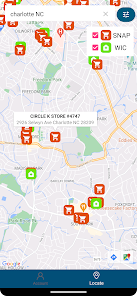
The ebtEDGE app prioritizes user security and privacy through various robust measures. It employs advanced encryption techniques to protect sensitive data during transmission, ensuring that personal and financial information remains confidential. The app requires users to create a secure login, incorporating multi-factor authentication to add an extra layer of protection against unauthorized access. In terms of privacy practices, ebtEDGE adheres to strict data handling policies, only collecting necessary information to facilitate its services. The app is transparent about its data usage and provides users with clear privacy settings, allowing them to manage their information effectively. Users are also informed about how their data is stored, accessed, and shared, promoting trust and accountability. Regarding permissions, ebtEDGE requests only essential access to device features, such as location services for specific functionalities. Users have the option to enable or disable these permissions based on their preferences. Overall, ebtEDGE demonstrates a strong commitment to safeguarding user data while maintaining transparency in its privacy practices.
Advertisement

Compare APP

User Reviews

  • Amanda Peterson
    2026/04/14

    what is going on? I can no longer get into it! White screen. I am using the website now but there's no point in having an app if it doesn't work. It should be zero stars. It once was great, and I mean great. I wasn't sure if I was going to like the switch from propel to ebtEDGE but I like the simplicity and clear data. But now I'm perplexed and sad because it doesn't seem like they care that their app isn't working for many people. Who knows how many, it could be all of us... And no info?!?!

  • Kelly
    2026/06/15

    Loved the app when it was working. It was super easy to use and had a scanner available to use on items in store for WIC which was so helpful in stored that don't mark their inventory very visibly. I'm giving it 3 stars because it stopped working for me. I've tried uninstalling, and the reinstalling as well as restarting my phone before downloading the app and nothing has worked. Hopefully they will come out with a newer version because I tried Propel and it won't load my balance on my cards.

  • Angela Riley
    2026/04/01

    When I click on the app, it doesn't ask for login info anymore it goes straight to the main screen. However, the main screen is blank. When I went to the website, it let me log in once. I unfreeze my card. So I went to order groceries, and it wouldn't let the transaction go through. So I went back to the website to log in, and it said my credentials were incorrect. I have yet to find anyone associated with the app to help solve this problem...smh.


  • Serge S.
    2026/05/19

    Before I had been using connectEbt and I'd say it showed more information on transactions than ebtEDGE. The connectEbt always showed the name of the store where the transaction took place alike in a bank statement. So I can clearly see is it mine or not. But ebtEDGE just shows me an amount only and no store. IMHO it is bad. Second bad: no account alert too. App says SMS alerts is n/a but email alerts are not coming too. PS: no feedback in the app itself so I post my issues here.

  • Joette Caughill
    2026/05/21

    Around April 2026, the app stopped working completely. 😟 I installed and uninstalled it several times trying to reset it. No matter what I tried, I could not get it to work. 😒😤 This is EXTREMELY frustrating!!! 🤬 I used this app multiple times a day, several days a week! I REALLY depended on this app, not only was it quick and easy to navigate but it helped manage my family's grocery budget! This USED TO BE the one app I could ALWAYS count on!! 😡🤬 💥🚧💥PLEASE FIX IT!!!💥🚧💥

Review Source: Google Play store public user reviews.

FAQ

1

Does ebtEDGE collect my personal data?

ebtEDGE may collect personal data necessary for account management and transaction tracking, but it adheres to privacy regulations to protect user information.

2

Does ebtEDGE offer a free trial or free version?

ebtEDGE is a free application available for download, with no subscription fees or trial periods required to access its features.

3

Does ebtEDGE require an internet connection?

Yes, ebtEDGE requires an internet connection to access account information and perform transactions within the app.

4

How can I contact support or send feedback for ebtEDGE?

Users can contact ebtEDGE support through the app or visit the official website for additional resources and feedback options.

5

How do I manage or cancel my ebtEDGE subscription?

Since ebtEDGE is a free app without subscription fees, there is no need to manage or cancel a subscription; users can simply uninstall the app if they no longer wish to use it.

How to use ebtEDGE

1

How do I activate my ebtEDGE account?

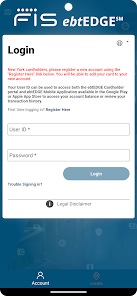
To activate your account, download the app and select "Register." Follow the prompts to enter your EBT card details and create your login credentials.

2

How do I contact customer service for the ebtEDGE app?

You can contact customer service by calling the number listed on the ebtEDGE website or within the app. Look for the "Help" or "Contact Us" section for specific details.

3

How do I log in to the ebtEDGE app?

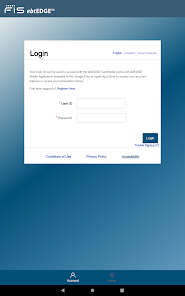
Open the app and enter your username and password. If you are a new user, you may need to register first using your EBT card information.

4

What is the customer service number for ebtEDGE?

The customer service number can vary by state. Check the official ebtEDGE website or your state's EBT customer service page for the correct number.

What's New

Bug fixes and enhancements.

Editor's Choice