This site uses cookies to enhance your user experience. By clicking any link on this site you are giving your consent to our cookie policy. Read more
Reject
Accept All

Advertiser and Editorial Disclosures

ConnectEBT

ConnectEBT

verified

Conduent Incorporated

4.3
Rating
1,000,000+ Downloads
2.4.0(20260612) Version
  • category

    Category: Finance

  • price

    Price: free

  • age rating

    Age Rating: Everyone

  • rating

    Rating: 4.3

  • available on

    Available on: /

  • updated on

    Updated on: Jun 25, 2026

Screenshot 1
Screenshot 2
Screenshot 3
Screenshot 4
Screenshot 5
Screenshot 6
Advertisement

Features & Highlights

Real-Time Balance Updates

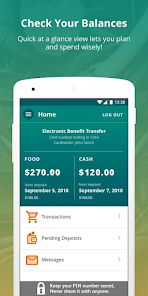
Stay informed with real-time balance updates that allow users to track their remaining benefits instantly. This feature ensures you’re always aware of your spending power, helping you manage your budget effectively and avoid any surprises at checkout.

Secure Account Management

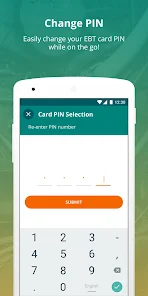
ConnectEBT prioritizes user security with robust account management features. Easily update your personal information, change passwords, and enable security notifications to ensure your account remains safe and secure at all times.

Transaction History Review

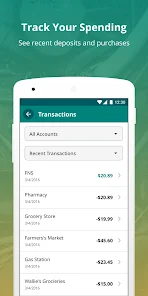
Easily review your transaction history with just a few taps. This feature provides a detailed overview of past purchases, allowing users to monitor their spending patterns and make informed decisions about their future purchases.

User-Friendly Interface

ConnectEBT boasts an intuitive design that makes navigating the app a breeze. Users can easily access their account information, track benefits, and find nearby retailers without any hassle, making it accessible for everyone, regardless of tech-savviness.

Advertisement

Pros & Cons

Pros
  • Streamlined access to benefits for users
  • User-friendly interface for easy navigation
  • Real-time balance updates for informed spending
  • Secure transactions ensuring user privacy
  • Comprehensive support for troubleshooting and assistance
Cons
  • Limited retailer acceptance hampers usability.
  • Frequent technical issues disrupt transactions.
  • User interface can be confusing for some.
  • Customer support response times are often slow.

Real Experience Using ConnectEBT

Application Scenarios

ConnectEBT serves as a vital tool for individuals and families who rely on government assistance programs. The app is particularly useful for users who receive benefits through the Supplemental Nutrition Assistance Program (SNAP) or Temporary Assistance for Needy Families (TANF). Users can easily check their EBT balance, view transaction history, and locate nearby participating retailers. This functionality is especially beneficial during times of economic hardship when budgeting becomes crucial. Furthermore, the application provides access to additional resources and information about eligibility and benefits, making it an all-in-one solution for those navigating government aid.

User Experience

The user experience of ConnectEBT is designed to be straightforward and intuitive. Upon launching the app, users are greeted with a clean interface that prioritizes ease of navigation. Registration is simple, requiring minimal personal information to create an account. Once logged in, users can quickly access their balance and transaction history, which is displayed in a user-friendly format. The app also features a GPS-enabled store locator, allowing users to find nearby grocery stores that accept EBT payments. Feedback from users highlights the app's reliability and speed, contributing to a positive overall experience. However, some users have reported occasional glitches, particularly during peak usage times, which can hinder functionality.

Pricing

ConnectEBT is free to download and use, making it accessible for all individuals who qualify for government assistance programs. There are no hidden fees or in-app purchases, ensuring that users can manage their benefits without incurring additional costs. This pricing structure aligns with the app's mission to support individuals in need and provide them with the tools necessary to navigate their benefits effectively. The absence of any financial barriers allows users to focus on their essential needs, further enhancing the app's value.

Updates & Support

The developers of ConnectEBT are committed to maintaining and improving the app through regular updates. These updates often include bug fixes, performance enhancements, and new features based on user feedback. The app’s support system is also commendable, providing users with comprehensive FAQs and a dedicated customer service team that can be reached through the app. Users have reported positive experiences with the support team, noting quick response times and helpful solutions. Overall, the combination of consistent updates and reliable support ensures that users can depend on the app for their benefit management needs.

verified Security & Privacy Review

The ConnectEBT app prioritizes user security and privacy, implementing robust measures to protect sensitive information. The app uses encryption protocols to safeguard data transmission, ensuring that personal and financial details remain confidential during communication with servers. In terms of permissions, ConnectEBT requires minimal access, primarily focusing on essential functionalities. Users are informed about the permissions needed at the time of installation, promoting transparency. The app does not request unnecessary access to device features, which reflects a commitment to user privacy. ConnectEBT has established guidelines for data handling, emphasizing that user information is collected solely for the purpose of providing services related to Electronic Benefits Transfer. The app adheres to relevant regulations and best practices, ensuring that data is stored securely and not shared with third parties without user consent. Overall, ConnectEBT demonstrates a strong commitment to data security and privacy, allowing users to manage their benefits with confidence while maintaining control over their personal information.
Advertisement

Compare APP

User Reviews

  • Darth Aussie
    2026/06/18

    Great app! I use it to check my balance and also to lock my card so it can't be used. Every time I go shopping, I like the ability to unlock it for half an hour, one hour, or a couple of hours so I can do my shopping and pay for everything. Then the card automatically relocks, so no purchases can be made without me unlocking it.

  • Jon Grah
    2026/04/04

    The app works about 90% of the time ok. The 10% of the time it didnt work was inconvenient, as i was ready to pay for something and i got "server error". But usually you can login via web browser and all is ok. App is good for checking transaction history + locking/unlocking card. I wish the auto-relock was 5 or 10 min. Not 30 min. Also, app support is difficult to contact. So minus 2 stars for the server errors and inability to contact app support

  • Cecelia Thomas
    2026/01/29

    Updating my review. Useless!I've not been able to use the app because I keep getting an error that says " there is an error when decrypting the data". This app has become useless. The app shows my balance and transactions as it should. Therefore, I rated it 3 stars. It's meh... But right now, EBT benefit theft is raging due to cards being cloned or skimmed. Please consider adding an option to lock or freeze the card to prevent theft. If it had that feature, it would be a 5 star app!

  • E K
    2026/04/06

    It is nice to keep track of what you have left without having to call the phone number and go through that hassle, but one of a few issues I have is it does not show you offers for jobs, housing, and other things that other apps have done. I would switch back but ever since I signed up for this one it won't let connect back to the other app.

  • Alyssa McGee
    2026/04/08

    App will not work for me. For the past 6 months I have tried time & time again to log in. I know my login info is correct because it works on the actual website. But on the app, it says Error every time. I have tried to uninstall & re-download the app many times... that doesn't help. The app is useless if it won't allow people to log in. I keep giving it a chance, thinking maybe the issue has been fixed. It has not.

Review Source: Google Play store public user reviews.

FAQ

1

Does ConnectEBT collect my personal data?

ConnectEBT may collect personal data necessary for account management and transaction processing, but it adheres to privacy policies to protect user information.

2

Does ConnectEBT offer a free trial or free version?

ConnectEBT is typically offered as a free app without a trial period, allowing users to access its features without any cost.

3

Does ConnectEBT require an internet connection?

Yes, ConnectEBT requires an internet connection to access account information and perform transactions within the app.

4

How can I contact support or send feedback for ConnectEBT?

Users can contact ConnectEBT support through the app's help section or visit the official website for additional contact options and feedback forms.

5

How do I manage or cancel my ConnectEBT subscription?

Since ConnectEBT is a free app without a subscription model, there is no need to manage or cancel a subscription. Users can simply uninstall the app if they choose not to use it anymore.

How to use ConnectEBT

1

Can I update my personal information in the ConnectEBT app?

Yes, log in and go to the "Profile" section to edit your personal information.

2

How can I check my EBT balance using the ConnectEBT app?

Log in to the app, and your balance will be displayed on the home screen under your account details.

3

How can I contact customer service for the ConnectEBT app?

You can reach customer service through the app's "Contact Us" feature or call the customer service number provided on your EBT card.

4

How do I activate my ConnectEBT account?

To activate, download the app, select "Register," and follow the prompts using your EBT card information.

5

How do I log in to my ConnectEBT account?

Open the app, enter your username and password, then tap "Log In." If you don't have an account, you may need to register first.

What's New

Minor bug fixes and improvements

Editor's Choice