This site uses cookies to enhance your user experience. By clicking any link on this site you are giving your consent to our cookie policy. Read more
Reject
Accept All

Advertiser and Editorial Disclosures

Bank of America Mobile Banking

Bank of America Mobile Banking

verified

Bank of America

4.6
Rating
50,000,000+ Downloads
26.07.02 Version
  • category

    Category: Finance

  • price

    Price: free

  • age rating

    Age Rating: Everyone

  • rating

    Rating: 4.6

  • available on

    Available on: /

  • updated on

    Updated on: Jul 2, 2026

Screenshot 1
Screenshot 2
Screenshot 3
Screenshot 4
Screenshot 5
Screenshot 6
Screenshot 7
Screenshot 8
Advertisement

Features & Highlights

Account Management

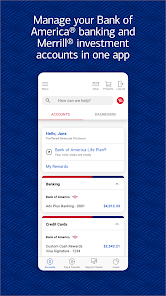
Stay on top of your finances with intuitive tools for tracking your spending and managing your accounts. You can view balances, transaction history, and categorize expenses, making it simple to understand your financial health at a glance.

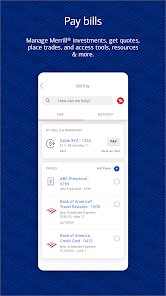
Bill Pay Made Easy

Pay your bills directly through the app without the hassle of writing checks or mailing payments. Schedule one-time or recurring payments, and receive reminders to ensure you never miss a due date, keeping your finances organized and stress-free.

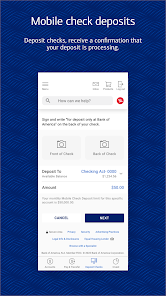
Mobile Check Deposit

Easily deposit checks from the comfort of your home by simply taking a photo of the check with your smartphone. This feature saves you time and eliminates the need for trips to the bank, ensuring your funds are available faster than ever before.

Secure Sign-In Options

Bank of America prioritizes your security with multiple sign-in options, including fingerprint and facial recognition. This added layer of protection ensures that your sensitive financial information remains safe while providing you with quick access to your accounts.

Advertisement

Pros & Cons

Pros
  • Access your account anytime, anywhere for ultimate convenience.
  • Enjoy secure transactions with advanced encryption technology.
  • Easily transfer funds and pay bills with just a few taps.
  • Track spending and manage budgets with intuitive tools.
  • Receive real-time alerts to stay updated on your finances.
Cons
  • Limited functionality compared to in-branch services can hinder complex transactions.
  • Frequent app glitches may disrupt user experience and access to accounts.
  • Customer support response times can be slow, leaving users frustrated during issues.

Real Experience Using Bank of America Mobile Banking

Real Experience Application Scenarios

The Bank of America Mobile Banking app excels in providing seamless banking solutions for a variety of everyday scenarios. Whether you're on the go and need to check your balance, transfer funds between accounts, or pay bills, this app covers all bases. Users often find themselves utilizing the app when traveling, as it allows for quick access to account information and the ability to manage cards, including reporting lost or stolen ones instantly. Furthermore, the app’s remote deposit feature is a game changer for those who receive checks, enabling users to deposit them from the comfort of their homes. Additionally, the app's budgeting tools help users track spending habits and set financial goals, making it an essential companion for managing personal finances effectively.

User Experience

User experience with the Bank of America Mobile Banking app is generally positive. The interface is well-designed, with intuitive navigation that makes it easy for users of all ages to access various features. The app is responsive, with quick load times that enhance the overall experience. Many users appreciate the customizable dashboard, which allows them to prioritize the features they use most frequently. Security is a top concern for many, and the app employs robust measures such as biometric authentication and real-time alerts for transactions, giving users peace of mind. However, some users have reported occasional glitches or slowdowns during peak usage times, which can be frustrating. Despite these minor hiccups, the app's overall usability remains high, making it a preferred choice for Bank of America customers.

Pricing

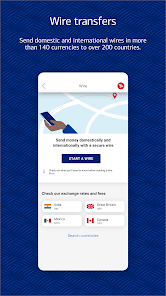
One of the standout features of the Bank of America Mobile Banking app is that it is free to download and use for all Bank of America customers. There are no hidden fees for accessing standard banking services through the app, making it an economical option for managing your finances. However, it is important to note that certain services, such as wire transfers or international transactions, may involve fees as dictated by the bank’s policy. Overall, the app provides excellent value, especially when considering the convenience and range of features it offers without any direct costs to the user.

Updates & Support

The Bank of America Mobile Banking app is regularly updated to enhance functionality and security. These updates often include feature enhancements, bug fixes, and performance improvements, ensuring that users have access to the latest banking technologies. The bank also provides robust customer support through the app, including live chat options and access to FAQs for resolving common issues. Users have reported positive experiences with customer service, noting that representatives are knowledgeable and helpful. Additionally, the bank encourages feedback and actively works to incorporate user suggestions into future updates, creating a community-driven approach to app development.

verified Security & Privacy Review

Security & Privacy Review The Bank of America Mobile Banking app prioritizes user security through advanced encryption and multi-factor authentication, ensuring that sensitive financial information remains protected. The app employs 256-bit SSL encryption technology, safeguarding data transmitted between the user's device and the bank's servers. Additionally, biometric login options, such as fingerprint and facial recognition, enhance security by providing a convenient yet secure method of accessing accounts. In terms of privacy practices, Bank of America adheres to strict regulations and guidelines regarding user data. The app clearly outlines its privacy policy, detailing how personal information is collected, used, and shared. Users are informed about data retention practices and their rights regarding personal information. The app requests essential permissions to function effectively, such as access to the camera for check deposits and location services for finding nearby ATMs. However, users have the option to limit access to non-essential permissions, providing an added layer of control over their personal data. Overall, the Bank of America Mobile Banking app demonstrates a strong commitment to security and user privacy, making it a reliable choice for managing financial transactions.
Advertisement

User Reviews

  • Bill Dale
    2026/01/16

    My fingerprint is no longer usable as ID (age). My hands twitch, so when I try to type one letter I often hit a different letter when entering password, and unlike other banks (I have three) there is no way to see if I made a mistake. The way other banks work, when typing in a password, there is an "eye" icon to the right we can click on that allows us to see the completed password in case we typed any letters incorrectly. It's an EASY FIX! I AM GIVING U 1 STAR UNTIL U FIX IT!!!

  • Commander-RR
    2024/09/11

    In whole it's good. But they recently made a change, its not nessesary & redundant. When you try to go to bill pay it pops up a screen called recipients. In order to get to your normal bill pay page you have to scroll to the bottom and tap it again. There was no reason for this addition. It doesn't seem to have done damage to the app itself, but why add something that's not needed? I have sent them a message about this twice & have gotten no replies. Lowered rating 1 for change 2 for no reply.

  • Joy Nesbitt Evelyn
    2026/06/30

    I really don't like that the my balance feature was taken away. I'm on the road a lot and being able to use that feature without logging in while driving was useful. I've had to change my password 3 days straight because there's no "eye" feature that allows you to see if you're typing the correct password. And after entering the password incorrectly once you have to come up with a new password. It has become cumbersome and inconvenient for people on the go.

  • A Google user
    2026/06/30

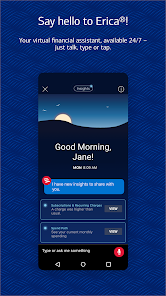
    One of the best, most user-friendly, and secure apps out there. Erica is a really pain. I've turned off 99% of its functionality, but it continues to be a pain. Really needs an on/off switch. App could use a feature that allows one to enter a paper check, like for property tax, as a pending transaction or place holder until the check is to the bank. My town hall has a habit of taking a week to cash them & you can loose track if your not careful.

  • Moatasem Fouda
    2026/07/05

    The AutoPay setup process is one of the worst I've used. You can't fully set it up in the app, adding an external bank requires a desktop browser, and AutoPay won't activate until eBills is enabled, which required customer service and a two-week internal request in my case. None of this was clearly disclosed. A simple feature has been turned into an unnecessarily complex process that can result in missed payments and late fees

Review Source: Google Play store public user reviews.

FAQ

1

Can I submit suggestions or feedback to Bank of America Mobile Banking?

Yes, users can submit suggestions or feedback through the app itself or by contacting customer service through the Bank of America website.

2

Does Bank of America Mobile Banking collect my personal data?

Yes, the app collects personal data to facilitate account management and secure transactions, but it adheres to strict privacy policies to protect user information.

3

Does Bank of America Mobile Banking support offline use?

While most features require an internet connection, some functionalities, like viewing previously downloaded statements, may be accessible offline.

4

How do I cancel my Bank of America Mobile Banking subscription?

Since the app does not require a subscription, there is no cancellation process. Users can simply stop using the app if they choose.

5

How much does a subscription to Bank of America Mobile Banking cost?

There is no subscription cost for the Bank of America Mobile Banking app; it is free for users to access their banking services.

How to use Bank of America Mobile Banking

1

Can I activate my Bank of America account through the mobile app?

Yes, you can activate your account via the mobile app by selecting the activation option and following the prompts.

2

Can I change my Customer Number if I want to?

Currently, you cannot change your Customer Number. If you have concerns, please reach out to Customer Service for guidance.

3

How can I contact Customer Service for Bank of America Mobile Banking?

You can reach Customer Service by calling the number on the back of your debit or credit card or through the app's support section.

4

How do I activate my new debit card using the mobile app?

To activate your debit card, log in to the app, select the card activation option, and follow the on-screen instructions.

5

How do I log in if I have two-factor authentication enabled?

If you have two-factor authentication, log in as usual and enter the verification code sent to your registered device.

What's New

In this release, we've made some minor enhancements and bug fixes. We're always making improvements, so turn on automatic app updates to get the latest. Go to Google Play Store > Menu > Settings > Auto-update apps, and set your preference.

Editor's Choice