This site uses cookies to enhance your user experience. By clicking any link on this site you are giving your consent to our cookie policy. Read more
Reject
Accept All

Advertiser and Editorial Disclosures

Arvest Go Mobile Banking

Arvest Go Mobile Banking

verified

Arvest Bank

3.7
Rating
500,000+ Downloads
1.29.1 Version
  • category

    Category: Finance

  • price

    Price: free

  • age rating

    Age Rating: Everyone

  • rating

    Rating: 3.7

  • available on

    Available on: /

  • updated on

    Updated on: Apr 2, 2026

Screenshot 1
Screenshot 2
Screenshot 3
Screenshot 4
Screenshot 5
Screenshot 6
Advertisement

Features & Highlights

Account Management

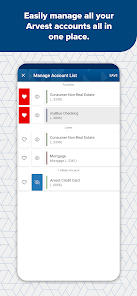
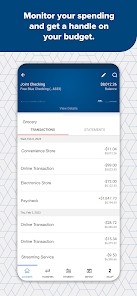
Stay on top of your finances with comprehensive account management tools. You can view balances, transaction histories, and even categorize your spending, all from the palm of your hand, helping you make informed financial decisions anytime, anywhere.

Bill Pay Feature

Take the hassle out of paying bills by using the built-in bill pay feature. Schedule payments, set up recurring bills, and receive reminders, ensuring you never miss a due date while keeping your finances organized and stress-free.

Mobile Check Deposit

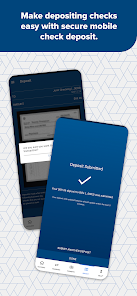
Easily deposit checks from the comfort of your home using the mobile check deposit feature. Simply snap a photo of your check, and the app will guide you through the submission process, making banking more convenient than ever without the need to visit a branch.

Secure Messaging

Communicate directly and securely with customer support through the secure messaging feature. Whether you have questions or need assistance, you can reach out without worrying about your information being compromised, ensuring a safe banking experience.

Advertisement

Pros & Cons

Pros
  • Convenient access to your accounts anytime, anywhere
  • Instant transaction alerts keep you informed
  • Easily deposit checks using your smartphone camera
  • User-friendly interface for seamless navigation
  • Secure banking with advanced encryption technology
Cons
  • Limited functionality compared to desktop version
  • Occasional app crashes and bugs
  • Poor customer support response times
  • Limited compatibility with older devices

Real Experience Using Arvest Go Mobile Banking

Application Scenarios

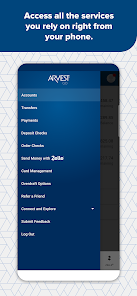
The Arvest Go Mobile Banking app is designed to meet the needs of a variety of users, making it an essential tool for both personal and business banking. Users can utilize the app for everyday transactions, such as checking account balances, transferring funds, and paying bills. The app's mobile deposit feature allows users to take photos of checks and deposit them directly into their accounts, providing convenience for those who are often on the go. Additionally, the app is particularly beneficial for small business owners who need to manage cash flow, track expenses, and access their accounts from anywhere. Overall, the Arvest Go app is well-suited for anyone looking to streamline their banking experience and maintain financial oversight at their fingertips.

User Experience

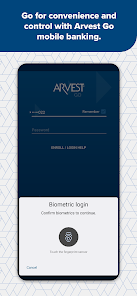
Users generally report a positive experience with the Arvest Go Mobile Banking app due to its user-friendly interface and seamless navigation. The app is visually appealing, with a clean layout that makes it easy to find necessary features. Users appreciate the customizable dashboard that allows them to prioritize the most frequently used functions. The app's performance is typically smooth, with quick loading times and minimal glitches, enhancing the overall user experience. Furthermore, the secure login options, including biometric authentication, provide peace of mind for users concerned about their financial information. Customer feedback highlights the app's reliability and the convenience it brings in managing daily banking tasks without the need to visit a physical branch.

Pricing

The Arvest Go Mobile Banking app is available for free to all Arvest Bank account holders. There are no hidden fees associated with downloading or using the app, making it an accessible option for anyone with an account at the bank. While some premium banking features may incur fees, the basic functionalities provided through the app, such as balance checks, fund transfers, and bill payments, are offered at no additional cost. This transparency in pricing is appreciated by users, as it allows them to budget their banking needs without any unexpected charges.

Updates & Support

The Arvest Go app is regularly updated to enhance its functionality and security. Users can expect periodic releases that introduce new features, improve performance, and address any bugs reported by users. The support provided by Arvest Bank is also commendable, with a dedicated customer service team available to assist users with any issues or inquiries related to the app. Users can access help through the app itself or via the bank’s website, ensuring they have the resources needed to resolve any challenges they may encounter. Overall, the commitment to updates and support makes the Arvest Go Mobile Banking app a reliable choice for managing one’s finances in a digital landscape.

verified Security & Privacy Review

The Arvest Go Mobile Banking app prioritizes user security and privacy, employing robust encryption protocols to safeguard sensitive information during transmission. The app utilizes advanced security measures, including biometric authentication options such as fingerprint and facial recognition, ensuring that only authorized users can access their accounts. In terms of permissions, the app requests access to essential device features like location services for branch and ATM locator functionalities. Users are informed about the necessity of these permissions, allowing for a transparent experience. Additionally, the app adheres to strict data handling practices, collecting only the information required to provide banking services while maintaining user confidentiality. Arvest Bank follows industry standards and regulatory compliance, including the use of secure servers and regular security audits to protect user data from unauthorized access. Overall, the Arvest Go Mobile Banking app demonstrates a strong commitment to maintaining the privacy and security of its users, fostering trust and confidence in its digital banking services.
Advertisement

Compare APP

User Reviews

  • A Google user
    2020/01/15

    Update 1/15/20: I'm still having the same problem with this app. I'm not going to contact tech everytime I need to use the app. It's a waste of my time. It keeps saying my password is wrong when it isn't! I've called customer service 3 times now to get this fixed. It keeps happening. It works the day tech is called, then it doesn't work at the very next log in. This app is why I still use the bank in our last state for our primary accounts. It's unreliable. It shouldn't be this difficult.

  • Keith Lawson
    2024/12/22

    While seeing the register is nice and being able to move money from one account to another is great. The register is far from real time, sometimes being hours or days behind. Depositing checks is where the app really fails!!! Over the past 20 or so checks I have attempted to deposit, only one has been successful. Otherwise you get a message to call customer service or try again later. If you call customer service, they will tell you to take the check to a branch.

  • Gal3xyStar Official #BOTB
    2025/06/02

    It gets the job done, but I'd REALLY prefer an immediate transaction history like samsung pay does and is POSTED later. BOTH DATES. Mainly because I write down my purchases and they pop up a day later like I made them on that day when I know for a fact I didn't. Sometimes when I search for something that I know I paid for, it doesn't even pop up. CONSTANT unreadable error messages when viewing "quick view" feature and whatnot. Please fix this!

  • Tara Spencer
    2025/12/16

    The push notifications that are editable within the app (ex: for deposits, low balances, etc.) used to work but no longer do. I've talked to customer service about it and I've deleted and reinstalled and double-checked all my settings and I'm pretty sure it's not on my end. Maybe this will make it to the right dept. 🤞🏼 Edit: Message sent via app per developer's request.

  • Amanda Steeley
    2020/05/14

    Looks like I am not the only one having trouble. I have been using the app for a long time now and never had any issues besides for routine maintenance work. Then all of the sudden, it kicks me off right after log in. I keep reporting the problem but never hear back anything about it. As many people complaining, you would think that the problem would be looked into and not telling people that it is their phones.....

Review Source: Google Play store public user reviews.

FAQ

1

Does Arvest Go Mobile Banking collect my personal data?

Yes, Arvest Go Mobile Banking collects personal data necessary for providing banking services, but it follows strict privacy policies to protect your information and ensure it is used securely.

2

Does Arvest Go Mobile Banking offer a free trial or free version?

Arvest Go Mobile Banking is free to download and use for Arvest Bank customers, with no trial period or subscription fees required for accessing its basic features.

3

Does Arvest Go Mobile Banking require an internet connection?

Yes, Arvest Go Mobile Banking requires an active internet connection, either through Wi-Fi or mobile data, to access your account and perform banking transactions.

4

How can I contact support or send feedback for Arvest Go Mobile Banking?

You can contact Arvest Bank's customer support through the app, via their website, or by calling their customer service number for assistance or to provide feedback.

5

How do I manage or cancel my Arvest Go Mobile Banking subscription?

Since Arvest Go Mobile Banking is free and does not have a subscription model, there is no need for cancellation; you can simply uninstall the app from your device if you choose not to use it anymore.

How to use Arvest Go Mobile Banking

1

How do I activate the Arvest Go Mobile Banking app?

Download the app, enter your account information, and follow the prompts to complete the activation process.

2

How do I contact customer service for the Arvest Go Mobile Banking app?

You can reach Arvest customer service at 1-866-952-9523 for assistance with the mobile banking app.

3

How do I log in to the Arvest Go Mobile Banking app?

Open the app, enter your username and password, then tap "Log In" to access your account.

4

What is the customer number for Arvest Go Mobile Banking?

Your customer number is typically your account number; you can find it on your account statements or contact customer service for help.

What's New

This update includes routine bug fixes for a better, more enjoyable user experience. We never stop improving Arvest Go!

Editor's Choice