This site uses cookies to enhance your user experience. By clicking any link on this site you are giving your consent to our cookie policy. Read more
Reject
Accept All

Advertiser and Editorial Disclosures

Arlo Secure: Home Security

Arlo Secure: Home Security

verified

Arlo Technologies, Inc

4.7
Rating
5,000,000+ Downloads
6.34.0 Version
  • category

    Category: Lifestyle

  • price

    Price: free

  • age rating

    Age Rating: Everyone

  • rating

    Rating: 4.7

  • available on

    Available on: /

  • updated on

    Updated on: Jul 2, 2026

Screenshot 1
Screenshot 2
Screenshot 3
Screenshot 4
Screenshot 5
Screenshot 6
Screenshot 7
Screenshot 8
Advertisement

Features & Highlights

24/7 Monitoring

Arlo Secure offers continuous monitoring options that ensure your home is protected at all times. With a reliable backup system and professional monitoring available, you can rest easy knowing that help is just a call away in case of an emergency.

HD Video Quality

Experience crystal-clear video streams with Arlo Secure’s HD resolution, making sure you never miss a detail. Whether it’s day or night, the advanced night vision feature keeps your property monitored around the clock, offering peace of mind even in low light conditions.

Real-Time Alerts

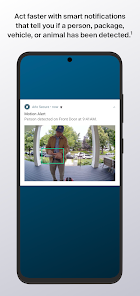
Stay connected with instant notifications sent directly to your smartphone whenever motion is detected. This ensures you are always aware of what’s happening around your home, allowing for prompt action if needed, no matter where you are.

Two-Way Audio

Engage in real-time conversations with visitors or delivery personnel using the built-in two-way audio feature. This capability allows for seamless communication, letting you greet guests or deter intruders without needing to open your door, enhancing both convenience and security.

Advertisement

Pros & Cons

Pros
  • 24/7 monitoring for peace of mind
  • Instant alerts for unusual activity
  • Easy-to-use app for remote access
  • Smart integrations with other devices
  • Flexible storage options for video footage
Cons
  • High subscription costs for premium features
  • Limited camera support for older devices
  • Requires stable internet for optimal performance
  • Customer service can be slow to respond

Real Experience Using Arlo Secure: Home Security

Application Scenarios

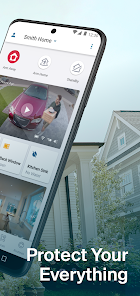
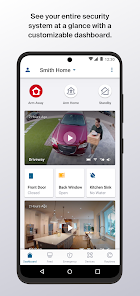
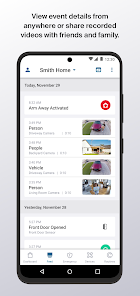
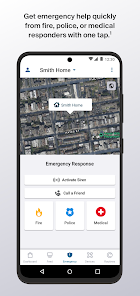
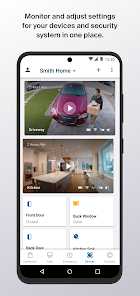
The Arlo Secure app is designed for a variety of home security needs, making it a versatile tool for users looking to enhance their safety. Whether you live in a bustling urban environment or a quiet suburban neighborhood, the app provides features tailored to your specific security concerns. Users can monitor live feeds from their Arlo cameras, receive alerts for motion detection, and access recorded footage. The app is particularly beneficial for those who travel frequently, as it allows remote monitoring of your home from anywhere in the world. Additionally, it integrates seamlessly with smart home systems, enabling users to automate routines that enhance their security, such as scheduling lights to turn on or off when they are away.

User Experience

The user experience of the Arlo Secure app is generally positive, with a clean and intuitive interface that allows for easy navigation. Users appreciate the clarity of the video streams and the responsiveness of the app when it comes to alerting them of potential security breaches. The setup process is straightforward, making it accessible even for those who may not be tech-savvy. Many users highlight the customizable notification settings, allowing them to tailor alerts based on their preferences and minimize unnecessary disturbances. However, some users have reported occasional connectivity issues, particularly when accessing the app from remote locations, which can be frustrating during critical moments.

Pricing

Arlo Secure offers a tiered pricing model that caters to different user needs. The basic plan is free and allows access to live video feeds and limited cloud storage for recorded footage. However, for those who seek advanced features such as extended cloud storage, enhanced video resolution, and additional camera support, premium plans are available at a monthly or annual subscription fee. Users frequently comment that while the premium plans can be a bit on the pricey side, the investment is justified by the added peace of mind and features that enhance their home security. The option to try a free trial of the premium features before committing is also a notable advantage.

Updates & Support

Arlo is committed to providing regular updates and enhancements to the Secure app, ensuring that users benefit from the latest security technologies and features. Users have noted that the app receives frequent updates, improving functionality and addressing bugs in a timely manner. Customer support is available through multiple channels, including live chat, email, and an extensive online help center. While many users have had positive experiences with customer support, others have mentioned longer wait times during peak periods. Overall, the combination of regular updates and accessible customer support contributes significantly to user satisfaction and trust in the Arlo Secure app.

verified Security & Privacy Review

The Arlo Secure app prioritizes user security and privacy, implementing robust encryption protocols to safeguard video feeds and personal information. All data transmitted between the app and Arlo's cloud servers is encrypted, ensuring that sensitive content remains secure from unauthorized access. When it comes to permissions, the app requires access to the camera and microphone for live streaming and two-way audio features. Users are informed about these permissions during the installation process, promoting transparency. Additionally, the app may request location access to enhance functionality, such as geofencing, which can automate security settings based on the user's whereabouts. Arlo's privacy policy is comprehensive, detailing how user data is collected, used, and shared. It emphasizes that personal data is not sold to third parties, aligning with industry standards for data protection. Users have the ability to manage their privacy settings within the app, allowing for control over what information is shared and with whom. Overall, Arlo Secure demonstrates a commitment to maintaining user privacy and data security, making it a reliable choice for home security needs.
Advertisement

Compare APP

User Reviews

  • Kenneth Masson
    2026/02/04

    subscription is way overpriced. started 4.00 a month and now it's like 10. want to check and see if there was an event and it stopped recording back in January. check the app and it was set to home and not away so some ways along the line when it updated it changed all my settings. I've had nothing but trouble so stay away! Going to get one that doesn't require a ripoff subscription.

  • Vergel Harker
    2025/10/03

    The hardware used to be among the better options available, with a terrible app and software and very hit-and-miss on smart alerts. I have paid for the subscription for years (because I want the features) and the activity zones have never once done anything. I still receive motion alerts outside every activity zone on every camera I own, which is more than 10 cameras, I'm not sure the point of it! It's unfortunate, I used to be a fan, but this now feels like a brand on the way out!

  • Amber Fox
    2025/08/28

    the app freezes and doesn't give alerts for a large portion of the time. The cameras don't pick up motion a large majority of the time without me going and waving at them repeatedly. None of the "troubleshooting" options does anything to help. They are trying to force a subscription to make the system work correctly. As a whole, the product is awful and very untrustworthy. I wouldn't trust it with your safety, I know my family doesn't anymore!!!!

  • Idaho Weed Abatement LLC.
    2025/02/24

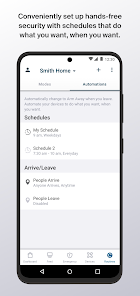
    This has got to be one of the biggest failures Arlo has done. I have had their service and cameras since the beginning. This recent UI update had made it to were my system no longer records as it should when on a schedule. Granted if all your cameras are being turned on and off by the mode only it will work. But I have my entire system set to a schedule. To arm and unarm depending on the day, time, and camera location. With any automation added the new UI system is a complete failure.

  • SeattleDan R
    2025/02/26

    Total pain to simply set 2 cameras to record after sunset until sunrise. You have to configure all 7 (or however many you have) cameras in two separate "modes" changing motion detection on/off only for the two you want to switch. Then assign one schedule to enable one mode at sunset and another schedule to enable the other mode at sunrise. O...M...F...G!

Review Source: Google Play store public user reviews.

FAQ

1

Does Arlo Secure: Home Security collect my personal data?

Arlo Secure: Home Security may collect personal data to enhance its services, but it adheres to privacy policies and regulations to protect user information. Users can review the privacy policy for detailed information.

2

Does Arlo Secure: Home Security offer a free trial or free version?

Arlo Secure: Home Security typically does not offer a free version, but it may provide a free trial period for new users to explore premium features before committing to a subscription plan.

3

Does Arlo Secure: Home Security require an internet connection?

Yes, Arlo Secure: Home Security requires a stable internet connection to function properly, as it relies on cloud services for remote monitoring and access to features.

4

How can I contact support or send feedback for Arlo Secure: Home Security?

You can contact Arlo Secure: Home Security support through the app, the Arlo website, or by accessing their dedicated support channels, which include live chat, email, and community forums for feedback and assistance.

5

How do I manage or cancel my Arlo Secure: Home Security subscription?

You can manage or cancel your Arlo Secure: Home Security subscription through the app or the Arlo website by navigating to your account settings, where you will find options for subscription management.

How to use Arlo Secure: Home Security

1

How can I contact Arlo Secure customer service for assistance?

You can reach Arlo Secure customer service through the app or by visiting their website for live chat and support options.

2

How do I log in to my Arlo Secure account?

To log in, open the app, enter your email and password, and tap "Log In."

3

Is there a way to activate my Arlo Secure subscription?

Yes, you can activate your subscription through the app by going to the subscription section and following the prompts to complete the activation.

4

What is the customer service number for Arlo Secure?

The customer service number for Arlo Secure is available on their official website under the support section.

What's New

General stability, bug fixes, and performance improvements.

Editor's Choice